1. Product Overview
The Cecotec Conga Home 5000 Self-cleaning Base is an essential accessory designed to enhance the convenience and hygiene of your Conga 5000 series robot vacuum cleaner. This base automatically empties the robot's dustbin, providing a hands-free cleaning experience. It features a digital screen for status indication and automatic bag detection for seamless operation, ensuring your home remains clean with minimal effort.
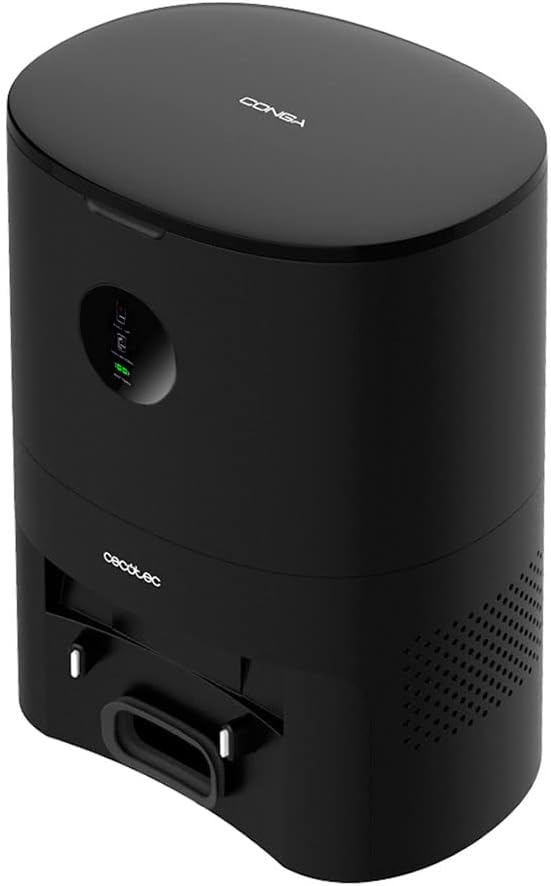
Image 1.1: Front view of the Cecotec Conga Home 5000 Self-cleaning Base, showcasing its sleek black design and integrated digital display.
2. Setup Guide
2.1 Unpacking
Carefully remove all components from the packaging. Ensure all parts are present: the self-cleaning base, power cable, and one disposable dust bag.
2.2 Placement
Place the self-cleaning base on a hard, flat surface against a wall. Ensure there is at least 1 meter (3.3 feet) of clear space in front of the base and 0.5 meters (1.6 feet) on either side to allow the robot vacuum to dock properly.

Image 2.1: The self-cleaning base positioned against a wall with the compatible robot vacuum docked, illustrating proper placement in a home environment.
2.3 Power Connection
Connect the power cable to the port on the back of the self-cleaning base and then plug the other end into a wall outlet. The digital screen on the base should illuminate, indicating it is powered on.
2.4 Dust Bag Installation
Open the top lid of the self-cleaning base. Insert a new disposable dust bag into the designated slot, ensuring it is fully seated. The base features automatic bag detection, so ensure the bag is correctly installed for proper function. Close the lid securely.

Image 2.2: A person demonstrating the installation of a dust bag into the top compartment of the self-cleaning base, highlighting the 3-liter capacity.
2.5 Robot Vacuum Docking
Ensure your Conga 5000 series robot vacuum is charged and ready. Guide the robot to dock with the self-cleaning base. The base will automatically detect the robot and prepare for emptying after a cleaning cycle.

Image 2.3: An overhead view of the self-cleaning base and the robot vacuum, showing their integrated design when the robot is docked.
3. Operating Instructions
3.1 Automatic Emptying
After your Conga 5000 series robot vacuum completes a cleaning cycle and returns to the self-cleaning base, the base will automatically initiate the emptying process. A powerful suction motor will transfer the dirt and debris from the robot's dustbin into the disposable dust bag inside the base.
3.2 Digital Screen Indicators
The digital screen on the front of the base provides real-time status updates. Indicators may include:
- "COLLECTING": Indicates the base is actively emptying the robot's dustbin.
- Bag Full Icon: Illuminates when the disposable dust bag needs replacement.
- Battery Icon: Shows the charging status of the docked robot vacuum.
- "PULL UP": May indicate an issue with the lid or bag installation.

Image 3.1: A close-up view of the digital screen on the self-cleaning base, displaying status icons such as "COLLECTING" and battery level.
3.3 Automatic Bag Detection
The base is equipped with sensors to detect the presence and proper installation of the dust bag. If a bag is not detected or is incorrectly installed, the base may not initiate the emptying process or may display an error on the digital screen.

Image 3.2: The self-cleaning base and robot vacuum operating in a kitchen environment, demonstrating their seamless integration into daily life.
4. Maintenance
4.1 Dust Bag Replacement
When the bag full indicator illuminates on the digital screen, it is time to replace the disposable dust bag. Open the top lid, carefully remove the full bag, and dispose of it. Install a new dust bag as described in Section 2.4. It is recommended to check the bag status regularly, especially in homes with high debris accumulation.
4.2 Cleaning the Base
Periodically wipe the exterior of the self-cleaning base with a soft, dry cloth. Ensure the charging contacts and the emptying port (where the robot docks) are free of dust and debris to maintain optimal performance. Do not use abrasive cleaners or immerse the base in water.
5. Troubleshooting
5.1 Base Not Emptying Robot
- Check Dust Bag: Ensure the disposable dust bag is correctly installed and not full. Replace if necessary.
- Robot Docking: Verify that the robot vacuum is properly docked on the base. Re-dock if needed.
- Obstructions: Check the emptying port on both the base and the robot for any blockages.
5.2 Digital Screen Not Illuminating
- Power Connection: Ensure the power cable is securely plugged into both the base and a working wall outlet.
- Power Outlet: Test the outlet with another device to confirm it is supplying power.
5.3 Bag Full Indicator Remains On After Replacement
- Bag Installation: Re-open the lid and ensure the new dust bag is fully and correctly seated in its compartment.
- Sensor Cleanliness: Gently wipe any sensors inside the bag compartment to ensure they are not obstructed by dust.
6. Specifications
| Feature | Specification |
|---|---|
| Model Number | Conga Home 5000 |
| Capacity (Dust Bag) | 3 litres |
| Voltage | 230 Volts |
| Item Weight | 4.12 kg |
7. Warranty Information
This Cecotec Conga Home 5000 Self-cleaning Base comes with a standard manufacturer's warranty. Please refer to the warranty card included in your product packaging or visit the official Cecotec website for detailed information regarding warranty terms, conditions, and duration. Keep your proof of purchase for any warranty claims.
8. Customer Support
For technical assistance, troubleshooting beyond this manual, or spare parts inquiries, please contact Cecotec customer support. Contact details can typically be found on the official Cecotec website or in the product's original documentation. When contacting support, please have your product model number and purchase information ready.


