
Marshall 1006014
Marshall Stanmore III Bluetooth Wireless Speaker User Manual
Model: 1006014
1. Introduction
The Marshall Stanmore III is a versatile Bluetooth wireless speaker designed to deliver high-performance audio in any room. It features a re-engineered wider soundstage for an immersive listening experience and supports next-generation Bluetooth technology for seamless connectivity. This manual provides essential information for setting up, operating, maintaining, and troubleshooting your Stanmore III speaker.

Figure 1: Marshall Stanmore III Bluetooth Wireless Speaker (Black)
2. What's in the Box
Upon unboxing your Marshall Stanmore III, ensure all components are present:
- Stanmore III Bluetooth Speaker
- Quick start guide
- Legal and safety information
- Mains lead (power cable)
Video 1: Official overview of the Marshall Stanmore III speaker, highlighting its features and app connectivity.
3. Setup
3.1 Initial Power-Up
- Connect the mains lead to the mains input on your speaker.
- Connect the mains plug to a wall socket.
- Use the power switch (toggle switch) on the top panel to turn the speaker on.

Figure 2: Top panel controls and power switch for initial setup.
3.2 Bluetooth Pairing
- Use the Source button on the top panel to select Bluetooth.
- Push and hold the Source button until the Bluetooth LED pulses red, indicating pairing mode.
- On your audio device (smartphone, tablet, etc.), go to Bluetooth settings and select "STANMORE III" from the available devices list.
- Once connected, the Bluetooth LED will turn solid blue.

Figure 3: Bluetooth pairing indicators and source selection.
3.3 Marshall Bluetooth App
For advanced control and features, download the Marshall Bluetooth App from your device's app store. The app allows you to:
- Set up your speaker.
- Access placement compensation settings to optimize sound based on speaker location.
- Receive over-the-air (OTA) updates for the latest software and features.
- Control bass and treble settings with greater precision.
4. Operating the Speaker
4.1 Controls and Connectivity
The Stanmore III features intuitive controls on its top panel:
- Source button: Toggles between Bluetooth, AUX (3.5 mm input), and RCA inputs.
- Volume control knob: Adjusts the overall audio volume.
- Bass control knob: Adjusts the bass level.
- Treble control knob: Adjusts the treble level.
- Play/Pause button: Controls media playback.
- Power lever: Turns the speaker on or off.
In addition to Bluetooth 5.2, the speaker offers wired connectivity options:
- 3.5 mm input: For connecting devices with a standard audio jack.
- RCA input: For connecting devices with RCA audio outputs, such as turntables.
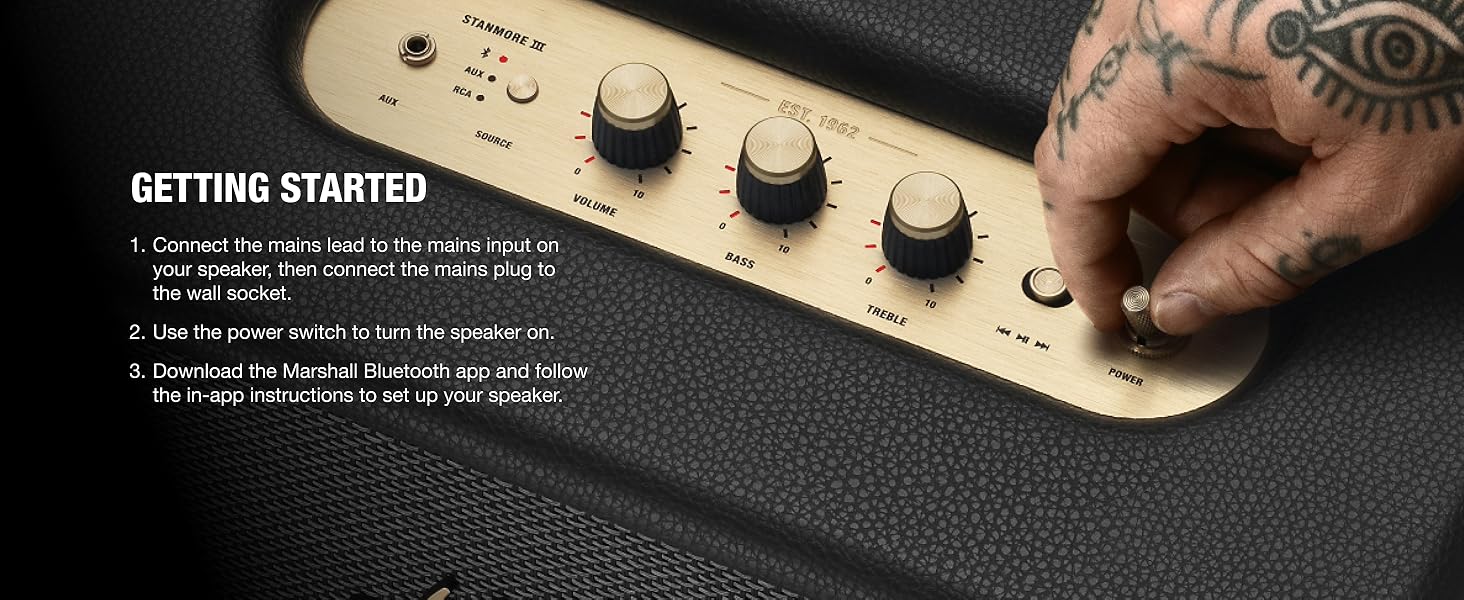
Figure 4: Detailed view of the Stanmore III top panel controls.
5. Maintenance
5.1 Cleaning
To maintain the appearance and longevity of your speaker:
- Wipe the exterior surfaces with a soft, dry cloth.
- Avoid using abrasive cleaners or solvents, as these can damage the finish.
- Keep the speaker free from dust and debris, especially around the speaker grille and control knobs.
5.2 Storage
When not in use for extended periods, store the speaker in a cool, dry place away from direct sunlight and extreme temperatures.
6. Troubleshooting
| Problem | Possible Cause | Solution |
|---|---|---|
| No power | Power cable not connected; wall socket not active. | Ensure mains lead is securely connected and wall socket is functional. |
| No sound | Incorrect source selected; volume too low; device not paired. | Check source input, increase volume, re-pair Bluetooth device. |
| Bluetooth connection issues | Device out of range; interference; speaker not in pairing mode. | Move device closer to speaker (within 10 meters), reduce interference, put speaker in pairing mode. |
| Distorted sound at high volume | Volume too high; bass/treble settings too extreme. | Reduce volume, adjust bass and treble knobs. |
7. Specifications
| Feature | Detail |
|---|---|
| Brand | Marshall |
| Model Name | Stanmore III |
| Model Number | 1006014 |
| Speaker Type | Freestanding |
| Connectivity Technology | Bluetooth (Next-Generation), Wired (3.5mm, RCA) |
| Wireless Communication Technology | Bluetooth |
| Bluetooth Range | 10 Meters |
| Audio Output Mode | Stereo |
| Speaker Maximum Output Power | 80 Watts |
| Frequency Response | 20 Hz - 20 kHz |
| Signal-to-Noise Ratio | 70 dB |
| Product Dimensions | 8"D x 13.78"W x 7.4"H |
| Item Weight | 9.4 Pounds |
| Material | Plastic (PVC-free, 70% recycled) and Vegan materials |
| Included Components | Stanmore III Bluetooth Speaker, Quick start guide, Legal and safety information, Mains lead |
8. Warranty and Support
8.1 Warranty Information
The Marshall Stanmore III Bluetooth Wireless Speaker comes with a Limited Warranty. For specific terms and conditions, please refer to the "Legal and safety information" document included in your product packaging or visit the official Marshall website.
8.2 Customer Support
For further assistance, technical support, or warranty claims, please contact Marshall customer support through their official website or the contact information provided in your product documentation.
You can also refer to the official User Manual (PDF) for more detailed information.
Related documents1006014


Ask a question about this manual
Ask about setup, troubleshooting, compatibility, parts, safety, or missing instructions. Manuals+ will review the question and use this page’s manual context to help answer it.