
Introduction
Thank you for choosing BERTSCHAT PRO Single Heating Heated Mittens. These mittens are designed to provide warmth and comfort in cold environments, making them ideal for various outdoor activities. Equipped with advanced insulation and heating technology, they ensure your hands stay warm, dry, and protected.
Safety Warnings
WARNING:
Read all safety warnings and instructions carefully before using this product. Failure to follow these warnings and instructions may result in electric shock, fire, or serious injury.
- Do not disassemble the product. Unauthorized modifications can lead to injury or malfunction.
- Ensure batteries are charged using only the provided USB charger.
- Keep the mittens and batteries away from water and extreme heat.
- If you experience discomfort, excessive heat, or any unusual sensation, immediately turn off the mittens and remove them.
- This product is intended for warming the body in cold environments. Do not use for medical purposes or on individuals unable to perceive heat.
Product Overview
The BERTSCHAT PRO Single Heating Heated Mittens feature a robust design with multiple layers for optimal performance.
Key Features:
- Advanced Insulation: Equipped with HIPORA and 3M Thinsulate for superior warmth, dryness, and wind protection.
- Extensive Heating Surface: Heating elements cover the entire back of the hand and extend to the finger area.
- Adjustable Heat Settings: Three distinct heat levels (low, medium, high) allow for personalized temperature control.
- Powerful Batteries: Powered by two 4000 mAh lithium-polymer rechargeable batteries.
- Long Heat Duration: Provides 2 to 11 hours of heat, depending on the selected heat setting and ambient temperature.
- USB Rechargeable: Convenient charging via the included USB cable.
- Touchscreen Compatible: Special fingertips allow for use with touchscreen devices without removing the mittens.
- Durable Construction: Features a waterproof shell and a soft polar fleece liner for comfort and protection.
Components Included:
- 1 pair of BERTSCHAT PRO Single Heating Heated Mittens
- 2 rechargeable lithium-polymer batteries (4000 mAh each)
- 1 USB charger cable
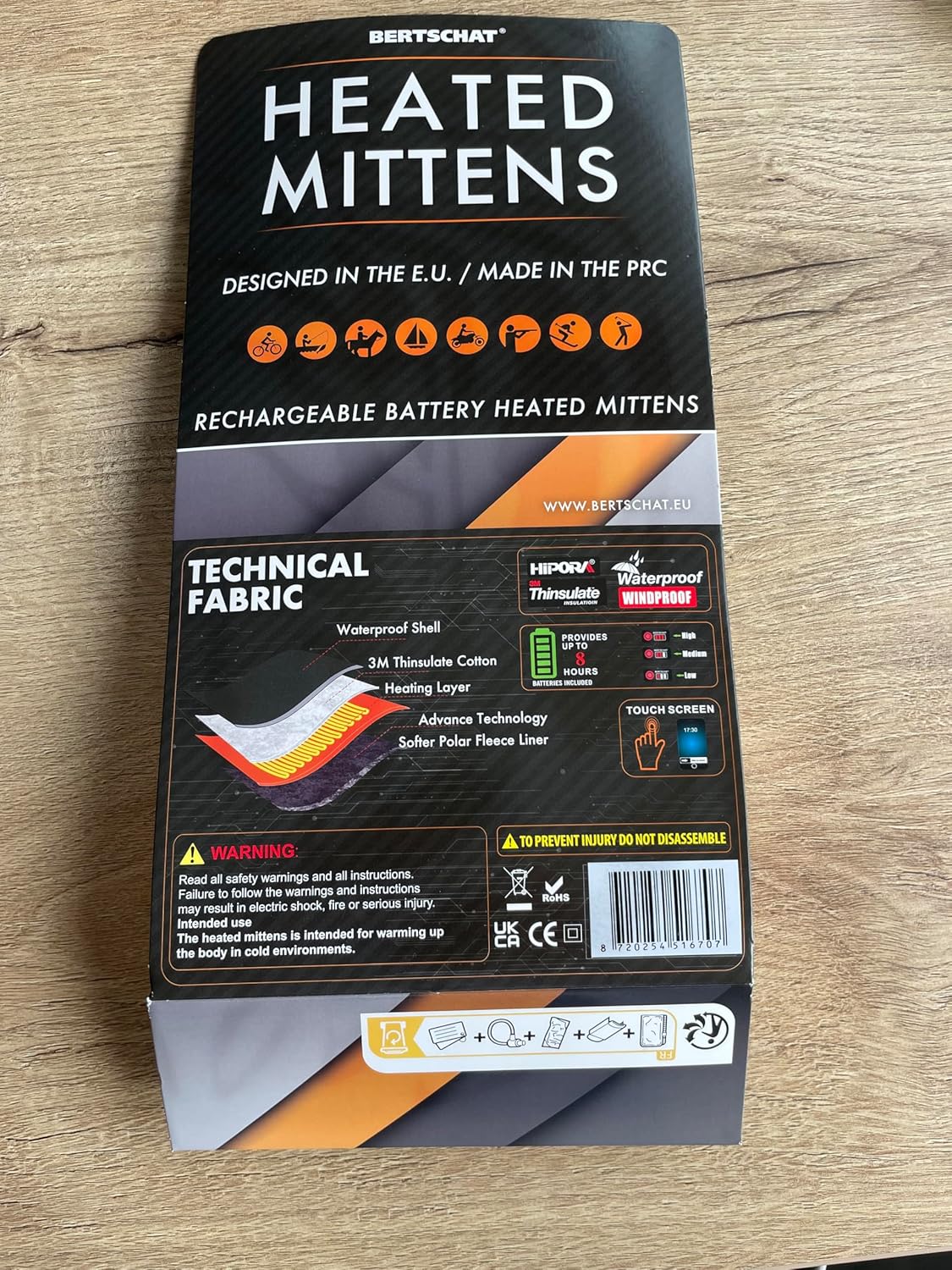
This image displays the product packaging, highlighting the technical fabric layers including a waterproof shell, 3M Thinsulate cotton, heating layer, advanced technology, and a softer polar fleece liner. It also shows icons for various activities like cycling, fishing, boating, motorcycling, hunting, skiing, and hiking, indicating the mittens' versatility. Key features like HIPORA, Waterproof, Windproof, Thinsulate insulation, and touchscreen compatibility are also visible. Note that while the packaging indicates 'up to 8 hours' of heat, the actual duration with the included 4000mAh batteries ranges from 2 to 11 hours depending on the heat setting and environmental conditions.
Setup
1. Charging the Batteries
- Locate the two lithium-polymer batteries and the USB charger cable.
- Connect the batteries to the USB charger cable.
- Plug the USB charger cable into a compatible USB power source (e.g., wall adapter, computer USB port, power bank).
- Allow the batteries to fully charge before first use. The charging indicator light on the battery or charger will change color or turn off when charging is complete.
2. Inserting Batteries
- Locate the battery pocket inside each mitten, usually near the cuff.
- Carefully insert one fully charged battery into each pocket.
- Connect the battery cable from the mitten to the battery. Ensure a secure connection.
- Close the battery pocket securely, typically with a zipper or hook-and-loop fastener.
Operating Instructions
1. Powering On/Off
- To turn on the mittens, press and hold the power button located on the cuff for approximately 3-5 seconds until an indicator light illuminates.
- To turn off the mittens, press and hold the power button again for 3-5 seconds until the indicator light turns off.
2. Adjusting Heat Levels
Once powered on, the mittens will typically start at a default heat setting. To cycle through the heat levels:
- Press the power button briefly (less than 1 second) to change the heat setting.
- The indicator light will change color to show the current heat level:
- High: (e.g., Red light) - Provides maximum heat.
- Medium: (e.g., White/Orange light) - Provides moderate heat.
- Low: (e.g., Blue light) - Provides gentle heat and extends battery life.
- Continue pressing the button to cycle through the settings until you reach your desired warmth.
3. Touchscreen Functionality
The fingertips of these mittens are designed to be touchscreen compatible. This allows you to operate most touchscreen devices without exposing your hands to the cold. Ensure a firm and direct contact between the special fingertip material and the screen for best results.
Maintenance
1. Cleaning
- Always remove batteries before cleaning.
- Hand wash the mittens gently with mild soap and cold water. Do not machine wash, tumble dry, or wring.
- Allow the mittens to air dry completely before reinserting batteries or storing. Do not use external heat sources to dry.
- Do not dry clean or iron the mittens.
2. Battery Care and Storage
- Store batteries in a cool, dry place away from direct sunlight and extreme temperatures.
- For long-term storage, charge batteries to approximately 50-70% capacity every 3-6 months to maintain battery health.
- Do not store batteries connected to the mittens.
- Dispose of old or damaged batteries according to local regulations.
Troubleshooting
- Mittens not heating:
- Ensure batteries are fully charged and correctly inserted into the pockets.
- Verify that the battery cables are securely connected to the mittens.
- Press and hold the power button for 3-5 seconds to ensure the mittens are turned on.
- Check if the indicator light is on. If not, the battery might be depleted or not connected.
- Short battery life:
- Battery life varies significantly with the heat setting. High heat consumes more power.
- Extreme cold environments can also reduce battery efficiency.
- Ensure batteries are fully charged before each use.
- Over time, battery capacity may decrease. Consider replacing old batteries if performance significantly degrades.
- Mittens feel too hot or not warm enough:
- Adjust the heat setting using the power button to cycle through low, medium, and high.
- Allow a few minutes for the heating elements to reach the desired temperature.
- Touchscreen not responding:
- Ensure direct and firm contact between the special fingertip material and the screen.
- Some screen protectors or device settings may affect touchscreen sensitivity.
Specifications
| Brand | BERTSCHAT |
| Model | PRO Single Heating |
| Material | Polyester, Leather, Elastane |
| Battery Type | Lithium-polymer |
| Battery Capacity | 2 x 4000 mAh |
| Heat Duration | 2 to 11 hours (depending on heat setting and ambient temperature) |
| Color | Black |
| Included Components | 1 pair of mittens, 2 rechargeable batteries, 1 USB charger cable |
| Intended Use | Adult unisex, cold environments |
Warranty and Support
For warranty information, technical support, or any questions regarding your BERTSCHAT PRO Single Heating Heated Mittens, please contact BERTSCHAT customer service through their official website or the retailer where the product was purchased. Please have your purchase receipt and product model information ready when contacting support.
You can find more information at www.bertschat.eu.

