
1. Introduction
This manual provides comprehensive instructions for the installation, operation, maintenance, and troubleshooting of your Steelcraft Automotive 114700 Running Boards. Please read this manual thoroughly before beginning installation to ensure proper fitment and safe use. These running boards are designed to fit Ford Explorer vehicles.
The Steelcraft 114700 Running Boards are constructed from durable aluminum with a black finish, providing a secure step for vehicle entry and exit while enhancing the vehicle's appearance.
2. Safety Information
Always prioritize safety during installation and use. Failure to follow these instructions could result in injury or damage to the product or vehicle.
- Wear appropriate personal protective equipment, including safety glasses and gloves, during installation.
- Ensure the vehicle is parked on a level surface and the parking brake is engaged before beginning installation.
- Do not exceed the maximum weight limit of 414 pounds per running board.
- Periodically check all mounting hardware for tightness and re-tighten as necessary. Loose hardware can lead to product failure.
- Keep hands and clothing clear of moving parts or pinch points during installation.
- If you are unsure about any step of the installation process, consult a qualified professional.
3. Parts List
Verify that all components are present before beginning installation. If any parts are missing or damaged, contact Steelcraft customer support.
- Running Boards (2)
- Mounting Brackets (Quantity varies by vehicle application, typically 4-6)
- Hardware Kit (Bolts, washers, nuts, etc.)

Image 3.1: A pair of Steelcraft Automotive 114700 Running Boards, showcasing their black textured surface and polished chrome edges. These boards are designed to provide a secure step and enhance vehicle aesthetics.
4. Setup and Installation
Installation typically requires basic hand tools. Refer to the specific vehicle application guide for detailed instructions on bracket placement and torque specifications. The general steps are outlined below.
Tools Required:
- Socket Wrench Set
- Torque Wrench
- Measuring Tape
- Marker or Pencil
Installation Steps:
- Prepare the Vehicle: Park the Ford Explorer on a flat, stable surface. Engage the parking brake. For easier access, consider lifting the vehicle using a hoist or jack stands, ensuring it is securely supported.
- Identify Mounting Locations: Locate the factory mounting points on the vehicle's frame or rocker panel. These are typically pre-drilled holes or existing bolts. Refer to your vehicle's specific service manual or the detailed installation guide provided with your running boards for precise locations.
- Attach Mounting Brackets: Secure the appropriate mounting brackets to the identified vehicle mounting points using the provided hardware. Do not fully tighten the hardware at this stage; allow for some adjustability.
- Position Running Boards: Carefully lift one running board and align it with the attached mounting brackets. The running board typically slides into channels on the brackets or bolts directly to them.
- Secure Running Boards: Attach the running board to the brackets using the remaining hardware. Adjust the position of the running board to ensure it is level and properly aligned with the vehicle.
- Tighten All Hardware: Once the running board is in the desired position, progressively tighten all bolts, starting from the center and working outwards. Use a torque wrench to tighten all hardware to the manufacturer's specified torque settings. This is critical for safety and stability.
- Repeat for Other Side: Follow the same steps for installing the running board on the opposite side of the vehicle.
- Final Inspection: After installation, double-check all connections to ensure they are secure. Gently step on each running board to confirm stability and proper installation.

Image 4.1: A close-up view of a Steelcraft running board mounting bracket, showing its robust construction and the elongated hole for flexible attachment to the vehicle's chassis.
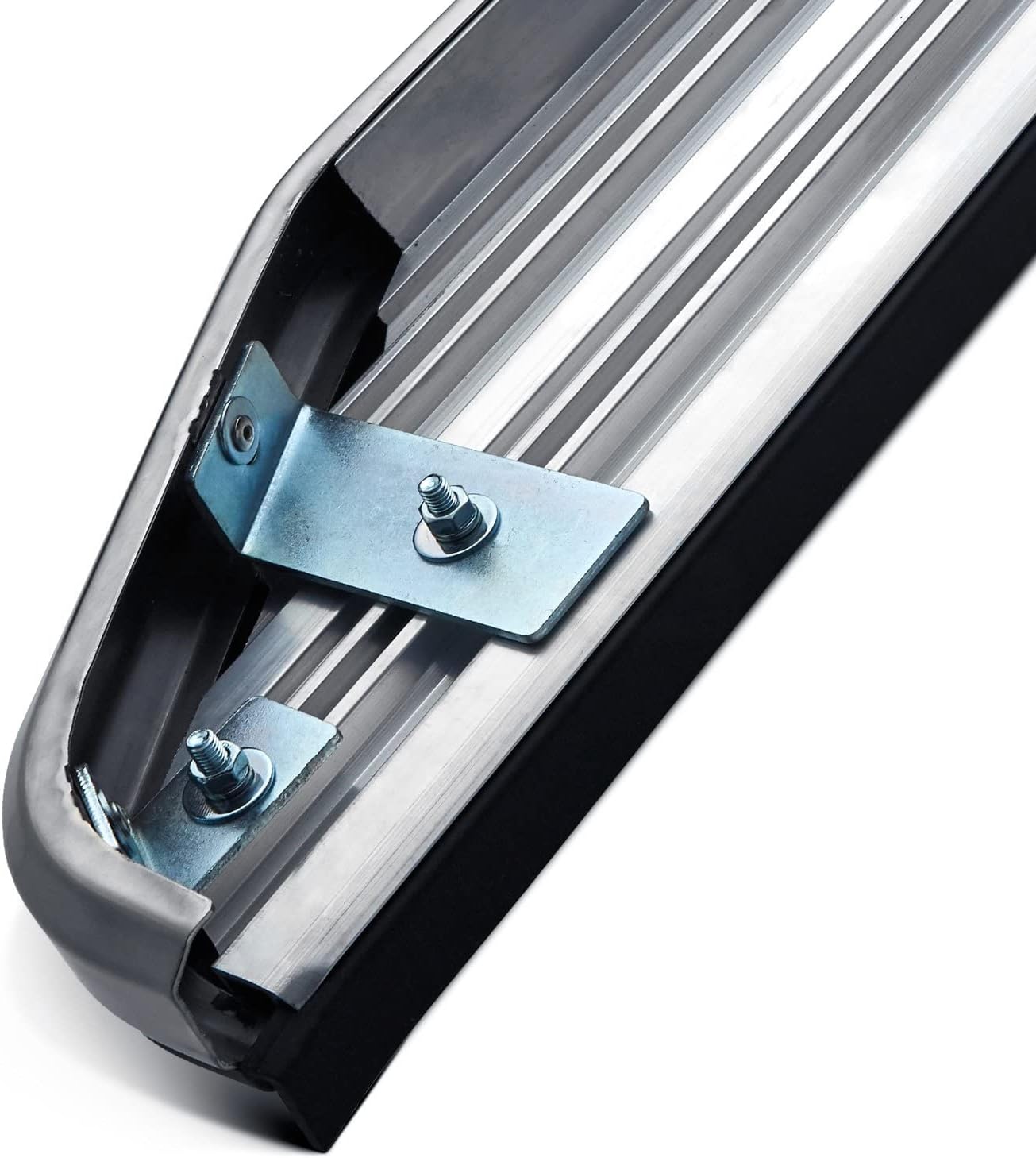
Image 4.2: This image displays the underside of a running board, highlighting how the mounting brackets are secured to the board's frame. This connection point is crucial for stability and load-bearing capacity.
5. Operating
The Steelcraft 114700 Running Boards are designed to provide a stable and convenient step for entering and exiting your Ford Explorer. To ensure safe operation:
- Always step onto the running board with caution, especially in wet or icy conditions.
- Distribute your weight evenly when stepping on the board.
- Avoid jumping or placing excessive force on the running boards.
- Ensure the surface of the running board is clear of debris, mud, or ice before stepping.

Image 5.1: A detailed view of the running board's textured black stepping surface, designed to provide enhanced grip, alongside its polished aluminum trim.
6. Maintenance
Regular maintenance will help preserve the appearance and functionality of your running boards.
- Cleaning: Wash the running boards regularly with mild soap and water. Avoid abrasive cleaners or harsh chemicals that could damage the finish. Rinse thoroughly and dry with a soft cloth.
- Hardware Check: Periodically (e.g., every 3-6 months or after off-road use) inspect all mounting hardware for tightness. Re-tighten any loose bolts to the specified torque settings.
- Damage Inspection: Inspect the running boards for any signs of damage, such as bends, cracks, or excessive wear. If significant damage is found, consider replacement to ensure safety.
7. Troubleshooting
This section addresses common issues you might encounter.
| Problem | Possible Cause | Solution |
|---|---|---|
| Running board feels loose or wobbly. | Loose mounting hardware. | Inspect all bolts and nuts. Re-tighten to specified torque settings. |
| Difficulty aligning running board during installation. | Brackets not properly positioned or hardware too tight. | Loosen bracket hardware slightly to allow for adjustment. Ensure brackets are on correct sides (if applicable). |
| Unusual noises (squeaking, rattling) from running board. | Loose hardware or contact with vehicle components. | Check all mounting points for tightness. Ensure no part of the running board or bracket is rubbing against the vehicle's frame or body. |
8. Specifications
| Attribute | Detail |
|---|---|
| Brand | Steelcraft |
| Model Number | 114700 |
| Material | Aluminum |
| Color | Black |
| Exterior Finish | Aluminum |
| Item Dimensions (L x W x H) | 83 x 11 x 8 inches |
| Item Weight | 44 Pounds |
| Weight Limit | 414 Pounds |
| UPC | 840813175263 |
| Manufacturer | Steelcraft Automotive |
| Compatible Vehicle Service Type | Ford Explorer (All of the above) |
9. Warranty and Support
For warranty information or technical support, please contact Steelcraft Automotive directly. Keep your purchase receipt and product model number (114700) handy when contacting support.
Manufacturer: Steelcraft Automotive
Model: 114700
Date First Available: October 5, 2021
Refer to the official Steelcraft Automotive website or product packaging for the most current warranty terms and contact information.