
1. Introduction
This manual provides instructions for the COMTEC ZDR038 Digital Inner Mirror Drive Recorder. This device integrates a drive recorder with a digital inner mirror, offering enhanced rear view visibility and comprehensive recording capabilities for both front and rear of your vehicle. It features a high-resolution display, advanced safety functions, and reliable recording modes.

Image: The COMTEC ZDR038 Digital Inner Mirror Drive Recorder, showing the main mirror unit and the separate front and rear cameras.
2. Setup
2.1. Component Check
Before installation, ensure all components are present:
- Main Digital Inner Mirror Unit
- Front Camera
- Rear Camera
- Power Cable
- Rear Camera Connection Cable
- Silicone Bands for Mirror Unit Attachment
- microSD Card (16GB included, inserted in main unit)
2.2. Installation
The main unit attaches to your existing rearview mirror using the provided silicone bands. The front camera is a separate unit, allowing flexible positioning to avoid obstructing your view. The rear camera is typically installed on the rear window. Ensure all cables are routed safely and do not interfere with vehicle operation.

Image: Detailed view of the COMTEC ZDR038 main mirror unit and its separate front and rear cameras, highlighting the compact design.
For professional installation, a dedicated service may be available. Refer to the product packaging or official website for details on installation services.

Image: Information regarding available professional installation services for the drive recorder.
3. Operation
3.1. Power On/Off
The device automatically powers on and begins recording when the vehicle's engine is started. It powers off automatically when the engine is turned off.
3.2. Touch Panel Control
The ZDR038 features an electrostatic touch panel for intuitive operation. Lightly touch the screen to access menus and settings.
3.3. Display Modes
The LCD display offers four viewing modes:
- Wide: Displays the recorded image across the full width of the screen. You can adjust the display range by operating on-screen buttons.
- Normal: Displays the recorded image across the full height, showing the entire recorded range.
- Double: Displays both front and rear images side-by-side across the screen.
- Mini-view: Displays either the rear or front image in wide view, and the other image smaller in two screens.
Note: When displaying the front camera image in full screen in Wide display or Mini-view display, or in Normal display, it will automatically return to the rear camera image after 10 seconds for safety.
3.4. Half-Mirror Function
When the LCD display is turned off, the unit functions as a traditional rearview mirror. You can toggle the LCD display on/off via the sub-menu.
4. Key Features
4.1. High-Resolution Recording
Both front and rear cameras record in Full HD (2 million pixels), capturing clear and detailed images. This is crucial for accident analysis and can also be used to record memorable driving moments.
4.2. STARVIS™ Technology
Equipped with Sony's STARVIS™ technology on both front and rear CMOS sensors, the ZDR038 provides bright and clear recordings even in low-light conditions such as at night or inside tunnels.

Image: Visual comparison demonstrating enhanced clarity in night recordings with STARVIS technology enabled.
4.3. HDR (High Dynamic Range) Function
The HDR function corrects images to prevent overexposure (whiteout) and underexposure (blackout), ensuring clear recordings even in challenging lighting conditions like strong backlighting or sudden changes in brightness (e.g., entering/exiting tunnels).
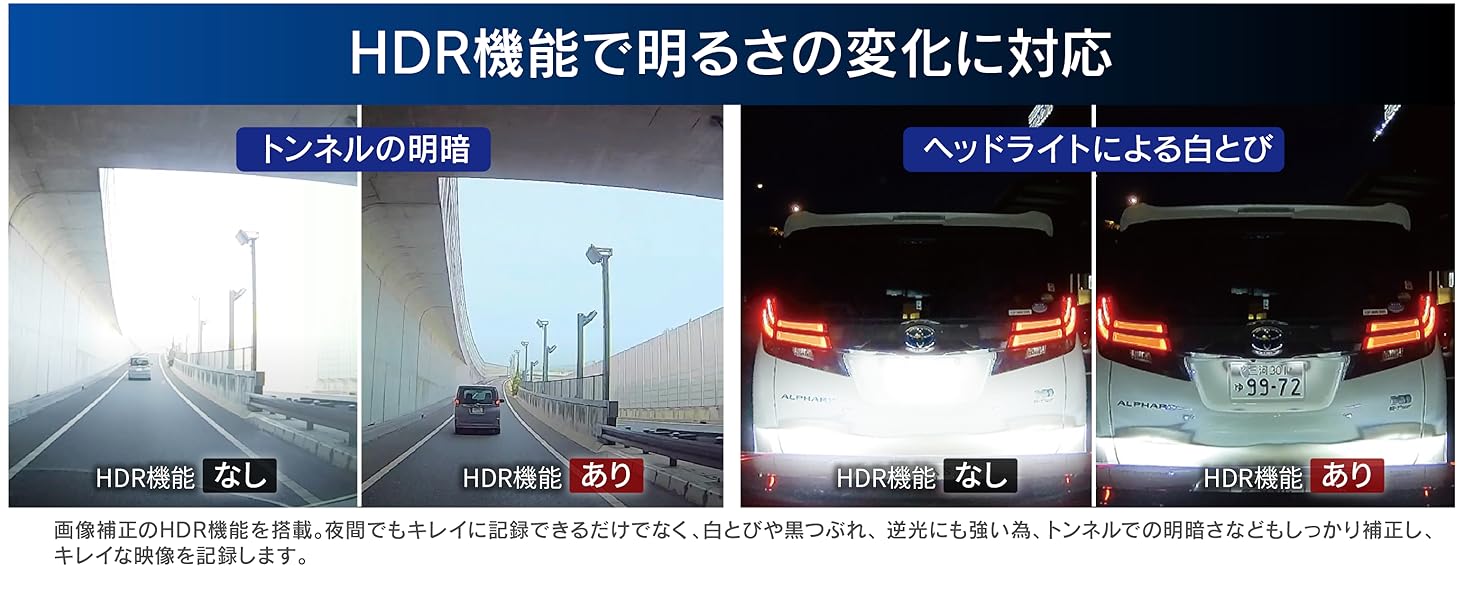
Image: Demonstrates the effectiveness of HDR in maintaining clear image quality in both bright and dark areas, such as tunnel exits and against strong headlights.
4.4. Ultra-Wide Angle Lens
Both front and rear cameras feature an ultra-wide 168° diagonal field of view, capturing a broader area around your vehicle, including previously unseen blind spots.

Image: Diagram illustrating the 168-degree wide-angle coverage provided by both the front and rear cameras.
4.5. GPS Functionality
The built-in GPS records location and speed data, which can be viewed with the dedicated PC viewer software. Some safety support functions rely on GPS reception.
4.6. Noise Countermeasures
The device is designed with noise countermeasures to minimize interference with digital terrestrial broadcasting reception and car navigation GPS signals.
5. Safety Driving Support Functions
The ZDR038 includes seven safety driving support functions to assist in safer driving. These functions provide alerts and notifications but are not a substitute for attentive driving.
- Rear Vehicle Approach Notification: Detects vehicles approaching from behind and provides audio or visual alerts. This can also trigger an event recording.
- Preceding Vehicle Departure Notification: Alerts you when the vehicle in front starts moving.
- Preceding Vehicle Approach Notification: Warns if you are approaching the vehicle in front too closely.
- Preceding Vehicle Continuous Approach Notification: Alerts if you are continuously following the vehicle in front too closely, helping to prevent unintended tailgating.
- Front Signal Notification: Detects when the traffic light ahead turns green.
- Drive Support Function: Detects rapid acceleration, sudden deceleration, or sharp turns and provides alerts.
- Vehicle Speed Alarm: Notifies you if your vehicle exceeds a set speed limit.
Note: Safety driving support functions are not guaranteed to prevent accidents. When driving, always pay attention to actual traffic conditions and drive safely. Some functions require GPS reception to operate. Performance may vary depending on surrounding conditions, weather, and the shape/color of other vehicles.

Image: Diagram showing how the system detects and alerts the driver about a vehicle approaching from the rear.
6. Recording Functions
The ZDR038 offers three primary recording modes to ensure critical events are captured.
- Continuous Recording: Records continuously from engine ON to OFF. Older files are automatically overwritten when the microSD card is full (initial setting).
- Impact Recording: When the built-in G-sensor detects an impact, the device automatically saves the relevant footage as an event recording.
- Manual Recording: Press a dedicated button to manually initiate a recording at any desired time.
Note: Recording duration varies based on resolution, frame rate, and image quality settings. In impact and manual recording, the file at the time of detection/button press, and the preceding or subsequent file, are saved as event data. These files may also be overwritten if the recording limit is reached.
6.1. High-Speed Startup Recording
The device starts recording immediately after the engine is turned on, ensuring no moments are missed from the start of your drive.
6.2. Time-Lapse Recording
Records still images at 1-second intervals and compresses them into a short video. This allows for extended recording durations and easier review of long periods.
7. Parking Surveillance Function
With the optional parking surveillance/direct wiring cord [HDROP-14], the ZDR038 can monitor your vehicle while parked.

Image: Diagram showing the detection zones for parking surveillance, indicating how impacts are detected and recorded.
- Impact Quick Recording: Activates upon impact detection while parked, recording front and rear images. This mode conserves power, enabling ultra-long-term parking surveillance mode operation.
- One-Time Parking Surveillance Mode: Temporarily activates parking surveillance even if it's normally off. Useful for specific parking situations.
- Parking Surveillance Mode Pass Function: Temporarily disables parking surveillance. Useful in environments prone to false triggers, such as mechanical multi-story parking lots or windy conditions.
- Time-Lapse Recording: Records continuously in time-lapse mode while parked, allowing for long-duration monitoring.
Note: Parking surveillance images are saved to a dedicated folder for easy identification. Impact detection sensitivity can be adjusted across 11 levels (including OFF).
8. Maintenance
8.1. microSD Card Management
The ZDR038 uses a proprietary file system that minimizes data fragmentation on the microSD card, reducing the need for frequent formatting compared to standard FAT file systems. While periodic formatting is not strictly required, it is recommended to extend the lifespan of the microSD card, which is a consumable item.
8.2. SD Card Check Function
Upon startup, the device checks the microSD card for damage. If an abnormality is detected, an LED indicator will alert you, preventing missed recordings due to a faulty card.
8.3. Emergency Recording Stop Function
In the event of a significant impact (e.g., an accident), the device automatically stops recording. This prevents important accident footage from being overwritten if the vehicle is moved or repaired afterward.
9. Specifications
| Feature | Detail |
|---|---|
| Brand | COMTEC |
| Model Name | ZDR038 |
| Product Dimensions (D x W x H) | 22 x 290 x 72 mm |
| Product Weight | 927 g |
| Battery | 2 Lithium Metal batteries (included) |
| Position | Front |
| Special Features | Built-in GPS |
| Color | Gray, Black |
| Video Capture Resolution | 1080p (Full HD) |
| Included Components | None (refer to package contents for full list) |
| Mounting Type | Adhesive |
| Field of View | 168 degrees (diagonal) |
| Control Method | Touch Panel |
| Image Sensor | 1/2.8 inch CMOS Sensor (STARVIS technology) |
| Effective Pixels | Max 2 million pixels |
| Lens Angle (Horizontal/Vertical/Diagonal) | Front: 138°/70°/168°, Rear: 138°/70°/168° |
| F-value | 1.8 |
| Lens Material | Glass |
| LCD Screen Size | 11.88 inches |
10. Troubleshooting
This section addresses common issues you might encounter with your ZDR038 drive recorder.
10.1. No Power / Not Recording
- Ensure the power cable is securely connected to both the device and the vehicle's power source.
- Check the vehicle's fuse box for any blown fuses related to the power outlet.
- Verify that the engine is running or the ignition is in the ACC position.
- If the SD card check function alerts you, replace the microSD card.
10.2. Poor Image Quality / Blurry Images
- Clean the camera lenses and the vehicle's windshield/rear window.
- Ensure the protective film has been removed from the camera lenses and the mirror display.
- Check if the HDR function is enabled for improved clarity in varying light conditions.
- Verify that the camera is securely mounted and not vibrating.
10.3. GPS Not Receiving Signal
- Ensure the device has a clear view of the sky. Obstructions like tinted windows or metallic coatings can interfere with GPS reception.
- Move the device to a different location on the windshield if possible.
- GPS reception can be affected by tunnels, tall buildings, or dense foliage.
10.4. Safety Driving Support Functions Not Working
- Confirm that GPS is receiving a signal, as some functions depend on it.
- Ensure the camera's view is unobstructed and clean.
- Environmental factors (weather, lighting, vehicle type/color) can affect detection accuracy.
10.5. Device Interference with Other Electronics
- The ZDR038 is designed with noise countermeasures. If interference occurs, try repositioning the device or its cables away from other electronic devices.
11. Warranty and Support
11.1. Product Warranty
The COMTEC ZDR038 comes with a 3-year warranty from the date of purchase. Please retain your proof of purchase (e.g., receipt, delivery note) as it is required for warranty claims. The warranty is void if used outside of Japan or without valid proof of purchase.

Image: Graphic indicating a 3-year warranty for the product.
11.2. Dedicated Viewer Software
A dedicated viewer software is available for download from the official COMTEC website. This software allows you to review recorded video and audio, as well as GPS and G-sensor data, on your computer. You can also convert recorded data into video or still image files for saving.
For the latest software and support resources, please visit the official COMTEC website: www.comtec.co.jp
12. Video Demonstration
12.1. Night Recording Quality
Video: This video demonstrates the COMTEC ZDR038's recording quality during nighttime driving, showcasing both front and rear camera views and their clarity in low-light conditions.