
Introduction
This manual provides instructions for the DNRPrime Active Stylus Pen, a digital capacitive touch pen designed for use with various electronic devices. It features palm rejection technology and a rechargeable battery, making it suitable for handwriting, note-taking, drawing, and design tasks on compatible touch screens.
The stylus is compatible with iPhone 13, Mini, Pro, Pro Max, and other capacitance touch screens, including iPads, smartphones, and tablets. It operates without the need for Bluetooth pairing or driver installation.

Image: The DNRPrime Active Stylus Pen, a sleek black digital pen with a fine tip, shown alongside a colorful digital swirl, illustrating its creative potential.
Setup
Charging the Stylus
Before first use, fully charge the stylus.
- Locate the charging port on the stylus.
- Connect the provided charging cable to the stylus and a USB power source.
- The indicator light will show red during charging.
- Charging typically takes 60-80 minutes for a full charge.
- The indicator light will turn off when fully charged.

Image: Close-up of the stylus charging port with a charging cable connected. The image also shows indicator lights for "Fully Charged" (light off) and "Charging" (red light).
Turning On/Off
The stylus does not require Bluetooth pairing.
- To turn on: Press the power button located on the top of the stylus. The indicator light will show white.
- To turn off: Press the power button again.
- The stylus features an intelligent power-saving function and will automatically turn off after 30 minutes of inactivity to preserve battery life.

Image: A diagram illustrating the power button and indicator light on the stylus, along with explanations for charging indication (red for charging, light off for full, white for in use) and how to exchange the tip.
Operating Instructions
General Usage
Once turned on, the stylus is ready for immediate use on your compatible touch screen device.
- Writing and Drawing: Use the fine tip for precise input, ideal for note-taking, sketching, and detailed drawing.
- Navigation: Navigate your device's interface, select items, and scroll with ease.
- Palm Rejection: The stylus features palm rejection technology, allowing you to rest your hand naturally on the screen while writing or drawing without unintended marks.

Image: A hand using the stylus to draw a diagram on a tablet screen, demonstrating its high precision and smooth operation.
Compatibility
The DNRPrime Active Stylus Pen is designed for wide compatibility with various capacitive touch screen devices.
- Apple Devices: Compatible with iPhone 13 series (Mini, Pro, Pro Max), iPad Pro, and other iPhone/iPad models with capacitive touch screens.
- Other Devices: Works with most Android smartphones and tablets, as well as Windows tablets that feature capacitive touch screens.
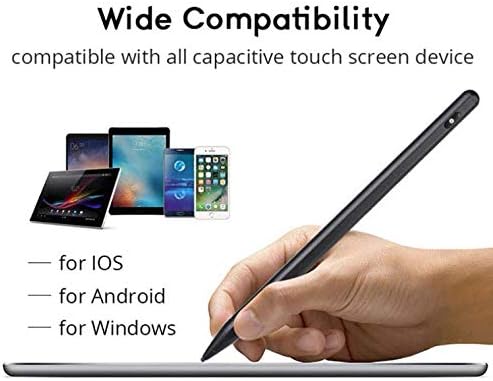
Image: A hand holding the stylus over a tablet, with various smartphones and tablets in the background, illustrating its wide compatibility across iOS, Android, and Windows devices.
Maintenance
Replacing the Stylus Tip
Over time, the stylus tip may wear down. Replace it to maintain optimal performance.
- Gently pull the existing tip straight out from the stylus body.
- Insert a new replacement tip firmly into the stylus body until it is secure.

Image: A detailed view of the stylus tip, showing its 1.5mm extendable fine tip, and a diagram illustrating how to exchange the tip by pulling it off and inserting a new one.
Cleaning
Wipe the stylus body with a soft, dry cloth. Do not use harsh chemicals or abrasive materials.
Troubleshooting
- Stylus not turning on: Ensure the stylus is fully charged. Press the power button firmly.
- Stylus not responding:
- Ensure the stylus is turned on (white indicator light).
- Check if your device's screen is clean and free of debris.
- Verify that your device has a capacitive touch screen.
- If the tip is worn, replace it.
- Inaccurate input:
- Ensure the stylus tip is clean.
- Restart your device.
- If the tip is loose or damaged, replace it.
- Short battery life: Ensure the stylus is fully charged for the recommended time. Avoid extreme temperatures during use and charging.
Specifications
| Feature | Specification |
|---|---|
| Model Number | DN-DN18084P4E-30 |
| Length | 180mm (16.5 cm shown in image) |
| Pen Tube Diameter | 8.9mm |
| Fiber Tip Diameter | 0.24 inches (6mm) |
| Weight | 16.6 grams (0.58 ounces) |
| Material | Aluminum Alloy |
| Charging Time | 60-80 minutes (1-1.5 hours) |
| Working Time | 10 hours (8-10 hours) |
| Color | Black |
| Compatible Devices | Smartphones, Tablets (Capacitive Touch Screens) |
| UPC | 742345180848 |
Note: Some specifications may vary slightly based on usage conditions.
Warranty Information
Specific warranty details for the DNRPrime Active Stylus Pen are not provided in this manual. Please refer to the retailer's return policy or the official DNRPrime website for comprehensive warranty information and terms.
Customer Support
For further assistance, technical support, or inquiries regarding your DNRPrime Active Stylus Pen, please contact DNRPrime customer support through their official channels.
You may find contact information on the product packaging or the manufacturer's official website.


