
1. Introduction
This manual provides instructions for the safe and effective use of your Tamron 28-75mm F/2.8 Di III VXD G2 lens (Model A063). This high-performance zoom lens is designed for Sony E-mount full-frame mirrorless cameras, offering outstanding resolution and image quality across its versatile zoom range. Please read this manual thoroughly before using the product.
Key Features:
- Fast, quiet VXD linear motor for high-speed and high-precision autofocus.
- Minimum Object Distance (MOD) of 7.1 inches at the wide end and a maximum magnification ratio of 1:2.7 for creative close-ups.
- Redesigned exterior with enhanced texture and improved scratch resistance for greater user-friendliness.
- Compact design, measuring 4.6 inches long and weighing approximately 19 oz.
- Moisture-Resistant Construction and Fluorine Coating for durability and protection.
- Equipped with a USB-C port for direct firmware updates and customization via Tamron Lens Utility software.
2. Product Components and Identification
Familiarize yourself with the various parts of your Tamron 28-75mm F/2.8 Di III VXD G2 lens.
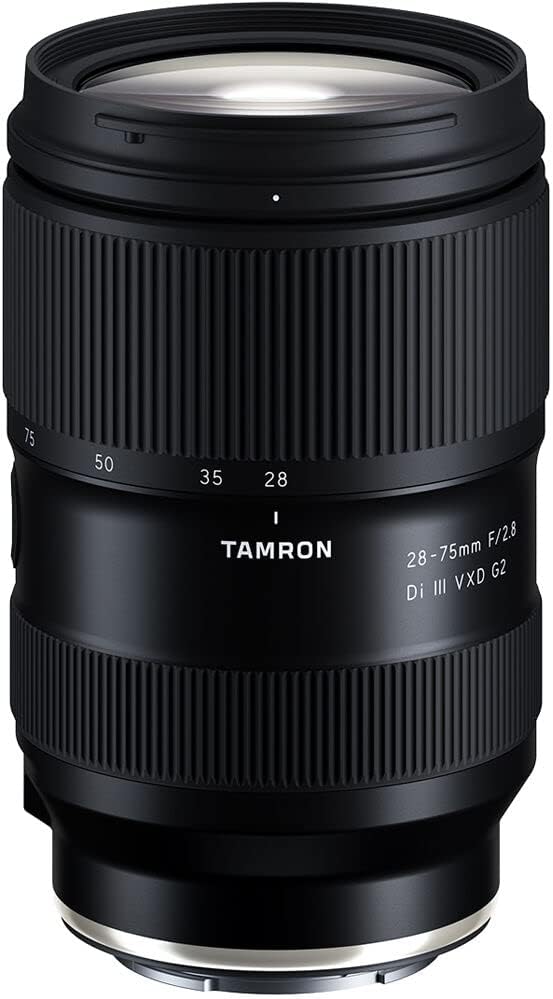
Figure 2.1: Front view of the Tamron 28-75mm F/2.8 Di III VXD G2 lens, showing the zoom ring, focus ring, and Tamron branding.

Figure 2.2: Rear view of the Tamron 28-75mm F/2.8 Di III VXD G2 lens, displaying the lens mount and product information.

Figure 2.3: Angled view of the Tamron 28-75mm F/2.8 Di III VXD G2 lens, highlighting its compact form factor.

Figure 2.4: Side view of the lens, showing the USB-C port for firmware updates and customization.
What's in the Box:
- Tamron 28-75mm F/2.8 Di III VXD G2 Lens
- Lens Hood
- Front Lens Cap
- Rear Lens Cap
3. Setup and Installation
3.1 Attaching the Lens to Your Camera
- Ensure both the camera and the lens are clean and free of dust.
- Remove the rear lens cap from the lens and the body cap from your camera.
- Align the mounting index mark on the lens with the corresponding mark on your camera body.
- Insert the lens into the camera mount and rotate it clockwise until it clicks into place. Do not force the lens.
To detach the lens, press the lens release button on your camera body and rotate the lens counter-clockwise until it detaches.
3.2 Attaching the Lens Hood
The included lens hood helps to block unwanted stray light, reducing flare and ghosting, and provides some physical protection to the front element.
- Align the hood's mounting mark with the mark on the front of the lens.
- Rotate the hood clockwise until it locks securely into place.
For storage, the lens hood can be reversed and attached to the lens.
4. Operation
4.1 Autofocus (AF)
The Tamron 28-75mm F/2.8 Di III VXD G2 lens features a VXD (Voice-coil eXtreme-torque Drive) linear motor for fast, precise, and quiet autofocus performance. It supports various Sony E-mount camera AF functions, including:
- Fast Hybrid AF: Combines phase-detection and contrast-detection AF for quick and accurate focusing.
- Eye AF: Automatically detects and focuses on human or animal eyes for sharp portraits.
Ensure your camera's AF mode is set appropriately for your shooting conditions. Refer to your camera's manual for specific AF settings.
4.2 Manual Focus (MF)
To use manual focus, set your camera's focus mode to MF. Rotate the focus ring on the lens to adjust focus. The lens supports customization of the focus ring direction via the Tamron Lens Utility software.
4.3 Zooming
The lens offers a versatile zoom range from 28mm (wide-angle) to 75mm (short telephoto). Rotate the zoom ring to adjust the focal length. The lens extends as you zoom towards 75mm.
4.4 Close-Up Shooting
This lens excels in close-up photography, achieving a Minimum Object Distance (MOD) of 7.1 inches (0.18m) at the 28mm wide end, with a maximum image magnification ratio of 1:2.7. This allows for detailed close-up shots with pleasing background blur.

Figure 4.1: Example of close-up photography with the Tamron 28-75mm G2 lens, showcasing detail and bokeh.
4.5 Firmware Updates and Customization (Tamron Lens Utility)
The lens is equipped with a USB-C port, allowing users to update firmware and customize various functions directly without needing a separate TAP-in Console. Download the Tamron Lens Utility software from the official Tamron website.

Figure 4.2: The Tamron 28-75mm G2 lens connected via USB-C for firmware updates and customization.
Customizable functions include:
- Focus Ring Function (e.g., direction reversal).
- Assigning custom functions to the Focus Set Button (if present on the lens).
- Adjusting AF/MF settings.
5. Care and Maintenance
Proper care will ensure the longevity and optimal performance of your lens.
- Cleaning the Lens: Use a soft, clean microfiber cloth specifically designed for optical lenses. For stubborn smudges, use a small amount of lens cleaning fluid applied to the cloth, not directly to the lens.
- Dust and Debris: Use a blower brush to remove dust from the lens surfaces. Avoid wiping dry lens elements, as this can cause scratches.
- Moisture-Resistant Construction: While the lens features moisture-resistant construction, it is not waterproof. Avoid exposing it to heavy rain or submerging it in water. Wipe off any moisture immediately.
- Fluorine Coating: The front element has a fluorine coating that repels water and oil, making it easier to clean.
- Storage: When not in use, attach both the front and rear lens caps and store the lens in a dry, cool place, away from direct sunlight and extreme temperatures.
- Avoid Impact: Protect the lens from drops and impacts, which can damage internal components.
6. Troubleshooting
This section addresses common issues you might encounter with your lens.
| Problem | Possible Cause | Solution |
|---|---|---|
| Lens not focusing (Autofocus) |
|
|
| Images appear soft or blurry |
|
|
| Dust on sensor/images |
|
|
7. Specifications
Detailed technical specifications for the Tamron 28-75mm F/2.8 Di III VXD G2 lens.
| Feature | Detail |
|---|---|
| Model Number | AFA063S700 |
| Focal Length | 28-75mm |
| Maximum Aperture | F/2.8 |
| Minimum Aperture | F/22 |
| Lens Type | Standard Zoom |
| Compatible Mountings | Sony E-Mount |
| Autofocus Motor | VXD (Voice-coil eXtreme-torque Drive) |
| Minimum Object Distance (MOD) | 7.1 inches (0.18m) at 28mm |
| Maximum Magnification Ratio | 1:2.7 at 28mm |
| Filter Size | 67mm |
| Product Dimensions | 4.6 x 2.98 x 2.98 inches (Length x Diameter) |
| Item Weight | 1.18 pounds (approx. 535g) |
| Construction | Moisture-Resistant Construction, Fluorine Coating |
| Date First Available | October 19, 2021 |
8. Warranty and Support
This Tamron lens comes with a 6-Year Limited USA Warranty. Please retain your proof of purchase for warranty claims.
For detailed warranty information, product registration, and technical support, please visit the official Tamron website or contact Tamron customer service.
You can also visit the Tamron Store on Amazon for more product information and accessories.
9. Product Videos
Watch these official videos for additional information and demonstrations of the Tamron 28-75mm F/2.8 Di III VXD G2 lens.
Tamron 28-75mm F/2.8 Di III VXD G2 Overview (Seller Video)
Video Description: A brief overview video from the seller, highlighting the key features and design of the Tamron 28-75mm F/2.8 Di III VXD G2 lens. This video is a short preview.
Tamron Lens Utility Demonstration (Seller Video)
Video Description: An official demonstration video from the seller, showing how to use the Tamron Lens Utility software for firmware updates and lens customization via the USB-C port.


