
1. Introduction
This manual provides essential instructions for the safe and efficient use of your Sony SA-SW5 300W Wireless Subwoofer. Please read this manual thoroughly before operating the unit and retain it for future reference. This subwoofer is designed to enhance the bass performance of compatible Sony soundbars, creating a more immersive audio experience for home theater systems.
2. Safety Information
- Power Source: Ensure the subwoofer is connected to an AC power outlet that matches the voltage specified on the unit.
- Ventilation: Do not block ventilation openings. Allow adequate space around the unit for proper airflow to prevent overheating.
- Water and Moisture: Do not expose the unit to rain, moisture, or place objects filled with liquids, such as vases, on the apparatus.
- Heat Sources: Keep the unit away from heat sources such as radiators, heat registers, stoves, or other apparatus (including amplifiers) that produce heat.
- Cleaning: Unplug the unit from the wall outlet before cleaning. Use a soft, dry cloth only.
- Servicing: Do not attempt to service this product yourself. Refer all servicing to qualified service personnel.
3. Package Contents
Verify that all items are present in the package:
- Sony SA-SW5 Wireless Subwoofer Unit
- Power Cord
- Operating Instructions (this manual)
4. Setup
4.1 Subwoofer Placement
For optimal bass performance, place the subwoofer on the floor near your compatible Sony soundbar. Experiment with different positions in the room to find the best sound balance. Avoid placing it directly against a wall or in a corner, as this can sometimes lead to boomy or unclear bass. Ensure there is sufficient space for ventilation.

Image: Front view of the Sony SA-SW5 wireless subwoofer, showcasing its sleek black design and front-firing port.

Image: Angled front view of the Sony SA-SW5 wireless subwoofer, highlighting its compact and modern aesthetic.
4.2 Power Connection
- Connect the supplied power cord to the AC IN terminal on the rear of the subwoofer.
- Plug the other end of the power cord into a wall outlet.

Image: Rear view of the Sony SA-SW5 wireless subwoofer, displaying the power input port and the two control buttons (Power and Link).
4.3 Wireless Connection to a Soundbar
The SA-SW5 subwoofer is designed to connect wirelessly with compatible Sony soundbars. The pairing process typically involves these steps:
- Power On: Ensure your compatible Sony soundbar is powered on.
- Subwoofer Power: Plug in the SA-SW5 subwoofer. The power indicator on the subwoofer should light up.
- Automatic Pairing: In most cases, the subwoofer will automatically detect and connect to the soundbar. The link indicator on the subwoofer will change to a steady green or blue once connected.
- Manual Pairing (if needed): If the subwoofer does not connect automatically, refer to your soundbar's instruction manual for specific manual pairing instructions. Typically, this involves pressing a "Link" or "Pairing" button on both the soundbar and the subwoofer (located on the rear panel of the SA-SW5).

Image: Top view of the Sony SA-SW5 wireless subwoofer, featuring the subtle Sony logo on the fabric grille.
5. Operating Instructions
5.1 Power On/Off
The subwoofer will typically power on and off automatically with your connected Sony soundbar. If manual control is needed, use the power button on the rear of the unit.
5.2 Adjusting Bass Levels
Bass levels and other audio settings for the SA-SW5 are controlled directly through your connected Sony soundbar's remote control or on-screen menu. Refer to your soundbar's manual for detailed instructions on adjusting subwoofer output.
5.3 Wireless Communication
The SA-SW5 utilizes wireless technology for audio transmission from the soundbar. Ensure no obstructions are between the subwoofer and the soundbar that could interfere with the signal. The effective range for wireless communication is approximately 10 meters (33 feet).

Image: A graphic displaying the Bluetooth logo, signifying the wireless communication technology used by the subwoofer.
6. Maintenance
6.1 Cleaning
To clean the exterior of the subwoofer, use a soft, dry cloth. Do not use abrasive pads, scouring powder, or solvents such as alcohol or benzene. These can damage the surface. For stubborn stains, lightly dampen the cloth with water and then wipe dry.
6.2 Storage
If storing the unit for an extended period, unplug it from the power outlet and store it in a cool, dry place away from direct sunlight and extreme temperatures.
7. Troubleshooting
| Problem | Possible Cause | Solution |
|---|---|---|
| No power | Power cord not securely connected. | Ensure the power cord is firmly plugged into both the subwoofer and the wall outlet. |
| No sound from subwoofer |
|
|
| Sound is distorted or unclear |
|
|
8. Specifications
| Model Name | SA-SW5 |
| Item Model Number | E9SNSASW5 |
| Speaker Type | Subwoofer |
| Speaker Maximum Output Power | 300 Watts |
| Subwoofer Diameter | 10.91 Inches |
| Connectivity Technology | Wireless (Bluetooth) |
| Wireless Communication Technology | Bluetooth |
| Bluetooth Range | 10 Meters |
| Product Dimensions (D x W x H) | 16.61"D x 10.91"W x 16.1"H |
| Item Weight | 37.5 pounds |
| Manufacturer | Sony |
| UPC | 840133991697 |

Image: An internal view of the Sony SA-SW5 subwoofer, illustrating the large speaker driver and the passive radiator for enhanced bass response.
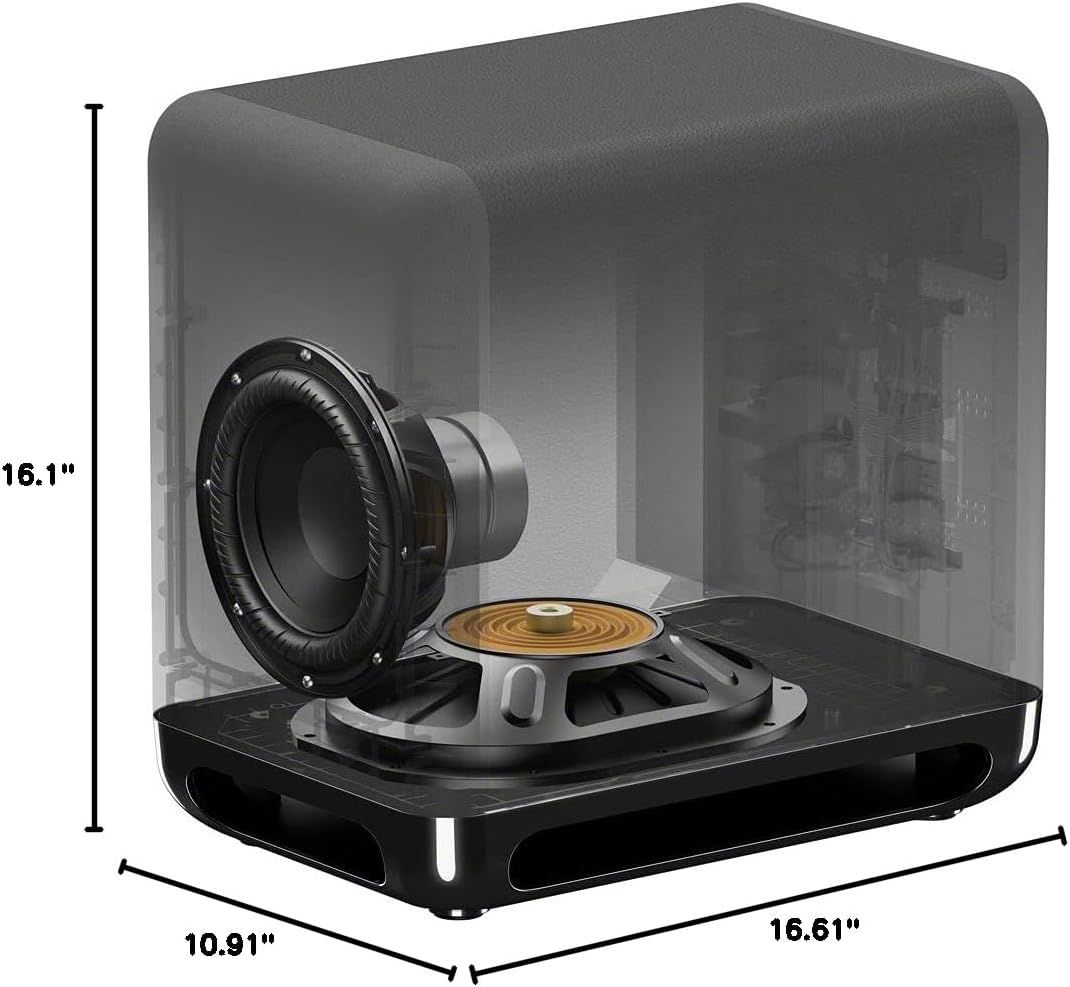
Image: Diagram showing the dimensions of the Sony SA-SW5 wireless subwoofer: 16.1 inches height, 10.91 inches width, and 16.61 inches depth.
9. Warranty and Support
9.1 Warranty Information
This Sony SA-SW5 Wireless Subwoofer comes with a Full Warranty. For specific terms and conditions, including coverage duration and what is covered, please refer to the warranty card included with your product or visit the official Sony support website. Keep your proof of purchase for warranty claims.
9.2 Customer Support
For further assistance, technical support, or service inquiries, please contact Sony customer support. You can find contact details and additional resources on the official Sony website:
- Sony Support Website: www.sony.com/electronics/support
- Product Page: Amazon Product Page


