
1. Introduction
Thank you for choosing the Decdeal 95-240V Programmable Thermostat. This device is designed to provide uniform and comfortable temperature control for water heating systems, combining advanced technology with a sleek, contemporary design. Please read this manual carefully before installation and operation to ensure proper use and longevity of the product.
1.1 Package Contents
- 1 x Decdeal Programmable Thermostat
- 2 x Mounting Screws
- 1 x User Manual
2. Safety Information
Please observe the following safety precautions to prevent electric shock, damage to the product, or injury.
- Electrical Installation: All wiring must be performed by a qualified electrician in accordance with local electrical codes.
- Power Disconnection: Always disconnect power at the circuit breaker before installing or servicing the thermostat.
- Voltage Compatibility: Ensure the thermostat's voltage rating (AC 95-240V) matches your electrical supply.
- Water Exposure: Do not install the thermostat in areas where it may be exposed to water or excessive humidity.
- Children: Keep the device out of reach of children.
3. Product Overview
The Decdeal thermostat features a modern design with a large LCD display for easy readability and touch controls for simple operation.
3.1 Key Features
- Sleek, ultra-thin embedded panel design.
- 2.5D arc chamfer large backlight LCD for clear reading.
- Touch controls for intuitive operation.
- 5+1+1 six periods programmable mode for comfort and energy efficiency.
- Manual or programmable mode switchable.
- 0.5℃ accuracy with ±1℃ temperature control error.
- Data memory retention during power outages.
3.2 Thermostat Components and Display
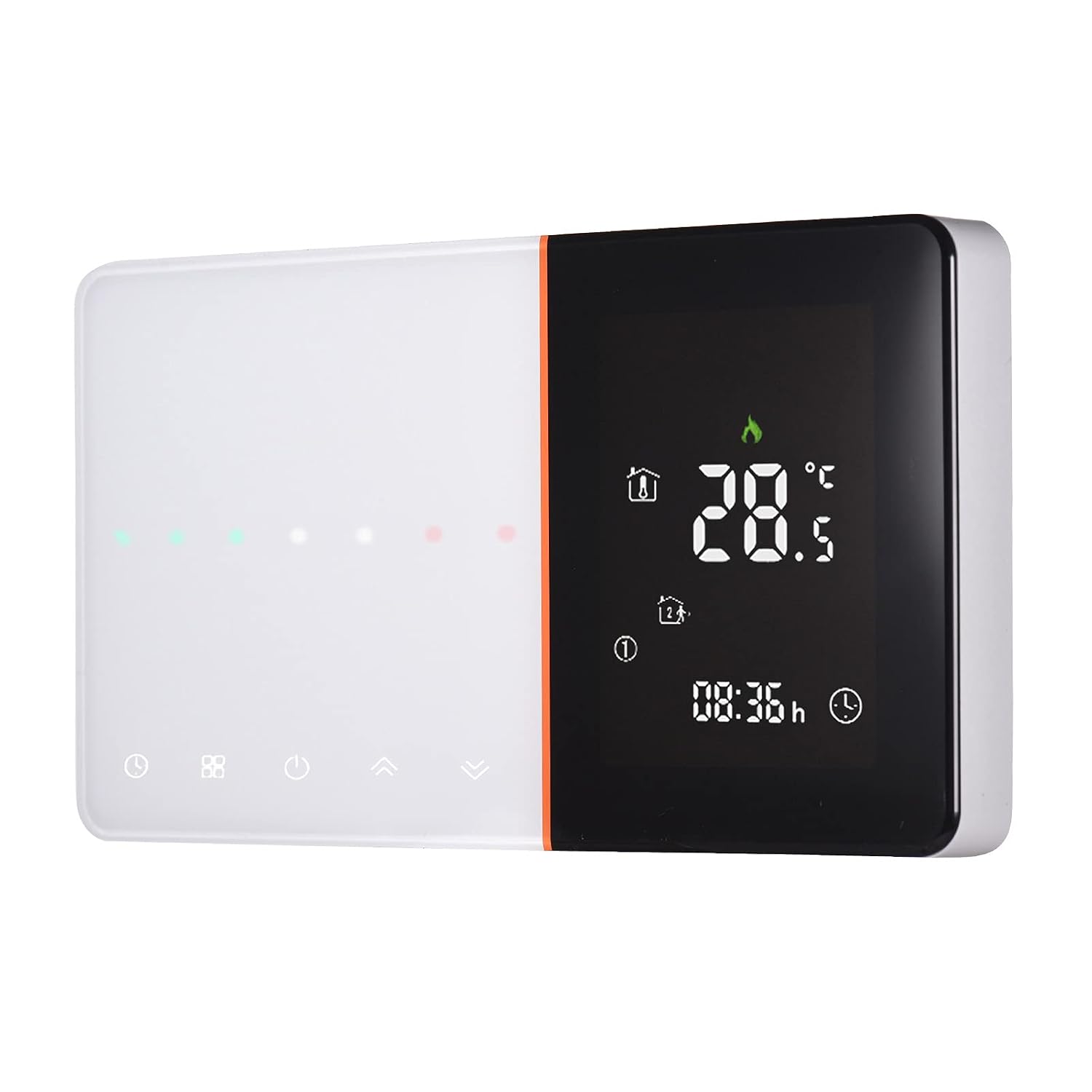
Figure 1: Front view of the Decdeal Programmable Thermostat.

Figure 2: Detailed layout of the LCD display and touch buttons.
The display shows current temperature, set temperature, time, day of the week, operating mode (heating, ECO), and various indicators such as lock status and period number. Touch buttons allow for mode selection, power on/off, clock settings, and temperature adjustments (Up/Down).
3.3 Wi-Fi and Non-Wi-Fi Variants

Figure 3: Comparison of Wi-Fi and Non-Wi-Fi thermostat models. The Wi-Fi model includes a Wi-Fi indicator on the display.
4. Installation
4.1 Mounting Location
Install the thermostat on an interior wall, approximately 1.5 meters (5 feet) above the floor, in an area with good air circulation. Avoid locations near heat sources (e.g., direct sunlight, lamps, fireplaces) or drafts (e.g., windows, doors).
4.2 Wiring Diagram
The thermostat is designed for water heating systems. Ensure correct wiring based on your valve type (Normally Open or Normally Close).

Figure 4: Wiring diagram for the Decdeal thermostat (GA model for water heating). Connections for power supply (L, N), sensor (NTC), and valve control (1, 2, 3, 4) are shown for both Normally Open and Normally Close valve configurations. NTC and Modbus connections are optional.
Wiring Instructions:
- Connect the Live (L) and Neutral (N) wires from your power supply to the corresponding terminals on the thermostat.
- Connect the external NTC sensor wires to terminals 5 and 6 (if using an external sensor).
- Connect the valve control wires to terminals 1, 2, 3, and 4 according to your system's requirements for Normally Open or Normally Close valves. Consult your heating system's manual for specific valve wiring.
4.3 Typical Application Diagram

Figure 5: Example of a water heating system application with multiple thermostats controlling different rooms via a distribution manifold and thermal actuators.
4.4 Physical Installation

Figure 6: Dimensions of the thermostat and suitable wall switch box types. The thermostat is compatible with European 60mm round boxes or standard 86mm pattress boxes.
Mounting Steps:
- Ensure power is off.
- Separate the front panel from the backplate.
- Mount the backplate to a standard European 60mm round box or an 86mm pattress box using the provided screws.
- Complete the wiring as per the diagram in Section 4.2.
- Carefully attach the front panel to the mounted backplate, ensuring all connections are secure.
- Restore power at the circuit breaker.
5. Setup
5.1 Initial Power-On
Upon first power-on, the thermostat will display the current room temperature and default settings. You may need to set the current time and day.
5.2 Setting Time and Day
Refer to the display layout (Figure 2) for button locations.
- Press the 'Clock' button to enter time setting mode.
- Use the 'Up' and 'Down' buttons to adjust the hour, then press 'Clock' again to confirm and move to minutes.
- Adjust minutes, then press 'Clock' to confirm and move to day of the week.
- Adjust the day (1=Monday, 7=Sunday), then press 'Clock' to exit time setting.
6. Operation
6.1 Power On/Off
Press the 'Power' button to turn the thermostat on or off.
6.2 Mode Selection
Press the 'Mode' button to switch between Manual mode and Programmable mode.
- Manual Mode: The thermostat maintains a constant temperature set by the user.
- Programmable Mode: The thermostat follows a pre-set schedule of temperatures for different times of the day and week.
6.3 Temperature Adjustment
In Manual mode, or during a temporary override in Programmable mode:
- Press the 'Up' or 'Down' button to increase or decrease the desired temperature.
- The new set temperature will be displayed and maintained.
6.4 Programmable Schedule (5+1+1 Periods)
The thermostat allows for programming six periods each day for weekdays (5 days), Saturday (1 day), and Sunday (1 day).
To set the program:
- Ensure the thermostat is in Programmable mode.
- Press and hold the 'Mode' button for approximately 3-5 seconds to enter program setting mode.
- The display will show the first period for weekdays (e.g., '1' for period 1, 'Mon-Fri').
- Use 'Up'/'Down' buttons to adjust the start time for this period, then press 'Mode' to confirm.
- Use 'Up'/'Down' buttons to adjust the temperature for this period, then press 'Mode' to confirm.
- Repeat steps 4 and 5 for all six periods for weekdays, then for Saturday, and finally for Sunday.
- After setting the last period for Sunday, press 'Mode' to exit program setting mode.
6.5 Key Lock Function
To prevent accidental changes, the thermostat features a key lock function. Press and hold the 'Up' and 'Down' buttons simultaneously for 3-5 seconds to lock or unlock the keypad. A lock icon will appear on the display when activated.
7. Maintenance
The Decdeal thermostat requires minimal maintenance.
- Cleaning: Wipe the display and casing with a soft, damp cloth. Do not use abrasive cleaners or solvents.
- Avoid Obstructions: Ensure no objects block the thermostat's vents or sensor, as this can affect temperature readings.
8. Troubleshooting
| Problem | Possible Cause | Solution |
|---|---|---|
| Thermostat not powering on | No power supply; incorrect wiring; circuit breaker tripped. | Check power supply; verify wiring connections; reset circuit breaker. |
| Incorrect temperature reading | Sensor obstructed; thermostat in direct sunlight or draft. | Ensure sensor is clear; relocate thermostat if necessary; check sensor connection. |
| Heating system not responding | Incorrect wiring to heating system; system fault; thermostat in off mode. | Verify wiring; check heating system for faults; ensure thermostat is on and in heating mode. |
| Programming not working | Thermostat not in Programmable mode; incorrect program settings. | Switch to Programmable mode; re-enter program settings carefully. |
| Keypad locked | Key lock function activated. | Press and hold 'Up' and 'Down' buttons simultaneously for 3-5 seconds to unlock. |
9. Technical Specifications
| Specification | Value |
|---|---|
| Voltage | AC 95-240V 50-60Hz |
| Current Load | 5A |
| Power Consumption | <1.5W |
| Sensor | NTC3950, 10K |
| Accuracy | ±0.5℃ |
| Temperature Error | ±1℃ |
| Set Temperature Range | 5-45℃ |
| Ambient Temperature Range | 0-45℃ |
| Ambient Humidity | 5-95%RH (Non Condensing) |
| Timing Error | <1% |
| Installation Box | European 60mm Round Box |
| Protection Class | IP20 |
| Item Size | 131 x 75 x 37.5 mm |
| Item Weight | 122 g |
10. Warranty and Customer Support
This product comes with a standard manufacturer's warranty. For specific warranty details, please refer to the documentation provided with your purchase or contact your retailer. For technical support or inquiries, please contact Decdeal customer service through their official channels.