
Rampage KM-RX7 FORTUNA
Contents
Rampage KM-RX7 FORTUNA Gaming Combo User Manual
Model: KM-RX7 FORTUNA | Brand: Rampage
1. Introduction
Thank you for purchasing the Rampage KM-RX7 FORTUNA Gaming Combo. This product includes a rainbow illuminated gaming keyboard and a 6400 DPI gaming mouse, designed to enhance your gaming and computing experience. This manual provides essential information for the proper installation, operation, and maintenance of your new device. Please read this manual thoroughly before use and retain it for future reference.
2. Safety Information
To ensure safe operation and prevent damage to the device, please observe the following precautions:
- Do not expose the device to water, moisture, or extreme temperatures.
- Avoid dropping or subjecting the device to strong impacts.
- Do not attempt to disassemble or repair the device yourself. Refer all servicing to qualified personnel.
- Keep the device away from direct sunlight and heat sources.
- Use only with compatible personal computer systems.
3. Package Contents
Please check the package contents to ensure all items are present:
- Rampage KM-RX7 FORTUNA Gaming Keyboard
- Rampage FORTUNA Gaming Mouse (6400 DPI)
- User Manual (this document)

Image: The retail packaging for the Rampage KM-RX7 FORTUNA Gaming Combo, showing the keyboard and mouse on the box.
4. Setup
Follow these steps to set up your Rampage KM-RX7 FORTUNA Gaming Combo:
4.1 Connecting the Keyboard
- Locate an available USB port on your personal computer.
- Plug the USB connector of the Rampage KM-RX7 FORTUNA Gaming Keyboard into the USB port.
- The operating system will automatically detect and install the necessary drivers. This may take a few moments.
4.2 Connecting the Mouse
- Locate another available USB port on your personal computer.
- Plug the USB connector of the Rampage FORTUNA Gaming Mouse into the USB port.
- The operating system will automatically detect and install the necessary drivers.

Image: The Rampage KM-RX7 FORTUNA keyboard and mouse, illustrating their connection via USB to a computer.
4.3 Initial Use
Once the drivers are installed, the keyboard and mouse are ready for use. The rainbow backlighting on both devices should illuminate automatically.

Image: An angled view of the Rampage KM-RX7 FORTUNA keyboard, highlighting its adjustable feet for ergonomic positioning.
5. Operating Instructions
5.1 Keyboard Operation
The Rampage KM-RX7 FORTUNA keyboard features a standard Q layout with additional multimedia and lighting control functions.
- Standard Keys: All standard alphanumeric and function keys operate as expected.
- Rainbow Backlighting: The keyboard features a fixed rainbow backlighting effect. There are no specific keys mentioned for changing lighting modes, indicating a static or pre-set effect.
- Multimedia Keys: Look for function keys (F1-F12) with secondary icons (e.g., volume, play/pause). These are typically activated by pressing the 'Fn' key simultaneously with the desired function key.

Image: A top-down view of the Rampage KM-RX7 FORTUNA keyboard, showcasing its full Q-layout and vibrant rainbow backlighting.

Image: A detailed close-up of the numeric keypad and arrow keys on the Rampage KM-RX7 FORTUNA keyboard, highlighting their illumination.
5.2 Mouse Operation
The Rampage FORTUNA mouse offers precise tracking and customizable DPI settings.
- Left/Right Click: Standard mouse buttons for primary and secondary actions.
- Scroll Wheel: For scrolling through documents and web pages. Can also function as a middle click button.
- DPI Adjustment: The mouse features a dedicated DPI button (usually located behind the scroll wheel). Press this button to cycle through different DPI sensitivity levels (up to 6400 DPI). Each press will change the cursor speed.
- Side Buttons: The mouse includes two side buttons (typically for 'forward' and 'back' navigation in web browsers or customizable in games).

Image: A top-down view of the Rampage FORTUNA gaming mouse, showing its ergonomic shape, scroll wheel, DPI button, and vibrant RGB lighting.
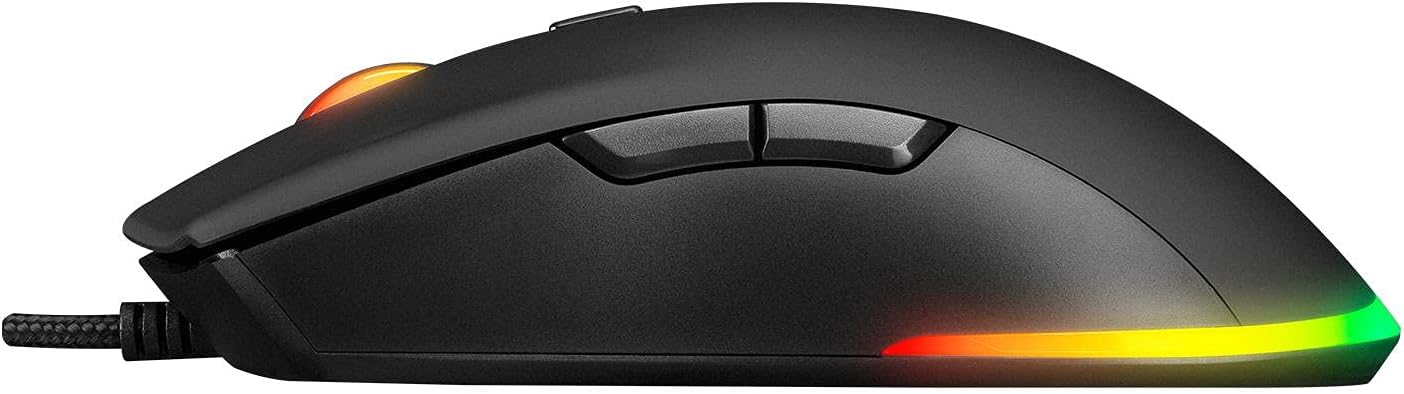
Image: A side view of the Rampage FORTUNA gaming mouse, highlighting its ergonomic contour and the placement of the two customizable side buttons.
6. Maintenance
Proper maintenance ensures the longevity and optimal performance of your gaming combo.
- Cleaning: Use a soft, dry cloth to wipe down the surfaces of the keyboard and mouse. For stubborn dirt, a slightly damp cloth can be used, but ensure no liquid enters the device.
- Dust Removal: Use compressed air to remove dust and debris from between the keyboard keys and around the mouse sensor.
- Avoid Liquids: Do not immerse the devices in water or any other liquid.
- Storage: When not in use for extended periods, store the devices in a cool, dry place away from direct sunlight.
7. Troubleshooting
If you encounter issues with your Rampage KM-RX7 FORTUNA Gaming Combo, refer to the following table for common problems and solutions:
| Problem | Possible Cause | Solution |
|---|---|---|
| Keyboard/Mouse not recognized | Loose USB connection, faulty USB port, driver issue. | Ensure USB cables are firmly plugged in. Try a different USB port. Restart your computer. |
| Backlighting not working | Power issue, device not properly connected. | Check USB connection. Ensure your computer is powered on. |
| Mouse cursor erratic or not moving | Dirty sensor, unsuitable surface, faulty sensor. | Clean the mouse sensor with a soft cloth. Use a mouse pad or a clean, non-reflective surface. |
| Keys not responding | Debris under key, software conflict, hardware malfunction. | Remove any debris. Test on another computer if possible. |
If the problem persists after trying these solutions, please contact customer support.
8. Specifications
Detailed specifications for the Rampage KM-RX7 FORTUNA Gaming Combo:
| Feature | Description |
|---|---|
| Brand | Rampage |
| Model | KM-RX7 FORTUNA |
| Color | Black |
| Connectivity Technology | USB |
| Key Feature | Ergonomic Design |
| Compatible Devices | Personal Computer |
| Keyboard Lighting | Rainbow Illumination |
| Mouse DPI | Up to 6400 DPI |
9. Warranty and Support
Rampage products are designed for reliability and performance. This product is covered by a manufacturer's warranty against defects in materials and workmanship. For specific warranty terms and conditions, please refer to the warranty card included with your product or visit the official Rampage website.
For technical support, troubleshooting assistance, or inquiries regarding your product, please contact Rampage customer service through their official channels. Contact information can typically be found on the product packaging or the official brand website.
Ask a question about this manual
Ask about setup, troubleshooting, compatibility, parts, safety, or missing instructions. Manuals+ will review the question and use this page’s manual context to help answer it.