
1. Introduction
Thank you for choosing the BRPOM BM500 Portable Car Jump Starter. This device is designed to provide emergency starting power for vehicles, as well as serve as a portable power bank and LED flashlight. Please read this manual thoroughly before use to ensure safe and optimal operation.
Package Contents
- 1 x BRPOM BM500 Portable Car Jump Starter
- 1 x Smart Jumper Cable
- 1 x USB-C Charging Cable
- 1 x Storage Case
- 1 x Multi-language User Manual
2. Safety Information
Always observe the following safety precautions to prevent injury or damage to the device or vehicle:
- Read all instructions carefully before using the jump starter.
- Keep the device out of reach of children.
- Do not short-circuit the jump starter by connecting the red and black clamps together.
- Do not expose the device to extreme temperatures (above 60°C / 140°F) or direct sunlight for prolonged periods.
- Avoid exposing the device to water, rain, or moisture.
- Do not attempt to disassemble, modify, or repair the unit yourself. Contact customer support if service is required.
- Ensure proper polarity when connecting the jumper cables to the vehicle battery (red clamp to positive, black clamp to negative). Incorrect connection can cause damage.
- Wear eye protection and gloves when working with vehicle batteries.
- Do not use the jump starter if the cables or clamps are damaged.
- Remove the jump starter from the vehicle battery within 30 seconds after the engine starts.
3. Product Overview
The BRPOM BM500 is a versatile device designed for emergency vehicle starting and portable power needs.
Device Components and Dimensions

Figure 3.1: BRPOM BM500 Jump Starter with labeled components and dimensions.
- Smart Red Clip: Connects to the positive (+) terminal of the vehicle battery.
- Smart Black Clip: Connects to the negative (-) terminal of the vehicle battery.
- Smart Clamp Plug: Connects the smart jumper cable to the jump starter's automatic start port.
- Automatic Start Port: Input for the smart clamp plug.
- Power Button: Turns the device on/off and cycles through flashlight modes.
- Battery Indicator: Shows the remaining battery charge level.
- Type-C Input: Used for charging the jump starter.
- USB 5V/2.1A Output: Standard USB output for charging devices.
- USB QC3.0 Output: Quick Charge 3.0 USB output for faster device charging.
- LED Flashlight: Provides illumination and emergency signaling.
Key Features
- High Capacity & Peak Current: 23800 mAh battery capacity with 3000A peak current, capable of starting most 12V vehicles.
- Wide Vehicle Compatibility: Suitable for gasoline engines up to 10.0L and diesel engines up to 8.0L.
- Multi-functional Power Bank: Dual USB outputs (5V/2.1A and QC3.0) for charging mobile phones, tablets, and other electronic devices.
- Integrated LED Flashlight: Features multiple lighting modes including steady light, strobe, SOS, and warning light.
- Smart Jumper Cables: Equipped with safety features to protect against reverse polarity, over-current, over-charge, and short-circuit.

Figure 3.2: High capacity and wide engine compatibility of the BRPOM BM500.

Figure 3.3: USB charging capabilities and versatile lighting modes.

Figure 3.4: Extended flashlight operation and modes.
4. Setup and Charging
Initial Charging
Before first use, fully charge the BRPOM BM500 jump starter. It typically arrives with a partial charge, but a full charge ensures maximum performance.
- Connect the provided USB-C charging cable to the Type-C input port on the jump starter.
- Connect the other end of the USB-C cable to a 5V/2A or 9V/2A USB wall adapter (not included) or a powered USB port.
- The battery indicator lights will illuminate and flash during charging. All lights will be solid when charging is complete.
A full charge can take several hours depending on the power source. It is recommended to recharge the device every 3-6 months to maintain battery health, even if not in use.
5. Operating Instructions
Jump Starting a Vehicle
Follow these steps carefully to jump start your vehicle:
- Prepare the Vehicle: Ensure the vehicle's ignition is off and the parking brake is engaged.
- Connect Jumper Cables to Jump Starter: Insert the smart clamp plug of the jumper cable into the automatic start port on the BRPOM BM500. Ensure a secure connection.
- Connect Clamps to Vehicle Battery:
- Attach the red (+) clamp to the positive terminal of the vehicle battery.
- Attach the black (-) clamp to the negative terminal of the vehicle battery.
The smart jumper cable's indicator light should turn green, indicating a correct and safe connection.
- Start the Vehicle: Once the indicator light is green, start your vehicle's engine. If it doesn't start immediately, wait 10-15 seconds before trying again. Do not crank for more than 3 seconds per attempt.
- Remove Jumper Cables: As soon as the engine starts, immediately remove the black (-) clamp from the vehicle battery, then remove the red (+) clamp. Finally, disconnect the smart clamp plug from the jump starter.
Important: If the smart jumper cable indicator light is red or flashing, do not attempt to start the vehicle. Check connections and refer to the troubleshooting section.
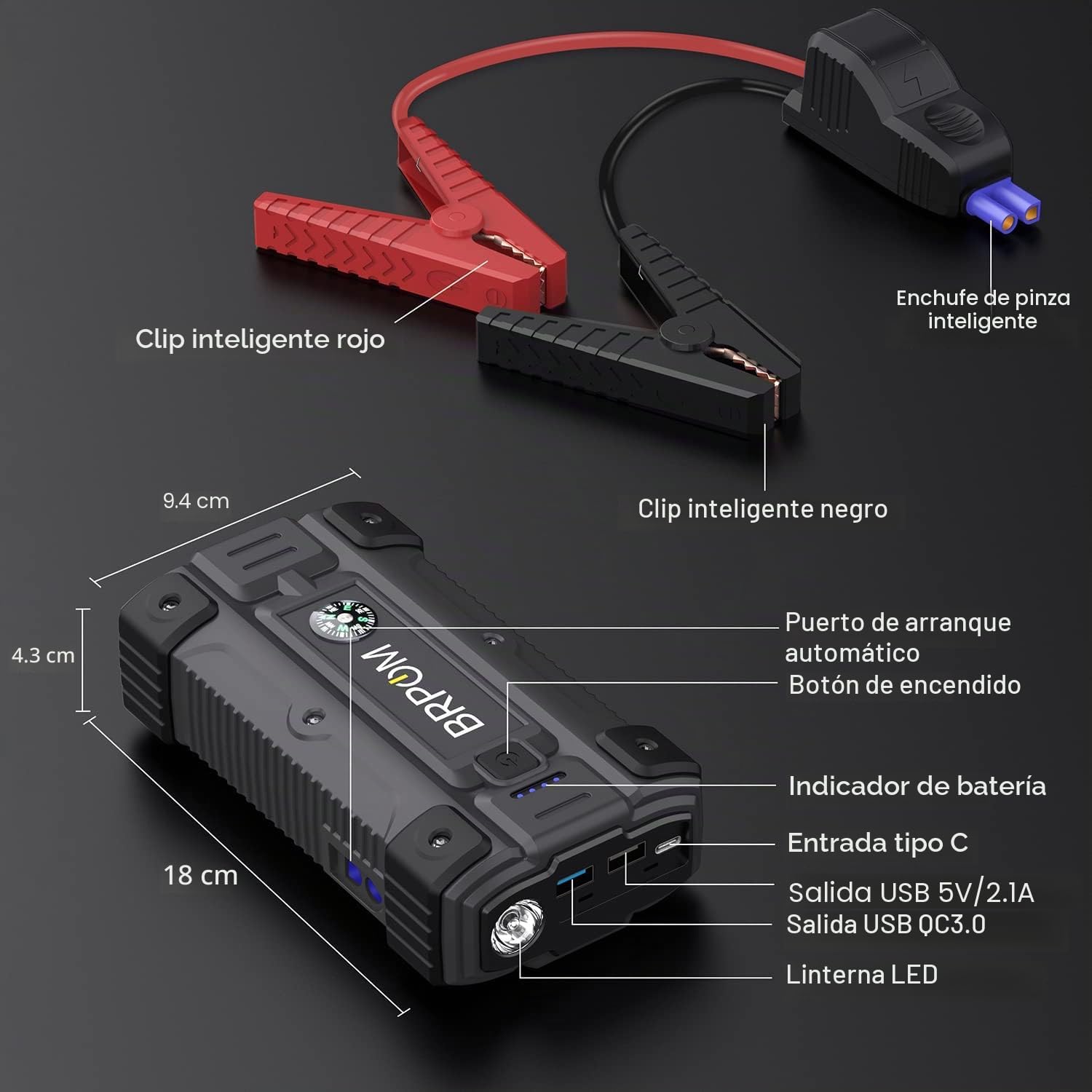
Figure 5.1: Using the BRPOM BM500 for emergency vehicle starting.
Using as a Power Bank
The BRPOM BM500 can charge various electronic devices:
- Press the power button once to turn on the jump starter. The battery indicator will light up.
- Connect your device's USB charging cable to either the USB 5V/2.1A output port or the USB QC3.0 output port on the jump starter.
- Charging will begin automatically. The battery indicator will show the remaining charge.
- Disconnect your device when fully charged. The jump starter will automatically turn off after a period of inactivity.
Using the LED Flashlight
The integrated LED flashlight offers multiple modes for different situations:
- Turn On/Off: Press and hold the power button for approximately 3 seconds to turn the flashlight on or off.
- Cycle Modes: Once the flashlight is on, short press the power button repeatedly to cycle through the modes: Steady Light → Strobe → SOS → Warning Light (red/blue flashing) → Off.
6. Maintenance and Storage
Proper maintenance and storage will extend the lifespan of your BRPOM BM500 jump starter:
- Recharge Regularly: Recharge the jump starter at least once every 3-6 months, even if not used, to maintain optimal battery health.
- Cleanliness: Keep the device clean and free from dust and debris. Use a soft, dry cloth for cleaning.
- Storage Conditions: Store the jump starter in a cool, dry place, away from direct sunlight, moisture, and extreme temperatures. The ideal storage temperature is between 0°C and 40°C (32°F and 104°F).
- Avoid Drops: Do not drop or subject the device to strong impacts.
- Cable Care: Inspect the jumper cables and clamps regularly for any signs of damage or wear. Replace if necessary.
7. Troubleshooting
If you encounter issues with your BRPOM BM500, refer to the following common problems and solutions:
| Problem | Possible Cause | Solution |
|---|---|---|
| Jump starter does not turn on. | Battery is completely discharged. | Charge the jump starter fully using the provided USB-C cable. |
| Vehicle does not start after connecting. | Incorrect cable connection. Vehicle battery is severely damaged. Engine issues unrelated to battery. | Ensure clamps are securely connected to the correct battery terminals (red to +, black to -). Check the smart cable indicator for a solid green light. If the battery is too damaged, it may not accept a jump. Consult a mechanic for engine issues. |
| Smart jumper cable indicator is red or flashing. | Reverse polarity connection. Short circuit. Over-current/Over-voltage. Jump starter battery low. | Disconnect clamps immediately. Recheck connections for correct polarity. Ensure clamps are not touching each other. Charge the jump starter if its battery is low. |
| USB devices not charging. | Jump starter is off. USB cable is faulty. Device is incompatible. | Press the power button to turn on the jump starter. Try a different USB cable. Ensure your device is compatible with 5V USB charging. |
If the problem persists after trying these solutions, please contact BRPOM customer support.
8. Specifications
Detailed technical specifications for the BRPOM BM500 Portable Car Jump Starter:
| Feature | Specification |
|---|---|
| Model Number | BM500 |
| Battery Capacity | 23800 mAh (88.06 Wh) |
| Peak Current | 3000 Amperes |
| Start Voltage | 12 Volts |
| Type-C Input | 5V/2A, 9V/2A |
| USB Output 1 | 5V/2A, 9V/2A (QC3.0) |
| USB Output 2 | 5V/2.1A |
| Battery Cell Composition | Lithium Ion |
| Product Dimensions | 17 x 9.7 x 4 cm (6.7 x 3.8 x 1.6 inches) |
| Product Weight | 1.28 kg (2.82 lbs) |
| Compatible Vehicle Type | Car, Motorcycle, Light Truck, SUV, Van |
| Engine Compatibility | Up to 10.0L Gasoline, Up to 8.0L Diesel |
| UPC | 725423035445 |
9. Warranty and Support
Warranty Information
The BRPOM BM500 Portable Car Jump Starter comes with a 2-year warranty from the date of purchase. This warranty covers manufacturing defects and ensures the availability of spare parts within the EU for this period. Please retain your proof of purchase for warranty claims.
The warranty does not cover damage caused by misuse, accident, unauthorized modification, or failure to follow the instructions in this manual.
Customer Support
If you have any questions, concerns, or require technical assistance, please contact BRPOM customer service through the platform where you purchased the product or visit the official BRPOM website for contact details. Our support team is available to assist you.


