1. Introduction
This manual provides essential information for the installation, operation, and maintenance of your VONADO LED Lighting Kit, specifically designed for the LEGO Technic 42129 4x4 Mercedes-Benz Zetros Trial Truck. This kit enhances your building model with dynamic lighting effects, bringing it to life. Please read these instructions carefully before beginning installation to ensure proper setup and functionality.
2. Safety Information
- This product contains small parts and is not suitable for children under 3 years of age due to choking hazards.
- Keep all components away from water and moisture to prevent electrical damage.
- Do not attempt to modify or disassemble the LED components, as this may void the warranty and cause damage.
- Ensure the power source (USB or battery box) is correctly connected to avoid short circuits.
- Dispose of batteries responsibly according to local regulations.
3. Package Contents
Please verify that all components listed below are present in your package:
- VONADO LED Lighting Kit for LEGO Technic 42129
- USB Power Cord
- AAA Battery Box (batteries not included)
- Remote Control
- Installation Brochure (with QR code for electronic manual)
4. Setup and Installation
The detailed installation process for the VONADO LED Lighting Kit is provided through an electronic instruction manual. This manual offers step-by-step guidance tailored to the LEGO Technic 42129 model.
- Accessing the Electronic Manual: Locate the QR code on the included installation brochure. Scan this QR code with your smartphone or tablet to access the comprehensive electronic instruction manual.
- Preparation: Ensure your LEGO Technic 42129 model is fully assembled before installing the lighting kit.
- Component Identification: Familiarize yourself with the various LED components and wires provided in the kit.
- Step-by-Step Installation: Follow the electronic manual's instructions carefully. The manual will guide you on where to place each light, how to route the wires, and how to connect them to the main power hub.
- Power Connection: Connect the main power hub to either the USB power cord or the AAA battery box. If using the battery box, insert 3x AAA batteries (not included) with correct polarity.
For visual assistance, please refer to the product video below, which demonstrates the installed lighting kit.
Video: Demonstration of the VONADO LED Lighting Kit installed on the LEGO Technic 42129 Mercedes-Benz Zetros Trial Truck, showcasing various lighting effects and remote control functionality.
5. Operating Instructions
Once the lighting kit is installed and powered, use the remote control to operate the lights.
Remote Control Functions:
- Power Button: Turns the lighting kit on or off.
- Mode/Effect Buttons: Cycles through different lighting modes or effects (e.g., steady on, flashing, pulsing).
- Brightness Adjustment: Increases or decreases the intensity of the lights.
- Directional Control (if applicable): Some kits may offer control over specific light groups (e.g., headlights, taillights, roof lights). Refer to the electronic manual for specific remote functions.

Image: The LEGO Technic 42129 Mercedes-Benz Zetros Trial Truck model illuminated by the VONADO LED Lighting Kit, with a hand holding the remote control to demonstrate operation.
Experiment with the remote control buttons to discover all available lighting effects and customize your display.
6. Maintenance
- Cleaning: Use a soft, dry cloth to gently wipe dust from the LED components and wires. Avoid using liquids or abrasive cleaners.
- Battery Replacement: If using the AAA battery box, replace batteries when lights dim or stop functioning. Ensure correct polarity.
- Storage: When not in use for extended periods, disconnect the power source and store the model in a cool, dry place away from direct sunlight.
7. Troubleshooting
| Problem | Possible Cause | Solution |
|---|---|---|
| Lights do not turn on. | No power, loose connection, dead batteries. | Check USB connection or replace AAA batteries. Ensure all wires are securely connected. |
| Some lights are not working. | Loose wire, damaged LED. | Inspect individual wire connections. If an LED is damaged, contact customer support. |
| Remote control not responding. | Remote batteries dead, obstruction, out of range. | Replace remote control batteries. Ensure clear line of sight to the receiver. Operate within close range. |
8. Specifications
| Feature | Detail |
|---|---|
| Product Model | Compatible with LEGO Technic 42129 |
| Power Source | USB Power Cord or 3x AAA Batteries (not included) |
| Control Method | Remote Control |
| Material | Environmentally friendly materials |
| Recommended Age | 16 years and up |
| Product Dimensions | 7.3 x 6.6 x 1.2 inches (packaging) |
| Item Weight | 3.52 ounces |

Image: A dynamic front three-quarter view of the LEGO Technic 42129 Mercedes-Benz Zetros Trial Truck, showcasing the bright, integrated VONADO LED lighting kit.
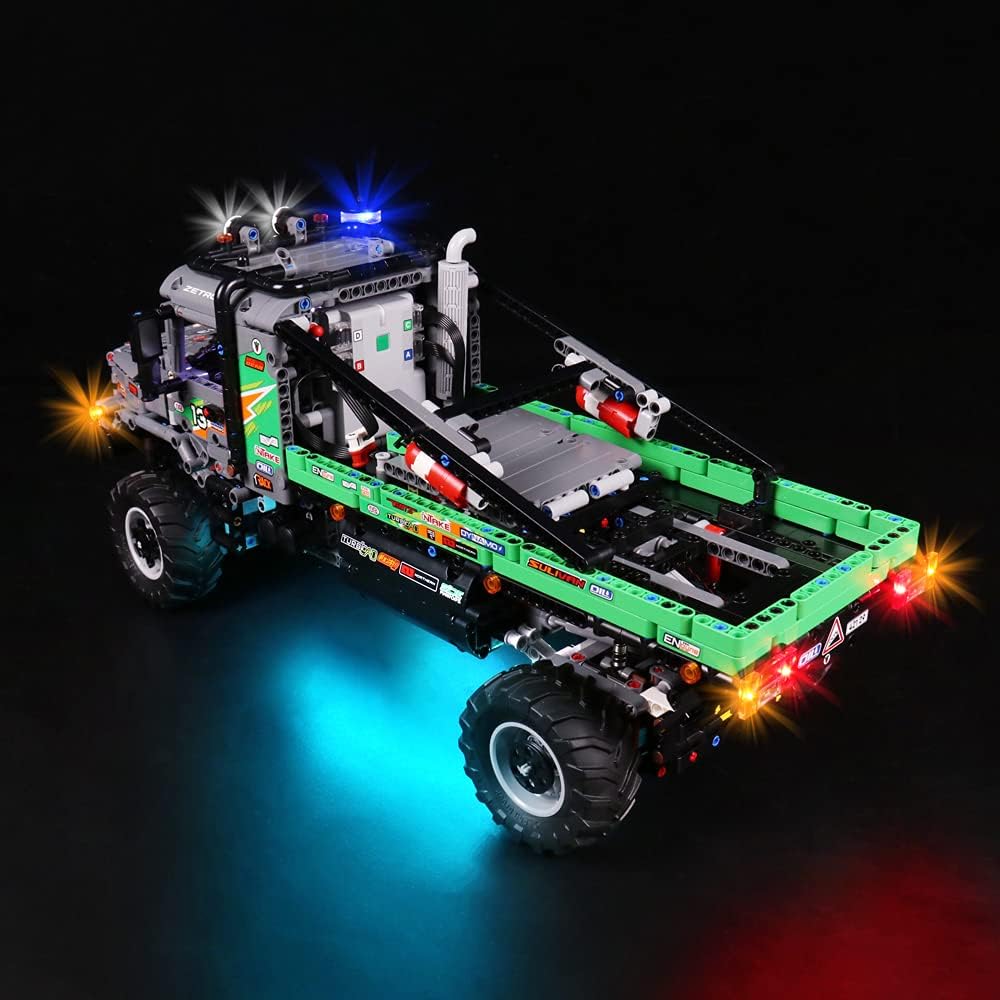
Image: A rear three-quarter view of the LEGO Technic 42129 Mercedes-Benz Zetros Trial Truck, highlighting the illuminated taillights and undercarriage glow from the VONADO LED Lighting Kit.

Image: A detailed close-up of the front section of the LEGO Technic 42129, showing the bright white headlights and amber turn signals provided by the VONADO LED Lighting Kit.

Image: A close-up view of the rear of the LEGO Technic 42129, featuring the red taillights and amber turn signals brightly lit by the VONADO LED Lighting Kit.
9. Warranty and Support
VONADO products are manufactured with quality and customer satisfaction in mind. For warranty information, technical support, or assistance with installation, please refer to the contact details provided on the product packaging or visit the official VONADO website. Please retain your proof of purchase for any warranty claims.


