
Introduction
Thank you for choosing the Kisonli Q6 Wireless Speaker. This device combines a high-quality wireless speaker with a colorful LED night light, offering a versatile audio and ambient lighting experience. This manual provides essential information for setting up, operating, and maintaining your speaker to ensure optimal performance and longevity.
Safety Information
- Do not expose the speaker to extreme temperatures, direct sunlight, or high humidity.
- Avoid dropping or subjecting the speaker to strong impacts.
- Do not disassemble or attempt to repair the speaker yourself. This will void the warranty.
- Keep the speaker away from water and other liquids, despite its water-resistant feature, to prevent damage.
- Use only the specified charging voltage (DC 5V) to prevent damage to the device.
Package Contents
Please check the package for the following items:
- Kisonli Q6 Wireless Speaker
- USB Charging Cable
- AUX Audio Cable (3.5mm)
- User Manual
Product Overview
Familiarize yourself with the speaker's controls and ports:

Image: Front view of the Kisonli Q6 speaker with labels indicating the Pause/Play button, Mode switch, Volume Up/Next Song, Volume Down/Last Song, LED light switch, Colors LED light area, DC 5V USB interface, OFF/ON switch, SD Card slot, AUX Audio port, and 5W horn.
- Pause/Play Button: Controls audio playback.
- Mode Switch: Cycles through Bluetooth, AUX, and SD Card modes.
- VOL+/Next Song: Increases volume or skips to the next track.
- VOL-/Last Song: Decreases volume or goes to the previous track.
- LED Light Switch: Turns the LED light on/off and changes modes.
- DC 5V USB Interface: For charging the speaker.
- OFF/ON Switch: Powers the speaker on or off.
- SD Card Slot: For playing music directly from an SD card.
- AUX Audio Port: For wired connection to audio devices.
Setup
1. Charging the Speaker
- Connect the small end of the USB charging cable to the DC 5V USB interface on the speaker.
- Connect the larger end of the USB cable to a USB power adapter (DC 5V, not included) or a computer's USB port.
- The LED indicator will show charging status (e.g., red for charging, off when fully charged).
- Allow approximately 2-3 hours for a full charge.
2. Power On/Off
- To power on, slide the OFF/ON switch to the 'ON' position. You will hear an audible prompt.
- To power off, slide the OFF/ON switch to the 'OFF' position.
3. Bluetooth Pairing
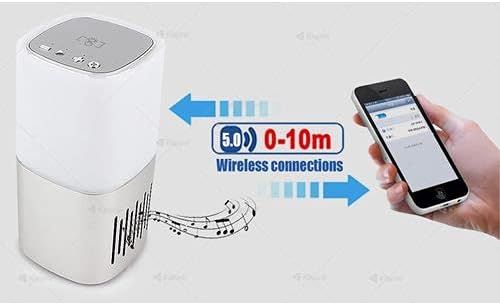
Image: The Kisonli Q6 speaker next to a smartphone, illustrating a wireless connection range of 0-10 meters via Bluetooth 5.0.
- Ensure the speaker is powered on and in Bluetooth mode (indicated by a flashing blue LED or audible prompt). If not, press the Mode switch until Bluetooth mode is activated.
- On your smartphone or Bluetooth-enabled device, go to the Bluetooth settings and enable Bluetooth.
- Search for available devices. You should see "Q6" or "Kisonli Q6" in the list.
- Select "Q6" to pair. Once paired, you will hear a confirmation sound, and the LED indicator will stop flashing.
- The wireless range is approximately 10 meters (33 feet) without obstacles.
4. True Wireless Stereo (TWS) Pairing (Optional)
If you have two Kisonli Q6 speakers, you can pair them together for a stereo sound experience.

Image: Two Kisonli Q6 speakers, one with a yellow LED light and one with a blue LED light, are shown connecting wirelessly to a smartphone via TWS (True Wireless Stereo) technology. The phone's screen displays 'Q6' twice, indicating successful pairing of both speakers.
- Ensure both Q6 speakers are powered on and in Bluetooth mode, but not yet paired to any device.
- On one of the speakers (this will be the primary speaker), press and hold the Play/Pause button for a few seconds until you hear a pairing tone, indicating it's searching for another TWS speaker.
- The two speakers will automatically connect to each other. You will hear a confirmation sound once TWS pairing is successful.
- Now, connect your smartphone or Bluetooth device to the primary speaker (the one you initiated TWS pairing on) as described in the Bluetooth Pairing section above.
- Audio will now play in stereo through both speakers.
5. AUX Audio Input
- Connect one end of the 3.5mm AUX audio cable to the AUX Audio port on the speaker.
- Connect the other end of the cable to the headphone jack or audio output of your device (e.g., MP3 player, computer).
- The speaker will automatically switch to AUX mode, or you may need to press the Mode switch to select AUX mode.
6. SD Card Playback
- Insert a microSD card (TF card) with MP3 audio files into the SD Card slot on the speaker.
- The speaker will automatically switch to SD Card mode and begin playing music, or you may need to press the Mode switch to select SD Card mode.
Operating
1. Basic Audio Controls
- Play/Pause: Press the Pause/Play button once to play or pause audio.
- Volume Up: Press and hold the VOL+/Next Song button to increase volume.
- Volume Down: Press and hold the VOL-/Last Song button to decrease volume.
- Next Track: Press the VOL+/Next Song button once to skip to the next track.
- Previous Track: Press the VOL-/Last Song button once to go to the previous track.
2. LED Light Operation
- Press the LED light switch once to turn the LED light on.
- Press the LED light switch repeatedly to cycle through different color modes and effects.
- Press and hold the LED light switch to turn the LED light off.
Maintenance
- Cleaning: Use a soft, dry cloth to wipe the speaker's surface. Do not use abrasive cleaners or solvents.
- Storage: When not in use for extended periods, store the speaker in a cool, dry place away from direct sunlight.
- Battery Care: To prolong battery life, charge the speaker fully before storing it for a long time and recharge it every 3 months if unused.
Troubleshooting
| Problem | Possible Cause | Solution |
|---|---|---|
| Speaker does not power on. | Low battery. | Charge the speaker fully. |
| Cannot pair via Bluetooth. | Speaker not in pairing mode; device Bluetooth off; too far from speaker. | Ensure speaker is in Bluetooth pairing mode. Turn on Bluetooth on your device. Move device closer to speaker (within 10m). |
| No sound in AUX mode. | Incorrect mode; cable not fully inserted; device volume low. | Ensure speaker is in AUX mode. Check cable connections. Increase volume on both speaker and connected device. |
| LED light not working. | Light switch off; low battery. | Press the LED light switch. Charge the speaker. |
Specifications
| Model Name | Q6 |
| Brand | Kisonli |
| Connectivity Technology | Bluetooth 5.0 |
| Wireless Range | Up to 10 meters (33 feet) |
| Output Power | 5W * 1 |
| Impedance | 4 Ohms |
| Audio Output Mode | Surround (2-channel configuration) |
| Power Source | Battery Powered |
| Special Features | Wireless, LED Light, Night Light, TWS Function |
| Compatible Devices | Smartphone and other Bluetooth-enabled devices |
| Mounting Type | Tabletop |
| Water Resistant | Yes |
| Input Ports | AUX (3.5mm stereo jack), SD Card, Micro USB (for charging) |
Warranty and Support
The Kisonli Q6 Wireless Speaker comes with a standard manufacturer's warranty. Please refer to the warranty card included in your package for specific terms and conditions. For technical support, troubleshooting assistance, or warranty claims, please contact your retailer or the Kisonli customer service department.