
Sena Parani A20
Sena Parani A20 Bluetooth Intercom Headset User Manual
Model: Parani A20
1. Introduction
This manual provides instructions for the proper use and maintenance of your Sena Parani A20 Bluetooth Intercom Headset. Please read this manual thoroughly before operating the device to ensure optimal performance and safety.
The Parani A20 is designed for motorcycle communication, offering features such as 4-way Bluetooth intercom, HD 2-way intercom, and smartphone connectivity for music and calls.
2. Package Contents
The Sena Parani A20 package typically includes the following components:
- Parani A20 Headset Unit
- Speaker Set
- Boom Microphone
- Wired Microphone
- Mounting Clamp Kit
- USB Charging Cable
- User Manual (this document)

Image: Overview of the Sena Parani A20 headset and its included components, such as the main unit, speakers, boom microphone, and wired microphone.
3. Setup and Installation
3.1 Charging the Device
Before first use, fully charge the Parani A20 headset. Connect the USB charging cable to the headset and a power source. The charging time is approximately 2.5 hours.
3.2 Mounting the Headset
The Parani A20 can be mounted to most motorcycle helmets using the included clamp kit. Ensure the mounting location allows for clear access to the controls and does not obstruct helmet functionality.
- Choose a suitable location on the left side of your helmet.
- Securely attach the mounting clamp to the helmet shell.
- Slide the Parani A20 main unit onto the mounted clamp until it clicks into place.

Image: The Sena Parani A20 headset unit attached to the side of a motorcycle helmet, showing its position relative to the helmet's structure.
3.3 Installing Speakers and Microphones
Install the speakers inside the helmet's ear pockets and route the microphone cable to the front of the helmet. Two microphone options are provided:
- Boom Microphone: Recommended for open-face or modular helmets. Position the microphone close to your mouth.
- Wired Microphone: Suitable for full-face helmets. Secure it inside the chin bar.
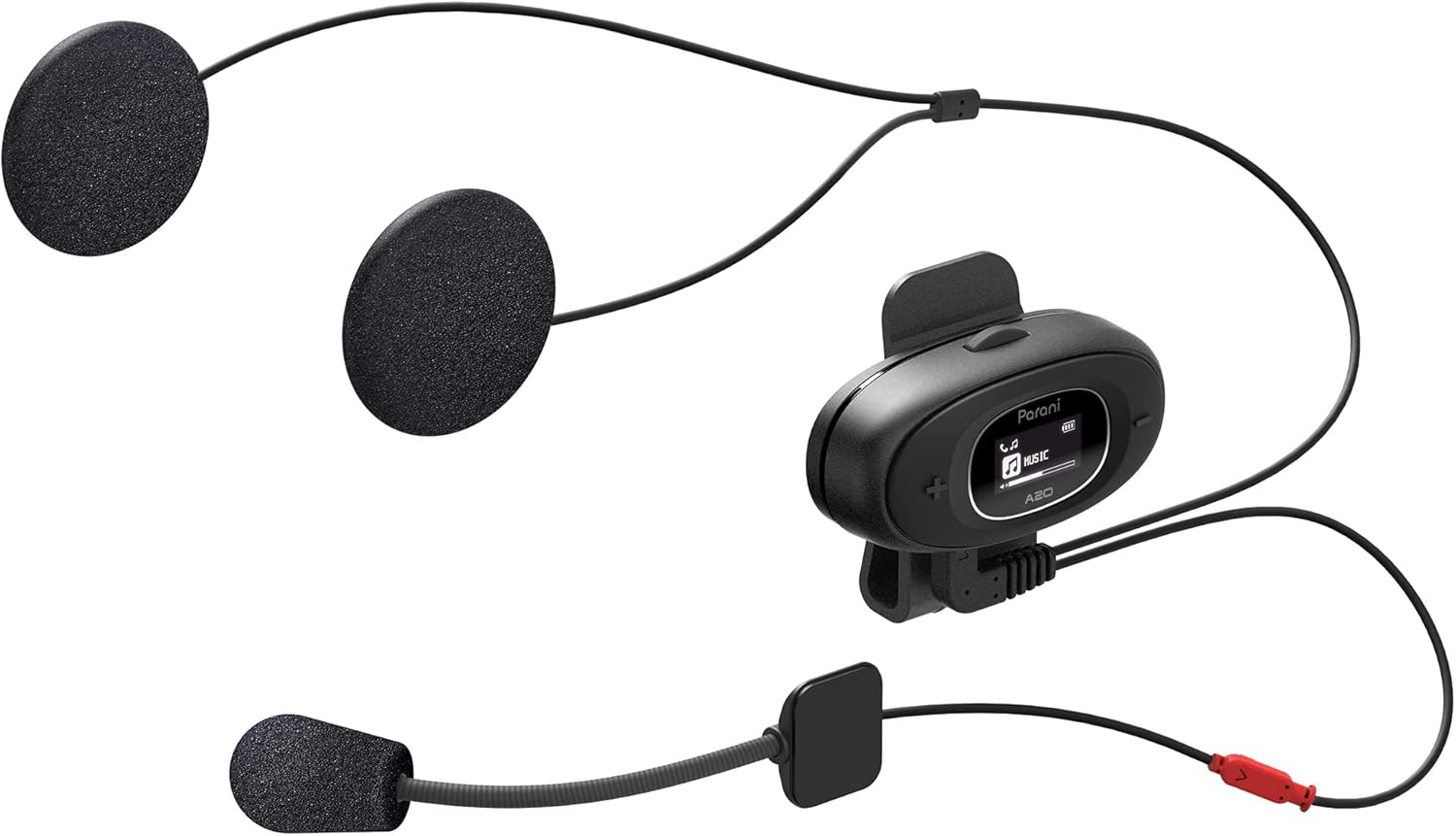
Image: The Sena Parani A20's speakers and both microphone types (boom and wired) are displayed, ready for installation inside a helmet.
4. Operating Instructions
4.1 Power On/Off
- Power On: Press and hold the Center Button for 1 second.
- Power Off: Press and hold the Center Button for 5 seconds.
4.2 Bluetooth Pairing with Smartphone
To connect your Parani A20 to a smartphone for music, GPS, or phone calls:
- With the headset off, press and hold the Center Button for 5 seconds until the LED flashes red and blue, indicating pairing mode.
- On your smartphone, go to Bluetooth settings and select "Parani A20" from the list of available devices.
- Once paired, the LED will flash blue.
4.3 Intercom Communication
The Parani A20 supports 4-way Bluetooth intercom and HD 2-way intercom with a range of up to 1 km (0.6 miles).
- Starting Intercom: Briefly press the Center Button to initiate intercom with a paired Parani A20 unit.
- Ending Intercom: Briefly press the Center Button again.
- Multi-way Intercom: Follow the specific pairing instructions in the full manual for connecting multiple units.

Image: A detailed view of the Parani A20 unit, highlighting its LCD screen which displays intercom status and battery level, along with the control buttons.
4.4 Music Playback and Volume Control
- Play/Pause: Press the Center Button during music playback.
- Volume Up: Press the (+) Button.
- Volume Down: Press the (-) Button.
- The Parani A20 offers exceptional sound quality with enhanced bass and clarity.
4.5 Phone Calls
- Answer Call: Briefly press the Center Button.
- End Call: Briefly press the Center Button.
- Reject Call: Press and hold the Center Button for 2 seconds.

Image: A motorcycle rider on the road, wearing a helmet equipped with the Sena Parani A20 intercom, demonstrating its use in a riding context.
5. Maintenance and Care
- Keep the device dry. The Parani A20 is not water-resistant.
- Clean the unit with a soft, damp cloth. Do not use harsh chemicals or solvents.
- Store the device in a cool, dry place when not in use.
- Ensure the charging port is free from dust and debris.
6. Troubleshooting
6.1 Device Not Powering On
- Check battery level. Charge the device for at least 30 minutes.
- Ensure the power button is pressed correctly (hold for 1 second).
6.2 No Audio from Speakers
- Verify that the speakers are correctly plugged into the headset unit.
- Check the volume level on both the headset and your connected smartphone.
- Ensure the headset is properly paired with your audio source.
6.3 Intercom Not Connecting
- Ensure both units are within the specified intercom range (up to 1 km).
- Re-pair the intercom units if connection issues persist.
- Check for any obstructions or interference.
6.4 Factory Reset
If the device is not functioning correctly, a factory reset may resolve the issue. Refer to the full manual for specific instructions on performing a factory reset.
7. Specifications
| Model Name | Parani A20 |
| Bluetooth Version | 5.1 |
| Intercom Range | Up to 1 km (0.6 miles) |
| Intercom Type | 4-way Bluetooth, HD 2-way |
| Charging Time | Approximately 2.5 hours |
| Frequency Spectrum | 20 Hz - 10,000 Hz |
| Weight | 240 g |
| Dimensions | 18.7 x 11.8 x 6.4 cm |
| Material | Plastic |
| Water Resistance | Not water-resistant |
| Compatible Devices | Mobile phones, Motorcycles |
8. Warranty and Support
For warranty information and technical support, please refer to the official Sena website or contact your local dealer. Keep your proof of purchase for warranty claims.
Online Resources: Visit the Sena website for the latest firmware updates, FAQs, and detailed product manuals.
9. Important Safety Information
- Always prioritize road safety. Do not operate the device in a way that distracts you from riding.
- Ensure the device is securely mounted to your helmet.
- Do not expose the device to extreme temperatures or direct sunlight for extended periods.
- Keep out of reach of children.
Related documentsParani A20


Ask a question about this manual
Ask about setup, troubleshooting, compatibility, parts, safety, or missing instructions. Manuals+ will review the question and use this page’s manual context to help answer it.