
1. Introduction
The Wisoqu AT5-2200X Variable Frequency Drive (VFD) is an advanced motor speed controller designed to convert single-phase 110VAC input into 3-phase 220V output, suitable for 3-phase motors. This device offers high torque and wide speed regulation capabilities, enabling precise control over motor start, stop, speed adjustment, and forward/reverse rotation to meet diverse production and equipment requirements.
Equipped with a clear digital display for convenient parameter setting and monitoring, the AT5-2200X also integrates multiple protection features including overcurrent, overvoltage, undervoltage, module failure, overheating, and short-circuit protection, ensuring reliable and safe operation with low electromagnetic interference.
2. Safety Precautions
Read all instructions carefully before installation, operation, or maintenance. Failure to follow these instructions may result in serious injury or equipment damage.
- Electrical Hazard: Ensure power is disconnected before performing any wiring or maintenance. Only qualified personnel should install and service this equipment.
- Grounding: The VFD must be properly grounded to prevent electric shock.
- Voltage Compatibility: Verify that the input voltage (110VAC) and output voltage (220V) are compatible with your motor and power supply.
- Environment: Do not install the VFD in environments with explosive gases, excessive dust, or high humidity. Ensure adequate ventilation to prevent overheating.
- Internal Components: Do not open the VFD casing unless specifically instructed for maintenance. High voltage is present inside, even after power is disconnected.
- Motor Compatibility: This inverter is designed for 3-phase 220V motors. Confirm your motor's specifications before connection.
3. Product Overview
The Wisoqu AT5-2200X VFD features a compact design with a user-friendly control panel and efficient cooling mechanisms.

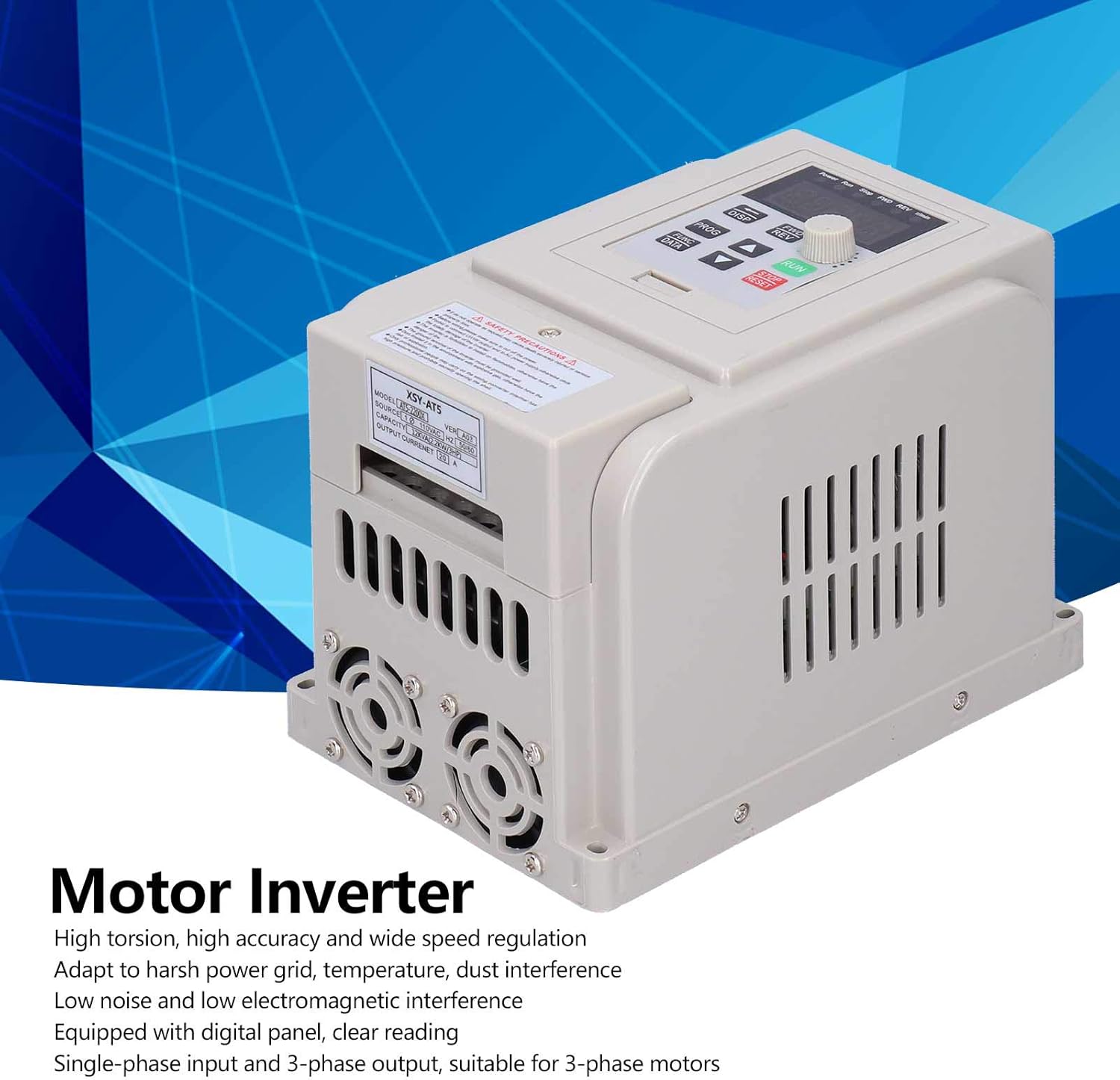


3.1. Control Panel Features
- Digital Display: Shows current operating frequency, parameters, and error codes.
- RUN Button: Initiates motor operation.
- STOP/RESET Button: Stops motor operation or clears error states.
- FWD/REV Buttons: Controls forward and reverse rotation direction.
- PROG/FUNC/DATA Buttons: Used for navigating menus, selecting functions, and entering/saving data.
- Speed Adjustment Knob: Rotary knob for precise frequency/speed control.
3.2. Product Overview Video
Video: A general overview of the Variable Frequency Drive, demonstrating its physical appearance and basic functionality.
4. Setup
4.1. Wiring Instructions
Proper wiring is critical for safe and effective operation. Refer to the wiring diagram provided with your unit and consult a qualified electrician if unsure.
- Power Input (L/N): Connect the single-phase 110VAC power supply to the designated input terminals (typically labeled L and N).
- Motor Output (U/V/W): Connect the three-phase 220V motor to the output terminals (typically labeled U, V, W). Ensure correct phase sequence for desired rotation direction.
- Grounding: Connect the VFD's ground terminal to a reliable earth ground.
- Control Terminals: For external control (e.g., start/stop switch, potentiometer), connect wires to the appropriate control terminals (e.g., COM, S1, AI, 10V, ACM).
4.2. Wiring and Basic Operation Videos
Video: Demonstrates the wiring process and basic operational setup of a Variable Frequency Drive.
Video: Shows the Variable Frequency Inverter in operation, controlling a motor's speed and direction.
5. Operating Instructions
5.1. Basic Operation
- Power On: Apply power to the VFD. The digital display will illuminate.
- Start Motor: Press the RUN button to start the motor.
- Adjust Speed: Rotate the speed adjustment knob to increase or decrease the motor's operating frequency.
- Change Direction: Use the FWD and REV buttons to switch between forward and reverse rotation.
- Stop Motor: Press the STOP/RESET button to stop the motor.
5.2. External Control Examples
Video: Illustrates how to use an external switch to start and stop the VFD-controlled motor.
Video: Demonstrates external speed control using a potentiometer, including forward and reverse operation.
6. Maintenance
Regular maintenance ensures the longevity and optimal performance of your VFD.
- Cleaning: Periodically clean the VFD's exterior, especially the ventilation openings, to prevent dust accumulation which can lead to overheating. Use a soft, dry cloth. Do not use liquid cleaners.
- Inspection: Regularly inspect all wiring connections for tightness and signs of wear or damage. Check for any unusual noises or odors during operation.
- Environment: Ensure the operating environment remains within specified temperature and humidity ranges.
- Cooling Fans: Check cooling fans for proper operation and clear any obstructions.
7. Troubleshooting
This section addresses common issues you might encounter with your VFD.
7.1. Common Issues and Solutions
- Motor Not Starting:
- Check power supply connections.
- Verify motor wiring (U, V, W) is correct and secure.
- Ensure the VFD is in RUN mode.
- Check for any active error codes on the digital display and refer to the manual's error code section (if available) for specific remedies.
- Motor Running Erratically or at Incorrect Speed:
- Check the speed adjustment knob setting.
- Verify control signal connections (if using external control).
- Ensure motor parameters are correctly set in the VFD.
- Overcurrent/Overload Error:
- Check for mechanical overload on the motor.
- Verify motor current ratings match VFD settings.
- Inspect motor and wiring for short circuits or damage.
- Overvoltage/Undervoltage Error:
- Check the input power supply voltage for stability and correct value (110VAC).
- Ensure proper braking resistor (if used) is connected and functioning.
For persistent issues or specific error codes not listed, please contact Wisoqu customer support.
8. Specifications
| Feature | Specification |
|---|---|
| Model | AT5-2200X |
| Power | 2200W |
| Power Phase Number | Single phase input, 3-phase output |
| Input Voltage | 110VAC 50/60Hz |
| Output Voltage | 3-phase 220VAC |
| Protection Features | Overcurrent, overvoltage, undervoltage, module failure, overheating, short circuit, input/output phase loss, abnormal motor parameter adjustment, electronic thermal relay. |
| Item Weight | 3.01 pounds |
| Package Dimensions | 8.66 x 8.15 x 6.57 inches |
9. Warranty and Support
For warranty information, technical support, or service inquiries regarding your Wisoqu AT5-2200X Variable Frequency Drive, please refer to the documentation included with your purchase or contact the manufacturer directly through their official website or customer service channels. Keep your purchase receipt as proof of purchase for any warranty claims.