
Introduction
The Skysonic WR2 Wireless Plus Vibration Pickup is an advanced soundhole pickup system designed for folk acoustic guitars. It offers a newly upgraded sound experience with four distinct effects, wireless transmission capabilities, and a dual pickup system for accurate sound reproduction. This manual provides detailed instructions for installation, operation, and maintenance to ensure optimal performance of your WR2 pickup.
Key Features
- Upgraded Sound Effects: Features four enhanced sound effects including reverb (lobby + metal), chorus, and delay, significantly improving guitar sound.
- Magnetic Pickup Acoustic Guitar Universal: Compatible with a variety of acoustic guitar models, suitable for both beginners and professional performers.
- Non-Invasive Installation: Designed for easy, hole-free installation, restoring the guitar's natural timbre. Compatible with sound hole sizes between 95mm-105mm, requiring only a screwdriver.
- Wireless Transmission & Bluetooth Accompaniment: Equipped with a wireless receiver for up to 60 meters of barrier-free transmission. The built-in Bluetooth module allows for mobile phone accompaniment or song playback while maintaining guitar sound quality.
- Dual Pickup System: Incorporates a magnetic coil design with independent volume and microphone adjustments for accurate and grainy sound pickup.
- Vibration Unit for Increased Volume: Features an independent vibration unit (R2) that can increase guitar volume by 30%-50% without external speakers, while adding chorus, reverb, and sustain effects to the guitar soul.
- Digital Noise Reduction: Built-in howling suppression for a clearer auditory sound field during play.
- Soft Rubber Grip: Double-layer soft rubber protection ensures stable installation and removal without damaging the guitar's finish.
Setup and Installation
The Skysonic WR2 pickup is designed for easy, non-invasive installation without the need for drilling. It fits acoustic guitars with a sound hole diameter between 95mm and 105mm.
- Gently slide the pickup into the guitar's sound hole. Ensure the soft rubber grips are positioned to secure the pickup without damaging the instrument's finish.
- Tighten the two screws on the pickup to firmly secure it in place. Avoid over-tightening to prevent damage.
- Connect the wireless receiver to your amplifier or audio system. The pickup and receiver should pair automatically upon powering on.

Image: The magnetic pickup is designed for universal acoustic guitar compatibility and non-invasive installation.
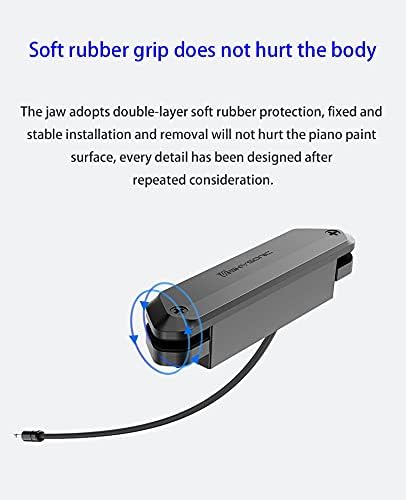
Image: The soft rubber grips ensure the pickup is securely fixed without damaging the guitar body.
Installation Demonstration Video
Video: A detailed demonstration of installing the X2 Double Wireless Acoustic Guitar Pickup, highlighting its ease of use and non-invasive design. The video also showcases sound tests with and without the pickup, and with different microphone and coil settings.
Operating Instructions
The Skysonic WR2 offers versatile operation with its dual pickup system, built-in effects, and wireless capabilities.
- Power On/Off: Use the designated power button on the pickup to turn the unit on or off. The receiver will automatically pair.
- Volume Adjustment: Adjust the master volume using the 'Volume' knob on the pickup.
- Microphone Adjustment: The 'Mic' knob controls the level of the internal microphone, allowing you to blend it with the magnetic coil pickup for a richer sound.
- Sound Effects: The pickup features integrated reverb (Lobby + Metal), chorus, and delay effects. Use the dedicated knobs to adjust the intensity of each effect.
- Wireless Transmission: The WR2 supports up to 60 meters of wireless transmission. Ensure the receiver is within range and connected to your amplifier or PA system.
- Bluetooth Accompaniment: Activate the Bluetooth module on the receiver to connect to your mobile phone for playing backing tracks or songs.
- Vibration Unit (R2): The independent vibration unit enhances the guitar's natural volume and adds effects like chorus, reverb, and sustain directly to the guitar's sound.

Image: The pickup features upgraded sound effects including reverb, chorus, and delay, with individual controls.

Image: The dual pickup system allows for independent volume and microphone adjustment for precise sound capture.

Image: The WR2 supports 60 meters of wireless transmission and Bluetooth accompaniment for versatile performance.
Maintenance
To ensure the longevity and optimal performance of your Skysonic WR2 pickup, follow these maintenance guidelines:
- Cleaning: Wipe the pickup gently with a soft, dry cloth to remove dust and grime. Avoid using harsh chemicals or abrasive materials.
- Storage: When not in use for extended periods, store the pickup in a dry, cool place away from direct sunlight and extreme temperatures.
- Battery Care: Ensure the pickup is fully charged before use. If the unit is not used regularly, charge it periodically to maintain battery health.
- Handling: Handle the pickup with care to avoid dropping or subjecting it to strong impacts, which could damage internal components.
Troubleshooting
If you encounter any issues with your Skysonic WR2 pickup, refer to the following troubleshooting tips:
- No Sound Output:
- Ensure the pickup and receiver are both powered on and fully charged.
- Verify that the receiver is correctly connected to your amplifier or audio system.
- Check the volume levels on both the pickup and your amplifier.
- Confirm that the pickup and receiver are successfully paired. Refer to the pairing instructions if necessary.
- Feedback/Howling:
- Reduce the volume level on the pickup or amplifier.
- Adjust the microphone gain.
- Ensure the pickup is securely installed in the sound hole.
- Move further away from the amplifier or speaker.
- Poor Sound Quality:
- Check the battery level of the pickup.
- Ensure the strings are not too close or too far from the magnetic poles.
- Verify that the pickup is clean and free from debris.
- Bluetooth Connectivity Issues:
- Ensure the Bluetooth function on the receiver is active.
- Restart both the receiver and your mobile device.
- Ensure no other devices are interfering with the Bluetooth signal.
Specifications
| Feature | Detail |
|---|---|
| Model Name | WR2 |
| Color | Black |
| Compatible Devices | Guitar |
| Connector Type | Bluetooth |
| Power Source | Battery Powered |
| Output Channel Quantity | 2 |
| Amplifier Type | Solid State |
| Number of Bands | 3 |
Warranty and Support
For warranty information, technical support, or service inquiries, please refer to the product packaging or contact the retailer where you purchased the Skysonic WR2 pickup. Keep your proof of purchase for warranty claims.