
Introduction
Thank you for choosing the SMAEL SL-1921 Multifunction Digital Quartz Waterproof Watch. This manual provides essential information for the proper use, setup, and maintenance of your watch. Please read it carefully to ensure optimal performance and longevity of your timepiece.
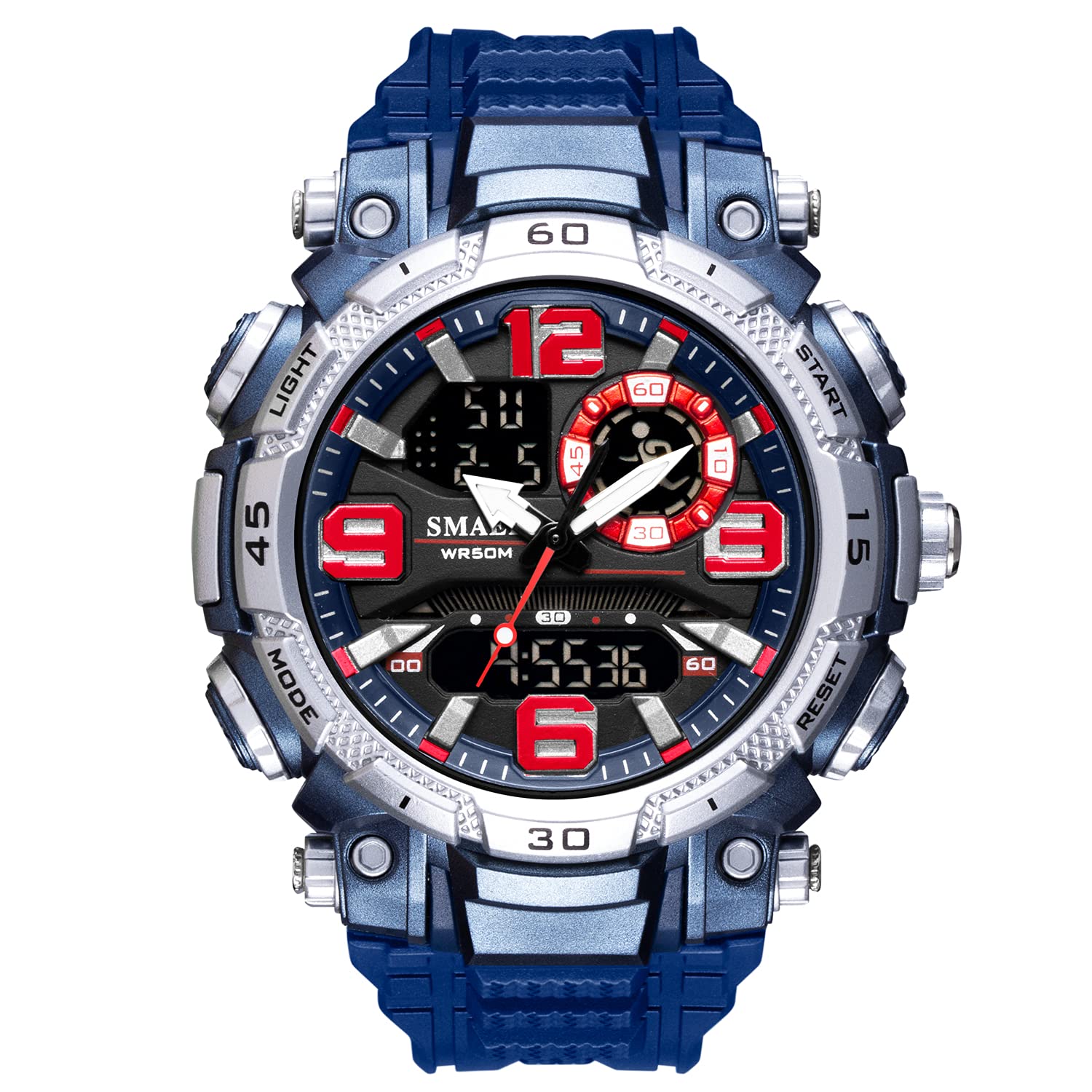
Image: The SMAEL SL-1921 watch, featuring a blue strap and a silver-tone case with red accents, displayed on a wrist.
Watch Components
Familiarize yourself with the main components and buttons of your SMAEL SL-1921 watch.

Image: A detailed view of the watch face, labeled "STEREO DIAL MULTI FUNCTION DIAL", showing the analog hands, digital displays, and surrounding buttons (Light, Mode, Start, Reset).
- LIGHT Button: Activates the LED backlight.
- MODE Button: Cycles through different modes (Time, Alarm, Stopwatch).
- START Button: Used for starting/stopping functions in Stopwatch mode, and adjusting settings.
- RESET Button: Used for resetting functions in Stopwatch mode, and adjusting settings.
- Analog Dial: Displays time with traditional hour and minute hands.
- Digital Display: Shows time, date, day of the week, and other digital functions.
Setup and Initial Configuration
Setting Analog Time
- Pull out the crown (the small knob on the right side of the watch case) to the first click position.
- Turn the crown to adjust the hour and minute hands to the correct time.
- Push the crown back in to its normal position to start the analog timekeeping.
Setting Digital Time and Date
- Press the MODE button repeatedly until the digital time display starts flashing (usually the seconds).
- Press the RESET button to select the item you wish to adjust (seconds, hour, minute, month, date, day of week, 12/24 hour format).
- Press the START button to increase the selected value. Hold START to rapidly advance the value.
- Once all settings are correct, press the MODE button to exit the setting mode.
Operating Instructions
Using the LED Backlight
To illuminate the digital display in low-light conditions, press the LIGHT button. The backlight will activate for a few seconds.

Image: The watch face with its digital display clearly visible due to the activated LED backlight in a dark environment.
Alarm Function
- Press the MODE button until you reach the Alarm mode (indicated by "AL" or a bell icon).
- Press the RESET button to select the hour or minute setting.
- Press the START button to adjust the hour or minute.
- Press the MODE button to confirm and exit.
- To turn the alarm ON/OFF, press the START button while in Alarm mode. An alarm icon will appear/disappear.
Stopwatch Function
- Press the MODE button until you reach the Stopwatch mode (indicated by "ST" or "STOP").
- Press the START button to begin timing.
- Press the START button again to pause timing.
- Press the RESET button to clear the stopwatch to zero.
- To resume timing after pausing, press START.
12/24 Hour Format
In the digital time setting mode, you can toggle between 12-hour and 24-hour formats by pressing the RESET button until the "H" or "P" indicator flashes, then use the START button to change it.
Maintenance and Care
- Water Resistance: This watch is water-resistant up to 50 meters. It is suitable for daily use, splashes, and brief immersion in water. Do not press any buttons underwater. Avoid exposure to hot water or steam, as this can compromise the water resistance seals.
- Cleaning: Wipe the watch case and strap with a soft, dry cloth. For stubborn dirt, a slightly damp cloth can be used, followed by drying.
- Battery: The watch is powered by a battery. When the display dims or functions become erratic, it may be time for a battery replacement. This should be done by a qualified watch technician to maintain water resistance.
- Storage: Store your watch in a cool, dry place away from direct sunlight and extreme temperatures.
- Avoid Chemicals: Do not expose the watch to solvents, detergents, perfumes, or other chemical sprays, as they can damage the case, strap, or seals.

Image: A close-up of the watch dial, showing the clear glass lens, with text "GLASS LENSES SEE TIME MORE CLEARLY".
Troubleshooting
| Problem | Possible Cause | Solution |
|---|---|---|
| Analog hands not moving. | Crown is pulled out; battery low/dead. | Push the crown back in. If still not working, replace battery. |
| Digital display is blank or dim. | Battery low/dead. | Replace the battery. |
| Digital time is incorrect. | Time not set correctly. | Refer to "Setting Digital Time and Date" section. |
| Water inside the watch. | Buttons pressed underwater; seals compromised. | Immediately take to a qualified watch technician for inspection and repair. Avoid further water exposure. |
Specifications
- Model Number: SL-1921
- Display Type: Analog - Digital
- Movement: Quartz
- Special Features: Dual time display, Alarm, Stopwatch, LED Backlight, Shock Resistant, Date and Week Display, 12/24 Hour Format
- Power Source: Battery Powered
- Strap Material: Polyurethane
- Clasp Type: Buckle
- Water Resistance Depth: 50 Meters (164 Feet)
- Case Diameter: 5 Centimeters
- Case Material: Rubber
- Dial Window Material Type: Glass
- Included Components: Watch, User Manual (this document)
Warranty and Support
Your SMAEL SL-1921 watch is designed for durability and performance. For any questions or concerns regarding your watch, please contact the seller or SMAEL customer support.
- Return Policy: Please refer to the retailer's return policy for details on returns and exchanges.
- Customer Service: If you encounter any issues or have questions, please do not hesitate to contact the seller for assistance. They are committed to customer satisfaction.