
bamix M200 MONO PRO-1
bamix M200 MONO PRO-1 Immersion Blender User Manual
Model: M200 MONO PRO-1
1. Introduction
Thank you for choosing the bamix M200 MONO PRO-1 Immersion Blender. This high-quality appliance, proudly made in Switzerland, is designed for versatile use in your kitchen, making tasks like mixing, pureeing, and chopping effortless. Please read this manual carefully before first use to ensure safe and optimal operation of your new appliance.
Important Safety Instructions
- Always unplug the appliance from the power outlet before cleaning or when not in use.
- Do not immerse the motor unit in water or any other liquid.
- Keep hands, hair, clothing, and utensils away from moving parts during operation to prevent injury.
- Do not operate the appliance with a damaged cord or plug, or after the appliance malfunctions or has been dropped or damaged in any manner.
- This appliance is not intended for use by persons (including children) with reduced physical, sensory or mental capabilities, or lack of experience and knowledge, unless they have been given supervision or instruction concerning use of the appliance by a person responsible for their safety.
- Use only original bamix accessories and attachments.
2. Package Contents
Your bamix M200 MONO PRO-1 package includes the following items:
- bamix M200 MONO PRO-1 Immersion Blender (Motor Unit with Shaft)
- Multi-purpose Blade
- Whisk/Beater Disc
- Mincing/Aerating Disc
- Wall Mount/Stand
- User Manual (this document)

Image: The bamix M200 MONO PRO-1 Immersion Blender, its wall mount/stand, and the three included attachments (multi-purpose blade, whisk/beater disc, mincing/aerating disc) laid out.
3. Components
Familiarize yourself with the main components of your bamix immersion blender:
- Motor Unit: The upper part containing the powerful 200W AC motor and speed control buttons.
- Shaft: The long metal shaft extending from the motor unit, housing the drive mechanism for the attachments. Made of durable stainless steel.
- Speed Control Buttons: Two buttons for selecting between two speed levels (Speed 1 and Speed 2).
- Multi-purpose Blade: Designed for chopping, pureeing, and mixing a wide range of ingredients, from raw vegetables to frozen fruits.
- Whisk/Beater Disc: Ideal for whipping cream, beating egg whites, emulsifying sauces, and aerating liquids.
- Mincing/Aerating Disc: Suitable for mincing meat, chopping herbs, and aerating light mixtures.
- Wall Mount/Stand: Provides a convenient storage solution for your bamix blender and attachments.

Image: The bamix M200 MONO PRO-1 Immersion Blender, showcasing its ergonomic handle and sleek black design.

Image: A close-up view of the three interchangeable attachments: the multi-purpose blade (bottom), the whisk/beater disc (top left), and the mincing/aerating disc (top right).
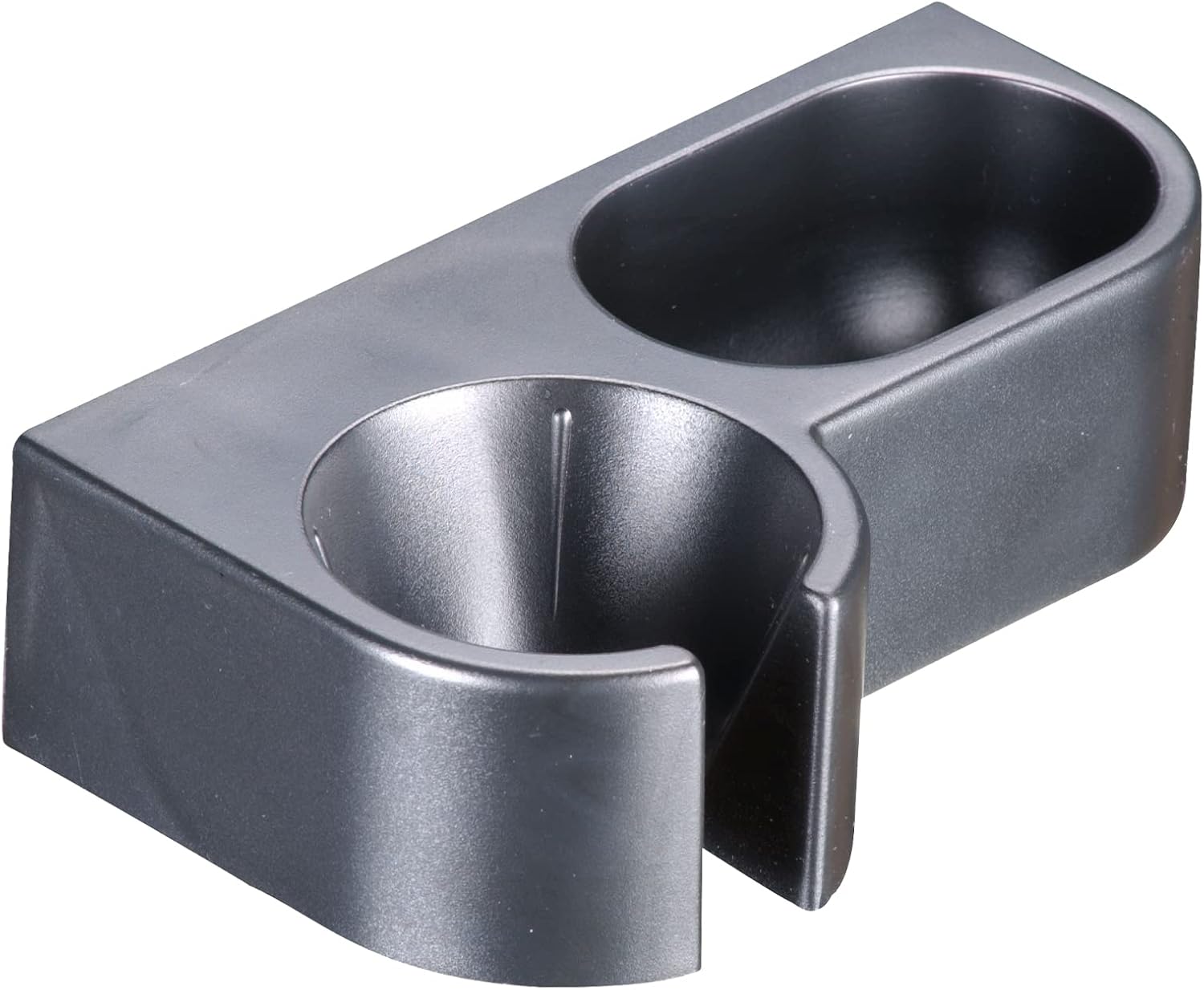
Image: The grey wall mount/stand designed to securely hold the bamix immersion blender and its attachments when not in use.
4. Setup
Attaching Blades/Discs
- Ensure the blender is unplugged from the power outlet.
- Select the desired blade or disc for your task.
- Align the blade/disc with the drive shaft at the bottom of the blender.
- Push the blade/disc firmly onto the shaft until it clicks into place. Ensure it is securely fastened before use.
- To remove, simply pull the blade/disc off the shaft.
Mounting the Wall Stand (Optional)
The included stand can be mounted on a wall for convenient storage. Use appropriate screws and wall plugs (not included) for your wall type. Ensure the stand is securely fastened before placing the blender in it.
5. Operating Instructions
The bamix M200 MONO PRO-1 features two speed settings for optimal control over your blending tasks.
General Operation
- Attach the appropriate blade/disc for your task.
- Plug the blender into a 220V power outlet.
- Immerse the blade end into the ingredients. Ensure the blade is fully submerged to prevent splashing.
- Press and hold the desired speed button (Speed 1 or Speed 2) to start the blender.
- Move the blender gently up and down or in circular motions to process ingredients evenly.
- Release the button to stop the blender.
- Unplug the blender from the power outlet after use.
Recommended Uses for Attachments
- Multi-purpose Blade: Use for soups, sauces, purees, baby food, crushing ice, chopping raw vegetables, and blending frozen fruits for smoothies.
- Whisk/Beater Disc: Ideal for whipping cream, beating egg whites, making mayonnaise, emulsifying dressings, and aerating milk for frothy drinks.
- Mincing/Aerating Disc: Best for mincing small quantities of meat, chopping herbs, processing cooked vegetables, and aerating light batters.
Note: For best results, ensure ingredients are cut into manageable pieces before blending. Do not overload the container.
6. Maintenance and Cleaning
Proper cleaning and maintenance will extend the life of your bamix immersion blender.
Cleaning
- Always unplug the blender before cleaning.
- For the Shaft and Blades: Immediately after use, rinse the shaft and attached blade under running warm water. For more thorough cleaning, immerse the shaft (up to just below the motor unit) in a container of warm soapy water and briefly switch on the blender for a few seconds. Rinse again with clean water.
- For the Motor Unit: Wipe the motor unit with a damp cloth. Never immerse the motor unit in water or any other liquid.
- Attachments: The blades and discs can be washed by hand or in a dishwasher.
- Dry all parts thoroughly before storing.
Storage
Store your bamix blender and its attachments in a dry place. The included wall mount/stand is ideal for keeping your appliance organized and easily accessible.
7. Troubleshooting
If you encounter any issues with your bamix M200 MONO PRO-1, please refer to the following common problems and solutions:
| Problem | Possible Cause | Solution |
|---|---|---|
| Blender does not turn on. | Not plugged in; power outlet issue; motor overheating. | Ensure the blender is securely plugged into a working outlet. Check your circuit breaker. If the motor is hot, unplug and let it cool down for 30 minutes. |
| Blender stops during operation. | Overload; motor overheating. | Reduce the amount of ingredients. Unplug and let the motor cool down. Ensure ingredients are not too hard or large. |
| Blade does not spin freely. | Food stuck in blade; blade not properly attached. | Unplug the blender. Carefully remove any food debris from around the blade. Re-attach the blade securely. |
| Excessive vibration or noise. | Blade not properly attached; damaged blade/shaft. | Unplug the blender and check if the blade is securely attached. If the issue persists, contact customer support. |
If the problem persists after trying these solutions, please contact bamix customer support.
8. Specifications
| Model: | M200 MONO PRO-1 |
| Brand: | bamix |
| Power: | 200 Watt |
| Voltage: | 220 Volts |
| Number of Speeds: | 2 |
| Material: | Stainless Steel (shaft), Durable Plastic (motor unit housing) |
| Dimensions (L x W x H): | 36 x 14 x 9.5 cm (approx.) |
| Weight: | 1.3 Kilograms (approx.) |
| Manufactured: | Switzerland |
9. Warranty and Support
Lifetime Motor Warranty
bamix offers a lifetime warranty on the high-quality AC motor of your immersion blender. This warranty covers defects in materials and workmanship of the motor under normal household use. Please retain your proof of purchase for warranty claims.
Customer Support
For any questions, technical assistance, or warranty claims, please contact bamix customer support through their official website or the retailer from whom you purchased the product. Always provide your model number (M200 MONO PRO-1) and proof of purchase when contacting support.
Ask a question about this manual
Ask about setup, troubleshooting, compatibility, parts, safety, or missing instructions. Manuals+ will review the question and use this page’s manual context to help answer it.