Introduction
This manual provides detailed instructions for the installation, operation, and maintenance of your UAYESOK UHF NMO Antenna (TC-152) and TCJ-N1 NMO Mount bundle. This product is designed for reliable UHF communication within the 400-470MHz frequency range. Please read these instructions carefully before proceeding with installation and use.
Product Overview
The UAYESOK UHF NMO Antenna bundle includes the following components:
- TC-152 UHF NMO Antenna: A flexible whip antenna designed for 400-470MHz operation.
- TCJ-N1 NMO Mount: A robust mount for secure antenna installation.
- RG58 Coaxial Cable: A 4-meter (13ft) cable for connecting the mount to your radio.
Key features of this antenna system include:
- Frequency Range: UHF 400-470MHz (70CM)
- Antenna Length: Approximately 6.4 inches (16.2 cm)
- Impedance: 50 Ohms
- VSWR: Less than 1.5
- Gain: 2.5dBi
- Maximum Power Input: 150W
- Antenna Whip Material: Stainless steel, flexible, no tuning required.
- Mount Type: NMO (New Motorola) for rugged installation.
Setup and Installation
Proper installation is crucial for optimal performance. The NMO mount requires drilling a hole in the mounting surface.
Required Tools (Not Included):
- Drill
- Drill bit (approximately 3/8" to 3/4" for the NMO mount)
- Wrench or pliers
- Sealant (optional, for weatherproofing)
Installation Steps:
- Select Mounting Location: Choose a flat, sturdy surface on your vehicle or structure that provides a clear line of sight for the antenna. Ensure there is sufficient clearance for the antenna whip and access for drilling and securing the mount.
- Drill Mounting Hole: Carefully drill a hole of approximately 3/8" to 3/4" diameter at the chosen location. Ensure the hole is clean and free of burrs.

Image: Side view of the NMO mount, illustrating the threaded base for secure installation.
- Install NMO Mount: Insert the NMO mount (TCJ-N1) through the drilled hole. Secure it from underneath with the provided nut, ensuring a tight fit. If desired, apply a weather-resistant sealant around the base for added protection against moisture.

Image: The RG58 coaxial cable connected to the NMO mount base, showing the connector type.
- Attach Antenna Whip: Screw the TC-152 UHF NMO Antenna onto the NMO mount. Hand-tighten until snug. Do not overtighten.

Image: The TC-152 UHF NMO Antenna securely attached to the TCJ-N1 NMO mount.
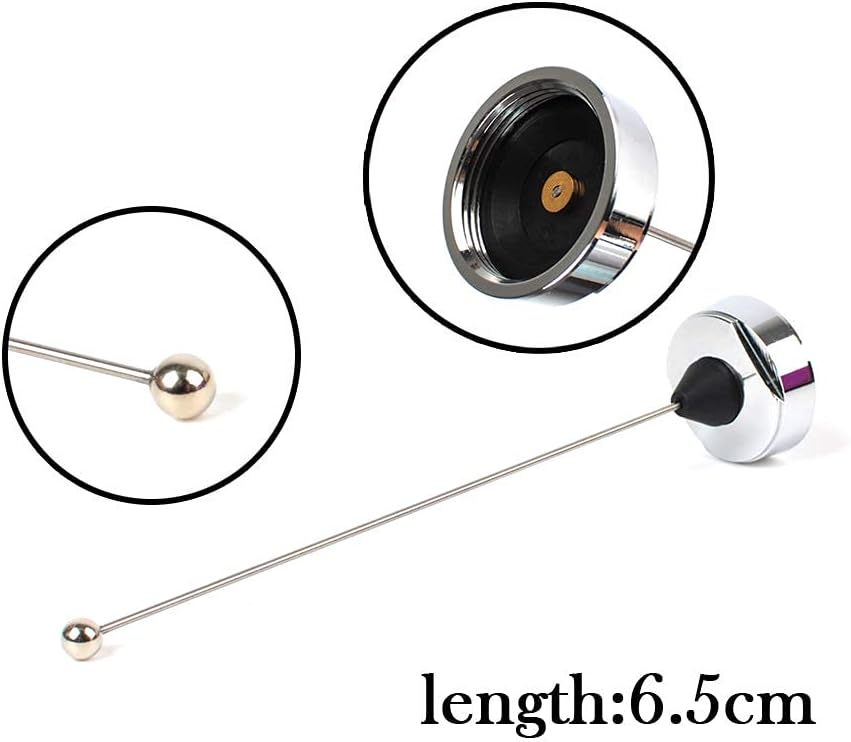
Image: Detailed view of the antenna whip and its connection point to the NMO mount.
- Route Coaxial Cable: Carefully route the 4-meter RG58 coaxial cable from the NMO mount to your radio. Avoid sharp bends, kinks, or routing near sources of electrical interference. Secure the cable to prevent damage or movement.
- Connect to Radio: Connect the end of the RG58 coaxial cable to the antenna input of your UHF radio.
Operating Instructions
Once the antenna system is installed, operate your radio according to its manufacturer's instructions. The UAYESOK UHF NMO Antenna is designed to provide efficient communication within the 400-470MHz band without requiring additional tuning.
- Ensure your radio is set to the correct UHF frequency band (400-470MHz).
- Always operate the radio with the antenna properly connected to prevent damage to the radio's transmitter.
- For optimal performance, ensure the antenna has a clear, unobstructed view of the sky.
Maintenance
Regular maintenance helps ensure the longevity and performance of your antenna system.
- Inspect Connections: Periodically check all connections (antenna to mount, mount to cable, cable to radio) to ensure they are secure and free from corrosion.
- Clean Antenna: Clean the antenna whip and mount base with a mild detergent and water as needed to remove dirt, grime, or road salt. Avoid abrasive cleaners.
- Check Cable: Inspect the coaxial cable for any signs of wear, cuts, or damage. Replace damaged cables immediately to prevent signal loss or short circuits.
- Weatherproofing: Reapply sealant around the NMO mount base if you notice any signs of water ingress or degradation of the original sealant.
Troubleshooting
If you experience issues with your antenna system, consider the following troubleshooting steps:
- Poor Signal Reception/Transmission:
- Check all cable connections for tightness and proper seating.
- Inspect the coaxial cable for damage (kinks, cuts, crushed sections).
- Ensure the antenna is mounted in a location with minimal obstructions.
- Verify your radio's settings (frequency, power output).
- High VSWR Reading (if using an SWR meter):
- A high VSWR indicates a mismatch or problem in the antenna system.
- Recheck all connections.
- Ensure the antenna whip is fully screwed into the NMO mount.
- Inspect the mount for proper grounding to the vehicle's chassis (if applicable).
- Ensure the antenna is not touching any metal objects.
- No Power to Radio (if applicable):
- This issue is typically related to the radio's power supply, not the antenna system. Refer to your radio's manual.
Specifications
| Brand | UAYESOK |
| Model | TC-152 UHF NMO Antenna, TCJ-N1 NMO Mount |
| Frequency Range | UHF 400-470MHz (70CM) |
| Antenna Length | 6.4 inches (approx. 16.2 cm) |
| Impedance | 50 Ohms |
| VSWR | Less than 1.5 |
| Gain | 2.5dBi |
| Maximum Power Input | 150W |
| Antenna Material | Stainless Steel Flexible Whip |
| Cable Type | RG58 Coaxial Cable |
| Cable Length | 4 meters (13 feet) |
| Mount Type | NMO (New Motorola) |
Warranty Information
UAYESOK products are manufactured to high-quality standards. This product is typically covered by a standard manufacturer's warranty against defects in materials and workmanship. For specific warranty terms and conditions, please refer to the product packaging or contact UAYESOK customer support. Keep your proof of purchase for warranty claims.
Customer Support
If you have any questions, require technical assistance, or encounter issues not covered in this manual, please contact UAYESOK customer support. Contact information can usually be found on the product packaging or the official UAYESOK website.


