1. Introduction
Thank you for choosing the Kidsneed SM935A Video Baby Monitor. This manual provides essential information for the safe and effective operation of your device. Please read it thoroughly before use and retain it for future reference.

Image 1.1: The Kidsneed SM935A Video Baby Monitor, showing both the camera unit and the parent monitor unit.
The Kidsneed SM935A is designed to provide parents with a secure and reliable way to monitor their baby. It features a 3.5-inch display, remote pan/tilt/zoom camera, two-way audio, night vision, temperature monitoring, and lullabies, all operating without the need for Wi-Fi or a mobile application, ensuring privacy and ease of use.
2. Package Contents
- Parent Unit (Monitor)
- Baby Unit (Camera)
- Power Adapter for Parent Unit
- Power Adapter for Baby Unit
- User Manual (this document)
Ensure all components are present and in good condition before proceeding with setup.
3. Setup Guide
3.1 Powering On the Units
- Connect the small plug of the power adapter to the DC jack on the back of the Baby Unit (camera).
- Connect the other end of the power adapter to a suitable electrical outlet.
- Connect the small plug of the power adapter to the DC jack on the side of the Parent Unit (monitor).
- Connect the other end of the power adapter to a suitable electrical outlet.
- Press and hold the Power button on the Parent Unit for a few seconds until the screen turns on.

Image 3.1: Both the camera and monitor units require power adapters for operation. The monitor unit also contains a rechargeable battery for portable use.
3.2 Placement of the Baby Unit (Camera)
Place the Baby Unit in a location that provides a clear view of your baby. Ensure it is at least 3 feet (1 meter) away from the baby to prevent entanglement with the power cord. The camera can be placed on a flat surface or wall-mounted.
- For optimal performance, avoid placing the camera near other electronic devices that may cause interference.
- Ensure the camera is positioned securely and cannot be easily knocked over by a child.
4. Operating Instructions
4.1 Basic Operation
- Power On/Off: Press and hold the Power button on the Parent Unit.
- Volume Control: Use the volume buttons on the Parent Unit to adjust the sound level.
- Brightness Control: Use the brightness buttons on the Parent Unit to adjust screen illumination.
4.2 Pan, Tilt, and Zoom
The Kidsneed SM935A camera offers remote pan, tilt, and zoom functions, allowing you to adjust the camera's view from the Parent Unit.
- Press the navigation button (often labeled with arrows or a joystick icon) on the Parent Unit to enter pan/tilt mode.
- Use the directional arrows to pan (move horizontally) and tilt (move vertically) the camera.
- Press the zoom button (often labeled with a magnifying glass icon) to zoom in or out on the image. The monitor supports 2X magnification.

Image 4.1: The camera unit offers a 355-degree horizontal pan and 120-degree vertical tilt for comprehensive room coverage.

Image 4.2: The 3.5-inch display allows for clear viewing, with a 2X magnification option to see finer details of your baby.
4.3 Night Vision
The Baby Unit is equipped with automatic infrared night vision. In low light conditions, the monitor will automatically switch to night vision mode, providing a clear grayscale image of your baby.

Image 4.3: Automatic night vision provides clear visibility of your baby even in complete darkness.
4.4 Two-Way Audio
To speak to your baby through the camera, press and hold the microphone button on the Parent Unit. Release the button to hear your baby's sounds.
4.5 Temperature Monitoring
The Baby Unit has a built-in temperature sensor that displays the room temperature on the Parent Unit's screen. An alert will sound if the temperature goes outside a preset range (if configured).

Image 4.4: The monitor displays the room temperature, helping you ensure a comfortable environment for your baby.
4.6 Lullabies
The monitor includes 4 pre-programmed lullabies to help soothe your baby. Access the lullaby menu through the Parent Unit's settings and select your desired tune.
Image 4.5: Select from a variety of lullabies to help your baby fall asleep peacefully.
4.7 VOX Mode (Eco Mode Voice Activation)
In VOX mode, the Parent Unit's screen will turn off to save battery, and the sound will be muted. It will automatically activate (screen turns on and sound resumes) when the baby unit detects sound above a certain threshold. This feature helps conserve battery life.
4.8 Feeding Timer
The Parent Unit allows you to set feeding reminders at intervals of 2, 4, or 6 hours. This feature helps maintain a consistent feeding schedule.
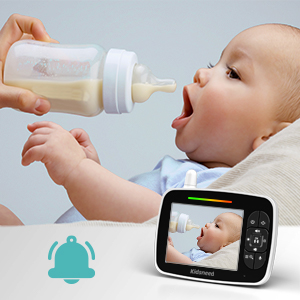
Image 4.6: Set convenient feeding reminders directly from the parent unit.
4.9 Multi-Camera Expandability
The Kidsneed SM935A system supports up to four cameras. This is useful for monitoring multiple children or different rooms simultaneously. Additional cameras are sold separately.
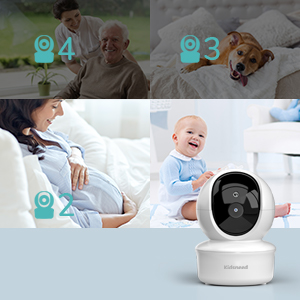
Image 4.7: Expand your monitoring system by adding up to four cameras.
4.10 Long Range Connectivity
The monitor utilizes 2.4G FHSS signal transmission technology, providing a secure and private connection with a range of up to 960 feet (292 meters) in open areas. This ensures reliable monitoring throughout your home without Wi-Fi dependency.

Image 4.8: Enjoy extended range for monitoring your baby from various locations in your home.
5. Maintenance
- Cleaning: Use a soft, dry cloth to clean the surfaces of the Parent Unit and Baby Unit. Do not use cleaning sprays or liquid cleaners.
- Battery Care: For optimal battery life, fully charge the Parent Unit before first use. Avoid extreme temperatures and prolonged exposure to direct sunlight.
- Storage: If storing the unit for an extended period, ensure both units are powered off and stored in a cool, dry place.
6. Troubleshooting
| Problem | Possible Solution |
|---|---|
| No image/sound on Parent Unit. | Ensure both units are powered on and connected to power. Check if the units are within range. Recharge the Parent Unit battery if low. |
| Poor image quality. | Adjust the camera's position. Ensure there are no obstructions between the camera and the monitor. Check for strong interference sources (e.g., Wi-Fi routers, microwaves). |
| Static or interference. | Move the Parent Unit closer to the Baby Unit. Relocate the units away from other electronic devices. |
| Parent Unit battery drains quickly. | Reduce screen brightness. Enable VOX mode to conserve power. Ensure the battery is fully charged before use. |
7. Specifications
| Feature | Detail |
|---|---|
| Model Number | SM935A |
| Display Size | 3.5 inches |
| Connectivity Technology | 2.4G FHSS (No Wi-Fi/App required) |
| Range | Up to 960 feet (open area) |
| Camera Features | Remote Pan (355°), Tilt (120°), Zoom (2X), Night Vision |
| Audio Features | Two-Way Audio, Lullabies (4 options), VOX Mode |
| Monitoring Features | Temperature Monitoring, Feeding Timer (2/4/6 hours) |
| Parent Unit Battery | 1200mAh (up to 8 hours live screen, 15 hours audio only) |
| Expandability | Supports up to 4 cameras |
| Power Source | Battery Powered (Parent Unit), AC Powered (Both Units) |
| Item Dimensions (L x W x H) | 3 x 4 x 5 inches |
| Item Weight | 1.21 pounds |
8. Warranty and Support
Kidsneed products are designed and manufactured to the highest quality standards. For warranty information, technical support, or service inquiries, please refer to the contact information provided on the product packaging or visit the official Kidsneed website.
Please retain your proof of purchase for warranty purposes.


