
1. Introduction
Thank you for purchasing the Velieta 24-inch Dual Zone Wine and Beverage Refrigerator. This appliance is designed to store your wine and beverages at optimal temperatures, offering both built-in and freestanding installation options. Please read this manual thoroughly before installation and operation to ensure proper use and maintenance.

Image: The Velieta 24-inch Dual Zone Wine and Beverage Refrigerator with stainless steel finish and glass door for wine, solid door for beverages.
2. Safety Information
To reduce the risk of fire, electric shock, or injury when using your appliance, follow these basic precautions:
- Read all instructions before using the appliance.
- Do not touch cold surfaces immediately after the appliance has been plugged in.
- Ensure the appliance is properly grounded.
- Do not use mechanical devices or other means to accelerate the defrosting process, other than those recommended by the manufacturer.
- Do not damage the refrigerant circuit.
- Do not use electrical appliances inside the storage compartments of the appliance, unless they are of the type recommended by the manufacturer.
- Unplug the appliance before cleaning or performing any maintenance.
- Keep ventilation openings, in the appliance enclosure or in the built-in structure, clear of obstruction.
- Do not store explosive substances such as aerosol cans with a flammable propellant in this appliance.
- This appliance is not intended for use by persons (including children) with reduced physical, sensory or mental capabilities, or lack of experience and knowledge, unless they have been given supervision or instruction concerning use of the appliance by a person responsible for their safety.
- Children should be supervised to ensure that they do not play with the appliance.
3. Product Overview
The Velieta 24-inch Dual Zone Wine and Beverage Refrigerator features independent temperature control for two distinct zones, designed for optimal storage of both wine and various beverages.
Key Features:
- Dual Zone Cooling: Independently controlled temperature zones for wine and beverages. The left beverage zone operates between 35°F-50°F, and the right wine zone operates between 41°F-64°F.
- Capacity: Accommodates up to 20 standard Bordeaux bottles and 88 standard 12oz/330ml cans.
- Installation Flexibility: Designed for both under-counter built-in and freestanding installation, featuring a front vent design.
- Efficient Cooling: Equipped with a powerful compressor and advanced fan system for stable and consistent temperatures. The stainless steel door on the beverage zone enhances insulation.
- User Interface: LED touch control panel for easy temperature adjustments and settings.
- Interior Lighting: Blue LED ambient lighting illuminates the interior, aiding visibility and enhancing aesthetics.
- Shelving: Features wooden shelves for wine bottles and wire shelves for beverages. All shelves are removable for flexible storage configurations.
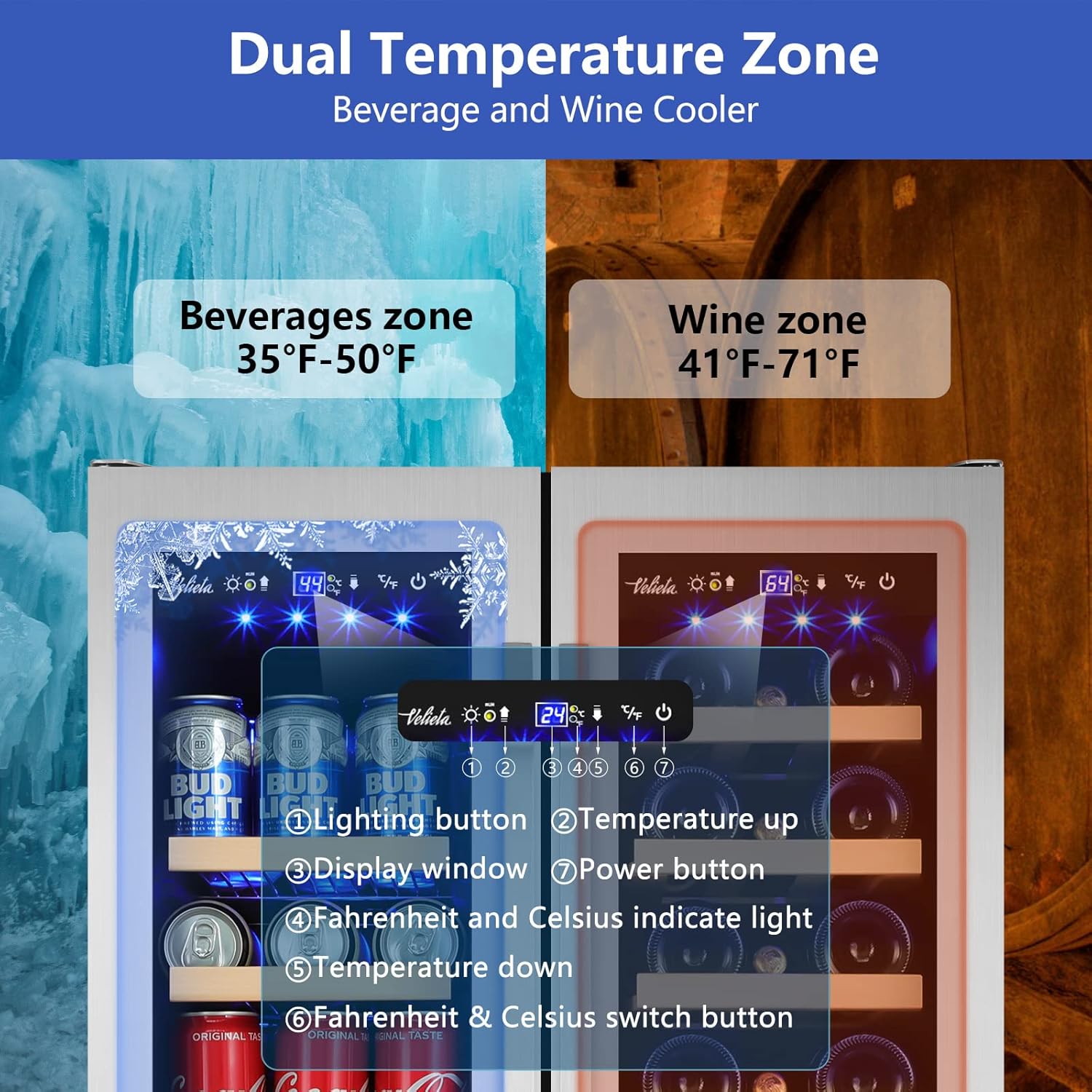
Image: Close-up of the dual temperature zones and control panel, showing temperature settings for beverages (left) and wine (right).
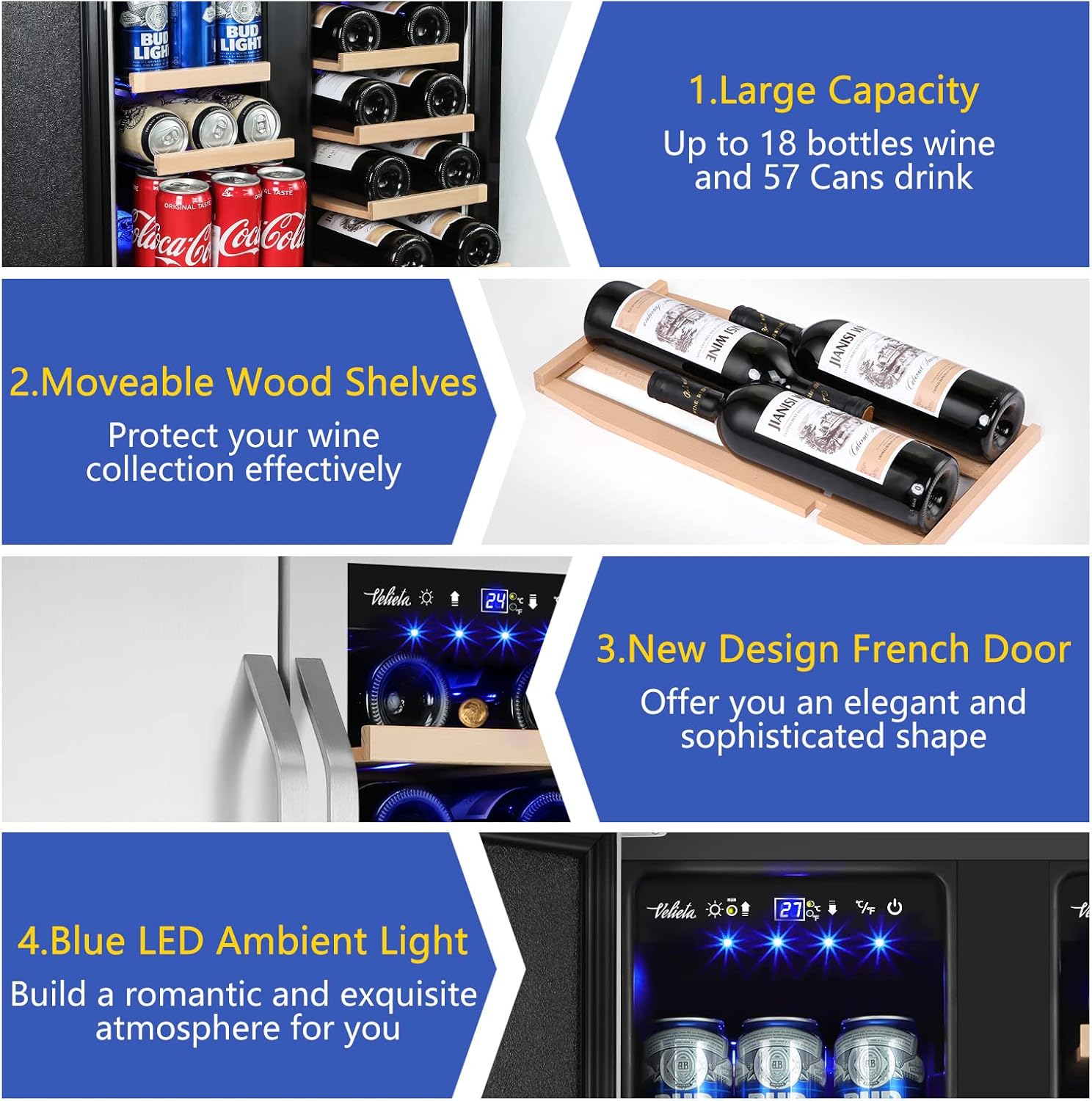
Image: Interior view showcasing the large capacity for both wine bottles on wooden shelves and beverage cans on wire shelves, highlighting movable shelves.
4. Setup and Installation
Unpacking and Placement:
- Carefully remove all packaging materials. Keep packaging for future transport if needed.
- Place the refrigerator upright in its desired location. It is crucial to allow the appliance to stand upright for at least 24 hours before plugging it in. This allows the compressor oils and refrigerants to settle, preventing potential damage.
- Ensure adequate ventilation around the unit. For freestanding use, maintain a minimum of 2-3 inches of space around the sides and back. For built-in installation, ensure the front vent is unobstructed.
- Level the appliance using the adjustable feet to ensure stable operation and proper door sealing.
Installation Options:
This refrigerator is designed for both built-in under-counter and freestanding applications.
- Built-in Installation: The front-venting design allows for seamless integration into cabinetry. Ensure the cabinet opening matches the appliance dimensions (approximately 23.4"W x 22.6"D x 34.2"H) and that the front grille is not blocked.
- Freestanding Installation: The unit can be placed anywhere with sufficient space and proper ventilation.

Image: Illustration showing the refrigerator installed as a built-in unit under a counter and as a freestanding unit in a room.

Image: Diagram illustrating the dimensions for built-in installation, including width, depth, and height requirements.
Electrical Connection:
Connect the appliance to a dedicated, grounded 115V AC, 60Hz electrical outlet. Do not use extension cords or adapter plugs.
5. Operating Instructions
Control Panel:
The refrigerator features an intuitive LED touch control panel located at the top of the glass door. This panel allows for independent temperature adjustment of each zone and control of the interior lighting.
Image: Detailed view of the control panel with numbered buttons: 1. Lighting button, 2. Temperature up, 3. Display window, 4. Fahrenheit and Celsius indicator light, 5. Temperature down, 6. Fahrenheit & Celsius switch button, 7. Power button.
Setting Temperature:
- Press the Power button to turn the unit on or off.
- Use the Temperature Up and Temperature Down buttons to adjust the desired temperature for each zone. The left zone (beverages) ranges from 35°F to 50°F, and the right zone (wine) ranges from 41°F to 64°F.
- Press the Fahrenheit & Celsius switch button to toggle between temperature units.
- The Display window will show the current set temperature.
Interior Lighting:
- Press the Lighting button to turn the blue LED interior lights on or off.

Image: A hand pressing a button on the touch control panel of the refrigerator, demonstrating ease of use.
6. Maintenance
Cleaning the Interior:
- Always unplug the appliance before cleaning.
- Wash the interior with a mild detergent and warm water solution. Use a soft cloth or sponge.
- Remove shelves and clean them separately. Dry thoroughly before returning them to the unit.
- Do not use abrasive cleaners, scouring pads, or harsh chemicals as they can damage surfaces.
Cleaning the Exterior:
- Clean the exterior surfaces with a soft cloth and a mild, non-abrasive cleaner.
- For stainless steel surfaces, use a stainless steel cleaner and polish in the direction of the grain.
- Regularly clean the front ventilation grille to ensure proper airflow and cooling efficiency.
Defrosting:
This appliance features a frost-free defrost system, minimizing the need for manual defrosting. However, if excessive ice buildup occurs, unplug the unit and allow the ice to melt naturally. Do not use sharp objects to remove ice.
7. Troubleshooting
Before contacting customer support, please review the following common issues and solutions:
| Problem | Possible Cause | Solution |
|---|---|---|
| Appliance does not operate. | Not plugged in; circuit breaker tripped; power outage. | Ensure plug is fully inserted. Check circuit breaker. Verify power supply. |
| Temperature is not cold enough. | Temperature setting too high; door not closed properly; excessive door openings; warm items added recently; poor ventilation. | Adjust temperature setting lower. Ensure door is sealed. Minimize door openings. Allow time for new items to cool. Ensure proper clearance for ventilation. |
| Appliance is making unusual noises. | Normal compressor operation; unit not level; items rattling inside. | Some operational sounds are normal. Level the unit using adjustable feet. Rearrange items to prevent rattling. |
| Vibration. | Unit not level. | Adjust the leveling legs. |
| Moisture buildup inside. | High humidity; door not sealed; frequent door openings. | Ensure door gasket is clean and sealing properly. Reduce frequency of door openings. |
8. Specifications
| Feature | Detail |
|---|---|
| Brand | Velieta |
| Model Number | KMYL120-2 |
| Product Dimensions (D x W x H) | 22.6" x 23.4" x 34.2" (575mm x 590mm x 870mm) |
| Item Weight | 109.8 pounds (49.9 kg) |
| Capacity | 4.24 Cubic Feet (20 bottles, 88 cans) |
| Annual Energy Consumption | 162.2 Kilowatt Hours |
| Noise Level | 40 dB |
| Installation Type | Under-Counter/Built-in/Freestanding |
| Voltage | 115 Volts (AC) |
| Defrost System | Frost Free |
| Number of Doors | 2 |
| Door Material Type | Stainless Steel |
| Shelf Type | Wire and Wood |
| Special Features | Touch Control, Blue LED Ambient Light |
| Certification | ETL/DOE |

Image: An infographic displaying the product dimensions (width, depth, height) and other key specifications like voltage, input power, temperature range, and capacity.
9. Warranty and Support
Velieta products are designed for reliability and performance. For specific warranty details, please refer to the warranty card included with your purchase or contact Velieta customer support.
Customer Support:
Should you encounter any issues or require assistance with your Velieta refrigerator, our professional support team is available to help.
- Support Email: support@velieta.com
- Support Phone: (213) 432-5433
Image: Customer support representatives ready to assist with product inquiries.
