
Autel MaxiTPMS TBE200
Autel MaxiTPMS TBE200(E) User Manual
Intelligent Tire Tread & Brake Disc Laser Examiner
Model: MaxiTPMS TBE200
1. Introduction and Overview
The Autel MaxiTPMS TBE200(E) is a state-of-the-art 2-in-1 laser-based tool designed for precise measurement of tire tread depth and brake disc wear. This device provides accurate, real-time data to help assess vehicle safety and maintenance needs. It features a high-resolution AMOLED touchscreen and dual cameras for enhanced functionality.
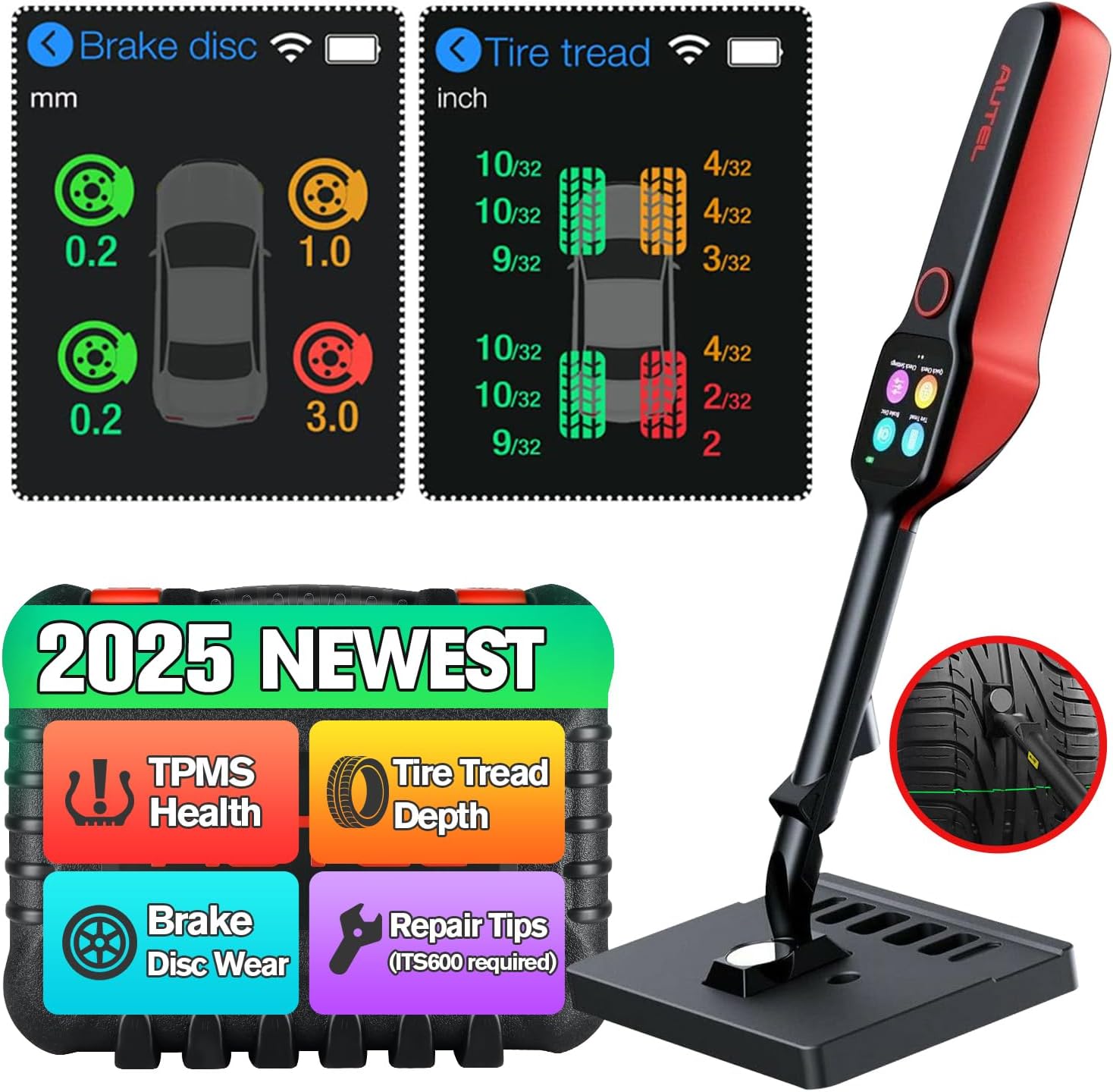
Figure 1.1: Autel MaxiTPMS TBE200(E) with example display readings.
Key Features:
- Laser Measurement: Provides 0.1 mm high accuracy for tire tread depth and brake disc wear.
- 1.65" AMOLED Touchscreen: Super Retina display for clear data visualization.
- Dual Cameras: Includes a 4-megapixel macro camera and an 8-megapixel zoom camera for DOT scanning and documenting tire wear/damage.
- Real-time Analysis: Displays measurement data curves and provides real-time tire health and uneven wear analysis.
- Comprehensive Test Reports: Can be paired with the Autel ITS600/ITS600 PRO via Wi-Fi for detailed reports.
- Wide Vehicle Coverage: Supports 99% of vehicles, including passenger cars, off-roads, and commercial vehicles, and is compatible with almost all tire types.
Product Overview Video:
Video 1.1: An overview of the Autel MaxiTPMS TBE200, highlighting its intelligent features and capabilities in tire wear analysis and brake disc measurement.
2. Package Contents and Setup
Package Contents:
The Autel MaxiTPMS TBE200(E) comes securely packaged in a rugged case designed to protect it from drops, spills, and impacts. The package includes the following items:
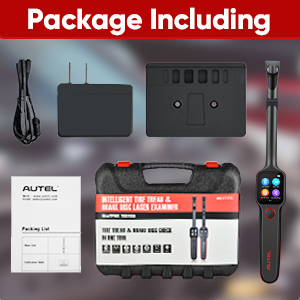
Figure 2.1: Included items in the TBE200(E) package.
- Autel MaxiTPMS TBE200(E) Laser Examiner Unit
- Calibration Plate / Stand
- Charging Cable
- Power Brick
- User Manual (PDF available online)
Initial Setup and Unboxing:
Before first use, ensure the device is fully charged. The TBE200(E) features a quick boot-up time. The magnetic tip allows for stable positioning during calibration and measurement.
Video 2.1: A detailed first look and unboxing of the Autel TBE200, demonstrating how to set up the device and its components.
3. Operating Instructions
The TBE200(E) is designed for ease of use, providing quick and accurate measurements for tire and brake health.
Basic Operation Steps:
- Power On: Long press the power button to turn on the device. The 1.65" AMOLED touchscreen will display the main menu.
- System Calibration: Before first use or if accuracy is in doubt, perform system calibration using the provided calibration plate. The magnetic tip of the TBE200(E) can be affixed to the plate for stability.
- Select Measurement Mode: From the main menu, select either 'Tire Tread' or 'Brake Disc' check.
- Perform Measurement: Position the laser examiner against the tire tread or brake disc surface as indicated on the screen. The laser will project lines to guide accurate placement.
- View Results: The device will display real-time measurement data and analysis on the screen. Results are color-coded (Gray: unchecked, Green: normal, Yellow: warning, Red: replace immediately).

Figure 3.1: How to use the Autel TBE200(E).
Advanced Functions:
- DOT Scan & Tire Recall Query: Use the dual cameras to scan or manually enter the DOT serial number on the tire sidewall to retrieve tire recall information (US region only) and tire age.
- Tire Expiration Notice: The device can detect if a tire has expired based on its manufacturing date.
- Document Tire Wear & Damage: Take photos of tire wear and damage for better analysis and record-keeping.
- Uneven Wear Analysis: The TBE200(E) can detect uneven wear across the tire's surface (outer, middle, inner areas) and suggest if a 4-wheel alignment is needed.

Figure 3.2: Detailed views of Brake Disc Wear Check and Tire Tread Depth Check.
Integration with ITS600/ITS600 PRO:
For optimal performance and comprehensive reporting, the TBE200(E) can be paired with an Autel ITS600 or ITS600 PRO TPMS tool via Wi-Fi. This integration allows for:
- Viewing tire tread depth and brake disc wear information on the larger screen of the ITS600.
- Combining TPMS data with tire and brake wear data to generate comprehensive vehicle health reports.
- Printing or emailing detailed reports for customers or record-keeping.

Figure 3.3: Generating a comprehensive test report with ITS600 integration.
Detailed Operation Video:
Video 3.1: A comprehensive demonstration of the Autel MaxiTPMS TBE200E, showcasing its laser tire tread diagnosis and scan tool features.
4. Maintenance and Care
To ensure the longevity and accuracy of your Autel MaxiTPMS TBE200(E), follow these maintenance guidelines:
- Keep the device clean and free from dust, dirt, and moisture. Use a soft, dry cloth for cleaning.
- Store the device in its rugged case when not in use to protect it from physical damage.
- Regularly check the laser emitter and camera lenses for obstructions or damage.
- Perform system calibration periodically to maintain measurement accuracy.
- Ensure the device's battery is charged regularly, especially before extended periods of storage.
5. Troubleshooting
If you encounter any issues with your Autel MaxiTPMS TBE200(E), please refer to the following common troubleshooting tips:
- Device not powering on: Ensure the battery is charged. Connect the device to the power adapter and allow it to charge for at least 30 minutes before attempting to power on again.
- Inaccurate readings: Perform a system calibration using the provided calibration plate. Ensure the measurement surface is clean and free from debris.
- Connectivity issues with ITS600: Ensure both devices have Wi-Fi enabled and are within range. Restart both the TBE200(E) and the ITS600, then attempt to reconnect.
- Screen unresponsive: Try restarting the device. If the issue persists, contact customer support.
For more detailed troubleshooting or issues not listed here, please refer to the full user manual (PDF) or contact Autel customer support.
6. Specifications
| Feature | Specification |
|---|---|
| Brand | Autel |
| Model | MaxiTPMS TBE200 |
| Material | Plastic |
| Item Dimensions (L x W x H) | 2 x 10 x 1.54 inches |
| Item Weight | 1.58 Kilograms (3.47 pounds) |
| Screen Size | 1.65 Inches (AMOLED Touchscreen) |
| Accuracy | 0.1 mm (Laser) |
| Cameras | 4-megapixel macro, 8-megapixel zoom |
| Battery | 3.7 V/3000 mAh (approx. 8 hours continuous use) |
7. Warranty and Support
The Autel MaxiTPMS TBE200(E) comes with a 1-year warranty from the date of purchase. Autel is committed to providing high-quality products and excellent customer service.
Customer Support:
For any technical assistance, warranty claims, or product inquiries, please utilize the following support channels:
- Online Support: Autel offers 24/7 online support for its products. Refer to the official Autel website for support resources and contact information.
- Email Support: You can contact Autel support via email for assistance. The feature bullets mention immoautel@outlook.com for support.
- Authorized Dealers: Contact your authorized Autel dealer for local support and service.
When contacting support, please have your device's serial number (12 digits) and proof of purchase readily available.
Ask a question about this manual
Ask about setup, troubleshooting, compatibility, parts, safety, or missing instructions. Manuals+ will review the question and use this page’s manual context to help answer it.