
BOMGE 220UB
BOMGE 220UB UHF Dual Wireless Microphone System
User Instruction Manual
Introduction
Thank you for choosing the BOMGE 220UB UHF Dual Wireless Microphone System. This system is designed to provide clear, stable audio transmission for various applications, including karaoke, public speaking, and small performances. Please read this manual thoroughly before operating the device to ensure proper use and optimal performance.
Package Contents
Please check the package to ensure all items are present:
- 2 x Handheld Wireless Microphones (BOMGE BG-220U)
- 1 x 6.35mm Plug Receiver (BOMGE BG-220U Universal Wireless Microphone)
- 2 x Anti-slip Rings
- 1 x USB Charging Cable
- 1 x User Manual
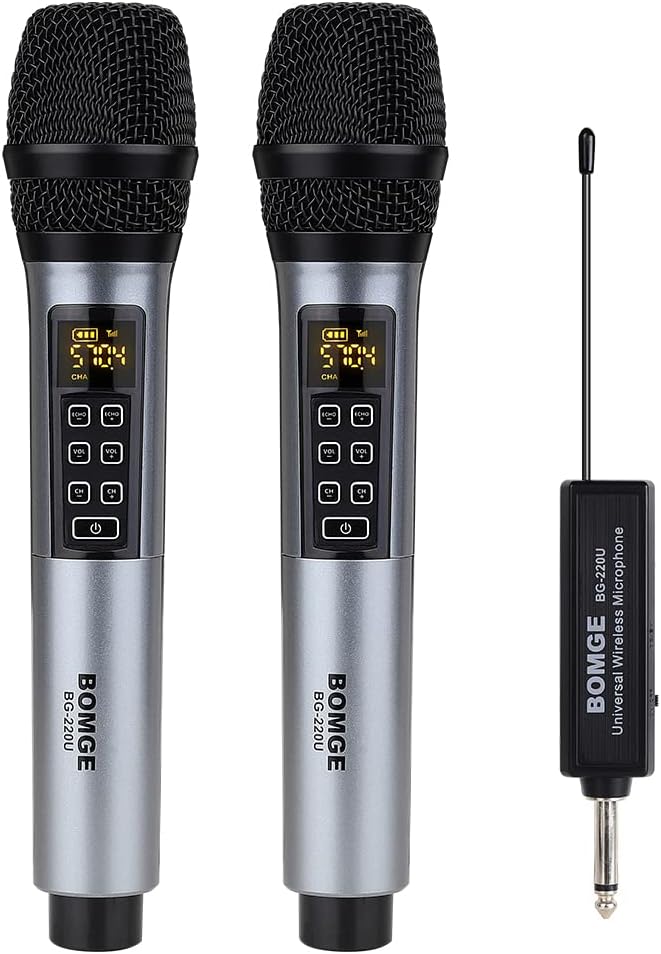
Image Description: This image displays the complete BOMGE 220UB system. It shows two silver-colored handheld wireless microphones with black grilles and digital displays, alongside a compact black 6.35mm plug receiver with an antenna. This illustrates the main components included in the package.
Product Overview
Microphone Features
- Digital Display: Shows battery level, channel, and signal strength.
- Controls: Volume adjustment (+/-), Channel adjustment (long press), Echo, Treble, Bass.
- Construction: Durable metal body for impact and corrosion resistance.
- Capsule: Designed for clear voice capture with noise filtering technology.

Image Description: This image provides a detailed view of the microphone and receiver, including their dimensions and control layouts. It highlights the microphone's digital display showing battery power and frequency point, and labels the buttons for effect adjustment, volume adjustment, frequency band, and the on/off switch. The receiver's 6.35mm plug and overall length are also indicated.
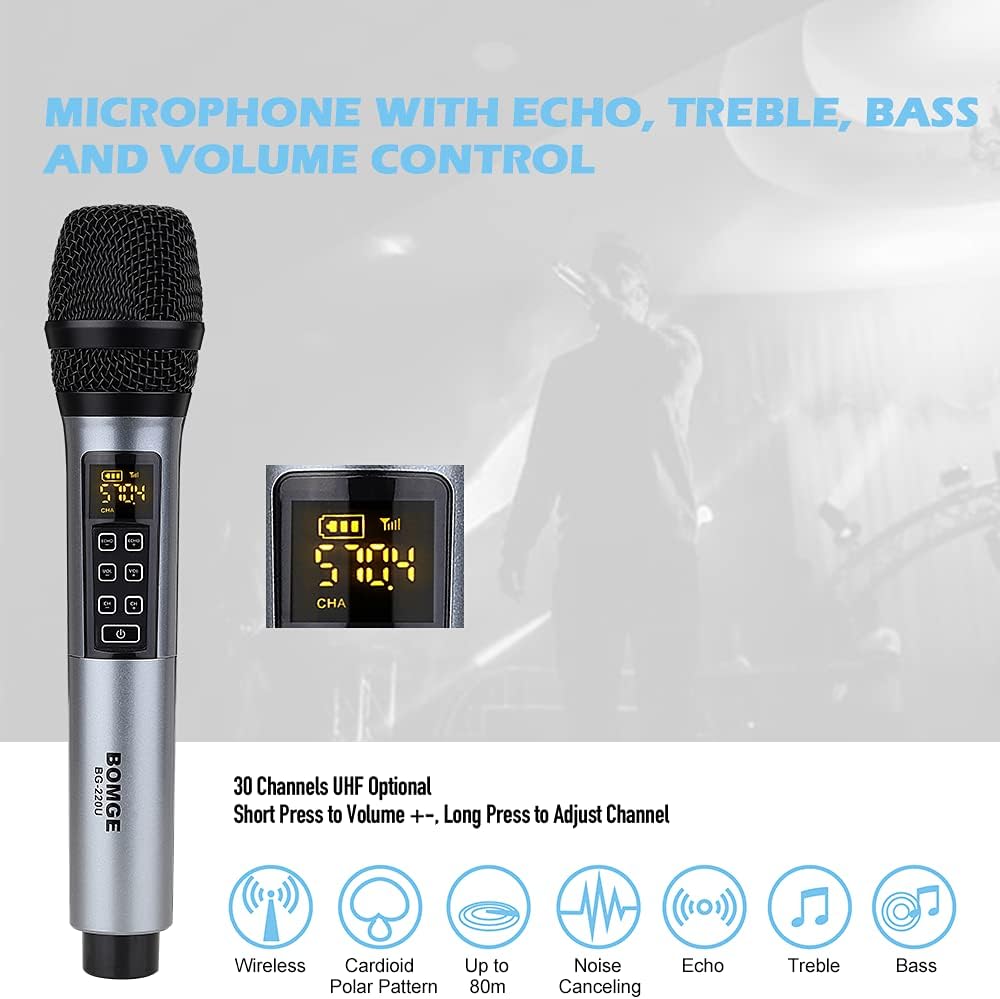
Image Description: This image focuses on the microphone's control panel and its various features. It shows the digital display with battery and channel information, and illustrates the buttons for adjusting Echo, Treble, Bass, and Volume. It also indicates the microphone's wireless capability, cardioid polar pattern, operating range up to 80m, noise canceling, and sound adjustment options.

Image Description: This image highlights the microphone's capsule design, emphasizing its sound guide and quiet technology. It illustrates how the electrostatic impedance design and filter wool work to filter out noise, ensuring clear and pleasant voice output. A polar pattern diagram is also included, showing the microphone's directional sensitivity.
Receiver Features
- Connectivity: 6.35mm (1/4 inch) plug for direct connection to audio equipment.
- Charging Interface: DC/5V USB port for recharging.
- Power Switch: On/Off slide switch.
- Antenna: Integrated antenna for stable signal reception.

Image Description: This image provides a close-up view of the receiver, detailing its key components. It clearly labels the DC/5V charging interface, the main body of the receiver with the BOMGE branding, and the push switch for power on/off. This helps users identify the charging port and power control.
Setup
- Charge the Devices: Before first use, fully charge both microphones and the receiver using the provided USB charging cable. Refer to the "Charging" section for details.
- Connect the Receiver: Insert the 6.35mm plug receiver into the microphone input (MIC IN) of your compatible audio device (e.g., karaoke machine, active speaker, power amplifier, mixer, audio interface).
- Power On:
- Slide the ON/OFF switch on the receiver to the "ON" position.
- Press and hold the power button on each microphone until the display illuminates.
- Automatic Pairing: The receiver and microphones are designed to automatically pair upon power-on. The microphone display will show a stable channel and signal indicator once connected.
- Volume Adjustment: Start with the microphone volume at a low setting and gradually increase it to a comfortable level on both the microphone and your audio device.
Important Note on Compatibility: This system is not compatible with mobile phones, computers, tablets, laptops, iPads, AV receivers, TVs, or bus audio systems. Ensure your audio device has a dedicated 6.35mm microphone input.

Image Description: This diagram illustrates the compatibility of the BOMGE 220UB system. It shows the microphones and receiver connecting to compatible devices like power amplifiers, speakers, and mixers via a 6.5mm jack. Crucially, it also clearly indicates devices that are NOT compatible, such as TVs and bus audio, and advises against using it with audio devices lacking a "MIC INPUT".
Operating Instructions
Microphone Controls
- Volume Adjustment: Short press the VOL+ or VOL- buttons to increase or decrease the microphone's output volume.
- Channel Adjustment: Long press the CH button to cycle through available UHF channels if interference is encountered. The system supports 30 optional channels.
- Sound Effects: Use the ECHO, TREBLE, and BASS buttons to adjust the sound characteristics to your preference.
- Power On/Off: Press and hold the Power button to turn the microphone on or off.
Operating Range
The system offers a wireless operating range of up to 278 feet (approximately 85 meters) in an open area. For optimal and stable performance, an ideal distance of 80 meters (approximately 262 feet) in open areas without interference is achievable, with a recommended operating distance of 50 meters (approximately 164 feet).

Image Description: This image illustrates the operating distance of the BOMGE 220UB system, stating an ideal distance of 80m in open areas and a recommended distance of 50m. It also highlights the use of UHF (Ultra High Frequency) technology for universal wireless microphone operation, ensuring stable signal transmission.
Charging
Both the microphones and the receiver are equipped with built-in rechargeable batteries. To charge:
- Connect the provided USB charging cable to the DC/5V port on the receiver and to a standard USB power adapter (not included) or a computer USB port.
- For the microphones, connect the USB charging cable to their respective charging ports (usually located at the bottom or side, refer to product overview images for exact location).
- A full charge typically takes approximately 2-3 hours.
- Once fully charged, the devices can operate for up to 7 hours.
Note: The microphone display will show the battery level. Charge the devices when the battery indicator is low to ensure uninterrupted performance.
Compatibility Guidelines
For optimal performance and to avoid damage, adhere to the following compatibility guidelines:
- Compatible Devices: Karaoke machines, active speakers, power amplifiers, mixers, and audio interfaces with a 6.35mm (1/4 inch) microphone input.
- Incompatible Devices: Mobile phones, computers, tablets, laptops, iPads, AV receivers, TVs, and bus audio systems.
- Power Recommendation: It is highly recommended to use this system with audio devices that have a power output above 70W. It is NOT recommended for use with devices below 15W, as this may result in suboptimal sound quality or insufficient amplification.
Troubleshooting
| Problem | Possible Cause | Solution |
|---|---|---|
| No sound from microphone. |
|
|
| Interference or static. |
|
|
| Short battery life. |
|
|
| Microphone not picking up voice clearly. |
|
|
Specifications
| Feature | Detail |
|---|---|
| Model | BOMGE 220UB |
| Microphone Form Factor | Microphone System (Handheld) |
| Wireless Technology | UHF (Ultra High Frequency) |
| Operating Range | Up to 80 meters (262 feet) line of sight; Recommended 50 meters (164 feet) |
| Channels | 30 optional channels |
| Power Source | Built-in Rechargeable Batteries (Microphones & Receiver) |
| Charging Time | Approx. 2-3 hours |
| Operating Time | Up to 7 hours |
| Material | Metal (Microphone body) |
| Polar Pattern | Omnidirectional |
| Impedance | 600 Ohms |
| Connector Type | 6.35mm (1/4 inch) plug for receiver, USB for charging |
| Product Dimensions (Microphone) | Approx. 26 cm (10.2 inches) length, 5 cm (2 inches) diameter (based on image) |
| Product Dimensions (Receiver) | Approx. 11.3 cm (4.4 inches) length, 2.5 cm (1 inch) width (based on image) |
| Item Weight | 700 Grams (total package weight) |
Maintenance
- Cleaning: Use a soft, dry cloth to clean the microphones and receiver. Do not use liquid cleaners or solvents.
- Storage: Store the system in a cool, dry place away from direct sunlight and extreme temperatures when not in use.
- Battery Care: For prolonged storage, charge the batteries every 3-6 months to maintain their health.
- Handling: Avoid dropping the microphones or subjecting them to strong impacts, as this can damage internal components.
Warranty and Support
For warranty information, technical support, or service inquiries, please contact BOMGE customer support through your purchase platform or the official BOMGE website. Please have your product model number (220UB) and purchase details ready when contacting support.
Ask a question about this manual
Ask about setup, troubleshooting, compatibility, parts, safety, or missing instructions. Manuals+ will review the question and use this page’s manual context to help answer it.