Introduction
This manual provides comprehensive instructions for the setup, operation, and maintenance of your Flysky FS-GR3E 2.4G Receiver. Please read this manual thoroughly before using the product to ensure proper function and longevity.

Image: Two Flysky FS-GR3E 2.4G Receivers, showing their compact design and antenna.
Product Specifications
| Model | FS-GR3E (RC-DR2264X2) |
| Channels | 3 channels |
| High Frequency Mode | GFSK |
| High Frequency Modulation | PPM |
| Frequency | 2.4G |
| Waterproof | Yes (with light blue label) |
| Power Input | 4.0-6.5V |
| System Type | AFHDS |
| Bind Port | Yes |
| Power Port | Yes (VCC) |
| Data Port | PWM |
| Dimensions (Package) | 6.57 x 4.25 x 0.59 inches |
| Item Weight | 0.634 ounces |
| Manufacturer Recommended Age | 15 years and up |

Image: Detailed view of the FS-GR3E receiver, highlighting its dimensions and key technical specifications such as modulation, system type, and power requirements.
Compatibility
The Flysky FS-GR3E receiver is compatible with a wide range of Flysky transmitters. Ensure your transmitter is listed below for proper operation:
- Flysky FS-i6X
- Flysky FS-i6
- Flysky FS-T6
- Flysky FS-CT6B
- Flysky FS-i10
- Flysky FS-TH9X
- Flysky FS-i8
- Flysky FS-GT2
- Flysky FS-GT2B
- Flysky FS-GT2E
- Flysky FS-GT3B
- Flysky FS-GT3C
- Flysky FS-T4B
- Flysky FS-i4X
- Flysky FS-i4

Image: A visual guide displaying various Flysky transmitter models that are compatible with the FS-GR3E receiver.
Setup and Binding Instructions
Follow these steps carefully to set up and bind your FS-GR3E receiver with your compatible Flysky transmitter.
- Install batteries in the transmitter and turn it off.
- Connect the binding jumper to the battery port of the receiver.
- Connect the battery of the receiver to any channel power supply. The red LED will blink, indicating that it is in binding mode.
- Press and hold the bind key of the transmitter and turn it on.
- The red LED of the receiver should stop blinking, meaning a successful binding.
- Disconnect the receiver battery.
- Turn off then turn back on the transmitter.
- Connect all the servos to the receiver and then connect its battery.
- Check if all servos are working as expected.
- If anything is wrong, restart this procedure from the beginning.
System Switching (AFHDS / AFHDS 2A):
- Turn the steering wheel and press the "BIND" button when turning the transmitter on.
- If the green LED keeps flashing, the current system is AFHDS. Press the "BIND" button to save this system.
- If the green LED flashes twice every time, the current system is AFHDS 2A. Press the "BIND" button to save this system.
- Restart the transmitter, and the current system will be the one you saved.

Image: A step-by-step diagram illustrating the binding process for the FS-GR3E receiver, showing connections for the bind cable, battery, and LED indicator.

Image: The FS-GR3E receiver connected to a battery pack, demonstrating a typical power connection.

Image: The FS-GR3E receiver connected to a servo, illustrating a typical control connection.
Operating Guidelines
Once bound, the FS-GR3E receiver operates by receiving signals from your transmitter and relaying them to the connected components (e.g., servos, ESCs). Ensure all connections are secure before operation.
- Always power on the transmitter first, then the receiver.
- Always power off the receiver first, then the transmitter.
- Ensure the receiver's antenna is positioned correctly for optimal signal reception. Avoid bending or cutting the antenna.
- Operate within the specified range to maintain a stable connection.

Image: The FS-GR3E receiver integrated into an RC vehicle chassis, demonstrating a typical installation scenario.
Maintenance
Proper maintenance will extend the life of your FS-GR3E receiver.
- Keep the receiver clean and free from dust and debris.
- Although the receiver is waterproof, avoid prolonged submersion or exposure to harsh chemicals.
- Regularly check all connections for looseness or corrosion.
- Store the receiver in a dry, cool place when not in use.
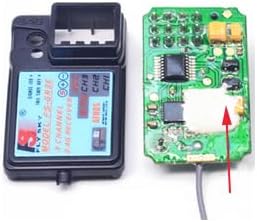
Image: An internal view of the FS-GR3E receiver, showing its circuit board and components, which should be kept clean and dry.
Troubleshooting
If you encounter issues with your FS-GR3E receiver, refer to the following common problems and solutions:
| Problem | Possible Cause | Solution |
|---|---|---|
| Receiver not binding | Incorrect binding procedure, low battery, incompatible transmitter. | Review "Setup and Binding Instructions". Ensure transmitter is compatible and batteries are charged. Try binding again. |
| Loss of signal/intermittent connection | Antenna damage/poor positioning, interference, out of range, low transmitter/receiver battery. | Check antenna for damage and ensure it's properly extended. Avoid operating near strong interference sources. Stay within operating range. Charge batteries. |
| Servos not responding | Incorrect servo connection, faulty servo, receiver not powered, not bound. | Verify servo connections to the correct channels. Test with a different servo if possible. Ensure receiver is powered and successfully bound. |
Warranty and Support
The Flysky FS-GR3E receiver comes with a 12-month worry-free warranty from the date of purchase. This warranty covers manufacturing defects and ensures friendly customer service.
For technical support, warranty claims, or any inquiries, please contact RCmall customer service through the platform where you purchased the product or visit the official RCmall store page for contact information.
RCmall Store Link: RCmall Official Store