
1. Product Overview
The LAUNCH X431 Pros V+ 5.0 Elite is a professional automotive diagnostic scanner designed for comprehensive vehicle system analysis. This tool offers advanced functionalities including bi-directional control, ECU coding, and over 37 reset services, making it suitable for a wide range of diagnostic and maintenance tasks. It features a robust hardware design and an intuitive Android-based interface for efficient operation.

Image 1.1: Overview of the LAUNCH X431 Pros V+ 5.0 Elite and its core capabilities.
Key Features:
- Advanced Hardware: Equipped with an 8.0 MP rear camera, Android 10.0 system, dual-frequency Wi-Fi (2.4GHz & 5GHz), 4GB RAM + 64GB storage, 6300mAh battery, and a 2.0 GHz quad-core CPU.
- DBSCar VII Connector: Features indicator lights for intuitive and user-friendly diagnostics, ensuring faster and more stable communication.
- CANFD Protocol Support: Newly added CANFD connector allows diagnosis of a wider range of vehicle models up to model year 2024.
- Bi-Directional Control (Active Test): Perform active tests on solenoids and actuators to verify operational status.
- ECU Coding: Modify pre-programmed options in the software to customize vehicle settings.
- 37+ Reset & Relearn Functions: Includes Oil Reset, ABS Bleeding, EPB Reset, SAS Reset, Injector Coding, TPMS Service, and many more.
- AutoAuth for FCA SGW: Provides diagnostic access for 2018+ FCA vehicles.
- Automatic VIN Detection: Smart AutoVIN technology for quick and accurate vehicle identification.
- Extensive Vehicle Coverage: Supports over 200,000 vehicle models from more than 200 manufacturers.
2. Setup Instructions
2.1 Unpacking and Initial Inspection
Carefully unpack all components from the carrying case. Verify that all items listed in the packing list are present and undamaged. The package typically includes the diagnostic tablet, DBSCar VII VCI connector, various OBD adapters, USB Type-A to Type-C cable, power adapter, quick start guide, and user manual.
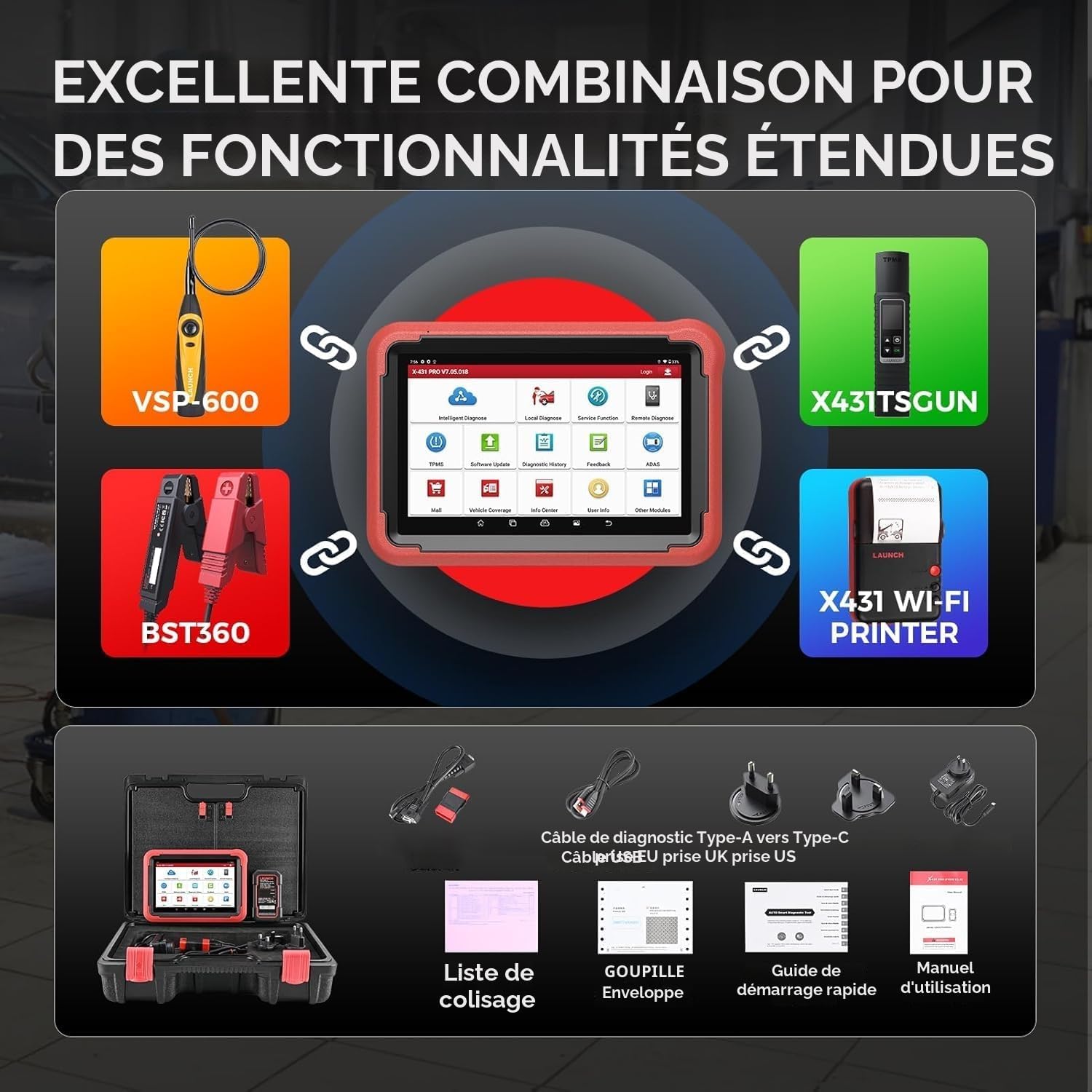
Image 2.1: Typical contents of the LAUNCH X431 Pros V+ 5.0 Elite package.
2.2 Charging the Device
Before first use, fully charge the diagnostic tablet using the provided power adapter. Connect the USB Type-C cable to the tablet and the power adapter to a suitable electrical outlet. The charging indicator will show the charging status. A full charge ensures optimal performance and uninterrupted diagnostic sessions.
2.3 Powering On and Initial Configuration
- Press and hold the power button on the tablet to turn it on.
- Follow the on-screen prompts to complete the initial setup, including language selection, Wi-Fi connection, and time zone settings.
- Register your device and create a LAUNCH account if prompted. This is necessary for software updates and online services.
2.4 Connecting the DBSCar VII VCI
The DBSCar VII VCI (Vehicle Communication Interface) connects the diagnostic tablet to the vehicle's OBD-II port. Ensure the VCI is securely plugged into the vehicle's OBD-II port, typically located under the dashboard. The VCI features indicator lights that confirm a successful connection and communication status.
3. Operating Instructions
3.1 Vehicle Connection and Identification
- Ensure the DBSCar VII VCI is connected to the vehicle's OBD-II port and the tablet is powered on and connected via Bluetooth or USB.
- From the main menu, select "Intelligent Diagnose" or "Local Diagnose".
- Automatic VIN Detection: For most vehicles (2006+), the system can automatically detect the VIN. Select "AutoVIN" and allow the tool to identify the vehicle.
- Manual Input: If AutoVIN fails or is not supported, select "Manual Input" to manually enter vehicle details such as make, model, and year.

Image 3.1: The diagnostic tool displaying all systems diagnosed and the AutoVIN feature.
3.2 System Diagnostics
After vehicle identification, you can proceed with system diagnostics. The tool can scan all accessible on-board ECUs.
- Read/Clear Codes: Retrieve Diagnostic Trouble Codes (DTCs) from all available systems and clear them after repairs.
- Live Data Stream: View real-time data parameters from various sensors and components. The tool supports 12-in-1 graphic live data display for detailed analysis.
- Freeze Frame Data: Capture a snapshot of sensor values at the moment a DTC was set, aiding in fault diagnosis.
- ECU Info. Retrieval: Access detailed information about the vehicle's Electronic Control Units.

Image 3.2: Overview of OE-level diagnostic functions including all system diagnostics, AutoAuth, bi-directional control, ECU coding, key programming, and AutoVIN.
3.3 Bi-Directional Control (Active Test)
This function allows you to send commands to vehicle systems/components to test their operational status without using the vehicle's controls. This is crucial for pinpointing faults.
- Examples include: turning on the radiator fan, modulating the throttle, operating mirrors, injector buzz test, activating the A/C compressor, testing door lock actuators, and more.

Image 3.3: Illustration of online coding (ECU coding) and bi-directional (active test) capabilities.
3.4 ECU Coding and Online Functions
The ECU Coding function allows you to change pre-programmed options within the vehicle's software. This can be used for customization or to address specific vehicle issues.
- Component Matching: Match/learn newly replaced ECUs.
- ECU Replacement: Write a VIN to the ECU, recode replacement parts.
- Online Calibration & Parameterization: Access online services for precise adjustments.
- V.A.G Guided Functions: Step-by-step instructions for complex procedures on VAG vehicles.
- Flash Hidden Functions: Unlock hidden features in certain vehicle models.
3.5 Reset and Special Functions
The tool provides over 37 common reset and special functions to perform various maintenance and service tasks.
- Oil Reset, ABS Bleeding, Electronic Parking Brake (EPB) Reset, Steering Angle Sensor (SAS) Reset, Injector Coding, Tire Pressure Monitoring System (TPMS) Reset, Battery Management System (BMS) Reset, Diesel Particulate Filter (DPF) Regeneration, Throttle Adaptation, Sunroof Initialization, Headlamp Matching (AFS Reset), Air Suspension Reset, Gearbox Reset, Key Programming (IMMO), Urea Reset, Coolant Bleed, Nox Sensor Reset, Seat Calibration, Window Calibration, AC System Relearn/Initialization, EGR Reset, Fuel Trim Reset, High Voltage Battery Diagnostic, GPF Regeneration, Camshaft/Crankshaft Sensor Relearn, and more.

Image 3.4: A selection of the 37+ hot reset functions available on the device.
3.6 CANFD Protocol Support
The newly added CANFD connector enables seamless diagnosis of a broader range of modern vehicle models (up to model year 2024) that utilize advanced CANFD protocols. This expands the tool's compatibility significantly.

Image 3.5: Illustration of the CANFD connector and its integration with the diagnostic system.
3.7 Diagnostic Report and Sharing
Upon completion of a diagnostic session, the tool can automatically generate a comprehensive diagnostic report. This report details the status of each vehicle module. Reports can be saved in PDF format and shared via email, facilitating record-keeping and client communication.
3.8 Remote Diagnostics
The LAUNCH X431 Pros V+ 5.0 Elite supports remote diagnostics, allowing technicians to provide assistance or receive support from a remote location. This feature enhances troubleshooting capabilities and efficiency.
4. Maintenance
4.1 Software Updates
The device includes 2 years of free online software updates. Regularly check for and install updates to ensure the tool has the latest vehicle coverage, functions, and bug fixes. Connect the tablet to a stable Wi-Fi network and navigate to the "Software Update" section in the main menu.
4.2 Battery Care
The integrated 6300mAh battery provides extended operation time. To prolong battery life:
- Avoid fully discharging the battery frequently.
- Store the device in a cool, dry place when not in use.
- Charge the device regularly, even if not in active use, to maintain battery health.
4.3 Cleaning and Storage
Clean the tablet screen and body with a soft, damp cloth. Avoid using abrasive cleaners or solvents. Store the device and its accessories in the provided carrying case to protect them from dust, moisture, and physical damage.
5. Troubleshooting
This section addresses common issues and provides solutions. For more complex problems, refer to the online feedback system or contact technical support.
5.1 Frequently Asked Questions (FAQs)
- Q: What should I do if the product I received is broken or appears used?
A: If you receive a damaged or previously used item, please inform us immediately. We will arrange for a new replacement. - Q: Who should I contact to resolve my issue?
A: You can contact us via Amazon Message or email (refer to the product details page for contact information). - Q: Why does the received product not function as described?
A: The list of features varies by vehicle brand, model, and year. For specific compatibility or functionality inquiries, please contact us via email.
5.2 Online Feedback System
The LAUNCH scanner includes an online feedback function. If you encounter any issues during the diagnostic process, use this feature to report the problem directly. This allows our support team to provide real-time assistance and helps improve product quality based on user feedback.
6. Specifications
| Feature | Specification |
|---|---|
| Brand | LAUNCH |
| Model Number | AMZLC-LC52110151FBAGM0u7M |
| Operating System | Android 10.0 |
| Screen Size | 8 Inches |
| Power Source | Battery Powered |
| Battery Capacity | 6300mAh |
| Memory | 4GB RAM + 64GB Storage (expandable) |
| Connectivity | Dual-frequency Wi-Fi (2.4GHz & 5GHz), Bluetooth |
| Camera | 8.0 MP Rear Camera |
| Key Features | Online ECU Coding, DBSCar VII Connector, Bi-Directional Diagnostic, IMMO Key Programming, CANFD Support, AutoAuth FCA SGW |
| UPC | 632111339436 |
7. Warranty and Support
7.1 Manufacturer's Warranty
This product is covered by a 2-year manufacturer's warranty. Please retain your proof of purchase for warranty claims. The warranty covers defects in materials and workmanship under normal use.
7.2 Technical Support
LAUNCH provides lifetime technical support for the X431 Pros V+ 5.0 Elite. For assistance, you can utilize the in-app online feedback system or contact customer service through the channels provided on the product details page or official LAUNCH website. Support resources also include "How-to" videos, operational skills guides, and a comprehensive user manual.


