
INKBIRDPLUS WM700
Inkbirdplus Moisture Meter
Model: WM700 User Manual
Introduction
The Inkbirdplus WM700 Digital Pin Type Moisture Meter is a precision instrument designed for fast and accurate measurement of moisture content in various materials. It is an essential tool for woodworkers, building inspectors, contractors, and homeowners to prevent material waste and identify potential moisture-related issues in structures.
This device features high-precision pins, a backlit LCD for clear readings, and 7 preset material modes to ensure accurate measurements across different material types. It also displays ambient temperature and humidity, offering comprehensive environmental data.

The Inkbirdplus WM700 is a professional tool for accurate moisture measurement in woodworking.

The meter is suitable for multiple uses, including measuring moisture in various woods and construction materials.
Safety Information
- Caution: The measurement pins are sharp. Handle the device with care to avoid injury. Keep the protection cap on when not in use.
- Do not attempt to measure live electrical circuits. This device is not designed for electrical testing.
- Keep the device dry. Avoid exposure to water or excessive humidity, which can damage the internal components.
- Store the device in a cool, dry place away from direct sunlight and extreme temperatures.
- Dispose of batteries according to local regulations. Do not mix old and new batteries.
Product Overview
Familiarize yourself with the components and display elements of your Inkbirdplus WM700 Moisture Meter.

Front and back view of the Inkbirdplus WM700 Moisture Meter, showing the display, buttons, and battery compartment.

Key components include the Electrode Protection Cap, Electrode Probe, Power Switch, SET Key, and Display Screen.
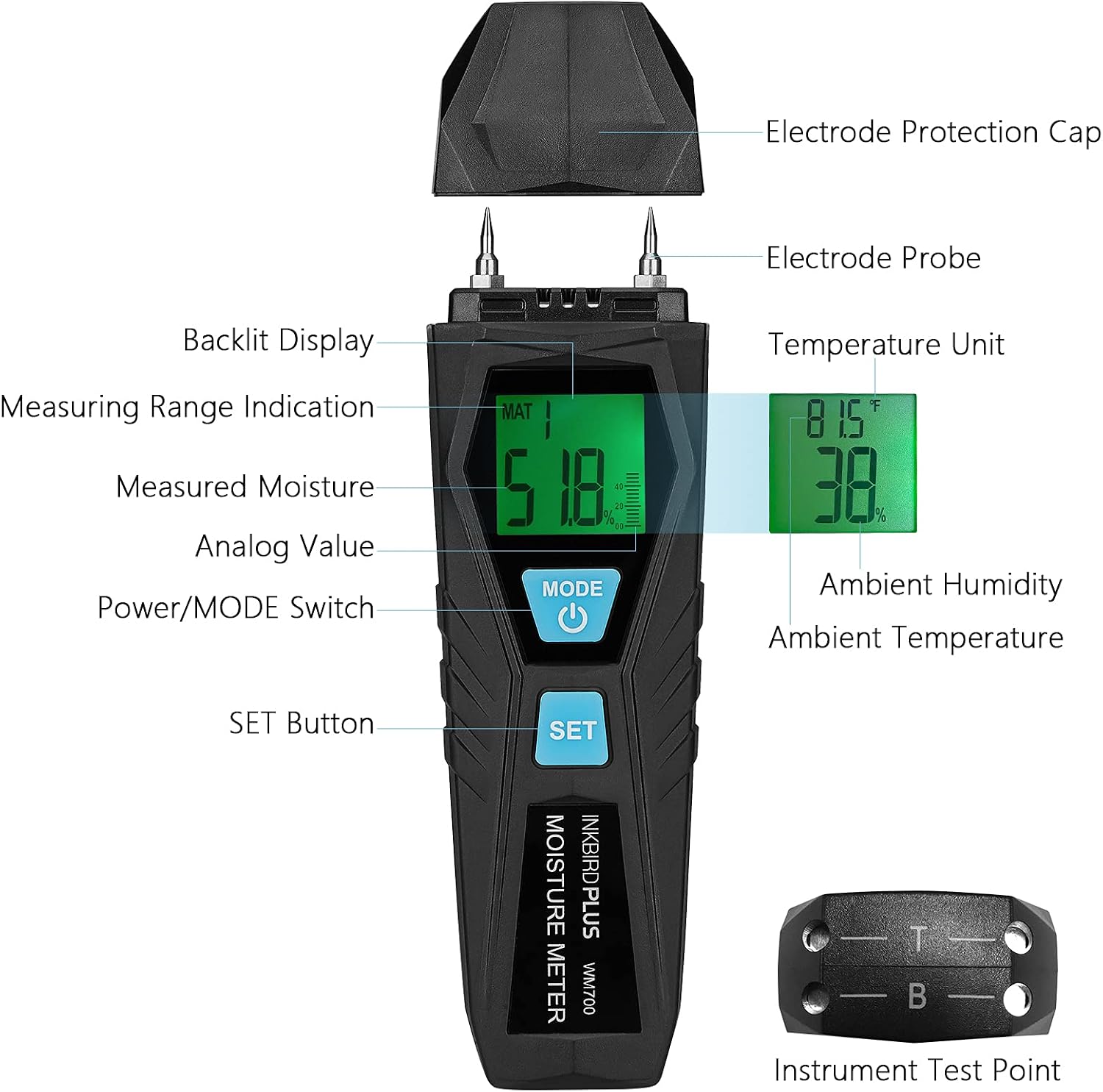
The backlit display shows Measured Moisture, Analog Value, Measuring Range Indication, Ambient Humidity, Ambient Temperature, and Temperature Unit.

A close-up view of the high-precision measurement pins and the instrument test points located on the protection cap.
Setup
Package Contents
Before first use, please verify that all items are included in the package:

The package includes the User Manual, Moisture Meter, Protection Bag, Packing Box, 2 AAA Batteries, and a Screwdriver.
Battery Installation
The Inkbirdplus WM700 requires 2 AAA batteries (included). Follow these steps to install them:
- Locate the battery compartment on the back of the device.
- Use the included screwdriver to open the battery compartment cover.
- Insert 2 AAA batteries, ensuring correct polarity (+ and -).
- Replace the battery compartment cover and secure it with the screw.
Operating Instructions
Basic Measurement
To take a moisture reading:
- Remove the protective cap from the measurement pins. The cap also contains 4 datum test points for calibration.
- Press the MODE button to turn on the device.
- Select the appropriate material mode (MAT1-MAT7) by pressing the SET button repeatedly until the desired mode is displayed. Refer to the 'Material Mode Selection' section for details.
- Carefully insert the measurement pins into the material you wish to test. Ensure both pins fully penetrate the surface for an accurate reading.
- Read the moisture percentage displayed on the LCD screen.
- After use, remove the pins from the material and replace the protective cap.
- The device will automatically turn off after 10 seconds of inactivity to save power. You can also press and hold the MODE button to manually turn it off.

Carefully remove the protection cap before taking measurements.

Insert the pins into the material to obtain a moisture reading.
Material Mode Selection
The WM700 offers 7 preset material modes (MAT1 to MAT7) to optimize measurement accuracy for different types of materials. Press the SET button to cycle through these modes. Refer to the table below for material types and their corresponding measurement ranges:

Select the appropriate material mode (MAT1-MAT7) for accurate readings.
Temperature and Humidity Display
The WM700 also displays ambient temperature and humidity. To switch between Celsius (°C) and Fahrenheit (°F) temperature units, press and hold the SET button for approximately 2 seconds while the device is on.

The meter displays ambient temperature and humidity, with an option to switch between Celsius and Fahrenheit.
Maintenance
- Cleaning: Wipe the device with a soft, dry cloth. Do not use abrasive cleaners or solvents.
- Storage: Always replace the protective cap over the pins when the meter is not in use. Store the meter in its protection bag in a dry, dust-free environment.
- Battery Replacement: If the battery low indicator appears on the display, replace both AAA batteries promptly to ensure accurate readings.
- Calibration: The protection cap includes 4 datum test points. Periodically test the meter against these points to ensure its accuracy. If readings are inconsistent, refer to the troubleshooting section or contact support.
Troubleshooting
Specifications
Warranty and Support
Inkbirdplus products are manufactured to high-quality standards and are warranted against defects in materials and workmanship. For specific warranty terms and conditions, please refer to the warranty card included with your product or visit the official Inkbirdplus website.
If you encounter any issues or have questions regarding the operation or maintenance of your WM700 Moisture Meter, please contact Inkbirdplus customer support. Our team is available to assist you with technical support and service inquiries.
Contact Information: Please refer to the contact details provided on the product packaging or the official Inkbirdplus website for the most up-to-date support information.
Ask a question about this manual
Ask about setup, troubleshooting, compatibility, parts, safety, or missing instructions. Manuals+ will review the question and use this page’s manual context to help answer it.