
WOPET B09GXBHF49
Contents
WOPET Automatic Pet Feeder User Manual
Brand: WOPET | Model: B09GXBHF49
1. Introduction
The WOPET Automatic Pet Feeder is designed to provide convenient and reliable feeding for your pets. With Wi-Fi connectivity and smartphone control, you can manage your pet's meal schedule from anywhere. This feeder features a 4L capacity, supports up to 15 meals per day with adjustable portions, and includes a voice recording function to call your pet to eat. Its durable design incorporates a food-grade stainless steel bowl and a secure twist-lock lid to maintain food freshness.

Image: The WOPET Automatic Pet Feeder, showing its design and the accompanying mobile application interface.
2. Setup Guide
2.1 Unboxing and Components
Before setup, ensure all components are present: the main feeder unit, stainless steel food bowl, and power adapter. Batteries (3 x D-cell) are optional for backup power and are not included.
2.2 Power Supply
The feeder supports dual power supply options:
- Primary Power: Connect the included power adapter to the feeder and a wall outlet.
- Battery Backup: For uninterrupted feeding during power outages, insert 3 D-cell batteries (not included) into the battery compartment at the bottom of the unit. It is recommended to use both power sources.

Image: Close-up view of the USB power port and the D-cell battery compartment.
2.3 App Installation and Wi-Fi Connection
- Download the WOPET app from your smartphone's app store (iOS or Android).
- Register or log in to your account.
- Follow the in-app instructions to add your feeder. Ensure your Wi-Fi network is 2.4GHz, as the feeder only supports this frequency.

Image: A smartphone displaying the easy setup steps within the WOPET application for remote control.
2.4 Food Loading
- Twist open the lid of the feeder.
- Ensure the stainless steel bowl is properly placed in its designated slot.
- Pour dry pet food (kibble size 2-15mm) into the food tank.
- Place the desiccant bag into its designated box under the lid to help keep food fresh.
- Securely close the lid by twisting it until it locks.

Image: Visual instructions demonstrating how to twist open the lid, remove the food bowl, insert the desiccant bag, install the food tank, and put the lid back on.
2.5 Custom Feeding Call Recording
You can record a 10-second voice message that will play during scheduled feeding times to call your pet. This feature provides comfort and familiarity for your pet.
- Access the voice recording function through the WOPET app settings.
- Record your message (e.g., "Hey boy, time to eat!").
- Save the recording. It will automatically play when food is dispensed.

Image: A dog looking towards the feeder, illustrating the voice message feature that calls pets to eat.
3. Operating Instructions
3.1 Scheduling Meals
The WOPET app allows you to set up to 15 meals per day with customizable portions.
- Open the WOPET app on your smartphone.
- Navigate to the feeding schedule section.
- Add new feeding times and specify the number of portions for each meal (1-20 portions, approximately 9 grams per portion).
- Save your schedule. The feeder will automatically dispense food at the set times.
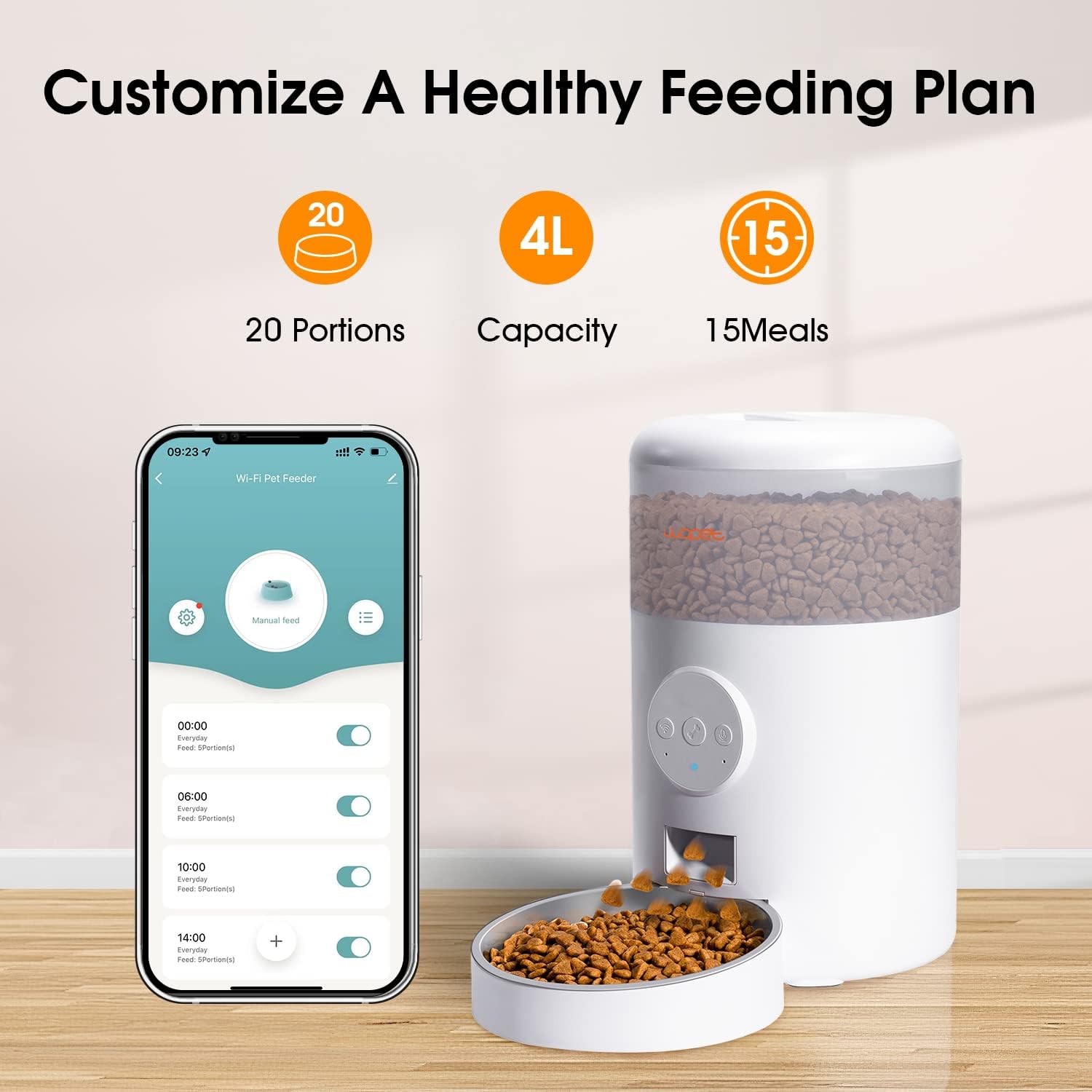
Image: The WOPET app interface demonstrating how to customize a healthy feeding plan with options for portions, capacity, and number of meals.
3.2 Manual Feeding
You can dispense food instantly outside of the scheduled times using the app's manual feeding option. This is useful for extra treats or testing the feeder.
- On the main screen of the WOPET app, locate the "Manual Feed" button.
- Tap the button to dispense a single portion, or select multiple portions if available.

Image: Illustrates the convenience of feeding your pet anytime, anywhere, whether on a business trip, at work, or traveling.
4. Maintenance
4.1 Cleaning
Regular cleaning ensures hygiene and proper functioning of the feeder.
- The food-grade stainless steel tray is detachable for easy cleaning. It can be hand washed with mild soap and water.
- Wipe the main feeder unit with a damp cloth. Do not submerge the main unit in water.
- Ensure all parts are completely dry before reassembling.
4.2 Maintaining Food Freshness
The feeder is designed with features to keep your pet's food fresh and crunchy:
- Secure Twist-Lock Lid: Always ensure the lid is securely twisted and locked to prevent air exposure and keep pets from accessing food.
- Built-in Desiccant Bag: Replace the desiccant bag periodically (e.g., every 1-2 months) to absorb moisture and maintain food quality.
- Patented Rotor: The internal rotor design helps prevent food jamming and maintains a sealed environment.

Image: Details of the secure twist-lock lid and the food-grade stainless steel tray, designed for safe and hygienic feeding.
5. Troubleshooting
- Feeder not dispensing food: Check power connection (adapter and batteries). Ensure the food tank is not empty and kibble size is within 2-15mm. Verify the feeding schedule in the app.
- App not connecting to feeder: Ensure your smartphone is connected to a 2.4GHz Wi-Fi network. Restart the feeder and your router. Re-attempt the pairing process in the app.
- Food jamming: Ensure kibble size is appropriate. Clean the dispensing mechanism if necessary.
- Voice recording not playing: Check app settings to ensure the recording is saved and enabled for feeding times.
6. Specifications
| Feature | Detail |
|---|---|
| Brand | WOPET |
| Model | B09GXBHF49 |
| Capacity | 4 Liters |
| Max Meals Per Day | 15 |
| Portions Per Meal | 1-20 (approx. 9g per portion) |
| Kibble Size | 2-15mm (dry food only) |
| Connectivity | 2.4GHz Wi-Fi |
| Voice Recording | Up to 10 seconds |
| Power Supply | Power Adapter (included) or 3 x D-cell Batteries (not included) |
| Material | Stainless Steel (bowl) |
| Item Dimensions (LxWxH) | 5 x 5 x 7 inches |
| Item Weight | 3.95 pounds |
7. Warranty and Support
WOPET stands behind the quality of its products. For warranty information, technical support, or any inquiries regarding your Automatic Pet Feeder, please refer to the contact information provided on the official WOPET website or within the WOPET application. Please retain your proof of purchase for warranty claims.
Documents and downloads
Ask a question about this manual
Ask about setup, troubleshooting, compatibility, parts, safety, or missing instructions. Manuals+ will review the question and use this page’s manual context to help answer it.