
Introduction
The WYZE TACTACAM Reveal External Solar Panel is designed to provide a continuous power source for your compatible TACTACAM Reveal trail cameras, including the Reveal X, Reveal XB, and Reveal SK models. This external solar panel helps extend the operational life of your camera by recharging its internal battery, reducing the need for frequent battery replacements and site visits.

Image: A person's hands holding the TACTACAM Reveal External Solar Panel, showcasing its compact design.
Setup and Installation
Proper installation of the solar panel is crucial for optimal performance. Follow these steps to set up your TACTACAM Reveal External Solar Panel:
- Choose a Location: Select a mounting location that receives maximum direct sunlight throughout the day. Avoid areas with heavy shade from trees or structures. The panel should ideally face south for northern hemisphere installations to capture the most sun.
- Mount the Panel: Use the included mounting strap or hardware to securely attach the solar panel to a tree, post, or other stable surface. Ensure the panel is positioned to allow for angle adjustment.
- Adjust the Angle: Angle the solar panel to directly face the sun during its peak hours. This maximizes charging efficiency.
- Connect to Camera: Connect the solar panel's power cable to the external power port on your TACTACAM Reveal trail camera. Ensure the connection is secure and weatherproof.

Image: A person installing a TACTACAM Reveal trail camera on a tree, with the external solar panel already mounted above it and connected.
The solar panel is designed to provide power even if the host camera batteries are completely depleted, ensuring continuous operation.
Operating Instructions
Once installed and connected, the TACTACAM Reveal External Solar Panel operates automatically. It converts sunlight into electrical energy to charge the internal battery of your connected TACTACAM Reveal trail camera.
- The panel will charge the camera's battery whenever sufficient sunlight is available.
- The efficiency of charging depends on the intensity and duration of direct sunlight.
- The panel is compatible with TACTACAM Reveal X, Reveal XB, and Reveal SK models.
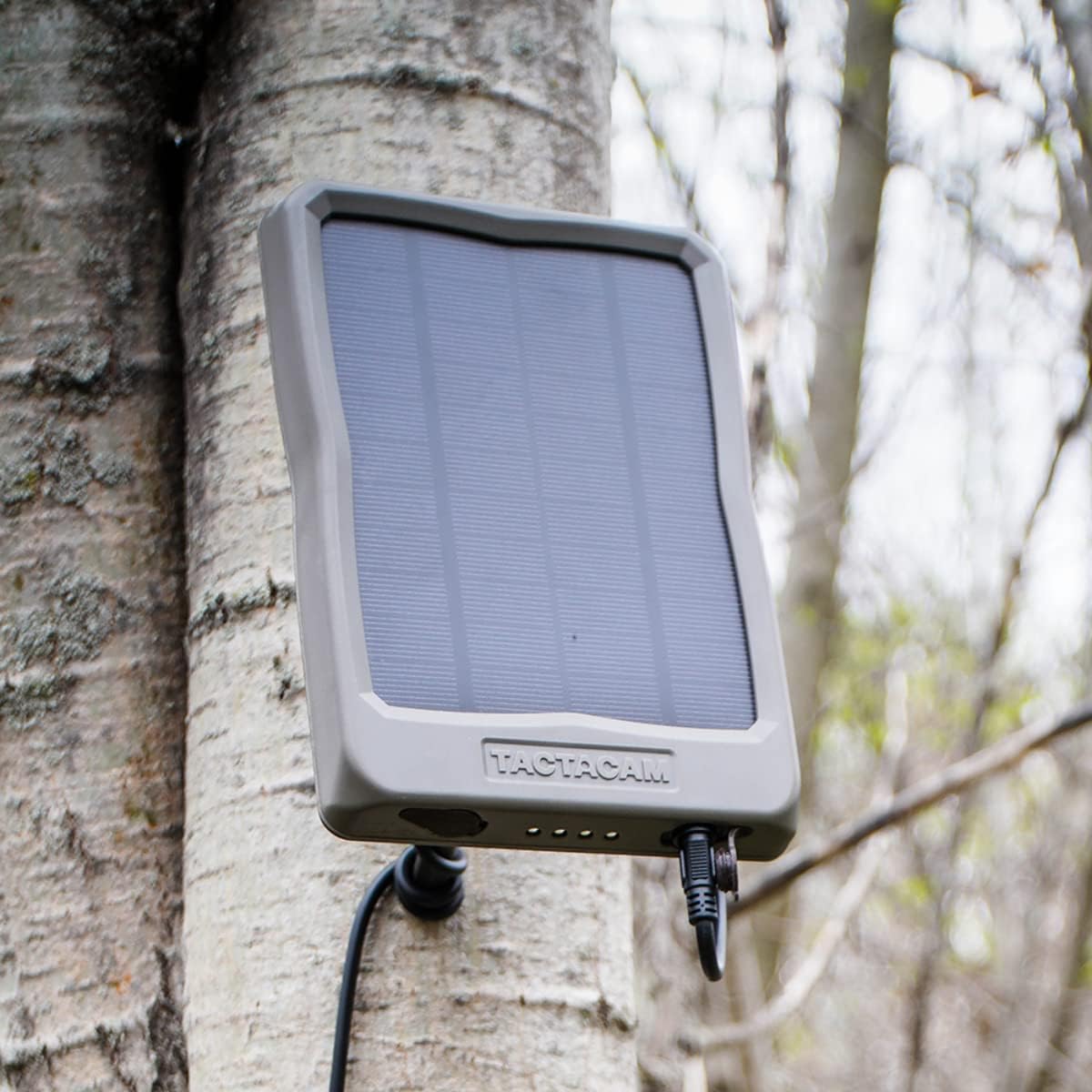
Image: A close-up view of the TACTACAM Reveal External Solar Panel securely mounted to a tree, showing its connection port.
Maintenance
To ensure the longevity and optimal performance of your solar panel, periodic maintenance is recommended:
- Cleaning: Regularly inspect the surface of the solar panel for dirt, dust, leaves, or other debris. Clean the panel gently with a soft, damp cloth to ensure maximum light absorption. Avoid abrasive cleaners or harsh chemicals.
- Connection Check: Periodically check the connection cable between the solar panel and the camera to ensure it is secure and free from damage.
- Obstruction Removal: Ensure no new foliage or objects are obstructing direct sunlight to the panel. Trim branches if necessary.
Troubleshooting
If your solar panel is not performing as expected, consider the following:
- Camera Battery Not Charging:
- Ensure the solar panel is receiving adequate direct sunlight. Partial shade significantly reduces charging efficiency.
- Verify that the connection cable is securely plugged into both the solar panel and the camera.
- Check the solar panel surface for dirt or obstructions and clean if necessary.
- Confirm compatibility: The panel is designed for TACTACAM Reveal X, Reveal XB, and Reveal SK models.
- Intermittent Charging: This can occur in environments with inconsistent sunlight, such as heavily treed areas. While the panel is designed to work in varied conditions, consistent direct sunlight yields the best results.
- Panel Damage: Inspect the panel for any physical damage. If the panel is cracked or severely damaged, it may not function correctly and might require replacement.
Specifications
| Feature | Detail |
|---|---|
| Brand | WYZE (Compatible with TACTACAM) |
| Model Number | 0850596007668 |
| Material | Aluminum, Tempered Glass |
| Product Dimensions | 10"L x 7"W x 4"H |
| Efficiency | High Efficiency |
| Maximum Voltage | 12 Volts |
| Item Weight | 1.87 pounds |
| Power Source | Battery Powered (via solar charging) |
| Compatibility | TACTACAM Reveal X, Reveal XB, Reveal SK trail cameras |
Warranty Information
For detailed warranty information regarding your WYZE TACTACAM Reveal External Solar Panel, please refer to the official WYZE or TACTACAM website, or the documentation included with your purchase. Warranty terms typically cover manufacturing defects for a specified period from the date of purchase.
Keep your proof of purchase for any warranty claims.
Support
If you require further assistance or have questions not covered in this manual, please contact customer support:
- Online Support: Visit the official WYZE website or TACTACAM website for FAQs, troubleshooting guides, and contact information.
- Contact Manufacturer: Refer to your product packaging or the manufacturer's website for specific customer service contact details (phone, email).