
1. Introduction
This manual provides detailed instructions for the installation, operation, and maintenance of your Edge Audio Xtreme Series EDX5000.1FD-E0 Monoblock Amplifier. The EDX5000.1FD-E0 is a high-performance Class D full-bridge amplifier designed for powerful audio output. Please read this manual thoroughly before attempting installation or operation to ensure proper use and to prevent damage.
1.1 Safety Precautions
- Always disconnect the vehicle's battery negative terminal before making any electrical connections.
- Ensure all wiring is properly routed and secured to prevent damage or short circuits.
- Use appropriate gauge wiring for power and ground connections as specified in this manual.
- Avoid mounting the amplifier in locations exposed to moisture or excessive heat.
- Consult a professional installer if you are unsure about any part of the installation process.
2. Package Contents
Verify that all items are present in the package before proceeding with installation.
- Edge Audio EDX5000.1FD-E0 Monoblock Amplifier
- Remote Bass Control Unit
- Wiring for Remote Bass Control
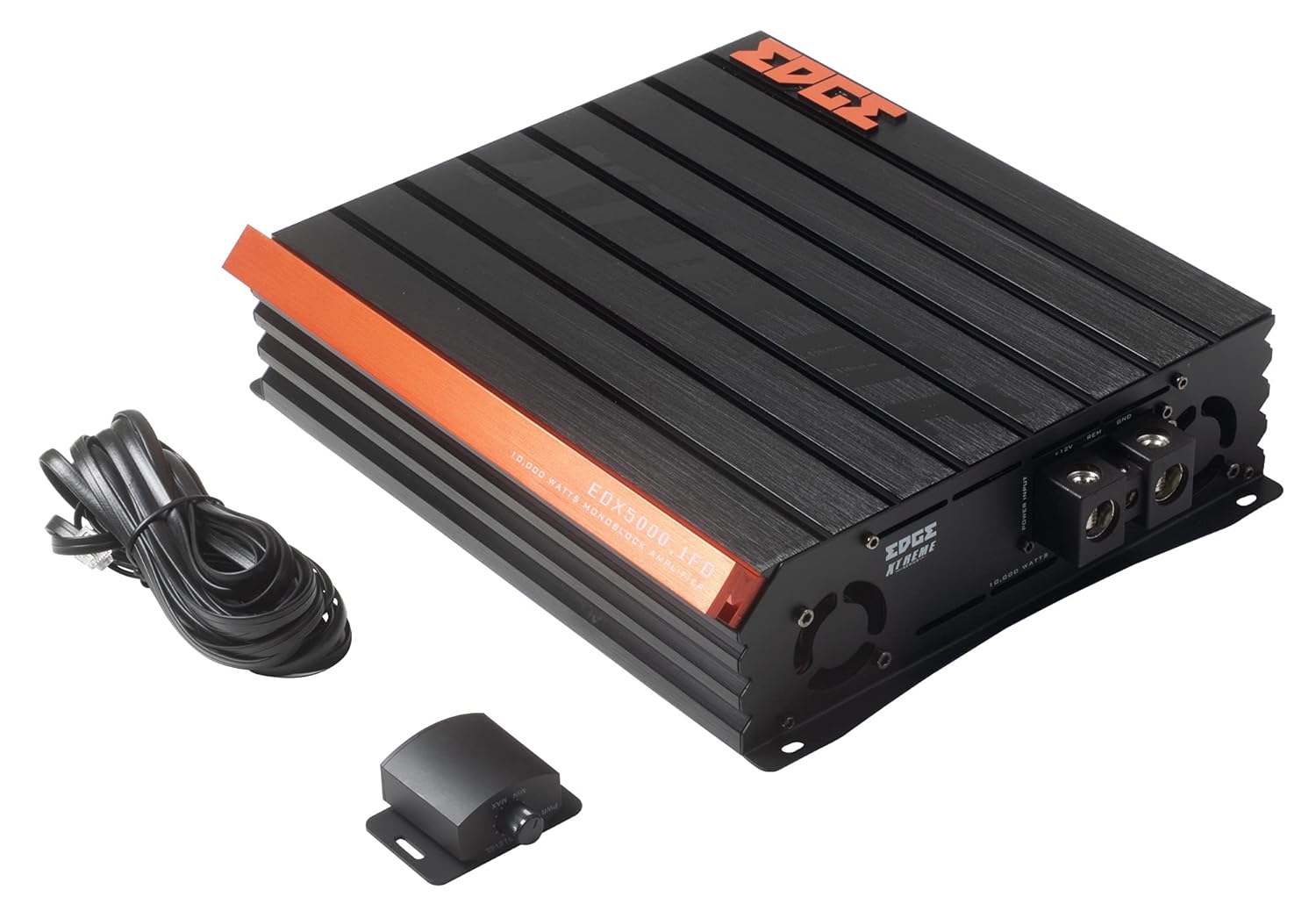
Image 2.1: Contents of the EDX5000.1FD-E0 package, including the amplifier, remote bass control, and connecting cable.

Image 2.2: The retail packaging for the Edge Audio EDX5000.1FD-E0 Monoblock Amplifier.
3. Features
The Edge Audio Xtreme Series EDX5000.1FD-E0 amplifier incorporates advanced features for optimal audio performance:
- Monoblock power amplifier design for dedicated subwoofer applications.
- Max Power: 10,000 watts.
- Built-in active crossovers (High-Pass Filter and Low-Pass Filter) for precise sound shaping.
- Adjustable Bass Boost circuit for enhanced low-frequency response.
- Ultra-efficient Class D topology for high power output with minimal heat generation.
- Wideband frequency response up to 20kHz.
- Full bridge technology for efficient power delivery.
- Compact footprint for versatile installation options.
- Dimensions (H x W x D): 2.5 x 10.4 x 9.1 inches (64 x 264 x 230mm).

Image 3.1: Top view of the EDX5000.1FD-E0 amplifier, showcasing its compact design and heatsink fins.
4. Setup and Installation
Proper installation is crucial for the performance and longevity of your amplifier. Follow these guidelines carefully.
4.1 Mounting Location
Mount the amplifier in a dry, well-ventilated area, away from direct sunlight or heat sources. Ensure sufficient airflow around the amplifier's heatsink. The amplifier is designed for surface mounting.
4.2 Wiring Connections
All wiring should be securely connected and insulated to prevent short circuits. Use high-quality, appropriate gauge wiring.
4.2.1 Power Connections
Connect the amplifier to the vehicle's electrical system as follows:
- +12V (Power): Connect a heavy-gauge power cable (e.g., 4 AWG or larger for 10,000W max power) directly from the positive terminal of the vehicle's battery to the +12V terminal on the amplifier. Install an appropriate fuse (not supplied) within 18 inches of the battery.
- GND (Ground): Connect a heavy-gauge ground cable of the same size as the power cable from the GND terminal on the amplifier to a clean, unpainted metal surface of the vehicle chassis. Ensure a solid electrical connection.
- REM (Remote Turn-On): Connect a smaller gauge wire (e.g., 18 AWG) from the REM terminal on the amplifier to the remote turn-on output of your head unit. This wire turns the amplifier on and off with your audio system.

Image 4.1: Power input terminals (+12V, REM, GND) on the EDX5000.1FD-E0 amplifier.
4.2.2 Audio Input Connections
Connect your head unit's RCA outputs to the 'LOW INPUT' RCA jacks on the amplifier.
4.2.3 Speaker Output Connections
Connect your subwoofer(s) to the speaker output terminals on the amplifier. Ensure correct polarity (+ to + and - to -) for optimal performance. Refer to your subwoofer's specifications for impedance matching.

Image 4.2: Rear panel of the EDX5000.1FD-E0 amplifier, showing low-level inputs, crossover controls, gain, bass boost, and speaker output terminals.
5. Operating Instructions
Once installed, adjust the amplifier settings for optimal sound quality.
5.1 Control Panel Overview
Refer to Image 4.2 for the location of the following controls:
- HPF (High-Pass Filter): Adjusts the high-pass crossover frequency. For subwoofer applications, this should typically be set to its minimum or off, as a low-pass filter is usually preferred.
- LPF (Low-Pass Filter): Adjusts the low-pass crossover frequency (15Hz - 200Hz). This filters out frequencies above the set point, sending only low frequencies to the subwoofer. Set this according to your subwoofer and system requirements, typically between 60Hz and 100Hz.
- GAIN: Matches the amplifier's input sensitivity to the output level of your head unit. Start with the gain at minimum, then slowly increase it until you hear distortion, then back off slightly. Do not use the gain control as a volume knob.
- BASS BOOST: Adjusts the level of bass enhancement (0dB - 12dB). Use sparingly to avoid distortion.
- FREQ (Bass Boost Frequency): Selects the center frequency for the bass boost (35Hz - 70Hz).
- REMOTE: Port for connecting the wired remote bass control unit.
5.2 Remote Bass Control
The included remote bass control allows for convenient adjustment of the subwoofer output level from the driver's seat. Connect it to the 'REMOTE' port on the amplifier.
6. Maintenance
Regular maintenance helps ensure the longevity and performance of your amplifier.
- Cleaning: Periodically clean the amplifier's exterior with a soft, dry cloth. Do not use harsh chemicals or abrasive cleaners. Ensure ventilation fins are free of dust and debris.
- Connection Check: Annually inspect all power, ground, remote, and speaker connections for tightness and corrosion. Loose connections can cause performance issues or damage.
- Environment: Ensure the amplifier remains in a dry, stable environment, protected from extreme temperatures.
7. Troubleshooting
If you experience issues with your amplifier, refer to the following common problems and solutions before contacting support.
- No Power:
- Check the in-line fuse near the battery.
- Verify +12V, GND, and REM connections are secure and receiving power.
- Ensure the remote turn-on wire is connected to a switched 12V source.
- No Sound:
- Check all RCA input and speaker output connections.
- Verify head unit is powered on and outputting audio.
- Adjust the GAIN control.
- Distorted Sound:
- Reduce the GAIN setting.
- Check speaker wiring for shorts or incorrect polarity.
- Ensure speaker impedance matches amplifier specifications.
- Reduce BASS BOOST if active.
- Amplifier Overheating:
- Ensure adequate ventilation around the amplifier.
- Check speaker impedance; running too low an impedance can cause overheating.
- Verify power and ground wire gauge is sufficient.
8. Specifications
Technical specifications for the Edge Audio Xtreme Series EDX5000.1FD-E0 Monoblock Amplifier:
| Feature | Specification |
|---|---|
| Model Number | EDX5000.1FD-E0 |
| Brand | EDGE |
| Amplifier Type | Monoblock, Class D, Full Bridge |
| Max Power | 10,000 Watts |
| Frequency Response | Up to 20kHz |
| Built-in Crossovers | Active (HPF, LPF) |
| Bass Boost | Adjustable (0-12dB) |
| Bass Boost Frequency | Adjustable (35Hz-70Hz) |
| Voltage | 230 Volts (Operating Voltage Range typically 12-14.4V DC for car audio) |
| Mounting Type | Surface Mount |
| Product Dimensions (H x W x D) | 2.5 x 10.4 x 9.1 inches (64 x 264 x 230mm) |
| Product Weight | 6.61 Pounds |
9. Warranty and Support
For warranty information or technical support, please refer to the documentation provided at the time of purchase or contact your authorized Edge Audio dealer. Keep your proof of purchase for warranty claims.


