1. Introduction
Thank you for choosing the ROXEL RSB100 Soundbar. This compact and versatile soundbar is designed to enhance your audio experience for music, movies, and gaming across various devices. Featuring Bluetooth connectivity, auxiliary input, USB, and Micro SD card support, along with a built-in microphone for hands-free calls, the RSB100 offers superior sound quality in a portable and elegant design. Please read this manual carefully to ensure proper use and maintenance of your device.
2. Package Contents
Please check the box for the following items:
- ROXEL RSB100 Soundbar
- Power Cable
- Auxiliary Cable
- User Manual
3. Key Features
- Compact and portable design
- Multiple connectivity options: Bluetooth, AUX, USB, Micro SD card
- Built-in microphone for hands-free calling
- 20W PMPO impressive audio output with superior bass and adaptive equalizer
- TWS (True Wireless Stereo) function for combining two RSB100 soundbars wirelessly
- Long battery life (up to 12 hours)
- Compatible with Smart TVs, PCs, laptops, smartphones, tablets, gaming consoles (XBOX, PS5), MP3 players
4. Product Overview

Figure 4.1: Angled view of the ROXEL RSB100 Soundbar, showcasing its sleek black design and illuminated control dial on the right side.

Figure 4.2: Front view of the ROXEL RSB100 Soundbar, highlighting the metal grille and the "ROXEL" branding.
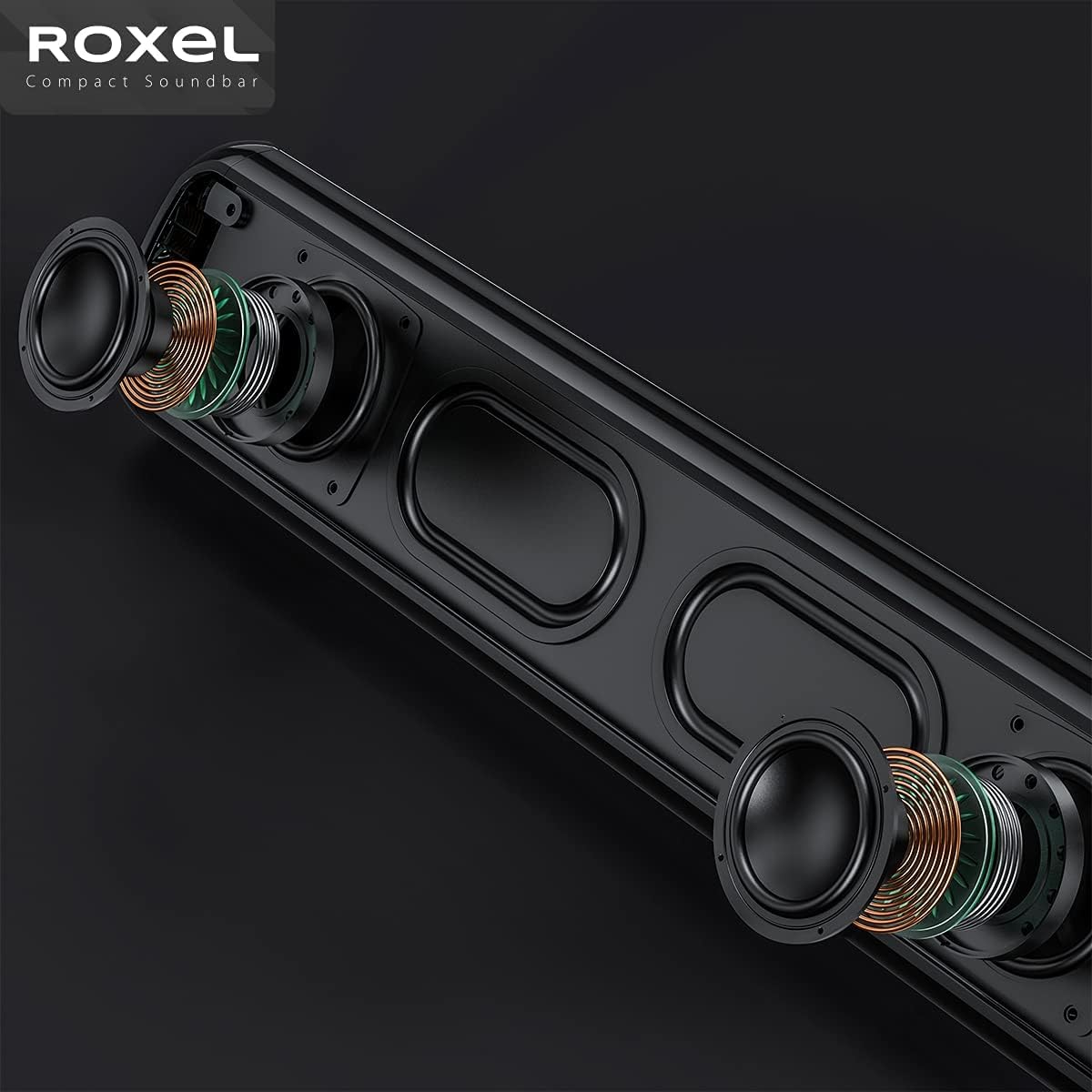
Figure 4.3: Internal view of the ROXEL RSB100 Soundbar, illustrating the placement of its speakers and internal wiring for optimal sound delivery.
5. Setup
5.1. Charging the Soundbar
Before first use, fully charge the soundbar using the provided power cable. The charging indicator light will show the charging status.
5.2. Powering On/Off
Press and hold the power button (usually integrated with the control dial) for a few seconds to turn the soundbar on or off.
5.3. Initial Placement

Figure 5.1: The ROXEL RSB100 Soundbar positioned neatly on a desk beneath a computer monitor, demonstrating its compact size and suitability for desktop use.
Place the soundbar on a stable, flat surface near your TV, PC, or desired audio source. Ensure there are no obstructions in front of the soundbar for optimal sound projection.
6. Operating Instructions
6.1. Bluetooth Connection
- Turn on the RSB100 Soundbar. It will automatically enter Bluetooth pairing mode (indicated by a flashing light).
- On your device (smartphone, tablet, PC), enable Bluetooth and search for "RSB100" in the list of available devices.
- Select "RSB100" to pair. Once connected, you will hear a confirmation tone, and the light will become solid.

Figure 6.1: The ROXEL RSB100 Soundbar shown connected to various devices like a TV, laptop, and mobile phone, illustrating its versatile multi-device connection capability via Bluetooth.
6.2. AUX (Auxiliary) Connection
Connect one end of the provided 3.5mm auxiliary cable to the AUX port on the soundbar and the other end to the audio output jack of your device (e.g., TV, PC, MP3 player). The soundbar will automatically switch to AUX mode.
6.3. USB and Micro SD Card Playback
Insert a USB flash drive or a Micro SD card (with audio files) into the respective port on the soundbar. The soundbar will automatically detect the storage device and begin playing audio files.
6.4. TWS (True Wireless Stereo) Function
The TWS function allows you to pair two RSB100 soundbars together for a true stereo sound experience.
- Ensure both RSB100 soundbars are powered on and not connected to any other Bluetooth device.
- On one of the soundbars, press and hold the TWS button (refer to the soundbar's physical buttons for exact location, usually a dedicated button or a long press on a mode button).
- The soundbars will attempt to pair with each other. Once successfully paired, you will hear a confirmation tone.
- Now, connect your device via Bluetooth to one of the paired soundbars. Audio will play through both soundbars in stereo.
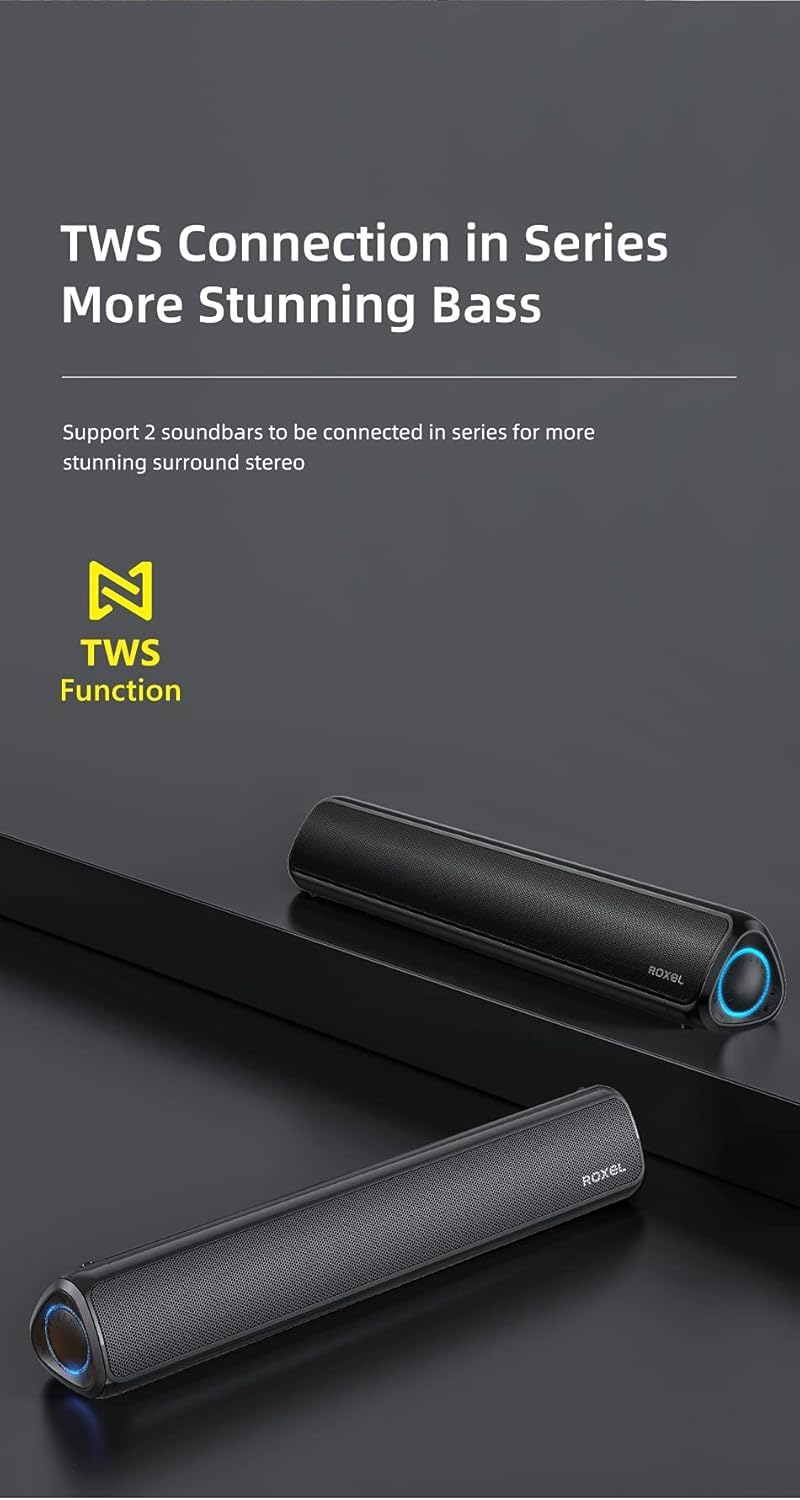
Figure 6.2: Two ROXEL RSB100 Soundbars displayed side-by-side, illustrating the TWS (True Wireless Stereo) function that allows them to connect wirelessly for enhanced surround sound.
6.5. Hands-Free Calling
When connected via Bluetooth to a smartphone, the built-in microphone allows you to answer calls directly through the soundbar. Press the Play/Pause button to answer or end a call.
7. Maintenance
- Clean the soundbar with a soft, dry cloth. Do not use abrasive cleaners or solvents.
- Keep the soundbar away from water, moisture, and extreme temperatures.
- Do not block the speaker grilles.
- Store in a cool, dry place when not in use for extended periods.
8. Troubleshooting
| Problem | Possible Cause | Solution |
|---|---|---|
| No power | Battery is low or depleted. | Charge the soundbar using the provided power cable. |
| No sound | Volume is too low; incorrect input mode; device not connected properly. | Increase volume; switch to correct input mode (Bluetooth, AUX, USB, TF); ensure device is paired/connected. |
| Bluetooth pairing failed | Soundbar not in pairing mode; device too far; interference. | Ensure soundbar is in pairing mode; move device closer; restart both devices. |
| TWS pairing failed | Soundbars not in TWS pairing mode; too far apart. | Ensure both soundbars are in TWS pairing mode; place them closer to each other. |
9. Specifications
| Model Name | RSB100 |
| Brand | Roxel |
| Connectivity Technology | Bluetooth, Auxiliary, USB |
| Speaker Type | Soundbar |
| Audio Output Mode | Stereo |
| Maximum Speaker Output Power | 20 Watts |
| Frequency Response | 134 KHz |
| Battery Life | 12 hours |
| Product Dimensions (L x W x H) | 44 x 7.5 x 7 cm |
| Item Weight | 900 Grams |
| Color | Black |
| Material | Metal Grille |
| Compatible Devices | Android, Computer, iOS, Laptop, PC, Samsung, Tablet, Television |
| Special Features | Hands-free calling, Bluetooth, TF Card, Auxiliary Input, Portable, Rechargeable, TWS, USB |

Figure 9.1: Visual representation of the ROXEL RSB100 Soundbar's battery performance, indicating 3.5 hours of working time and 3 hours of charging time for its 1800mAh battery.
10. Warranty and Support
The ROXEL RSB100 Soundbar comes with a 12-month manufacturer's warranty from the date of purchase. This warranty covers manufacturing defects and material faults under normal use.
For technical support, warranty claims, or further assistance, please contact your retailer or visit the official Roxel website. Please retain your proof of purchase for warranty purposes.
For more information, you may visit the Roxel Brand Store on Amazon.


