
1. Introduction
Thank you for choosing the ACTIVESHOP ÉLÉGANTE 880 4-in-1 Beauty Device. This professional-grade instrument combines four essential skincare functions: Microdermabrasion, Cavitation Peeling (Skin Scrubber), Vacuum, and Spray. Designed for intuitive operation and reliable performance, this device aims to enhance the range of services offered in professional beauty settings. Please read this manual thoroughly before initial use to ensure proper operation, safety, and longevity of your device.
2. Safety Instructions
Always adhere to the following safety guidelines to prevent injury or damage to the device:
- Read all instructions before operating the device.
- This device is intended for professional use only by trained personnel.
- Ensure the power supply matches the device's specifications (230V, 50/60Hz).
- Do not operate the device with wet hands or near water.
- Unplug the device from the power outlet when not in use, before cleaning, or during maintenance.
- Keep the device away from heat sources and direct sunlight.
- Do not use the device on broken, irritated, or infected skin.
- Keep out of reach of children.
- If the device or power cord is damaged, do not use it. Contact customer support for assistance.
3. Product Overview and Components
The ÉLÉGANTE 880 device consists of a main unit and several accessories designed for specific functions.
3.1 Main Unit
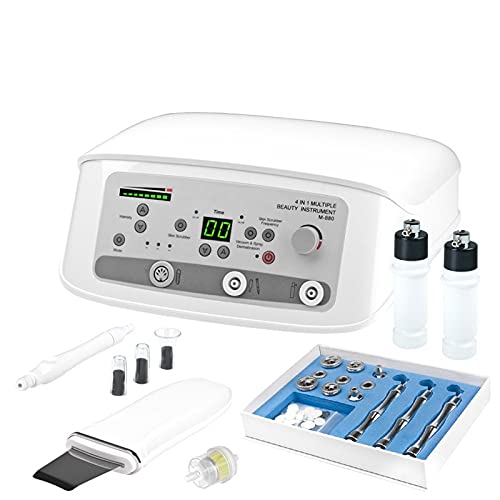
Image: The main unit of the ACTIVESHOP ÉLÉGANTE 880 device. It features a control panel with buttons for intensity, mode, time display, frequency, and power, along with ports for connecting various handpieces and accessories.
The main unit houses the control panel, power input, and connection ports for the various handpieces. The control panel includes:
- Power Button: To turn the device on/off.
- Intensity Control: Adjusts the power level for treatments.
- Mode Selection: Cycles through different operational modes.
- Time Display: Shows the duration of the treatment.
- Frequency Control: Adjusts the frequency for specific functions.
- Connection Ports: For microdermabrasion handles, skin scrubber, vacuum tubes, and spray bottles.
3.2 Included Accessories
- Microdermabrasion Handles and Diamond Tips: Used for exfoliation.
- Skin Scrubber (Cavitation Peeling Handpiece): For deep cleansing and exfoliation.
- Vacuum Tubes and Suction Cups: For lymphatic drainage and pore cleansing.
- Spray Bottles: For applying toners or mists.
- Connecting Hoses/Tubes: For vacuum and spray functions.
- Filter: For protecting the internal pump mechanism.
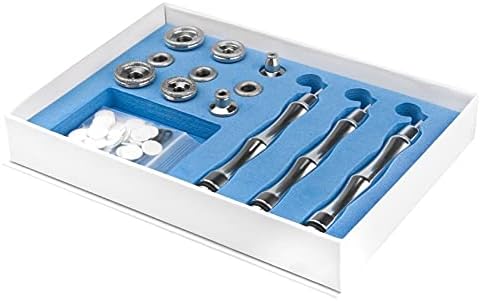
Image: A set of microdermabrasion handles and various diamond tips, neatly organized in a box. These are used for controlled exfoliation of the skin.
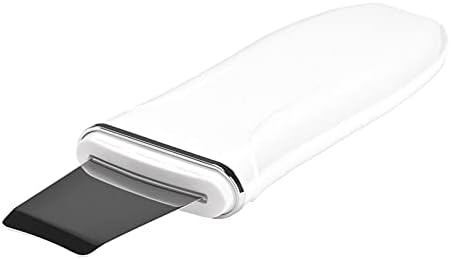
Image: A white skin scrubber handpiece with a metallic spatula-like tip. This tool is used for cavitation peeling and deep cleansing.

Image: A white handle with three clear glass suction cups of varying sizes. These are used for vacuum treatments to improve circulation and extract impurities.
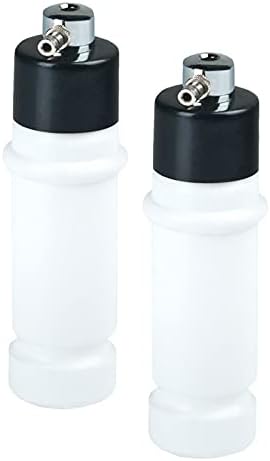
Image: Two white plastic spray bottles with black caps and metal nozzles. These are used to deliver fine mists of liquids onto the skin.

Image: A coiled clear plastic tube, used for connecting the vacuum and spray accessories to the main unit.

Image: A small, clear plastic filter with a yellow internal element. This component is crucial for protecting the device's internal mechanisms from debris.
4. Setup and Assembly
Follow these steps to set up your ÉLÉGANTE 880 device:
- Unpack: Carefully remove all components from the packaging. Inspect for any damage.
- Placement: Place the main unit on a stable, flat, and dry surface, ensuring adequate ventilation around the device.
- Power Connection: Connect the power cord to the back of the main unit, then plug it into a suitable electrical outlet (230V, 50/60Hz).
- Filter Installation: Locate the filter port (usually at the back or side) and securely attach the provided filter. This protects the internal pump.
- Accessory Connection: Connect the desired handpiece (Microdermabrasion handle, Skin Scrubber, Vacuum tube, or Spray tube) to its corresponding port on the front panel. Ensure connections are snug to prevent air leaks for vacuum/spray functions.
- Prepare Spray Bottles (if applicable): Fill the spray bottles with the appropriate toner or liquid for the spray function.
5. Operating Instructions
Before starting any treatment, ensure the client's skin is clean and prepared according to professional skincare protocols.
5.1 General Operation
- Power On: Press the main power button on the front panel. The display will illuminate.
- Select Function: Use the 'Mode' button to select the desired function (Microdermabrasion, Skin Scrubber, Vacuum, or Spray).
- Adjust Settings: Use the 'Intensity' and 'Frequency' controls to set the appropriate levels for the chosen treatment. Refer to specific function guidelines below.
- Set Time: Use the 'Time' controls to set the desired treatment duration.
- Start Treatment: Begin the treatment according to the specific instructions for each function.
- Power Off: After use, press the power button to turn off the device and unplug it from the wall outlet.
5.2 Microdermabrasion
This function uses diamond tips to gently exfoliate the skin, removing dead skin cells and promoting cell renewal.
- Attach the desired diamond tip to a microdermabrasion handle.
- Connect the handle to the appropriate port on the main unit.
- Select 'Microdermabrasion' mode.
- Adjust the vacuum intensity to a comfortable level. Start with lower settings and gradually increase if needed.
- Perform smooth, even strokes across the skin, ensuring the tip maintains contact without excessive pressure. Avoid sensitive areas.
5.3 Cavitation Peeling (Skin Scrubber)
Utilizes ultrasonic vibrations to deeply cleanse pores, remove impurities, and gently exfoliate the skin.
- Ensure the skin is thoroughly wet with water or a suitable conductive solution.
- Connect the skin scrubber handpiece to its designated port.
- Select 'Skin Scrubber' mode.
- Adjust the intensity/frequency as required.
- Hold the spatula at a 45-degree angle to the skin and glide it gently over the treatment area.
5.4 Vacuum
This function provides suction to aid in lymphatic drainage, improve circulation, and assist in pore extraction.
- Attach the desired glass suction cup to the vacuum tube.
- Connect the vacuum tube to the main unit's vacuum port.
- Select 'Vacuum' mode.
- Adjust the suction intensity. Start with low intensity and increase gradually.
- Apply the suction cup to the skin, ensuring a seal, and move it smoothly. Do not leave the cup stationary on the skin for extended periods.
5.5 Spray
Used to apply toners, mists, or other liquid solutions evenly onto the skin after treatments.
- Fill one of the spray bottles with the desired liquid (e.g., toner, distilled water).
- Connect the spray tube to the main unit's spray port and attach the filled spray bottle.
- Select 'Spray' mode.
- Place a finger over the opening of the other (empty) spray bottle to create pressure.
- Direct the nozzle of the filled spray bottle towards the treatment area and release the finger from the empty bottle to spray.
6. Maintenance and Cleaning
Regular cleaning and maintenance ensure optimal performance and hygiene.
- After Each Use: Disconnect all handpieces and accessories. Clean them thoroughly with a suitable disinfectant solution.
- Main Unit: Wipe the main unit with a soft, damp cloth. Do not use abrasive cleaners or immerse the unit in water.
- Diamond Tips: Clean microdermabrasion tips with a brush and disinfectant. Sterilize as per professional standards.
- Skin Scrubber: Wipe the spatula clean with disinfectant.
- Vacuum Cups & Tubes: Wash with soap and water, then disinfect. Ensure they are completely dry before storage.
- Spray Bottles: Rinse thoroughly with distilled water after each use, especially if using different solutions.
- Filter: Regularly check and clean or replace the filter to maintain proper vacuum suction and protect the pump.
- Storage: Store the device and accessories in a clean, dry place, away from direct sunlight and extreme temperatures.
7. Troubleshooting
If you encounter issues with your device, refer to the following common problems and solutions:
| Problem | Possible Cause | Solution |
|---|---|---|
| Device does not power on | Power cord not connected; Power outlet faulty; Device fuse blown. | Check power cord connection; Try a different outlet; Contact service for fuse replacement. |
| Weak or no vacuum suction | Loose connection of tubes/cups; Clogged filter; Damaged tube; Suction intensity too low. | Ensure all connections are tight; Clean or replace filter; Inspect tubes for damage; Increase intensity. |
| Spray function not working | Spray bottle empty; No pressure created; Clogged nozzle. | Refill bottle; Ensure finger covers empty bottle opening; Clean nozzle. |
| Skin scrubber not vibrating | Handpiece not connected properly; Mode not selected; Intensity too low. | Check connection; Select 'Skin Scrubber' mode; Increase intensity. |
If the problem persists after attempting these solutions, please contact ACTIVESHOP customer support.
8. Technical Specifications
| Feature | Specification |
|---|---|
| Model | ÉLÉGANTE 880 (Manufacturer Reference: 124218) |
| Functions | Microdermabrasion, Cavitation Peeling (Skin Scrubber), Vacuum, Spray |
| Voltage | 230 V |
| Frequency | 50/60 Hz |
| Power | 60 W |
9. Warranty and Support
For warranty information, technical support, or service inquiries, please contact your authorized ACTIVESHOP dealer or the manufacturer directly. Keep your purchase receipt as proof of purchase.


