
Introduction
This manual provides essential information for the safe and effective operation, maintenance, and troubleshooting of your Spokey MOVENA Electric Treadmill. Please read this manual thoroughly before initial use and keep it for future reference.
The Spokey MOVENA electric treadmill is designed for home fitness, offering a convenient alternative to outdoor running or gym workouts. It features a robust design, innovative shock absorption, and various training programs to suit different fitness levels.
Safety Instructions
Always follow basic safety precautions when using electrical appliances to reduce the risk of fire, electric shock, and injury.
- Ensure the treadmill is placed on a flat, stable surface with adequate clear space around it (at least 2 meters behind and 0.6 meters on each side).
- Keep children and pets away from the treadmill during operation.
- Always attach the safety key clip to your clothing before starting the treadmill. The treadmill will stop if the safety key is dislodged.
- Wear appropriate athletic footwear and clothing. Avoid loose clothing that could get caught in moving parts.
- Do not operate the treadmill if it has a damaged cord or plug, or if it is not working properly.
- Unplug the treadmill from the power outlet when not in use, before cleaning, or before performing any maintenance.
- Do not use the treadmill outdoors or in damp or wet locations.
- Consult a physician before starting any exercise program.
- The maximum user weight for this treadmill is 120 kg.
Setup and Assembly
The Spokey MOVENA treadmill comes largely pre-assembled. Follow these steps for initial setup.
- Unpacking: Carefully remove the treadmill from its packaging. Retain packaging materials for future storage or transport.
- Placement: Position the treadmill on a firm, level surface. Ensure sufficient clearance around the unit as described in the safety instructions.
- Unfolding (if folded):
The treadmill can be stored both vertically and horizontally. To unfold, gently lower the running deck until it locks into place. Ensure all locking mechanisms are secure before use.
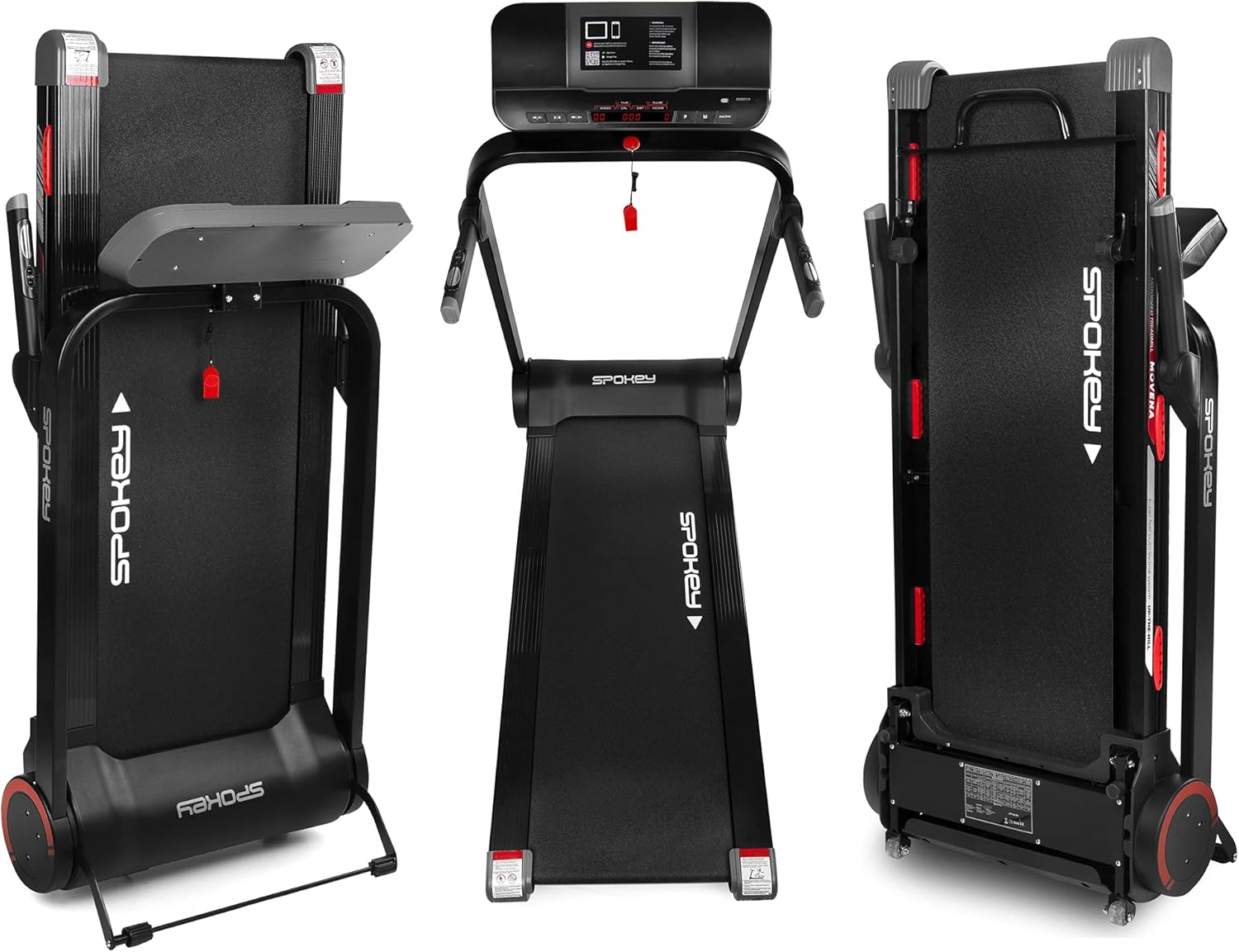
Image: The Spokey MOVENA treadmill shown in its fully unfolded position for use, and in two different folded configurations for compact storage (vertical and horizontal).
- Power Connection: Connect the power cord to the treadmill's power input and then plug it into a grounded electrical outlet.
- Safety Key: Locate the red safety key. Attach the clip end to your clothing and place the magnetic end into the designated slot on the console. The treadmill will not operate without the safety key in place.

Image: The Spokey MOVENA Electric Treadmill in its operational state, showing the main console, running belt, and frame.
Operating Instructions
Familiarize yourself with the control panel and its functions before beginning your workout.

Image: An overview of the Spokey MOVENA treadmill's key functions, including the control panel, Bluetooth connectivity, MP3 input, speaker location, various training programs, incline levels, and storage options.
Control Panel Overview
The console features an LCD display and various buttons for controlling your workout.
- Start/Stop: Initiates and halts the running belt.
- Speed +/-: Adjusts the running belt speed. The treadmill supports speeds up to 18 km/h (11.18 mph).
- Incline +/-: Adjusts the incline level. The treadmill offers 12 incline levels, with a maximum inclination percentage of 10%.
- Program (P): Selects from 12 pre-set training programs.
- Mode (M): Toggles between display modes (Time, Distance, Calories, Speed, Pulse).
- User Programs: 3 customizable user programs.
- HRC Programs: 3 Heart Rate Control programs.
- Body FAT: Body fat measurement function.
- Manual: Standard manual operation mode.
- MP3 Input & Speakers: Connect your device for audio playback.
- Bluetooth: For connecting to the FITSHOW application.

Image: A close-up view of the speed control buttons (+ and -) located on the treadmill's handle, allowing for easy adjustment during a workout.
Starting a Workout
- Ensure the treadmill is plugged in and the safety key is correctly placed.
- Step onto the side rails of the treadmill.
- Press the "Start" button. The belt will begin to move at a low speed.
- Carefully step onto the moving belt and gradually increase speed using the "Speed +" button to your desired pace.
- Adjust incline as desired using the "Incline +/-" buttons.
Using the FITSHOW Application
The Spokey MOVENA treadmill can connect to the dedicated FITSHOW application via Bluetooth.
- Download the FITSHOW app from your device's app store.
- Enable Bluetooth on your mobile device.
- Open the FITSHOW app and follow the on-screen instructions to pair with your treadmill.
- The app provides additional training options and tracks your progress.
Maintenance
Regular maintenance ensures the longevity and optimal performance of your treadmill. Always unplug the treadmill before cleaning or performing any maintenance.
- Cleaning: Wipe down the console and exterior surfaces with a damp cloth after each use. Avoid using abrasive cleaners or solvents.
- Running Belt Lubrication: The running belt requires periodic lubrication to reduce friction and extend its lifespan. Use the provided lubrication tools and silicone oil. Refer to the specific instructions in the included "Outils de lubrification" guide for proper application frequency and method.
- Belt Tension and Alignment: Periodically check the running belt for proper tension and alignment. If the belt slips or drifts to one side, consult the detailed instructions in the full user manual for adjustment procedures.
- General Inspection: Regularly inspect all nuts, bolts, and moving parts for tightness and wear. Tighten any loose fasteners.
Troubleshooting
This section addresses common issues you might encounter. For problems not listed here, contact customer support.
| Problem | Possible Cause | Solution |
|---|---|---|
| Treadmill does not start. | Power cord not plugged in; Safety key not in place; Power switch off. | Ensure power cord is securely plugged in; Insert safety key fully; Turn on power switch. |
| Running belt slips. | Belt tension too loose; Belt needs lubrication. | Adjust belt tension (refer to full manual); Lubricate the running belt. |
| Unusual noise during operation. | Loose parts; Belt misalignment; Motor issue. | Check and tighten all bolts and screws; Adjust belt alignment; If noise persists, contact customer support. |
| Console display is blank. | Power issue; Loose cable connection. | Check power supply and connections; Ensure all console cables are securely connected. |
Specifications
Key technical specifications for the Spokey MOVENA Electric Treadmill.

Image: A technical diagram illustrating the dimensions of the Spokey MOVENA treadmill, including its length (160 cm), width (74 cm), and height (132 cm), along with icons for motor power (2.5 HP), maximum user weight (120 kg), and folded dimensions (160 x 74 x 43 cm).
| Feature | Detail |
|---|---|
| Model Number | 5902693243854 |
| Brand | SPOKEY |
| Dimensions (L x W x H) | 160 x 74 x 132 cm |
| Material | Alloy Steel |
| Max User Weight | 120 kg |
| Max Speed | 18 km/h (11.18 mph) |
| Max Incline | 10% (12 levels) |
| Display Type | LCD |
| Special Features | Innovative Shock Absorption System (S.A.S.), Bluetooth connectivity (FITSHOW app), MP3 input, Large Speakers, Foldable (vertical and horizontal storage). |
| Power Source | Corded Electric |
Warranty and Support
For warranty information, please refer to the documentation included with your purchase or contact your retailer.
If you require technical assistance, have questions about operation, or need to order replacement parts, please contact Spokey customer support. Contact details can typically be found on the manufacturer's website or on your purchase receipt.


