
1. Introduction
Carbon monoxide (CO) is a highly toxic gas that is odorless, tasteless, and colorless, making it undetectable by human senses. It is produced by the incomplete combustion of carbon-containing fuels. Exposure to CO can lead to serious health issues, including death. This Smartwares FGA-13041 Carbon Monoxide Detector is designed to continuously monitor CO levels in your environment and alert you to dangerous concentrations, providing crucial protection for your home and family.
This manual provides essential information for the correct installation, operation, and maintenance of your CO detector. Please read it thoroughly before use and retain it for future reference.

Image 1.1: Carbon monoxide is a toxic gas undetectable by human senses.
2. Safety Information
- Important: This CO detector is designed to detect carbon monoxide gas. It is not a smoke detector, fire detector, or gas leak detector.
- Placement: Proper placement is crucial for effective detection. Refer to the installation section for detailed guidance.
- Testing: Test the detector regularly (at least once a month) to ensure proper functioning.
- Alarm: Do not ignore the alarm. If the alarm sounds, follow the instructions in the operating section immediately.
- Maintenance: Keep the detector clean and free from obstructions. Do not paint over it.
- End of Life: The sensor has a 10-year lifespan. Replace the unit after 10 years from the manufacturing date or when the end-of-life indicator activates.
3. Product Overview
3.1 Components
The Smartwares FGA-13041 Carbon Monoxide Detector package includes:
- 1x Carbon Monoxide Detector (FGA-13041)
- 3x AA Batteries (included)
- 1x Mounting Bracket
- 2x Screws and Wall Plugs
- 1x User Manual
3.2 Features
- Effective CO Protection: Equipped with an electrochemical sensor capable of detecting CO in the air, even at low concentrations (e.g., 27 ppm). Effective range between 20 and 40 m².
- Digital Display: The screen indicates the CO concentration in parts per million (PPM) and displays potential malfunctions, low battery warnings, or end-of-life status.
- Test Button: Allows for regular testing of the device's functionality.
- 10-Year Sensor Life: The electrochemical sensor has a lifespan of 10 years. The detector is powered by 3 included AA batteries, providing approximately 3 years of operation.
- Audible Alarm: An 85 dB alarm ensures that the warning is heard by all occupants.

Image 3.1: Front view of the FGA-13041 detector.

Image 3.2: LED indicators for device status.
4. Installation
4.1 Choosing a Location
Install at least one CO detector per floor. For optimal safety, place detectors near combustion appliances and in or near sleeping areas. Ensure the 85 dB alarm is audible to all occupants.
Recommended locations:
- Within 1 to 3 meters (3 to 10 feet) of any fuel-burning appliance.
- In or near bedrooms, ensuring the alarm can be heard.
- On each level of your home.
Avoid these locations:
- In direct sunlight or near heat sources.
- In areas with high humidity (e.g., bathrooms).
- Near vents, doors, or windows where air currents might prevent CO from reaching the sensor.
- In dusty, dirty, or greasy areas (e.g., kitchens, garages) where contaminants can affect the sensor.

Image 4.1: Potential sources of CO in a home environment.

Image 4.2: Recommended installation near a potential CO source.
4.2 Mounting Instructions
- Select a suitable location on a wall or ceiling, away from corners and obstructions.
- Use the mounting bracket as a template to mark the positions for drilling.
- Drill two holes and insert the wall plugs.
- Attach the mounting bracket to the wall using the provided screws.
- Align the detector with the mounting bracket and twist it clockwise until it clicks securely into place.
5. Setup
5.1 Battery Installation
The detector comes with 3 AA batteries already installed. Before first use, ensure the battery tab (if present) is removed. The device will automatically activate once the batteries are properly connected.
The detector is designed for approximately 3 years of battery life. When the batteries are low, the device will emit visual and audible signals to indicate that they need to be changed.
6. Operating Instructions
6.1 Normal Operation
During normal operation, the green LED indicator will flash periodically, and the digital display will show '0 PPM' or the current low CO concentration if present. This indicates the detector is actively monitoring the air.
6.2 Understanding the Display and Indicators
- Digital Display (PPM): Shows the detected concentration of carbon monoxide.
- Green LED: Indicates normal operation.
- Yellow LED: Indicates a fault, low battery, or end-of-life status.
- Red LED: Indicates a CO alarm.

Image 6.1: Detector display showing CO concentration.
6.3 Test Button
Press and hold the 'TEST' button for a few seconds to perform a self-test. The alarm will sound, and the LEDs will flash, confirming the detector's electronic circuitry and alarm are functioning correctly. Release the button to stop the test.
6.4 Alarm Conditions
The detector will activate its audible alarm (85 dB) and flash the red LED when CO levels reach dangerous concentrations according to EN 50291 standards. The display will show the detected CO level.
If the alarm sounds:
- Immediately move to fresh air outdoors or open all doors and windows to ventilate the area.
- Do a head count to check that all persons are accounted for.
- Do not re-enter the premises until the alarm has stopped and the CO level has returned to 0 PPM.
- Call the emergency services or a qualified technician to investigate the source of the CO.
7. Maintenance
7.1 Regular Testing
Test your CO detector monthly using the 'TEST' button to ensure it is working correctly.
7.2 Cleaning
Clean the detector regularly with a soft, damp cloth. Do not use cleaning agents or solvents, as these can damage the sensor. Do not paint the detector.
7.3 Battery Replacement
When the batteries are low, the detector will emit a specific audible chirp and the yellow LED will flash. Replace all three AA batteries immediately with new alkaline batteries. Ensure correct polarity.
7.4 End of Life
The CO sensor has a lifespan of 10 years. After this period, the detector will indicate its end-of-life status (typically via a specific chirp and yellow LED pattern). The entire unit must be replaced at this point to ensure continued protection.
8. Troubleshooting
| Problem | Possible Cause | Solution |
|---|---|---|
| Detector chirps periodically, yellow LED flashes. | Low battery. | Replace all 3 AA batteries immediately. |
| Detector chirps, yellow LED flashes, display shows 'Err' or similar. | Malfunction or end of life. | Perform a test. If the issue persists, the unit may be faulty or at its end of life. Replace the detector. |
| Alarm sounds, red LED flashes, display shows CO level. | High CO concentration detected. | Follow alarm procedures: ventilate, evacuate, call emergency services. |
| Detector does not respond to test button. | No power, faulty unit. | Check batteries. If batteries are new and correctly installed, the unit may be faulty. Replace the detector. |
9. Specifications
| Feature | Specification |
|---|---|
| Model Number | FGA-13041 |
| Dimensions (L x W x H) | 10.7 x 7.7 x 3.6 cm |
| Weight | 117 Grams |
| Power Source | 3x AA Alkaline Batteries (included) |
| Sensor Type | Electrochemical |
| Sensor Lifespan | 10 Years |
| Alarm Sound Level | 85 dB |
| Operating Humidity | 0% - 70% |
| Operating Temperature | Up to 45 Degrees Celsius |
| Material | ABS |
| Color | White |
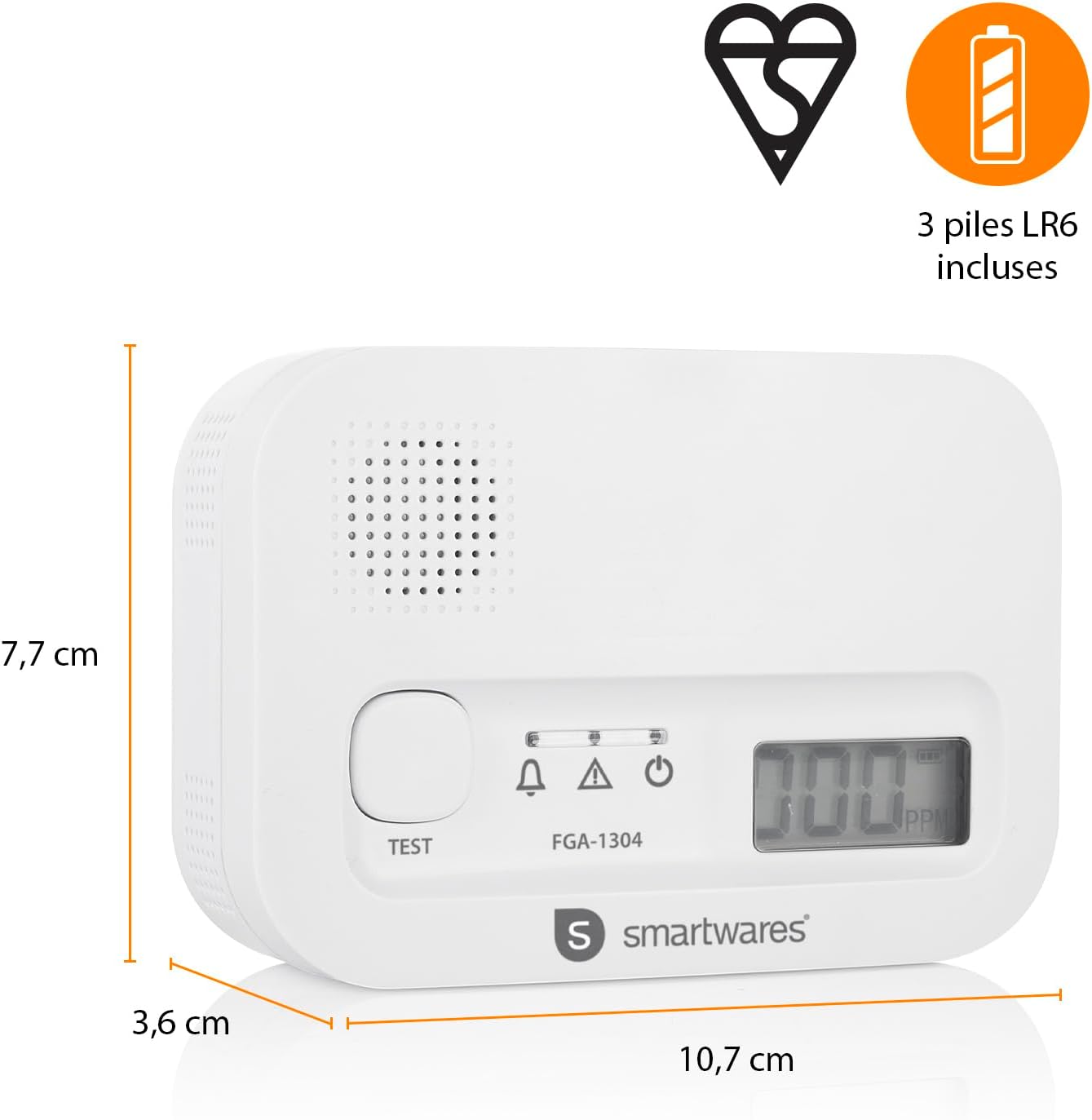
Image 9.1: Product dimensions.
10. Warranty and Support
10.1 Manufacturer's Warranty
This Smartwares FGA-13041 Carbon Monoxide Detector comes with a 2-year manufacturer's warranty from the date of purchase. Please retain your proof of purchase for warranty claims.
10.2 Customer Support
For technical assistance, troubleshooting, or warranty inquiries, please contact Smartwares customer support. You can find more information and contact details on the official Smartwares website or by visiting the Smartwares Brand Store.