
mucar CDL20
Contents
MUCAR CDL20 Universal OBD2 Scanner Instruction Manual
Model: CDL20
Introduction
The MUCAR CDL20 is a universal OBD2 scanner designed to help diagnose vehicle issues by reading and clearing diagnostic trouble codes (DTCs). This compact and user-friendly tool provides comprehensive OBD2 functions, allowing users to monitor vehicle performance, check emission readiness, and retrieve essential vehicle information. It is compatible with most 1996 and newer US-based OBDII compliant vehicles.
Safety Information
Always observe safety precautions when working on a vehicle. Ensure the vehicle is in a well-ventilated area. Do not wear loose clothing or jewelry that could get caught in moving parts. Keep the scanner away from water, oil, and grease. Refer to your vehicle's service manual for specific safety warnings and procedures.
What's in the Box
- MUCAR CDL20 OBD2 Scanner
Product Overview
The MUCAR CDL20 features a clear TFT screen and intuitive button layout for easy navigation. It is designed with a durable rubberized casing for protection.
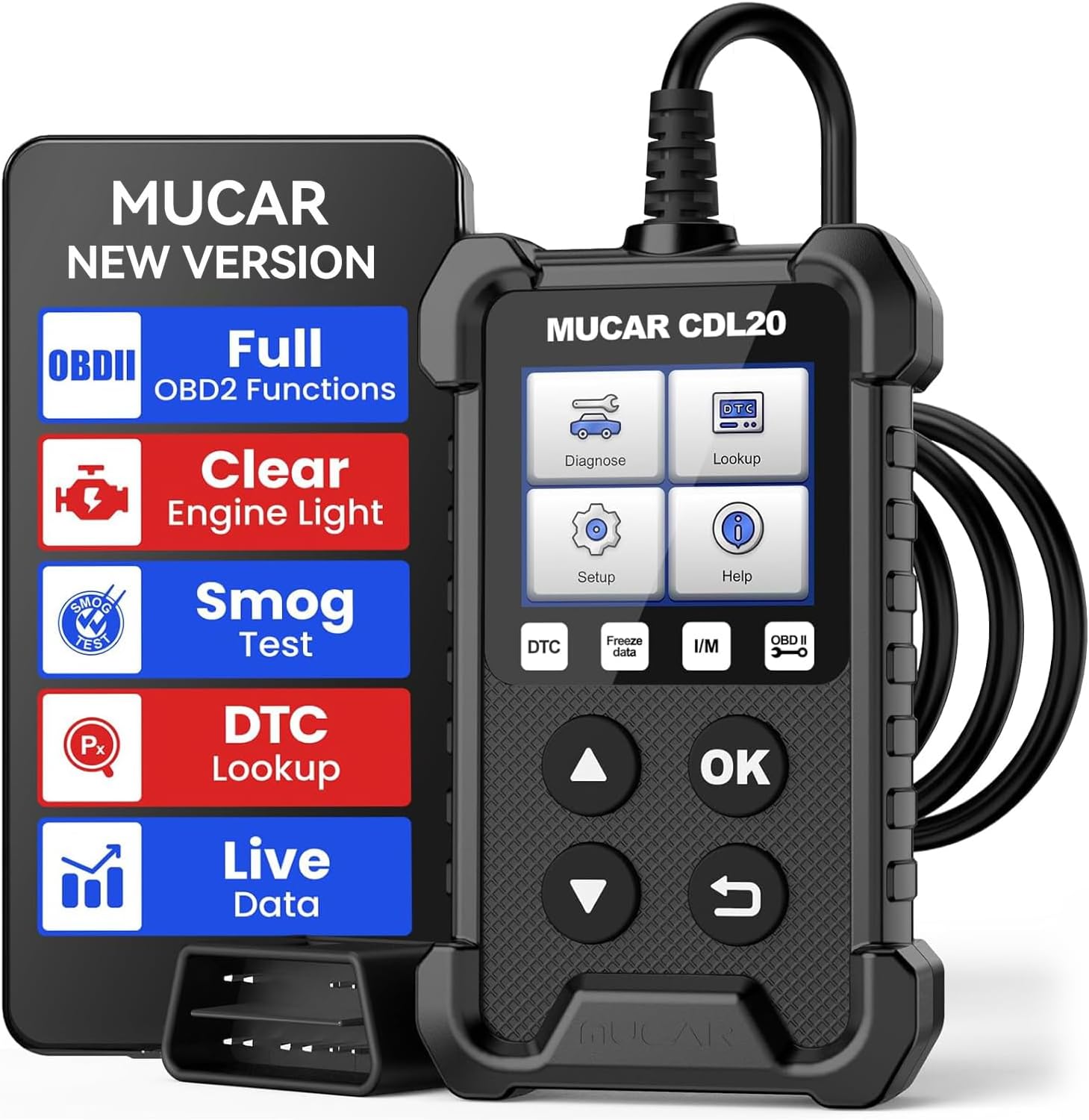

Setup
The MUCAR CDL20 is a plug-and-play device that does not require batteries or charging. Follow these steps for initial setup:
- Locate your vehicle's OBDII port. This is typically found under the dashboard on the driver's side.
- Ensure the vehicle's ignition is in the "ON" position (engine off).
- Connect the MUCAR CDL20's OBDII cable to the vehicle's OBDII port. The device will power on automatically.
- The scanner will begin processing and establishing communication with the vehicle's ECU.
Operating Instructions
The MUCAR CDL20 offers a variety of diagnostic functions. Use the navigation buttons (Up, Down, OK, Return) to select options from the menu.
1. Read Codes
This function reads the Diagnostic Trouble Codes (DTCs) stored in the vehicle's Engine Control Unit (ECU). These codes indicate specific issues detected by the vehicle's onboard diagnostic system.

2. Erase Codes
After repairing a vehicle issue, use this function to clear the stored DTCs and turn off the Malfunction Indicator Light (MIL) or "Check Engine" light. Ensure the underlying problem is resolved before clearing codes, as they will reappear if the fault persists.


3. I/M Readiness
This function checks the readiness status of various emission-related monitoring systems. It helps determine if the vehicle is ready for an emissions test.


4. Data Stream
View live data parameters from the vehicle's sensors in real-time. This can include engine RPM, vehicle speed, oxygen sensor readings, and more, providing valuable insights into vehicle performance.

5. View Freeze Frame
When an emission-related fault occurs, the ECU records certain vehicle operating conditions at the time of the fault. This "freeze frame" data can help pinpoint the cause of the problem.

6. O2 Sensor Test
This function allows retrieval and viewing of O2 sensor monitor test results for the most recently completed tests from the vehicle's onboard computer.

7. On-Board Monitoring
This function retrieves test results for emission-related powertrain components and systems that are not continuously monitored.
8. EVAP System Test
The EVAP (Evaporative Emission Control System) Test function initiates a leak test for the vehicle's EVAP system. This helps identify issues with fuel vapor leaks.

9. Vehicle Information
Retrieve the Vehicle Identification Number (VIN), Calibration ID (CID), and Calibration Verification Number (CVN) of the vehicle. This information is useful for record-keeping and verification.


10. DTC Code Look-up
The built-in DTC library allows you to look up the definition of a diagnostic trouble code directly on the device, saving time and effort.

Wide Compatibility
The MUCAR CDL20 is compatible with most 1996 and newer US-based vehicles that are OBDII compliant (OBDII protocols: KWP2000, ISO9141, J1850 VPW, J1850 PWM and CAN). This includes 12-volt sedans, SUVs, light duty trucks, mini vans, and hybrids. It supports multiple languages including English, French, Spanish, German, Russian, Italian, Portuguese, and Polish.

Maintenance
To ensure the longevity and optimal performance of your MUCAR CDL20 scanner, follow these maintenance guidelines:
- Cleaning: Use a soft, damp cloth to clean the device. Do not use abrasive cleaners or solvents.
- Storage: Store the scanner in a dry, cool place away from direct sunlight and extreme temperatures.
- Cable Care: Avoid bending or crimping the OBDII cable excessively. Store it neatly to prevent damage.
Troubleshooting
If you encounter issues with your MUCAR CDL20, refer to the following common scenarios:
- Fault Code Persists After Clearing: If you clear a fault code directly without repairing the underlying car issue, the fault code will likely reappear. It is crucial to repair the car's hardware fault first, and then clear the fault code.
- Incompatibility or Defective Issues: If you experience incompatibility or believe the device is defective, please provide your serial number, car brand, model, year, and VIN of your vehicle information. Contact customer service for assistance.
Specifications
| Feature | Detail |
|---|---|
| Brand | mucar |
| Product Dimensions | 4.33"L x 0.78"W x 2.58"H |
| Operating System | Android |
| Display Resolution | 480x854 |
| Automotive Fit Type | Universal Fit |
| UPC | 768297574337 |
| Manufacturer | mucar |
| Model | Scanner Tool |
| Item Weight | 7 ounces |
| Country of Origin | China |
| Manufacturer Part Number | CDL20 |
Warranty and Support
MUCAR provides comprehensive support for the CDL20 scanner:
- Warranty: 5 Years Warranty.
- Returns: 90 Days No Reason asked Return for refund.
- Customer Service: 24/7 Customer Service Team.
- Email Support: sales@thinkcarus.com
- Lifetime Support: Lifetime after-sales Support.
Documents and downloads
Ask a question about this manual
Ask about setup, troubleshooting, compatibility, parts, safety, or missing instructions. Manuals+ will review the question and use this page’s manual context to help answer it.