This manual provides comprehensive instructions for the installation, operation, and maintenance of your Hbodier HL-01S Smart Lock. Please read this manual carefully before installation and use to ensure proper function and safety. This smart lock offers multiple unlocking methods including fingerprint, mobile application, IC cards, passcodes, and traditional mechanical keys.
Package Contents
Verify that all components are present before beginning installation:
Hbodier Smart Lock (Exterior and Interior Assemblies)
2 x Key Fobs (IC Cards)
2 x Mechanical Keys
Installation Hardware (Screws, Spindle, etc.)
4 x AA Batteries
User Manual (This document)
Specifications
Feature
Detail
Model Number
HL-01S
Unlocking Methods
Fingerprint, APP, IC Card, Passcode, Mechanical Key
Door Thickness Compatibility
1-5/16'' ~ 2'' (33mm-50mm)
User Capacity
Up to 200 user codes/fingerprints
Power Supply
4 x AA Batteries
Automatic Locking
Adjustable (5-120 seconds)
Weight
2.07 Kilograms
Installation Guide
Follow these steps carefully for proper installation. A standard screwdriver is typically the only tool required beyond what is included in the package.
1. Prepare the Door
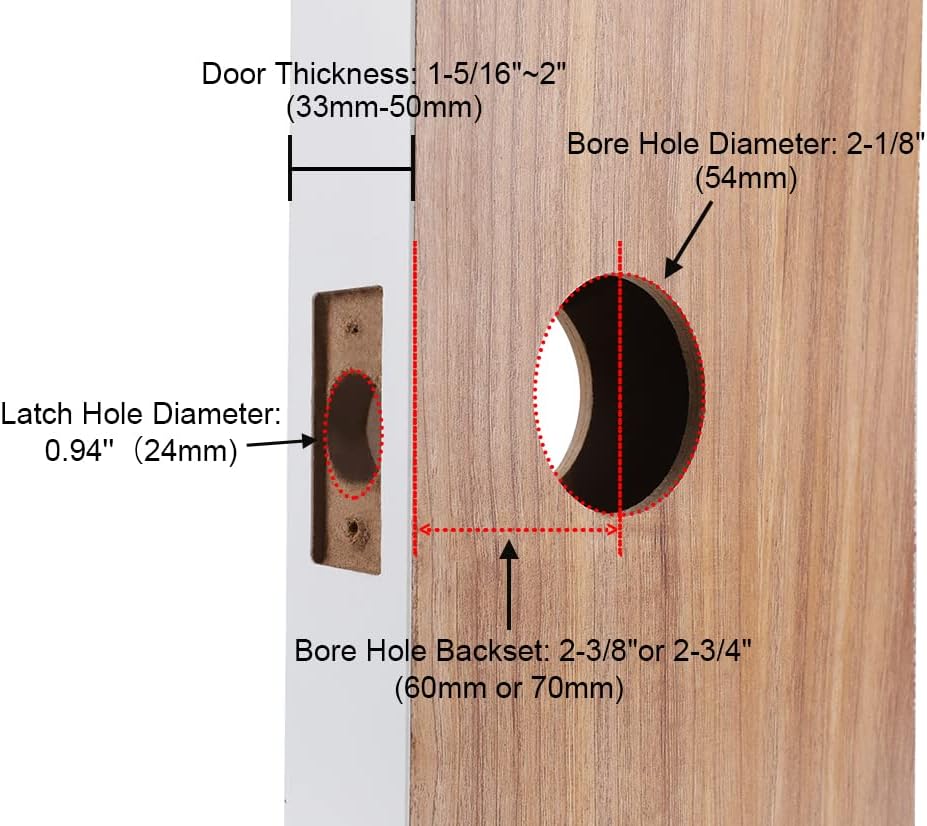
Ensure your door meets the following specifications:
Door Thickness: 1-5/16'' to 2'' (33mm-50mm)
Bore Hole Diameter: 2-1/8'' (54mm)
Latch Hole Diameter: 0.94'' (24mm)
Bore Hole Backset: 2-3/8'' or 2-3/4'' (60mm or 70mm)
Image Description: Diagram illustrating required door dimensions for installation, including door thickness (33-50mm), bore hole diameter (54mm), latch hole diameter (24mm), and bore hole backset (60mm or 70mm).
2. Install the Latch and Strike Plate
Insert the latch into the door edge. Ensure the latch bolt faces the door frame.
Secure the latch with screws.
Install the strike plate on the door frame, aligning it with the latch bolt.
3. Install the Exterior Assembly
Feed the cable and spindle through the bore hole from the exterior side.
Align the exterior assembly with the bore hole and ensure the spindle engages with the latch mechanism.
4. Install the Interior Mounting Plate
Connect the cable from the exterior assembly to the interior mounting plate.
Secure the interior mounting plate to the door using the provided screws, ensuring it is flush against the door.
5. Install the Interior Assembly
Attach the interior assembly to the mounting plate, ensuring the spindle engages correctly.
Secure the interior assembly with screws.
6. Insert Batteries
Open the battery cover on the interior assembly.
Insert 4 AA batteries, observing correct polarity.
Close the battery cover.
Image Description: A visual guide showing a person installing the Hbodier smart lock on a door, highlighting the ease of DIY installation with minimal tools.
7. Handing the Lock (Left/Right Door)
The Hbodier HL-01S lock is reversible and suitable for both left-handed and right-handed doors. Ensure the handle is oriented correctly for your door's swing direction during installation.
Image Description: Two images demonstrating the Hbodier smart lock installed on both a left-opening and a right-opening door, illustrating its reversible design.
Operating Instructions
The Hbodier HL-01S Smart Lock offers five methods for unlocking your door:
Image Description: A collage of images demonstrating the five different ways to unlock the Hbodier smart lock: via mobile app, fingerprint, IC card, passcode, and mechanical key.
1. Fingerprint Unlock
Place your registered finger on the fingerprint sensor.
The lock will emit a confirmation sound and unlock.
Turn the handle to open the door.
2. Passcode Unlock
Touch the keypad to activate it.
Enter your registered passcode followed by the '#' key.
The lock will confirm and unlock.
Turn the handle to open the door.
Anti-Peep Function: You can enter random digits before and after your actual passcode to prevent others from guessing your code. For example, if your passcode is 123456, you can enter 987123456321#.
Image Description: An illustration demonstrating the anti-peep code feature, where random digits can be entered before and after the actual passcode to enhance security.
3. IC Card Unlock
Present your registered IC card (key fob) to the card reader area on the lock.
The lock will confirm and unlock.
Turn the handle to open the door.
4. Mechanical Key Unlock
Insert the mechanical key into the hidden keyhole.
Turn the key to unlock the door.
Turn the handle to open the door.
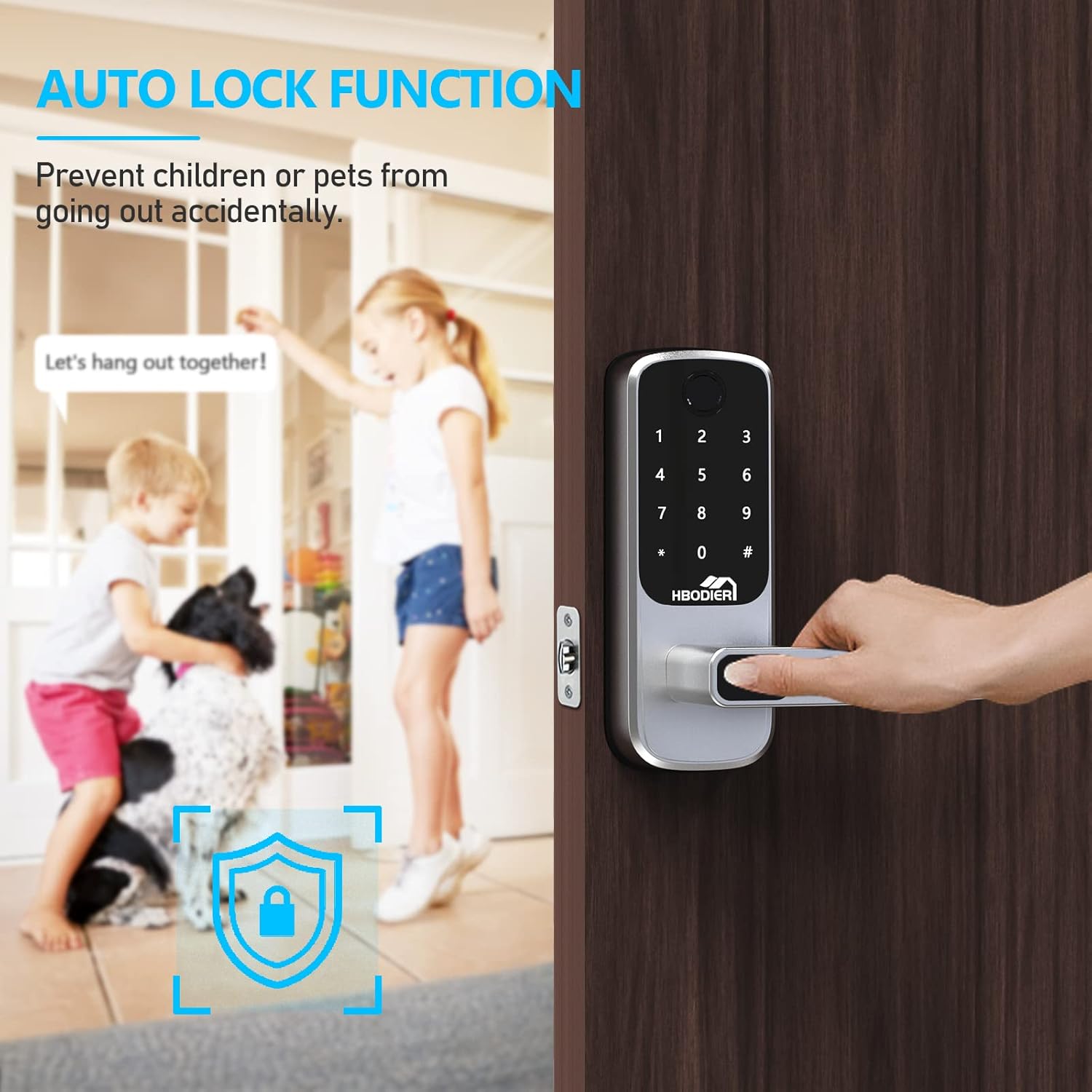
5. Automatic Locking Function
The lock can be configured to automatically lock after a set period (5-120 seconds) once the door is closed. This feature ensures your door is always secured.
Image Description: An image depicting children and a dog near a door, with a graphic overlay indicating the automatic lock function, preventing accidental exits.
Mobile Application Setup and Features
The Hbodier HL-01S Smart Lock can be controlled and managed via a dedicated mobile application, available for both iOS and Android devices.
Image Description: A smartphone displaying the Hbodier smart lock application interface, showing options for keyless entry, operation records, passcode management, and eKey sharing.
1. App Download and Pairing
Search for the "Hbodier Smart Lock" app in your device's app store (Google Play Store or Apple App Store).
Download and install the application.
Follow the in-app instructions to create an account and pair your smart lock via Bluetooth.
Image Description: The Hbodier smart lock shown alongside a smartphone displaying the lock's mobile application, which includes options for sending passcodes, managing fingerprints, and viewing records.
2. App Features
Remote Unlock: Unlock your door remotely via the app (within Bluetooth range).
User Management: Add, modify, or delete fingerprints, passcodes, and IC cards for up to 200 users.
Temporary Passcodes/eKeys: Generate one-time or time-limited passcodes/eKeys for guests or service providers. These can be shared remotely.
Activity Log: View a real-time record of all lock and unlock events, including the method used and the user.
Settings: Adjust lock settings such as automatic locking duration, volume, and security features.
Image Description: An image showing a person walking towards a house while looking at their smartphone, illustrating the convenience of remotely sharing eKeys or passcodes for access.
Maintenance
1. Battery Replacement
The lock will provide a low battery warning when power is critically low.
Replace all four AA batteries simultaneously with new, high-quality alkaline batteries.
Ensure correct polarity when inserting batteries.
2. Cleaning
Wipe the lock's exterior surfaces with a soft, dry cloth.
Avoid using abrasive cleaners, solvents, or harsh chemicals, as these can damage the finish and electronic components.
Keep the fingerprint sensor and keypad clean for optimal performance.
Troubleshooting
Problem
Possible Cause
Solution
Lock does not respond.
Dead batteries.
Replace all four AA batteries.
Fingerprint not recognized.
Finger is wet/dirty, sensor is dirty, or fingerprint not properly registered.
Clean finger and sensor. Re-register fingerprint if necessary.
Passcode not working.
Incorrect passcode entered, or lock is temporarily disabled after multiple incorrect attempts.
Ensure correct passcode is entered. Wait 5 minutes if lock is disabled. Check passcode in app.
IC Card not working.
Card not registered or damaged.
Register the IC card via the app. Try a different registered card.
Lock does not auto-lock.
Auto-lock feature disabled or door sensor misalignment.
Enable auto-lock in the app settings. Check door alignment and ensure it closes completely.
Cannot connect to app.
Bluetooth off, app not paired, or lock too far from phone.
Ensure Bluetooth is on. Re-pair the lock in the app. Move closer to the lock.
If problems persist, please contact customer support.
Warranty and Customer Support
Your Hbodier HL-01S Smart Lock comes with a 1-year product warranty from the date of purchase. Additionally, Hbodier offers lifetime customer support for this product.
For technical assistance, troubleshooting, or warranty claims, please refer to the contact information provided with your purchase or visit the official Hbodier website.
The associated mobile application is free to use, with no hidden charges or long-term costs.
Related Documents - HL-01S
HBODIER Smart Door Lock Fingerprint Identification Instruction Manual Instruction manual for the HBODIER Smart Door Lock with fingerprint identification. Covers safety warnings, core maintenance, pre-installation checklist, product parameters, specifications, and accessories.
HBODIER Smart Door Lock Instruction Manual Comprehensive instruction manual for the HBODIER Smart Door Lock with reversible handle, covering installation, operation via Bluetooth app (TTLock), and safety warnings.
Smart Door Knob User Manual - HL KnobLock 1 Comprehensive user manual for the HL KnobLock 1 Smart Door Knob, covering installation, operation, features, technical specifications, and troubleshooting for secure home access.
HEI LIANG HL KnobLock 1P Smart Door Knob User Manual Comprehensive user manual for the HEI LIANG HL KnobLock 1P Smart Door Knob, detailing installation, operation, app connectivity, features, and troubleshooting for fingerprint, password, and app-based access.
HydroLogic StealthRO150 User Manual: Customized Reverse Osmosis Filter This user manual provides comprehensive instructions for the HydroLogic StealthRO150 Customized Reverse Osmosis Filter, covering setup, filter replacement, maintenance, troubleshooting, and technical specifications. Designed for hydroponic and horticultural applications, it details how to achieve optimal water purification.