1. Introduction
Thank you for choosing the Inkbird BBQGO BG-CT2D Digital Food Thermometer. This device is designed to help you achieve perfectly cooked meals by accurately monitoring food temperatures. Featuring dual probes, a touch screen, and preset temperature options, it is ideal for use with ovens, grills, smokers, and various cooking methods. Please read this manual thoroughly before use to ensure proper operation and longevity of your thermometer.
2. Product Overview
2.1 Key Features
- Dual Probes: Monitor two different foods or two parts of the same food simultaneously. Probes are 40 inches (100cm) long and heat-resistant.
- Wide Temperature Range: Measures from -20℃ to 250℃ (-4°F to 482°F) with an accuracy of ±2℃/±2°F.
- Preset Menus: Includes factory-preset temperatures and doneness levels for 8 types of meat (Beef, Lamb, Veal, Hamburger, Pork, Turkey, Chick, Fish).
- Convenient Design: Features two magnets for attachment to metal surfaces and a back stand for tabletop use. Silicone cover provides protection.
- Touch Screen & LCD Backlight: Easy-to-read large LCD with sensitive touch controls and backlight for clear visibility in any lighting condition.
- Built-in Timer & Alarm: Set cooking times from 59 seconds to 99 minutes. An alarm sounds when the set temperature is reached or time expires, preventing overcooking.
2.2 Components
The Inkbird BBQGO BG-CT2D thermometer consists of the main unit and two temperature probes.

Image: The main thermometer unit with its two temperature probes, showing approximate dimensions.

Image: A detailed diagram illustrating the various parts and buttons of the thermometer, including probe channels, display areas, and control buttons.
- 1. Magnet: For attaching to metal surfaces.
- 2. Power Switch: Turns the device On/Off.
- 3. Support Frame: For tabletop placement.
- 4. Probe Jack: Connects the temperature probes.
- 5. Battery Compartment: Holds 2 AAA batteries (not included).
- 6. Preset Meat Type: Displays the selected meat type.
- 7. Probe Channel: Indicates which probe (1 or 2) is active.
- 8. Doneness Level: Shows the selected doneness (e.g., RARE, MEDIUM).
- 9. Alarm Temperature: Displays the target temperature for the alarm.
- 10. Current Temperature: Shows the real-time temperature from the probe.
- M Button: Changes preset mode or turns on the alarm.
- T Button: Selects doneness level or switches between °C/°F.
- CH Button: Selects probe channel or sets an alarm.
3. Setup
3.1 Battery Installation
- Locate the battery compartment on the back of the thermometer unit.
- Open the battery cover.
- Insert 2 AAA batteries (not included), ensuring correct polarity (+/-).
- Close the battery cover securely.

Image: The rear of the thermometer unit with the battery compartment open, indicating where to insert 2 AAA batteries.
3.2 Connecting Probes
- Ensure the thermometer unit is powered off.
- Insert the stainless steel probes into the probe jacks located on the sides of the main unit. Ensure they are fully inserted for a secure connection.
Image: The thermometer unit with both probes correctly connected to the side jacks.
3.3 Power On/Off
- To power on, slide the power switch on the back of the unit to the "ON" position.
- To power off, slide the power switch to the "OFF" position.

Image: A close-up view of the power switch located on the side of the thermometer unit.
4. Operating Instructions
4.1 Temperature Unit Selection (°C/°F)
To switch between Celsius (°C) and Fahrenheit (°F), press the T button on the touch screen. The display will update accordingly.

Image: The thermometer display indicating the option to select between Celsius and Fahrenheit temperature units.
4.2 Selecting Probe Channel
Press the CH button to switch between Probe 1 and Probe 2. The selected channel will be highlighted on the display.
4.3 Using Preset Temperatures
- Press the M button to cycle through the 8 preset meat types (BEEF, LAMB, VEAL, HAMBURGER, PORK, TURKEY, CHICK, FISH).
- Once a meat type is selected, press the T button to choose the desired doneness level (e.g., RARE, MED RARE, MEDIUM, WELL). The target temperature will adjust automatically.
- Insert the probe into the thickest part of the food, avoiding bone or gristle.
- The thermometer will display the current temperature and the set alarm temperature. An alarm will sound when the food reaches the target temperature.
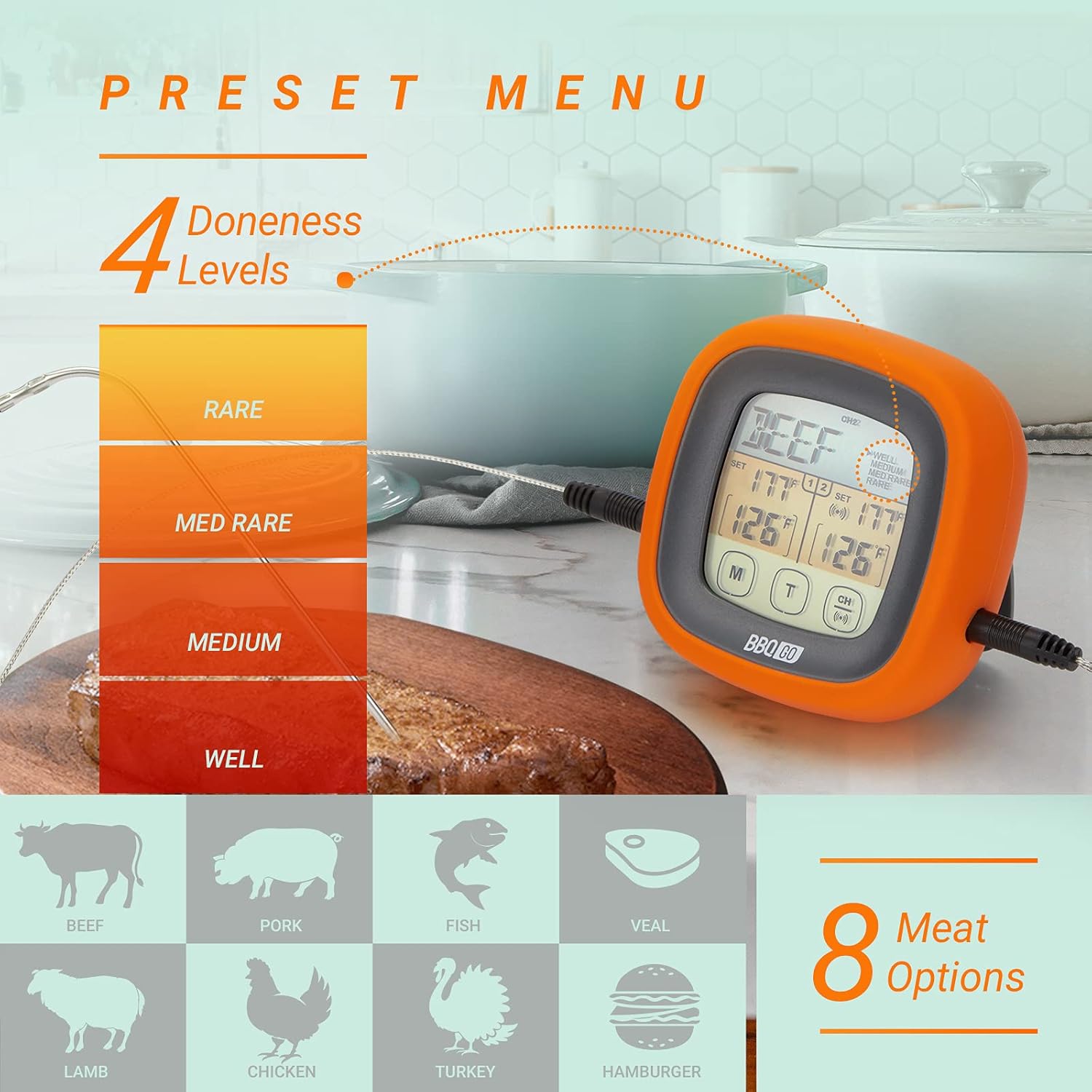
Image: The thermometer display illustrating the selection of various meat types and their corresponding doneness levels.
4.4 Setting Custom Temperatures
If you prefer a specific temperature not covered by the presets:
- Select the desired probe channel using the CH button.
- Press and hold the CH button until the alarm temperature starts flashing.
- Use the M and T buttons to adjust the target temperature up or down.
- Press CH again to confirm the setting.
4.5 Timer Function
The thermometer includes a built-in timer:
- To activate the timer, press and hold the M button until the timer digits appear.
- Use the M and T buttons to set the desired time (up to 99 minutes, 59 seconds).
- Press CH to start or pause the timer.
- An alarm will sound when the timer reaches zero.
4.6 Backlight Control
The LCD backlight can be activated for better visibility:
- Press any button to momentarily activate the backlight.
- The backlight will automatically turn off after a short period of inactivity to conserve battery.

Image: The thermometer display illuminated by its backlight, demonstrating clear readability in low-light conditions.
5. Maintenance
5.1 Cleaning
- Thermometer Unit: Wipe the main unit with a damp cloth. Do not immerse the unit in water or place it under running water.
- Probes: Wash the stainless steel probes with warm soapy water after each use. Rinse thoroughly and dry completely before storage. The probe wires are heat-resistant but should not be submerged in water.
5.2 Storage
- Store the thermometer and probes in a clean, dry place when not in use.
- Avoid storing in extreme temperatures or high humidity.
5.3 Battery Replacement
Replace batteries when the display becomes dim or the unit fails to power on. Follow the battery installation steps in Section 3.1.
6. Troubleshooting
| Problem | Possible Cause | Solution |
|---|---|---|
| Display is blank or dim. | Low or dead batteries; incorrect battery installation. | Replace batteries with new AAA batteries, ensuring correct polarity. |
| Inaccurate temperature readings. | Probe not fully inserted; probe tip touching bone/gristle; probe damaged. | Ensure probe is fully inserted into the food's thickest part, away from bone. If problem persists, the probe may need replacement. |
| Alarm does not sound. | Alarm function not activated; volume too low (if applicable); unit malfunction. | Ensure alarm temperature is set. Check if the unit has a volume setting (this model does not, so this is a general troubleshooting tip). Contact support if issue persists. |
| Touch screen unresponsive. | Unit frozen; temporary software glitch. | Remove and reinsert batteries to reset the unit. |
7. Specifications
| Feature | Detail |
|---|---|
| Model Name | BG-CT2D |
| Brand | Inkbird |
| Temperature Range | -20℃ to 250℃ (-4°F to 482°F) |
| Accuracy | ±2℃/±2°F |
| Probe Length | 40 inches (100 cm) |
| Display Type | LCD with Backlight |
| Power Source | 2 x AAA Batteries (not included) |
| Special Features | Fast Reading System, Dual Probes, Touch Screen, Preset Menus, Timer, Magnetic Back, Stand, Silicone Cover |
| Outer Material | Acrylonitrile Butadiene Styrene, Silicon |
| Product Care | Oven Safe (probes only), Wipe Clean (main unit) |
8. Warranty and Support
Inkbird products are designed for reliability and performance. For specific warranty information regarding your Inkbird BBQGO BG-CT2D Digital Food Thermometer, please refer to the warranty card included in your product packaging or visit the official Inkbird website.
If you encounter any issues or have questions about your product, please contact Inkbird customer support through their official website or the retailer where you purchased the product. Please have your model number (BG-CT2D) and purchase details ready when contacting support.
You can visit the Inkbird store for more information: Inkbird Official Store


