
1. Product Overview
The IN WIN Luna AL120 is a high-performance Addressable RGB (ARGB) case fan designed to provide efficient cooling and vibrant lighting for your PC system. This triple pack includes three fans and a dedicated one-click controller for easy management of lighting effects.

Figure 1: IN WIN Luna AL120 High Performance ARGB Case Fan Overview.
Key Features:
- Innovative Crescent Blade Design: Equipped with 9 crescent fan blades for impressive airflow and air pressure, optimizing PC cooling.
- Optimized P/Q Curve: Suitable for both static pressure and high airflow applications, making it versatile for various cooling needs.
- ARGB Lighting: Stunning and bright ARGB colors shine through white matte blades, offering customizable lighting effects. Compatible with ARGB motherboards for synchronization.
- ARGB One-Click Controller: Included in the triple pack for convenient control of ARGB components with 14 lighting modes, even without an ARGB motherboard.
- Shockproof Rubber Stands: Integrated rubber stands on each edge reduce vibrations and noise for quieter operation.
2. Package Contents
Verify that all items are present in your IN WIN Luna AL120 Triple Pack:
- 3 x IN WIN Luna AL120 ARGB LED Fans
- 12 x Mounting Screws
- 1 x ARGB One-Click Controller

Figure 2: Contents of the IN WIN Luna AL120 Triple Pack.
3. Specifications
| Feature | Specification |
|---|---|
| Model Number | IW-FN-AL120-3PK |
| Product Dimensions | 4.92"W x 3.23"H (approx. 125mm x 82mm) |
| Item Dimensions (LxWxH) | 4.72 x 4.72 x 0.98 inches (approx. 120mm x 120mm x 25mm) |
| Item Weight | 1 pounds (for the pack) |
| Material | Plastic |
| Power Connector Type | 4-Pin PWM |
| Voltage | 12 Volts |
| Wattage | 3 watts |
| Cooling Method | Fan |
| Compatible Devices | Radiator, PC Case |
| Noise Level | 35.5 Decibels |
| Maximum Rotational Speed | 1800 RPM |
| Airflow | Up to 82.96 CFM |
4. Setup and Installation
4.1 Physical Installation
- Prepare Your PC Case: Identify the desired mounting locations for the Luna AL120 fans (e.g., front, top, rear, or radiator). Ensure adequate space and clearance.
- Mount the Fans: Secure each Luna AL120 fan to your PC case or radiator using the provided 12 mounting screws. The shockproof rubber stands should be in contact with the mounting surface to minimize vibration.
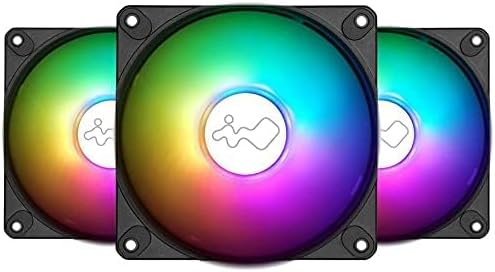
Figure 3: Front view of a single Luna AL120 fan.
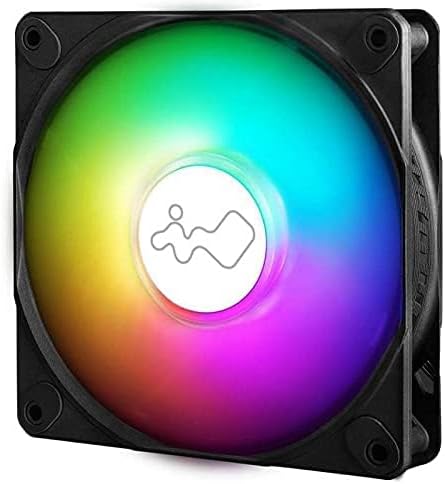
Figure 4: Back view of a single Luna AL120 fan, showing the label and cable.
4.2 Wiring Connections
- Connect Fan Power (PWM): Connect the 4-pin PWM cable from each Luna AL120 fan to an available 4-pin fan header on your motherboard or a fan hub.
- Connect ARGB Lighting:
- Option A (ARGB Motherboard Sync): Connect the 3-pin ARGB cable from each fan to an available 3-pin 5V ARGB header on your motherboard. If daisy-chaining multiple fans, connect them in series and then connect the last fan to the motherboard header.
- Option B (Included One-Click Controller): If your motherboard lacks ARGB headers or you prefer standalone control, connect the 3-pin ARGB cables from the fans to the included ARGB One-Click Controller. Connect the controller to your power supply via a SATA power connector.

Figure 5: Illustration of daisy-chaining ARGB cables for easy connection.

Figure 6: The included ARGB One-Click Controller for standalone lighting control.
5. Operating Instructions
5.1 Fan Speed Control (PWM)
The fan speed of the Luna AL120 fans is controlled via the 4-pin PWM connection to your motherboard. You can adjust fan curves and speeds through your motherboard's BIOS/UEFI settings or dedicated motherboard software (e.g., ASUS Armoury Crate, MSI Dragon Center, Gigabyte RGB Fusion).
5.2 ARGB Lighting Control
- Motherboard Software Control: If connected to an ARGB motherboard header, use your motherboard's RGB software to customize lighting effects, colors, and synchronization with other ARGB components.
- One-Click Controller: If using the included controller, press the button on the controller to cycle through 14 pre-set lighting modes. This provides quick and easy access to various effects without software.

Figure 7: ARGB lighting synchronization with a compatible motherboard.
6. Maintenance
Regular maintenance helps ensure optimal performance and longevity of your Luna AL120 fans:
- Cleaning: Periodically clean dust from the fan blades and frame using compressed air or a soft, dry cloth. Ensure the PC is powered off before cleaning.
- Inspection: Check fan cables for any signs of wear or damage. Ensure all connections remain secure.
- Operating Environment: Operate the fans in a clean, dry environment with adequate airflow to prevent dust buildup and overheating.
7. Troubleshooting
- Fans Not Spinning:
- Check if the 4-pin PWM power cable is securely connected to the motherboard or fan hub.
- Verify that the fan headers on the motherboard are enabled in BIOS/UEFI settings.
- ARGB Lighting Not Working:
- Ensure the 3-pin ARGB cable is correctly connected to a 5V ARGB header (not a 12V RGB header, which can damage the LEDs).
- If using the controller, ensure it is powered via the SATA connector and the ARGB cables are properly attached.
- If using motherboard software, ensure it is up-to-date and correctly configured for your ARGB devices.
- Excessive Noise:
- Check for any obstructions to the fan blades.
- Ensure the fans are securely mounted and the rubber stands are properly seated to absorb vibrations.
- Adjust fan speed settings in your motherboard's BIOS/UEFI or software to a lower RPM if noise is a concern.
8. Warranty and Support
IN WIN products are designed for reliability and performance. For specific warranty details, including coverage period and terms, please refer to the warranty card included with your product or visit the official IN WIN website.
For technical support, troubleshooting assistance, or to inquire about replacement parts, please contact IN WIN customer service through their official website or the contact information provided in your product documentation.
Keep your proof of purchase for warranty claims.