
Introduction
This user manual provides essential information for the safe and efficient operation of your Candy Fresco CCE4T618EW Combi Refrigerator. Please read these instructions carefully before installation and use, and keep them for future reference.
The Candy Fresco CCE4T618EW is a no-frost combi refrigerator designed for flexible storage and efficient food preservation. It features Total No Frost Circle+ technology, Wi-Fi connectivity via the hOn app, Safety Glass shelves, and LED interior lighting.
Safety Information
General Safety Warnings:
- Ensure the appliance is unplugged before performing any maintenance or cleaning.
- Do not damage the refrigerant circuit.
- Do not use electrical appliances inside the food storage compartments unless they are of the type recommended by the manufacturer.
- This appliance is not intended for use by persons (including children) with reduced physical, sensory or mental capabilities, or lack of experience and knowledge, unless they have been given supervision or instruction concerning use of the appliance by a person responsible for their safety.
- Children should be supervised to ensure that they do not play with the appliance.
- If the supply cord is damaged, it must be replaced by the manufacturer, its service agent or similarly qualified persons in order to avoid a hazard.
- Keep ventilation openings, in the appliance enclosure or in the built-in structure, clear of obstruction.
Disposal:
This appliance contains refrigerants and insulating gases which must be disposed of properly. Do not dispose of the appliance with unsorted municipal waste. Contact your local authority for information regarding available collection schemes.
Setup and Installation
1. Unpacking
Carefully remove all packaging materials. Inspect the appliance for any damage. If damage is found, do not install or operate the refrigerator and contact your retailer.
2. Placement
Place the refrigerator on a firm, level surface. Ensure adequate ventilation around the appliance. Maintain a minimum distance of 10 cm from the rear wall and 5 cm from the sides to allow for proper air circulation.
Avoid placing the appliance near heat sources (e.g., oven, radiator, direct sunlight) or in excessively cold environments.
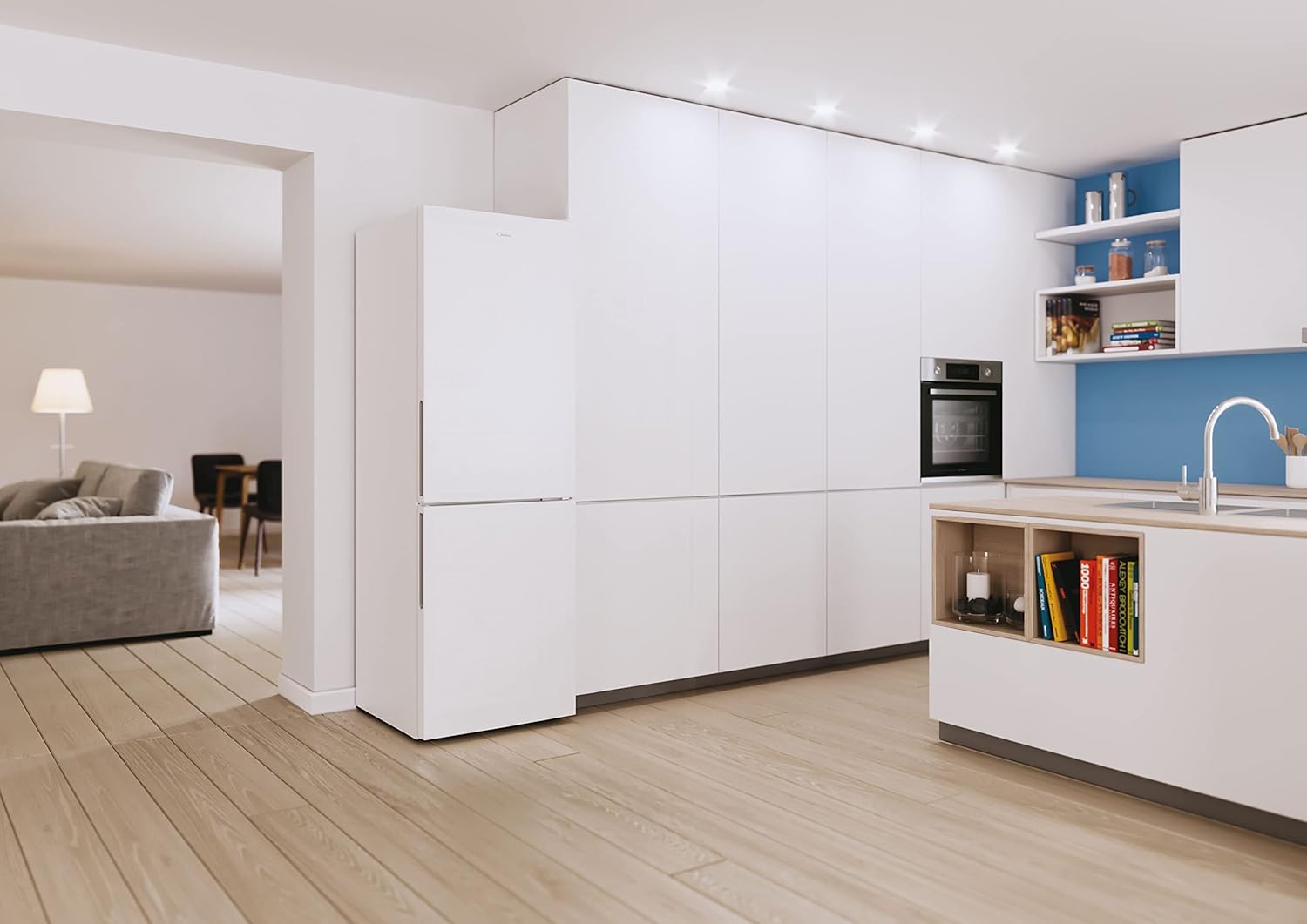
Image: The Candy Fresco CCE4T618EW refrigerator integrated into a kitchen environment, demonstrating typical placement.
3. Reversible Doors
The refrigerator doors are reversible, allowing them to open from either the left or the right side to suit your kitchen layout. Refer to the detailed instructions in the separate installation guide for the door reversal procedure. This process typically involves moving hinges and door stops.

Image: Illustration of the refrigerator with doors configured for both left and right-hand opening, highlighting the reversible door feature.
4. Electrical Connection
Before plugging in the appliance, ensure that the voltage and frequency indicated on the rating plate match your household power supply. The appliance must be properly earthed. Do not use adapters or extension cords.
After positioning the appliance, wait at least 4 hours before plugging it into the power outlet. This allows the refrigerant gases to settle.
Operating Instructions
1. Control Panel
The control panel is located inside the refrigerator compartment, typically at the top. It allows you to adjust temperature settings and activate special functions.

Image: Detailed view of the refrigerator's internal LED light and the electronic control panel with temperature settings and function indicators.
Typical Controls:
- Power Button: To turn the appliance on/off.
- Temperature Setting: Buttons or a dial to adjust the refrigerator temperature (e.g., 2°C, 4°C, 6°C, 8°C).
- Super Cool Function: For rapid cooling of newly added food.
- Wi-Fi Indicator: Shows connection status to the hOn app.
2. Temperature Adjustment
Press the temperature setting button repeatedly to cycle through available temperature options. The selected temperature will be indicated by an illuminated LED. A lower number indicates a colder setting.
Recommended Settings:
- Normal use: 4°C
- For heavier loads or warmer ambient temperatures: 2°C
3. Total No Frost Circle+ Technology
This refrigerator features Total No Frost Circle+ technology, which ensures a consistent and homogeneous temperature and humidity level throughout the refrigerator compartment. This advanced cooling system prevents ice build-up and helps keep food fresh for longer periods by circulating air evenly.

Image: Visual representation of the Total No Frost Circle+ airflow system, showing how cool air circulates to maintain uniform temperature and humidity.
4. hOn App Connectivity (Wi-Fi)
Your refrigerator is equipped with Wi-Fi connectivity, allowing you to control and monitor it remotely using the hOn app. Download the hOn app from your device's app store and follow the in-app instructions to pair your appliance.
App Features may include:
- Remote temperature control.
- Inventory Assistant for tracking food items and expiry dates.
- Smart Drink Assistant for optimal beverage cooling.
- Smart Food Locator for storage suggestions.
- Receiving notifications and tips.
5. Flexible Storage
The interior of the refrigerator is designed for maximum flexibility, offering up to 100 combinations for adjusting shelves and door balconies. This allows you to customize the storage space to fit various food items and container sizes.
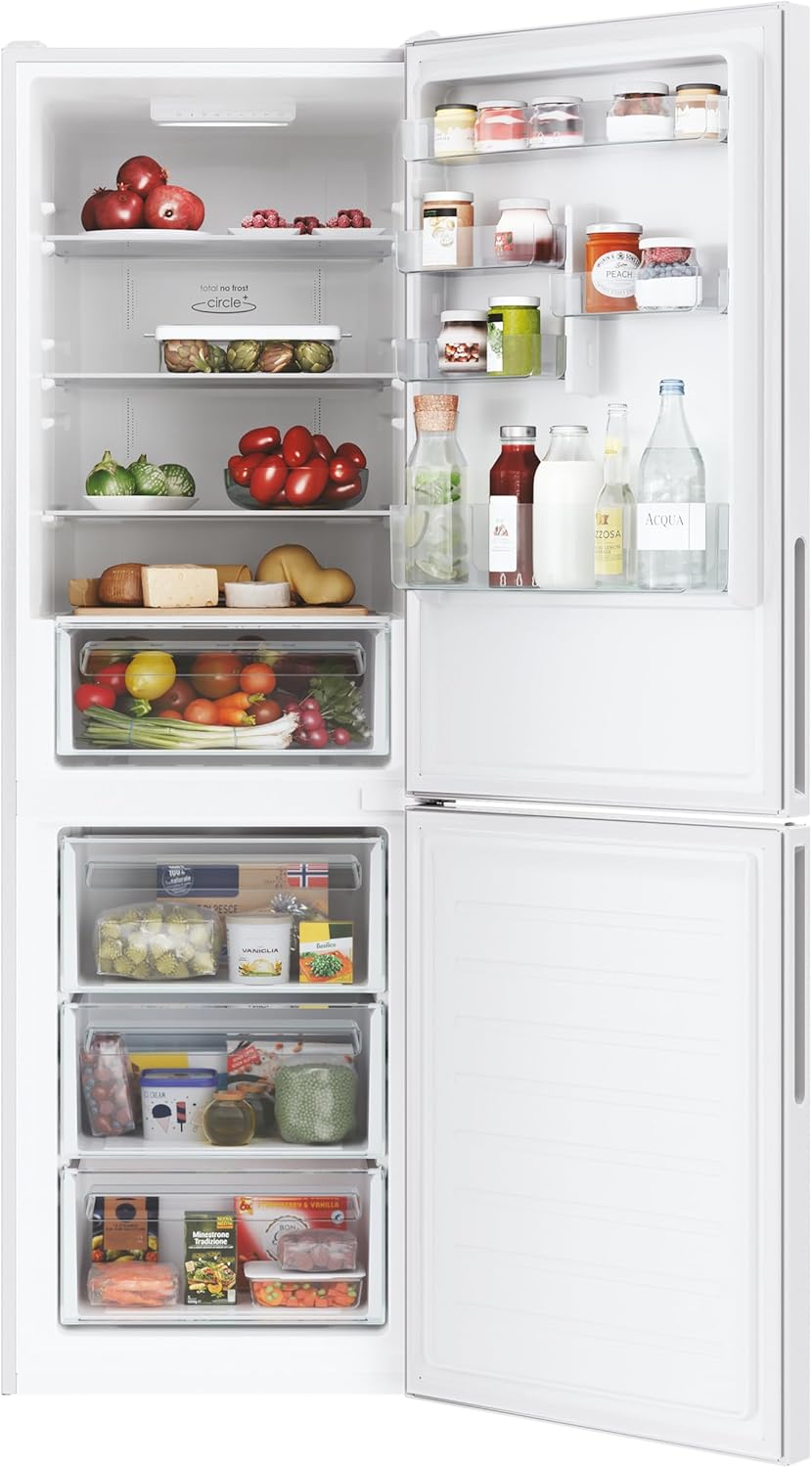
Image: The open interior of the refrigerator and freezer compartments, showcasing various shelves, drawers, and door storage filled with food.
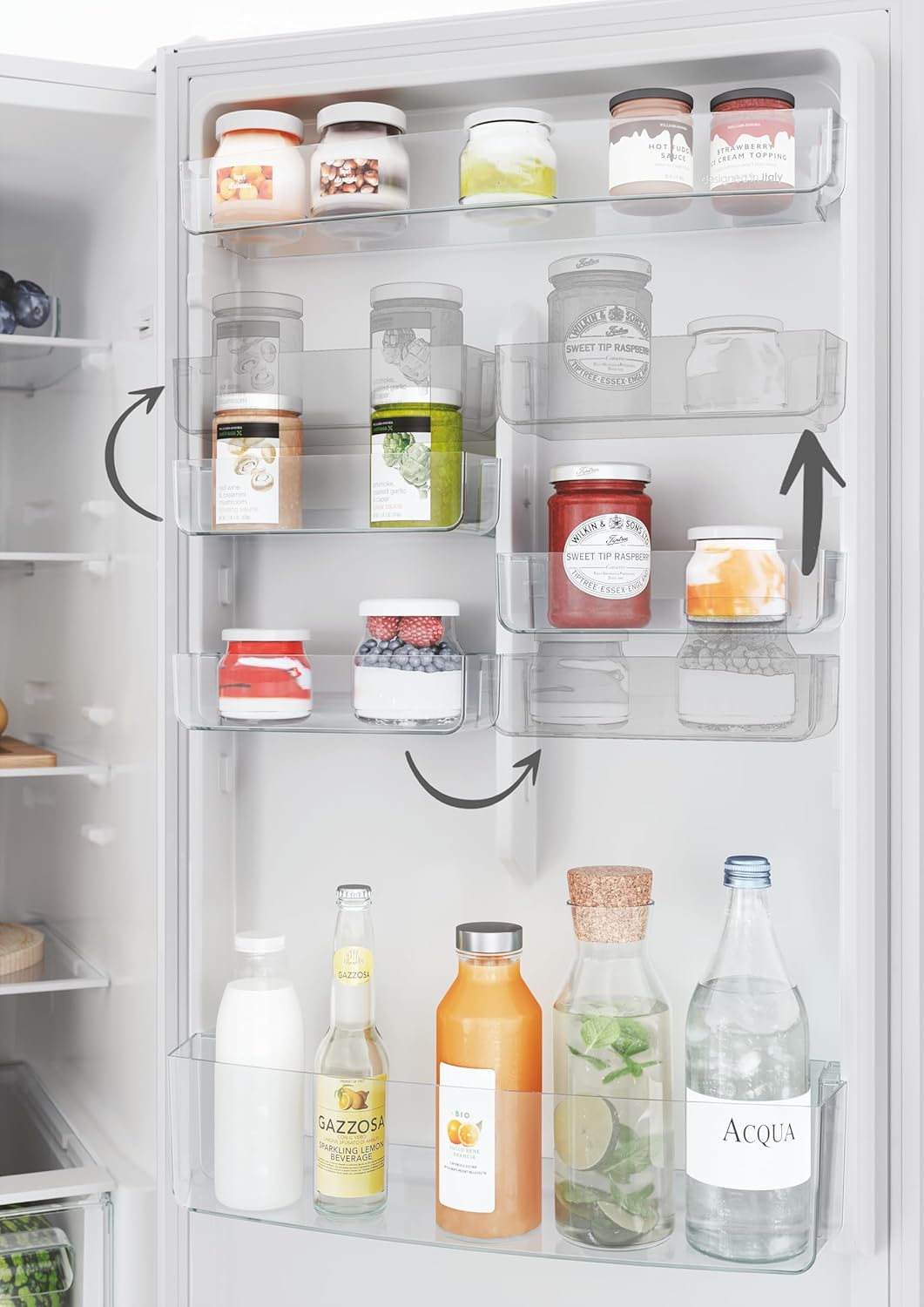
Image: Close-up of the refrigerator door showing adjustable balconies, indicated by arrows, allowing for flexible arrangement of items like jars and bottles.
Safety Glass Shelves: The shelves are made of Safety Glass, which are resistant and easy to clean. They feature a rounded design and increased thickness for durability and to prevent dirt accumulation.

Image: A detailed view of a Safety Glass shelf inside the refrigerator, highlighting its robust construction and smooth edges.
6. Cool Box with Fresh Control
The refrigerator includes a dedicated "Cool Box with Fresh Control" drawer, designed to maintain optimal humidity levels for fruits and vegetables, helping them stay fresh longer.

Image: A close-up of the "Cool Box with Fresh Control" drawer, showing its humidity control slider and contents like melons and other produce.

Image: A split image demonstrating the effectiveness of the crisper drawer, with fresh produce on one side and wilted produce on the other, illustrating prolonged freshness.
Maintenance and Cleaning
1. General Cleaning
Always unplug the appliance before cleaning. Clean the interior and exterior surfaces regularly with a soft cloth and a mild detergent solution. Avoid abrasive cleaners, solvents, or harsh chemicals that could damage surfaces.
Clean the door seals regularly to ensure a tight seal and efficient operation.
2. Defrosting
The Candy Fresco CCE4T618EW features an automatic defrost system (Total No Frost Circle+), eliminating the need for manual defrosting of the refrigerator and freezer compartments. If ice build-up occurs due to improper use (e.g., leaving doors open), ensure the doors are properly closed and the system will automatically manage the defrosting process.
3. LED Lighting
The refrigerator is equipped with long-lasting LED lighting. In the event of a malfunction, contact qualified service personnel for replacement. Do not attempt to replace the LED lights yourself.
Troubleshooting
Before contacting customer service, please check the following common issues and solutions:
| Problem | Possible Cause | Solution |
|---|---|---|
| Appliance does not operate. | No power supply; plug not inserted; fuse blown. | Check power connection; check household fuse. |
| Temperature is not cold enough. | Door left open; large amount of warm food added; poor ventilation; temperature setting too high. | Ensure door is closed; allow time for cooling after adding food; check ventilation; adjust temperature setting lower. |
| Excessive noise. | Appliance not level; objects touching the back wall; compressor noise (normal). | Adjust leveling feet; move objects away from the back; compressor noise is normal during operation. |
| Water on the bottom of the refrigerator compartment. | Drain hole blocked. | Clean the drain hole at the back of the refrigerator compartment. |
| hOn app connectivity issues. | Wi-Fi signal weak; incorrect pairing; router issues. | Check Wi-Fi signal strength; re-attempt pairing process in the app; restart your Wi-Fi router. |
Technical Specifications
| Brand | Candy |
| Model Number | CCE4T618EW |
| Configuration | Full size with freezer at the bottom |
| Total Capacity | 344 Liters |
| Refrigerator Capacity | 222 Liters |
| Freezer Capacity | 119 Liters |
| Dimensions (H x W x D) | 185 x 59.5 x 65.8 cm |
| Weight | 63 kg |
| Color | White |
| Material Type | Stainless steel, Glass |
| Number of Doors | 2 (Reversible) |
| Defrost System | Automatic (Total No Frost Circle+) |
| Voltage | 230V |
| Noise Level | 39 dBA |
| Special Features | Flexible storage, Safety glass shelves, Wi-Fi connectivity |
Energy Efficiency
The appliance is rated for energy efficiency according to EU standards. Details can be found on the energy label.

Image: The EU energy label for the Candy Fresco CCE4T618EW, showing its energy class (E), annual energy consumption (256 kWh/annum), and noise level (39 dBA).
For more detailed technical information, refer to the product information sheet.

Image: A comprehensive product information sheet detailing various technical specifications and compliance information for the Candy Fresco CCE4T618EW refrigerator.
Warranty and Support
For warranty information, please refer to the warranty card provided with your appliance or visit the official Candy website. Keep your purchase receipt as proof of purchase.
For technical assistance, spare parts, or to report a fault, please contact Candy customer service. You can find contact details on the official Candy website or in the documentation supplied with your product.
When contacting support, please have the model number (CCE4T618EW) and serial number of your appliance ready. The serial number is typically located on a label inside the refrigerator compartment.


