
1. Product Overview
This DL-pro drive unit is a replacement part designed for various Bosch Siemens MUM4 ProfiMixx series food processors. It includes the conical wheel and metal ring, essential components for the proper functioning of your kitchen machine.

Image 1: Overview of the DL-pro Drive Unit, Model 177509.
Specifications
- Model Number: 177509 (replaces 00177503)
- Dimensions: Length: 65 mm, Width: 60 mm, Height: 63 mm
- Color: Gray/White
- Material: Plastic (PA 66 GF 30)
- Components: Drive unit with conical wheel and metal ring

Image 2: Detailed view of the drive unit, showing its physical characteristics and approximate dimensions.
2. Compatibility
This drive unit is compatible with a wide range of Bosch Siemens MUM4 ProfiMixx food processor models. It is crucial to verify your appliance's model number against the provided compatibility lists to ensure proper fit and function. The part number for this drive unit is 177509, which replaces the older part number 00177503.
Please refer to the images below for a comprehensive list of compatible Bosch Siemens MUM4 series models:

Image 3: Partial list of compatible Bosch Siemens MUM4 food processor models (Part 1).

Image 4: Partial list of compatible Bosch Siemens MUM4 food processor models (Part 2).
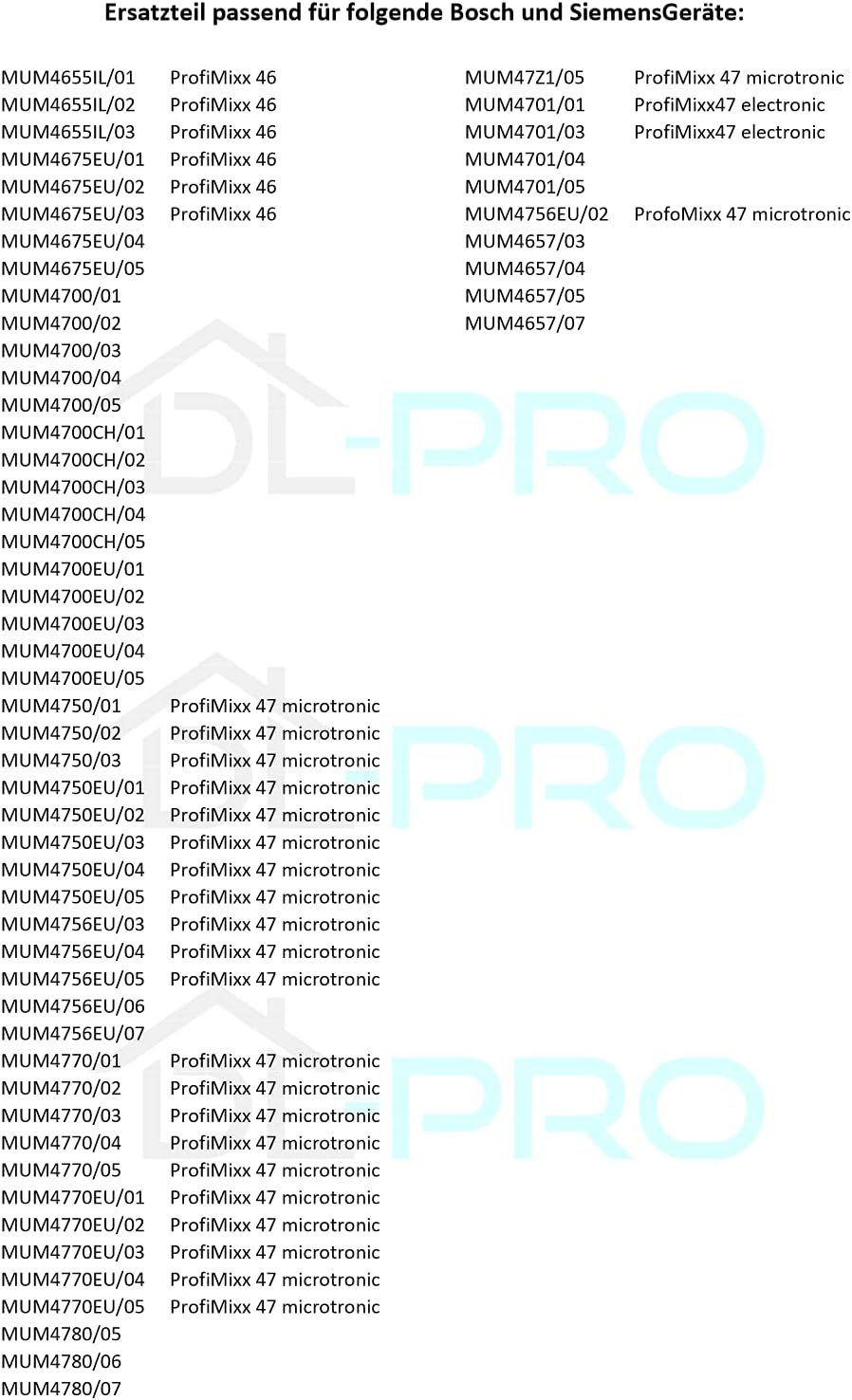
Image 5: Partial list of compatible Bosch Siemens MUM4 food processor models (Part 3).
If your specific model is not explicitly listed, compare the appearance and dimensions of your existing part with the images provided, or contact support for assistance.
3. Installation Guide
Replacing the drive unit in your Bosch Siemens MUM4 food processor is generally a straightforward process. However, always prioritize safety and ensure the appliance is disconnected from the power supply before beginning any repair work.
- Safety First: Unplug your food processor from the electrical outlet before attempting any installation or repair.
- Access the Drive Unit: Depending on your specific MUM4 model, you may need to disassemble certain parts of the food processor to access the existing drive unit. Refer to your appliance's original service manual if available.
- Remove Old Unit: Carefully detach the old, broken drive unit. Note its orientation and how it connects to other components.
- Install New Unit: Position the new DL-pro drive unit (Model 177509) in the same manner as the old one. Ensure it fits securely and all connections are properly aligned. The conical wheel and metal ring should integrate smoothly.
- Reassemble: Reassemble any parts of the food processor that were removed during the process. Ensure all screws and fasteners are tightened appropriately.
- Test Functionality: Once fully reassembled, plug the food processor back into the power supply and perform a test run to ensure the new drive unit functions correctly.
If you encounter any difficulties during installation, it is recommended to seek assistance from a qualified technician or contact DL-pro support.
4. Maintenance
To ensure the longevity and optimal performance of your DL-pro drive unit, follow these general maintenance guidelines:
- Regular Inspection: Periodically inspect the drive unit for any signs of wear, damage, or debris accumulation.
- Cleaning: If accessible, gently clean the exterior of the drive unit with a soft, damp cloth. Avoid using harsh chemicals or abrasive materials that could damage the plastic or metal components.
- Avoid Overloading: Ensure your food processor is not consistently overloaded, as this can put undue stress on the drive unit and other internal components.
- Proper Storage: If the food processor is stored for extended periods, ensure it is in a clean, dry environment.
5. Troubleshooting
If you experience issues after installing the DL-pro drive unit, consider the following troubleshooting steps:
- Unit Does Not Fit: Double-check the compatibility lists (Images 3, 4, 5) and your appliance's model number. Ensure you have the correct replacement part.
- Appliance Not Functioning:
- Verify that the food processor is properly plugged into a working electrical outlet.
- Ensure all components of the food processor are correctly assembled and locked into place, as safety mechanisms may prevent operation otherwise.
- Re-check the installation of the drive unit to ensure it is seated correctly and all connections are secure.
- Unusual Noises: If you hear grinding or unusual noises, immediately turn off and unplug the appliance. Re-inspect the drive unit installation for any misalignments or obstructions.
If troubleshooting steps do not resolve the issue, do not attempt further repairs. Contact customer support for professional assistance.
6. Support
For any questions, concerns, or if the product is not functioning as expected, please do not hesitate to contact DL-pro customer support. We are committed to assisting you and ensuring your satisfaction.
While specific contact details are not provided in this manual, you can typically find support information on the product packaging, the retailer's website where you purchased the item, or by searching for "DL-pro support" online.
We believe that repairing household appliances is the most sustainable solution for addressing defects. By providing high-quality spare parts, we enable our customers to repair their devices and give them a new life.

