
1. Introduction
The Peak Elara Pen is a professional-grade permanent makeup machine designed for precision and versatility. Its lightweight and ergonomic design provides pen-like control, making it suitable for a wide range of permanent makeup procedures, including microblading, lip blush, and color correction. This manual provides essential information for the safe and effective use of your Elara Pen.
2. Safety Information
- Always ensure the machine is disconnected from the power source before cleaning or performing maintenance.
- Use only compatible, sterile cartridge needles.
- Do not immerse the machine in liquid.
- Keep the machine out of reach of children.
- This device is intended for professional use by trained and certified permanent makeup artists only.
- Inspect the RCA cable for any damage before each use. Do not use if damaged.
3. Product Overview
The Peak Elara Pen features a durable body, a detachable textured grip, and an internal drive system. It is designed for use with standard cartridge needles.
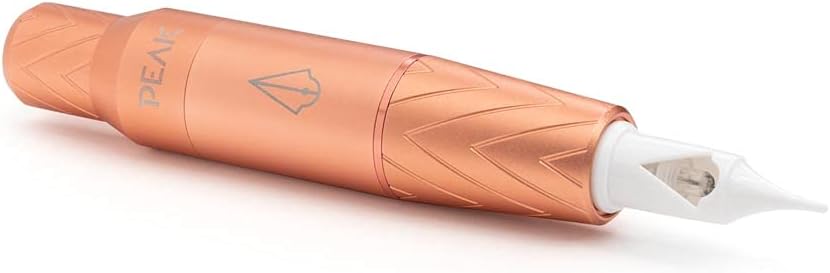
Figure 1: Peak Elara Pen Permanent Makeup Machine with a needle cartridge inserted, showcasing its sleek rose gold design.

Figure 2: The Peak Elara Pen with its textured grip detached, revealing the connection point for the grip and the RCA port at the rear.
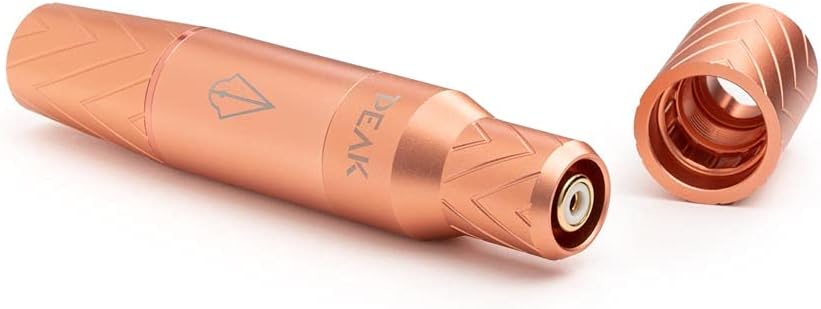
Figure 3: The Peak Elara Pen disassembled, showing the main body, the detachable grip, and the internal drive bar, illustrating its modular design.
4. Setup
Follow these steps to set up your Peak Elara Pen for operation:
- Connect Power: Plug the included RCA cable into the machine's RCA port and connect the other end to a compatible power supply.
- Insert Cartridge Needle: Securely insert a compatible cartridge needle into the front of the machine.
- Adjust Needle Depth: Rotate the grip clockwise to decrease needle depth or counter-clockwise to increase it.
- Adjust Stroke Length (Optional): The machine comes with a 3mm cam installed. To change the stroke length, detach the grip and replace the cam with either the 2.5mm or 3.5mm cam using the provided allen key.

Figure 4: Visual guide for initial setup, demonstrating power connection, needle insertion, and needle depth adjustment.
5. Operating Instructions
Once set up, operate your Elara Pen as follows:
- Power On: Turn on your power supply and set the desired voltage.
- Voltage Range: The Elara Pen supports a broad voltage range. A midrange voltage of 7V is optimal for most procedures. Lower voltages (5–6V) are suitable for stippling and pixel shading, while higher voltages (8V) are recommended for lip blushing and color correction.
- Procedure: Begin your permanent makeup procedure, maintaining proper technique and hygiene.
- Power Off: After use, turn off the power supply and disconnect the machine.
6. Maintenance
Proper maintenance ensures the longevity and performance of your Elara Pen:
- Cleaning: After each use, wipe down the exterior of the machine with a suitable disinfectant wipe. Ensure no liquids enter the internal components.
- Sterilization: The machine itself is not autoclavable. Only the needle cartridges are sterile and disposable.
- Storage: Store the machine in a clean, dry place away from direct sunlight and extreme temperatures.
- Inspection: Regularly inspect the machine for any signs of wear or damage, especially the RCA port and grip connection.
7. Troubleshooting
If you encounter issues with your Elara Pen, refer to the following common solutions:
| Problem | Possible Cause | Solution |
|---|---|---|
| Machine not turning on | Loose RCA connection, faulty power supply, damaged cable. | Check all connections. Test with a different RCA cable or power supply if available. |
| Needle not moving or weak operation | Incorrect voltage setting, needle cartridge issue, drive bar obstruction. | Adjust voltage. Replace needle cartridge. Ensure drive bar moves freely. |
| Excessive vibration or noise | Loose components, worn O-rings, incorrect assembly. | Ensure grip is securely attached. Check O-rings for wear and replace if necessary (2 O-rings included). Reassemble carefully. |
8. Specifications
- Brand: Peak
- Model: Elara Pen
- Stroke Lengths: 2.5mm, 3mm (pre-installed), 3.5mm (interchangeable cams included)
- Needle Depth: Adjustable by rotating grip
- Voltage Range: Broad, suitable for various procedures (e.g., 5-6V for stippling, 8V for lip blush)
- Compatibility: Most standard cartridge needles
- Connection: RCA
- Included Accessories: RCA cable, 2 O-rings, spring, allen key, drive bar
- ASIN: B09G3ZKXW4
- UPC: 850011407547
9. Warranty and Support
For detailed warranty information and customer support, please refer to the official Peak website or contact your authorized distributor. Keep your proof of purchase for any warranty claims.
Official Website: Visit the Peak Store on Amazon