
1. Introduction
The Nutale Findthing is a Bluetooth-enabled item finder designed to help locate misplaced personal items such as keys, wallets, bags, and other valuables. It connects to your smartphone via the Findthing application, allowing you to trigger an audible alert on the device or view its last known location.

Image 1.1: The Nutale Findthing device, a small, circular black tracker with the 'Nutale' logo, held in a person's hand.
2. Package Contents
Verify that all items are present in the package:
- 1 x Nutale Findthing Bluetooth Key Finder
- 1 x CR2032 Battery (pre-installed)
- 1 x Spare CR2032 Battery
- 1 x Quick Start Guide
- 1 x Double-Sided Sticker

Image 2.1: An illustration showing the Nutale Findthing device, a key ring, a quick start guide, a CR2032 battery, and a double-sided sticker, representing the typical package contents.
3. Setup Instructions
Follow these steps to set up your Nutale Findthing device:
- Power On the Device: Press and hold the button on the Nutale Findthing device for approximately 5 seconds until you hear an audible sound, indicating it has powered on.
- Download the App: Download and install the "Findthing" application from the Apple App Store (for iOS devices) or Google Play Store (for Android devices).
- Open the App and Add Device: Open the Findthing app on your smartphone. Tap the "+" icon to add a new device.
- Select Category and Finish: Choose a category for your item (e.g., Keys, Wallet) and then tap "Done" to complete the pairing process.
Your Nutale Findthing is now connected and ready for use. You can tap "Call" within the app to make your device ring.
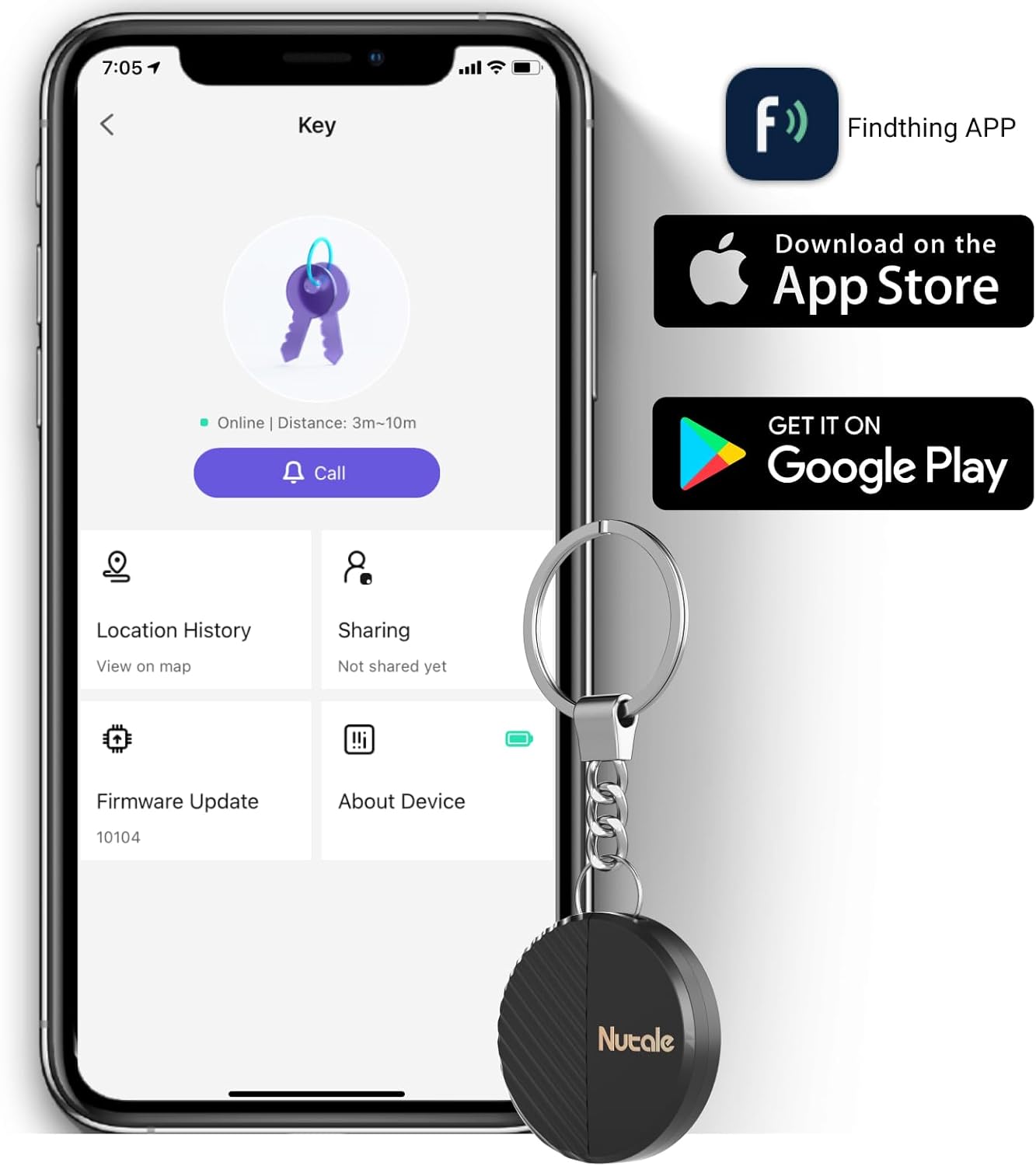
Image 3.1: A smartphone displaying the Findthing application interface, showing options like 'Call', 'Location History', and 'Sharing', with the Nutale Findthing device attached to a key ring next to it.
4. Operating Instructions
4.1 Locating Items
To find a misplaced item, open the Findthing app on your smartphone and tap the "Call" button associated with your Nutale Findthing device. The device will emit a loud ring (up to 100dB) to help you locate it quickly.

Image 4.1: A hand holding the Nutale Findthing device, with graphic representations of sound waves emanating from it, indicating its ringing function.
4.2 Range and Connectivity
The Nutale Findthing connects to your phone via Bluetooth. The effective range for locating items is approximately:
- Indoor: Up to 30 meters (98 feet)
- Outdoor: Up to 50 meters (164 feet)
The app will display the last known location of the device if it goes out of Bluetooth range. Note that this device is designed for short-range item finding and is not a long-distance GPS tracker.

Image 4.2: A diagram showing the Nutale Findthing's maximum indoor range of 30 meters and outdoor range of 50 meters, overlaid on images of a kitchen and a residential area.
4.3 Attaching the Device
The Nutale Findthing can be attached to various items using its integrated key chain or the provided double-sided sticker. Common uses include:
- Keys
- Wallets
- Backpacks and bags
- Remote controls
- Other personal items

Image 4.3: A collage showing the Nutale Findthing attached to various items such as a wallet, a notebook, keys, a toy, a backpack, and a remote control, demonstrating its versatility.
5. Maintenance
5.1 Battery Replacement
The Nutale Findthing uses a CR2032 coin cell battery, which typically lasts for up to 10 months. When the battery needs replacement:
- Locate the battery compartment on the device.
- Gently press out the battery cover. You may need a small tool like a safety pin to assist in removing the old battery.
- Insert a new CR2032 battery with the positive (+) side facing up.
- Close the battery compartment securely.
A spare CR2032 battery is included in your package.
6. Troubleshooting
- Device not ringing:
- Ensure the device is powered on (long press for 5 seconds).
- Check if the device is within Bluetooth range of your smartphone.
- Verify the battery level in the Findthing app. Replace the battery if it is low.
- Ensure Bluetooth is enabled on your smartphone.
- Cannot connect to the app:
- Make sure the device is powered on.
- Restart the Findthing app.
- Restart your smartphone's Bluetooth.
- Ensure your phone's operating system is compatible with the Findthing app.
- Inaccurate location:
- The device provides the last known location when it was connected via Bluetooth. It does not offer real-time GPS tracking over long distances.
- Environmental factors (e.g., thick walls, interference) can affect Bluetooth range and accuracy.
7. Specifications
| Feature | Detail |
|---|---|
| Product Dimensions | 1.5 x 1.5 x 0.29 inches |
| Item Weight | 1.76 ounces |
| Model Number | Nutale Findthing |
| Battery Type | 1 x CR2032 (included) |
| Connectivity | Bluetooth |
| Material | Plastic |
| Manufacturer | Nutale |
8. Warranty and Support
Nutale provides life-time technical support for the Findthing device. If you encounter any issues or have questions regarding the product, please refer to the contact information provided in your Quick Start Guide or visit the official Nutale support website.

