
Introduction
This manual provides instructions for the Merkury Innovations UZ-CAUM5-101 USB to Micro USB Cable. This cable is designed for charging and data transfer with compatible devices such as Android smartphones, tablets, and other Micro USB-enabled electronics. It features a durable nylon braided design and aluminum alloy connectors for reliable performance.
Product Overview
The Merkury Innovations UZ-CAUM5-101 cable consists of two main components:
- USB-A Connector: The standard rectangular USB connector, typically used for connecting to power adapters, computers, or USB hubs.
- Micro USB Connector: The smaller, trapezoidal connector, used for connecting to compatible mobile devices.
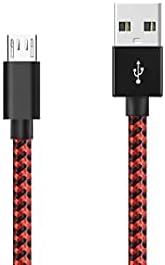
Image 1: Overview of the Merkury USB to Micro USB Cable, showing both the USB-A and Micro USB connectors. The cable features a red and black braided design.

Image 2: Close-up view of the Micro USB connector and the USB-A connector, highlighting the aluminum alloy joints designed for durability and resistance to rust and oxidation. This image illustrates the precise build quality.
Setup Instructions
- Identify Ports: Locate the USB-A port on your power adapter, computer, or USB hub, and the Micro USB port on your compatible device (e.g., smartphone, tablet).
- Connect USB-A: Insert the standard USB-A connector of the cable into the USB-A port of your power source or computer. Ensure it is fully inserted.
- Connect Micro USB: Carefully insert the Micro USB connector into the Micro USB port of your device. Ensure the connector is oriented correctly to avoid damage. Do not force the connection.
- Verify Connection: Once connected, your device should indicate that it is charging or connected for data transfer.
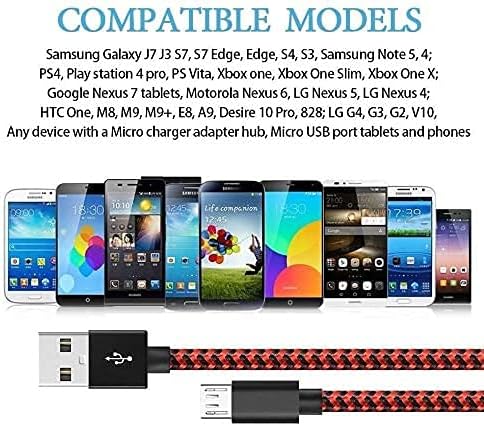
Image 3: Visual representation of the USB-A and Micro USB connectors, illustrating their compact design and the braided cable structure. This image helps in identifying the correct orientation for connection.
Operating Instructions
Charging Devices
To charge your device:
- Connect the USB-A end of the cable to a compatible USB wall adapter, car charger, or power bank.
- Connect the Micro USB end to your device's Micro USB port.
- Ensure the power source is active. Your device's battery indicator should show it is charging.
Data Transfer
To transfer data between your device and a computer:
- Connect the USB-A end of the cable to an available USB port on your computer.
- Connect the Micro USB end to your device's Micro USB port.
- Your computer should recognize the connected device. You may need to select a "File Transfer" or "MTP" mode on your device's screen if prompted.
- Access your device's storage through your computer's file explorer to transfer files.

Image 4: This image highlights the cable's capability for speedy synchronization and charging, indicating that it supports both fast charging and data transfer simultaneously. It visually reinforces the dual functionality.
Maintenance
- Storage: Store the cable in a cool, dry place away from direct sunlight and extreme temperatures.
- Cleaning: If necessary, gently wipe the cable and connectors with a soft, dry cloth. Avoid using harsh chemicals or abrasive materials.
- Handling: Avoid bending the cable sharply, especially near the connectors, to prevent internal wire damage. Do not pull the cable by the cord; always grasp the connector when plugging or unplugging.
- Inspection: Periodically inspect the cable and connectors for any signs of wear, fraying, or damage. Discontinue use if damage is observed.

Image 5: Close-up view of the cable's high-quality nylon braided material. This material is designed to be tangle-free, durable, and flexible, offering enhanced longevity compared to standard cables.
Troubleshooting
- Device not charging or connecting:
- Ensure both ends of the cable are securely connected to the device and the power source/computer.
- Try using a different USB port on your computer or a different power adapter.
- Test the cable with another compatible device to determine if the issue is with the cable or the device.
- Check your device's charging port for any debris or damage.
- Slow charging:
- Ensure you are using a power adapter with sufficient output (e.g., 2A or higher for faster charging).
- Avoid using the device heavily while it is charging.
- Close unnecessary applications running in the background on your device.
- Data transfer issues:
- On your device, ensure "File Transfer" or "MTP" mode is selected when connected to a computer.
- Restart both your device and computer.
- Ensure your computer's USB drivers are up to date.
Specifications
| Brand | Merkury Innovations |
| Model Number | UZ-CAUM5-101 |
| Connector Type | USB-A to Micro USB |
| Cable Type | USB 2.0 |
| Length | 5 Feet (approximately 1.5 meters) |
| Material | Nylon Braided Cable, Aluminum Alloy Connectors |
| Data Transfer Rate | Up to 0.48 Gigabits Per Second (480 Mbps) |
| Compatible Devices | Smartphones, Tablets, PS4 controllers, and other devices with a Micro USB port (e.g., Samsung Galaxy S7 Edge, S6, Note 5, LG K40) |
| UPC | 844702027275 |

Image 6: A visual guide to compatible models, displaying a range of smartphones and tablets that can be charged and synced using this Micro USB cable. This image helps users identify if their device is supported.
Warranty and Support
For warranty information or technical support regarding your Merkury Innovations UZ-CAUM5-101 USB to Micro USB Cable, please refer to the product packaging or contact Merkury Innovations customer service directly. Contact details can typically be found on the manufacturer's official website or on the product's retail packaging.

