Introduction
This manual provides instructions for the Gorilla babo universal remote control, designed for use with various FUJITSU air conditioner models, including AR-RY11, AR-RY12, AR-RY13, AR-RY14, AR-RY3, and AR-RY4. This remote is pre-programmed and does not require additional setup for basic functionality. Please read this manual carefully to ensure proper operation and to maximize the lifespan of your remote control.
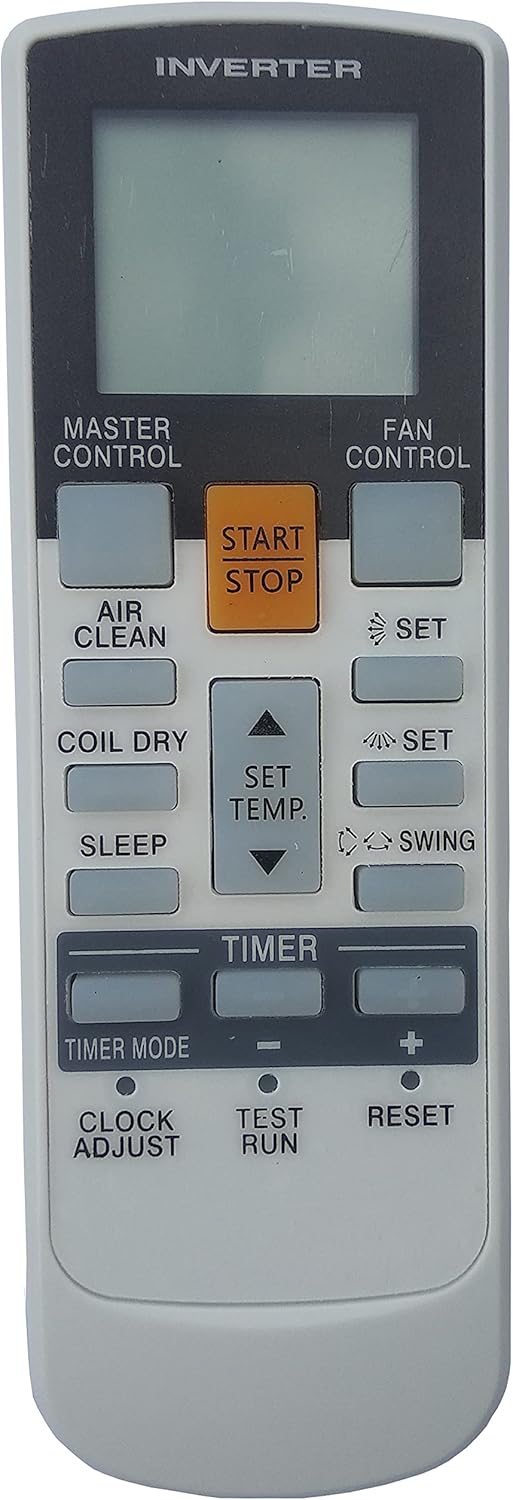
Image of the Gorilla babo universal remote control, showing its display and various function buttons.
Setup: Battery Installation
The remote control requires two (2) AAA batteries (not included) for operation. Ensure correct polarity when inserting batteries.
- Locate the battery compartment cover on the back of the remote control.
- Slide the cover downwards or press the latch and lift to open.
- Insert two new AAA batteries, matching the (+) and (-) terminals as indicated inside the compartment.
- Replace the battery compartment cover, ensuring it clicks securely into place.
Important: Remove batteries if the remote control will not be used for an extended period to prevent leakage and damage.
Operating Instructions
This section details the functions of the buttons on your universal remote control.
Basic Functions
- START/STOP Button (Orange): Press to turn the air conditioner unit ON or OFF.
- MASTER CONTROL Button: Cycles through the main operating modes of the air conditioner (e.g., Auto, Cool, Dry, Fan, Heat). Press repeatedly to select the desired mode.
- FAN CONTROL Button: Adjusts the fan speed (e.g., Auto, Low, Medium, High). Press repeatedly to cycle through available speeds.
- SET TEMP. Buttons (Up/Down Arrows): Increases or decreases the desired temperature setting.
Advanced Functions
- AIR CLEAN Button: Activates or deactivates the air purification function, if available on your AC unit.
- COIL DRY Button: Initiates a coil drying cycle to prevent mold and mildew growth within the indoor unit.
- SLEEP Button: Activates sleep mode, which typically adjusts temperature and fan speed for comfortable sleep and energy saving.
- SET Button (with fan icon): May be used to confirm fan settings or activate specific fan modes.
- SET Button (with snowflake/sun icon): May be used to confirm or select specific cooling or heating settings.
- SWING Button: Controls the louver swing function, directing airflow. Press to start/stop or change swing patterns.
Timer and Clock Functions
- TIMER Button: Initiates the timer setting process.
- TIMER MODE Button: Cycles through different timer modes (e.g., Timer On, Timer Off).
- '+' and '-' Buttons (under TIMER): Adjusts timer duration or time settings.
- CLOCK ADJUST Button: Used to set the current time on the remote's display.
Utility Functions
- TEST RUN Button: Activates a diagnostic test run of the air conditioner unit. Use with caution and refer to your AC unit's manual for details.
- RESET Button: Resets the remote control to its default settings. This may be necessary if the remote is not functioning correctly.
Changing Temperature Unit (Celsius/Fahrenheit)
Some universal remotes allow switching between Celsius and Fahrenheit. As this remote is pre-set and lacks explicit programming instructions, a common method for many universal AC remotes is to:
- Ensure the remote is powered off.
- Press and hold the SET TEMP. Up Arrow and SET TEMP. Down Arrow buttons simultaneously for approximately 5 seconds.
- Alternatively, try pressing and holding the MODE button and the SET TEMP. Up Arrow button simultaneously for 5 seconds.
If these methods do not work, the temperature unit may be fixed or controlled directly by your air conditioner unit. Consult your specific FUJITSU air conditioner's original instruction manual for details on changing the temperature display unit.
Maintenance
Battery Replacement
When the remote control's display becomes dim or its range decreases, it is time to replace the batteries. Follow the battery installation steps outlined in the "Setup" section. Always replace both batteries at the same time with new AAA batteries.
Caution: Do not mix old and new batteries, or different types of batteries. Dispose of used batteries responsibly according to local regulations.
Troubleshooting
- Remote not responding:
- Check if the batteries are inserted correctly with the correct polarity.
- Replace old batteries with new ones.
- Ensure there are no obstructions between the remote control and the air conditioner's receiver.
- Point the remote directly at the air conditioner unit.
- Air conditioner not responding to commands:
- Verify that the remote is compatible with your specific FUJITSU AC model (AR-RY11, AR-RY12, AR-RY13, AR-RY14, AR-RY3, AR-RY4).
- Try resetting the remote control using the RESET button.
- Ensure the air conditioner unit itself is powered on and functioning correctly.
- Temperature unit display is incorrect (Celsius/Fahrenheit):
- Refer to the "Changing Temperature Unit" section in this manual.
- Consult your original FUJITSU air conditioner manual for unit-specific instructions.
Specifications
| Feature | Detail |
|---|---|
| Product Dimensions | 4.72 x 1.57 x 0.39 inches |
| Item Weight | 3.52 ounces |
| Power Source | 2 x AAA Batteries (not included) |
| Connectivity Technology | Infrared |
| Compatible Devices | FUJITSU AR-RY11, AR-RY12, AR-RY13, AR-RY14, AR-RY3, AR-RY4 Air Conditioner Units |
Warranty and Support
Specific warranty information for this universal remote control is not provided in the product details. For any issues, questions, or support inquiries, please contact the seller directly through the platform where the purchase was made. Keep your purchase receipt as proof of purchase.


