
Introduction
This manual provides detailed instructions for the installation, operation, and maintenance of your SECRUI Wireless Doorbell M520+F55. Please read this manual thoroughly before use to ensure proper functionality and longevity of the product.
The SECRUI Wireless Doorbell is designed for ease of use, featuring a pre-paired system, long-range signal, multiple chime options, and durable, weather-resistant construction.
Package Contents
- Wireless Doorbell Transmitter (Push Button)
- Wireless Doorbell Receiver (Plug-in Chime)
- Mounting Hardware (Screws, Anchors, Adhesive Tape)
- User Manual
Setup and Installation
The SECRUI Wireless Doorbell system is pre-paired at the factory, allowing for immediate use upon unboxing. No complex wiring or electrician installation is required.
Receiver Installation
- Unpack the doorbell receiver.
- Plug the receiver into any standard electrical outlet indoors. Ensure it is within range of the transmitter and in a location where the chime can be easily heard.

Image: The receiver plugs directly into a standard wall outlet for easy setup.
Transmitter (Push Button) Installation
The transmitter can be mounted using either adhesive tape or screws.
- Adhesive Mounting:
- Clean the desired mounting surface thoroughly to ensure it is dry and free of dust or grease.
- Peel off one side of the adhesive tape and apply it firmly to the back of the transmitter.
- Peel off the other side of the adhesive tape and press the transmitter firmly onto the cleaned surface for at least 30 seconds.
- Screw Mounting:
- Open the back cover of the transmitter.
- Mark the desired drilling points on the wall using the screw holes on the transmitter's back plate as a guide.
- Drill pilot holes and insert wall anchors if necessary.
- Secure the back plate to the wall with the provided screws.
- Attach the transmitter body to the secured back plate.

Image: Detailed steps for both adhesive and screw mounting options for the doorbell transmitter.
The doorbell system features a strong anti-interference FM signal, ensuring reliable communication up to 1000 feet (300 meters) in an obstacle-free environment. This allows for flexible placement of both the transmitter and receiver.

Image: Example of a doorbell system covering multiple areas within a home, demonstrating its range and expandability.
Operating Instructions
Once the receiver is plugged in and the transmitter is mounted, your doorbell system is ready for use.
Changing Chimes
The doorbell offers 58 different chimes. To change the chime:
- Press the "Music Selection" button on the receiver to cycle through the available melodies.
- Once you hear a desired melody, stop pressing the button. The receiver will save this selection.
Adjusting Volume
There are 5 adjustable volume levels, including a mute mode. To adjust the volume:
- Press the "Volume Control" button on the receiver repeatedly.
- Each press will cycle through the volume levels (Level 1 to 5, then Mute). Select the desired volume.

Image: The receiver features buttons for selecting chimes and adjusting volume, along with an LED indicator.
LED Flashing Indicator
The receiver includes a colorful LED indicator that flashes when the doorbell is pressed, providing a visual alert in addition to the audible chime. This is particularly useful in mute mode or for individuals with hearing impairments.
Maintenance
The SECRUI Wireless Doorbell is designed for low maintenance and durability.
- Cleaning: Wipe the surfaces of both the transmitter and receiver with a soft, dry cloth. Avoid using abrasive cleaners or solvents.
- Weather Resistance: The transmitter is IP55 dustproof and waterproof, designed to withstand various weather conditions, including temperatures from -4°F to 140°F (-20°C to 60°C).
- Battery Life: The transmitter operates on a long-lasting battery with an estimated life of 3 years. The transmitter does not consume power when not being pressed. When the battery is low, the signal range may decrease, or the transmitter may stop functioning. Replace the battery as needed (battery type typically CR2032, refer to product packaging for exact type).

Image: The doorbell transmitter is built to be weather-resistant with an IP55 rating, suitable for outdoor use.
Troubleshooting
| Problem | Possible Cause | Solution |
|---|---|---|
| Doorbell does not chime when button is pressed. |
|
|
| Short signal range or intermittent operation. |
|
|
| Doorbell chimes without anyone pressing the button. |
|
|
Specifications
| Feature | Detail |
|---|---|
| Model | M520+F55 |
| Wireless Range | Up to 1000 ft (300m) in open areas |
| Chime Options | 58 melodies |
| Volume Levels | 5 levels (including mute) |
| Waterproof Rating (Transmitter) | IP55 |
| Operating Temperature | -4°F to 140°F (-20°C to 60°C) |
| Transmitter Battery Life | Approximately 3 years |
| Receiver Dimensions | 2.56 in x 2.56 in x 0.98 in (6.5 cm x 6.5 cm x 2.5 cm) |
| Transmitter Dimensions | 2.56 in x 1.3 in x 0.79 in (6.5 cm x 3.3 cm x 2 cm) |
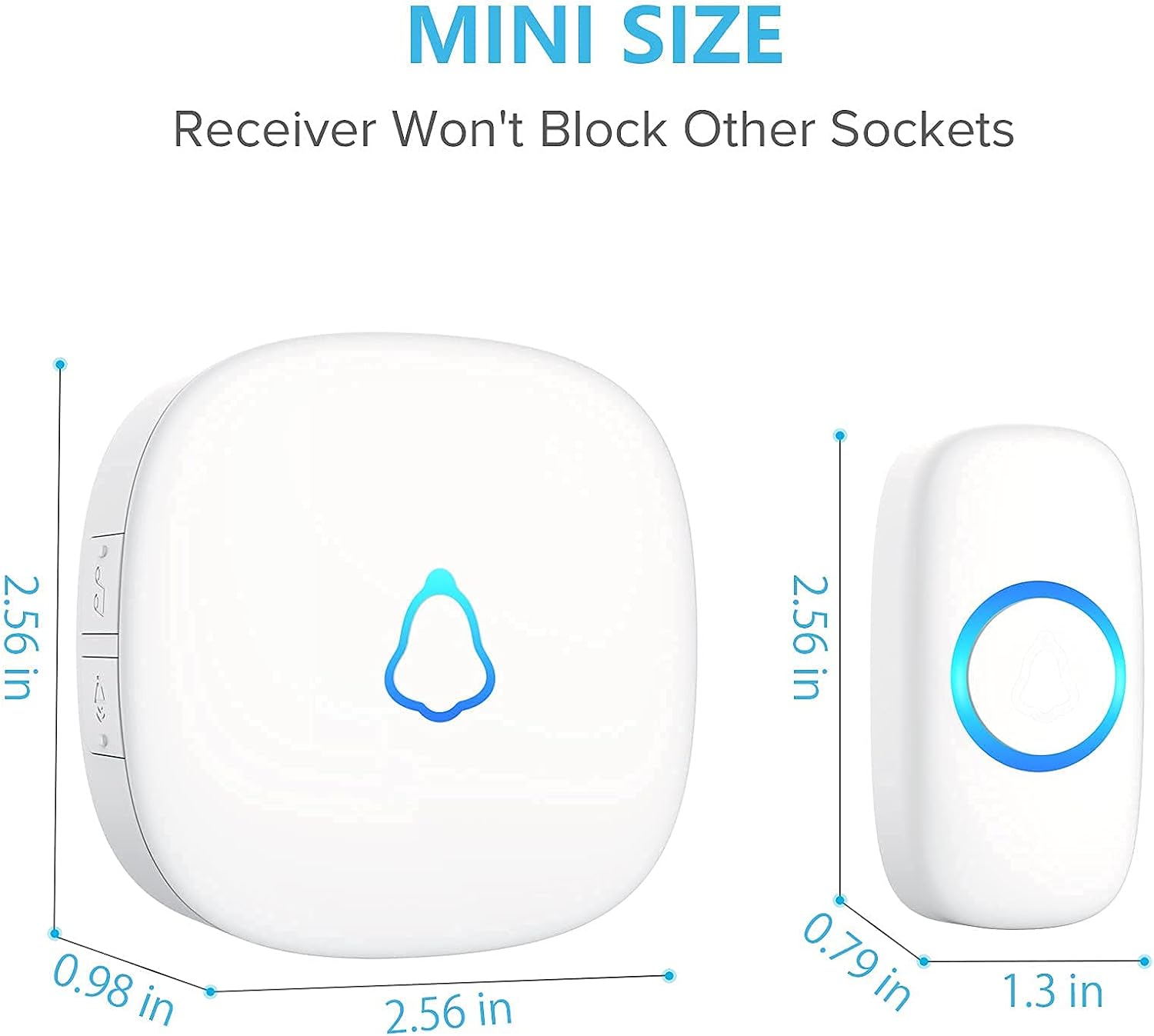
Image: Dimensions of the receiver and transmitter, illustrating their compact "mini size" design.

Image: The compact receiver is capable of producing a loud 120dB sound.
Warranty and Support
SECRUI is committed to providing high-quality products. While specific warranty details are not provided in this manual, please retain your proof of purchase for any warranty claims.
In case of any malfunctions, questions, or concerns regarding your SECRUI Wireless Doorbell, please contact our customer support team for assistance. You can typically find contact information on the product packaging or the official SECRUI website.
This doorbell can also serve as a caregiver pager, providing convenience for the elderly or pregnant women who may need assistance.

Image: The doorbell system can be utilized as a caregiver pager for individuals requiring assistance, such as the elderly or pregnant women.


