
DAVITU ASD-A2-0421-L
Contents
DAVITU Delta ASD-A2-0421-L AC Servo Drive
User Manual
1. Introduction
The DAVITU Delta ASD-A2-0421-L is a 400W, 220V AC servo drive from the Delta A2 series, designed for precise motor control in various industrial applications. This drive supports full-closed control, offering high accuracy and performance. This manual provides essential information for the proper installation, operation, and maintenance of the servo drive.
2. Safety Information
WARNING:
- Disconnect all power and wait 10 minutes before servicing. Residual voltage may cause electric shock.
- Do not touch heatsink when power is on. High temperatures may cause burns.
- Use proper grounding techniques to prevent electric shock and ensure stable operation.
- Installation and maintenance should only be performed by qualified personnel.
- Ensure the power supply matches the specifications of the servo drive (220V AC).
CAUTION:
- Protect the device from moisture, dust, and corrosive gases.
- Avoid installing in areas with excessive vibration or direct sunlight.
- Ensure adequate ventilation around the unit to prevent overheating.
3. Setup and Installation
Proper installation is crucial for the optimal performance and longevity of the servo drive. Follow these steps carefully:
3.1 Unpacking and Inspection
Upon receiving the servo drive, carefully unpack it and inspect for any signs of damage during transit. Verify that all components are present according to the packing list.
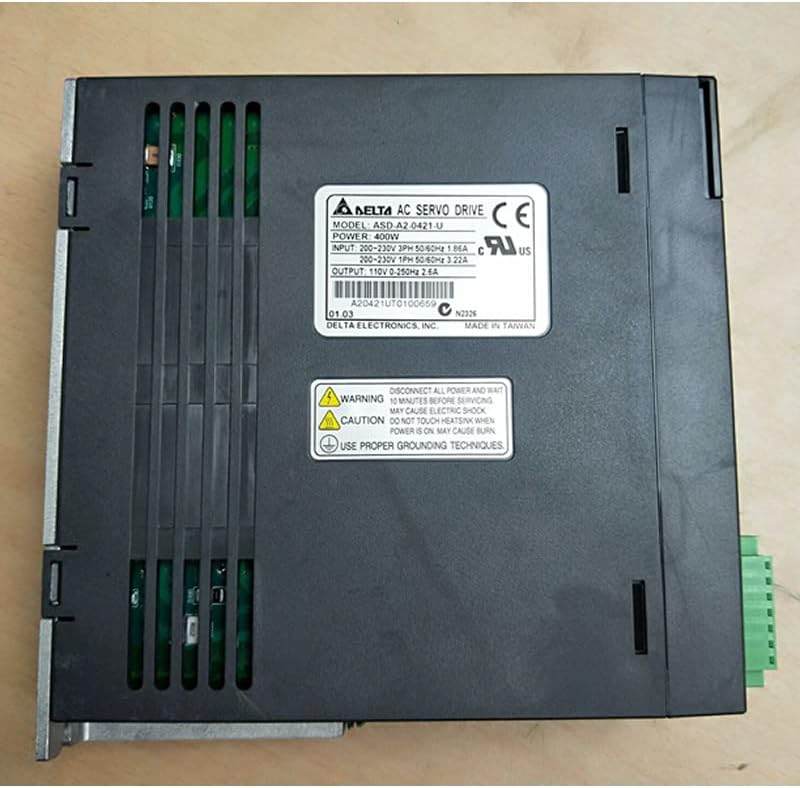
Figure 1: Rear view of the Delta ASD-A2-0421-L AC Servo Drive. This image displays the product label with model number ASD-A2-0421-U, power specifications (400W, 200-230V 3PH 50/60Hz), and safety warnings regarding power disconnection and grounding.
3.2 Mounting
Mount the servo drive vertically on a stable surface within an enclosure that provides sufficient cooling. Ensure there is adequate clearance around the unit for airflow.
3.3 Wiring Connections
Connect the power supply, motor, and control signals according to the wiring diagrams provided in the full technical manual. Pay close attention to polarity and grounding.

Figure 2: Side view of the Delta ASD-A2-0421-L AC Servo Drive. This image highlights the input terminals for 220V AC power (R, S, T) and connections for an external braking resistor.

Figure 3: Another side view of the Delta ASD-A2-0421-L AC Servo Drive. This image displays the motor output terminals (U, V, W) and various control signal connectors, including CN8.
- Power Supply: Connect the 220V AC power to the designated input terminals.
- Motor Connection: Connect the stepper motor to the U, V, W output terminals.
- Control Signals: Connect control signals (e.g., pulse, direction, enable) to the appropriate connectors (e.g., CN8).
- Grounding: Ensure the drive is properly grounded to a common ground point.
4. Operating Instructions
Once the servo drive is correctly installed and wired, you can proceed with operation:
4.1 Powering On
After verifying all connections, apply power to the servo drive. The status indicators on the drive should illuminate, indicating successful power-up.
4.2 Parameter Settings
The Delta ASD-A2 series servo drives require specific parameter settings for optimal performance with your motor and application. Refer to the detailed Delta A2 series programming manual for instructions on how to access and modify parameters using the drive's keypad or a dedicated software interface.
4.3 Running the Motor
Initiate motor movement through your control system (e.g., PLC, motion controller) by sending appropriate commands (e.g., pulse train, analog voltage). Monitor the motor's response and the drive's status indicators.
5. Maintenance
Regular maintenance helps ensure the longevity and reliable operation of your servo drive:
- Cleaning: Periodically clean the exterior of the drive to prevent dust accumulation, especially on cooling fins and ventilation openings. Use a soft, dry cloth. Do not use liquid cleaners.
- Connection Check: Regularly inspect all wiring connections for tightness and signs of wear or corrosion. Loose connections can lead to intermittent operation or damage.
- Environmental Conditions: Ensure the operating environment remains within the specified temperature and humidity ranges.
- Fan Inspection: If the drive has a cooling fan, check it periodically for proper operation and clear any obstructions.
6. Troubleshooting
This section provides solutions to common issues you might encounter:
| Problem | Possible Cause | Solution |
|---|---|---|
| Drive does not power on | No power supply; Incorrect wiring; Blown fuse | Check power source; Verify wiring connections; Replace fuse if necessary |
| Motor does not move | Motor not connected; Enable signal not active; Incorrect parameters; Overload | Check motor wiring; Activate enable signal; Verify parameter settings; Reduce load |
| Drive displays an error code | Overvoltage; Undervoltage; Overcurrent; Overheat | Refer to the Delta A2 series manual for specific error code meanings and corrective actions. |
| Motor vibrates or makes unusual noise | Improper tuning; Loose mechanical connections; Motor damage | Perform auto-tuning or manual tuning; Check mechanical connections; Inspect motor for damage |
If the problem persists after attempting these solutions, contact technical support.
7. Specifications
| Feature | Specification |
|---|---|
| Model Number | ASD-A2-0421-L |
| Motor Type | Stepper Motor (compatible) |
| Power Supply | AC 220V |
| Rated Power | 400W |
| Control Method | Full-Closed Control |
| Material | Copper (internal components) |
| Manufacturer | DAVITU |
8. Warranty and Support
For warranty information, please refer to the terms and conditions provided at the time of purchase or contact your vendor. For technical support, product inquiries, or assistance with troubleshooting beyond the scope of this manual, please contact DAVITU customer service or your authorized distributor. When contacting support, please have your product model number (ASD-A2-0421-L) and any relevant error codes ready.
You can find additional resources and detailed technical documentation on the official Delta Electronics website for the A2 series servo drives.
Documents and downloads
Ask a question about this manual
Ask about setup, troubleshooting, compatibility, parts, safety, or missing instructions. Manuals+ will review the question and use this page’s manual context to help answer it.