
1. Introduction
This manual provides essential information for the safe and efficient installation, operation, and maintenance of the JIAYIN JYPC-5 501P Electromagnetic Water Pump. Please read this manual thoroughly before using the product and retain it for future reference. This pump is designed for applications requiring high-pressure water delivery, such as in coffee machines, using water or non-corrosive liquids.
2. Safety Instructions
- Electrical Safety: Ensure the power supply matches the pump's requirements (AC 220V-240V, 50Hz). Disconnect power before installation, maintenance, or troubleshooting. All electrical connections must be performed by a qualified professional and comply with local electrical codes.
- Liquid Compatibility: Use only water or non-corrosive liquids with this pump. Using corrosive liquids can damage the pump and void the warranty.
- Installation Environment: Install the pump in a dry, well-ventilated area, protected from extreme temperatures and direct moisture.
- Pressure: The pump operates at a high pressure of 9 bar. Ensure all connections and hoses are rated for this pressure to prevent leaks or bursts.
- Handling: Handle the pump with care to avoid physical damage. Do not drop or subject it to strong impacts.
3. Product Overview
The JIAYIN JYPC-5 501P is a compact electromagnetic pump designed for reliable performance in various applications. It features a robust construction and is engineered for continuous operation (ED100%).

Figure 3.1: Front view of the JIAYIN JYPC-5 501P pump, showing the 'jiayin' label and model number.
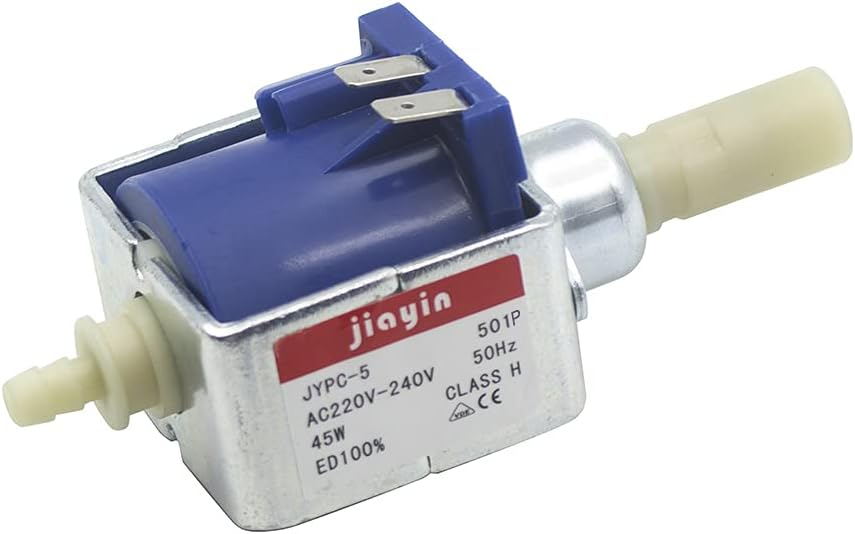
Figure 3.2: Angled view of the pump, highlighting the electrical connection terminals at the top.

Figure 3.3: Side view of the pump, illustrating the water inlet (left) and outlet (right) nozzles.
4. Specifications
The following table details the technical specifications of the JYPC-5 501P pump:

Figure 4.1: Detailed technical parameters, flow/pressure, flow/time, and temperature rise/time charts for the JYPC-501P series.
| Parameter | Value |
|---|---|
| Model | JYPC-5 501P |
| Voltage | AC 220V - 240V |
| Frequency | 50Hz |
| Power | 45W |
| Maximum Pressure | 9 bar |
| Average Flow Rate | 550 ±10% cc/min (approx. 550 Cubic Inches Per Minute) |
| Working Medium | Water or non-corrosive liquid |
| Material | Plastic |
| Dimensions (L x W x H) | 4.88 x 2.13 x 1.26 inches |
| Duty Cycle | ED100% (Continuous Operation) |
| Part Number | JYPC-5A05-A1 |
| UPC | 603765374371 |
5. Setup and Installation
Proper installation is crucial for the pump's performance and longevity.
5.1 Mounting
- Secure the pump using appropriate fasteners through the mounting holes on its metal frame. Ensure it is mounted on a stable, vibration-resistant surface.
- Allow sufficient space around the pump for ventilation and access for maintenance.
5.2 Plumbing Connections
- Identify the inlet and outlet ports. The inlet typically has a smaller barb, and the outlet is the larger nozzle. Refer to Figure 3.3 for visual identification.
- Connect appropriate hoses to the inlet and outlet ports. Ensure all connections are tight and leak-free, using clamps if necessary, to withstand the 9 bar operating pressure.
- Ensure the liquid source is clean and free of debris to prevent clogging.
5.3 Electrical Connections
- Connect the pump to an AC 220V-240V, 50Hz power supply.
- Ensure proper grounding according to local electrical codes.
- Verify that all wiring is secure and insulated to prevent electrical hazards.

Figure 5.1: Top-down view of the pump, showing the overall compact design.
6. Operating Instructions
Once installed, operating the pump is straightforward:
- Prime the Pump (if necessary): For initial startup or after extended periods of inactivity, ensure the pump's inlet is submerged in liquid or that the system is filled to prevent dry running.
- Apply Power: Turn on the power supply to the pump. The pump will begin to operate, drawing liquid through the inlet and expelling it at high pressure from the outlet.
- Monitor Operation: Observe the pump during its first few minutes of operation for any unusual noises, leaks, or signs of malfunction.
- Continuous Duty: The JYPC-5 501P is designed for continuous operation (ED100%).
- Shut Down: To stop the pump, simply disconnect the power supply.
7. Maintenance
Regular maintenance ensures optimal performance and extends the pump's lifespan.
- Regular Inspection: Periodically inspect the pump for any signs of wear, damage, or leaks. Check electrical connections for tightness and corrosion.
- Cleanliness: The pump is designed to resist rust and clogging. However, ensure the liquid being pumped is clean and free of particulate matter to prevent internal blockages. If the pump is used with liquids that may leave residue, periodic flushing with clean water may be beneficial.
- Storage: If the pump will not be used for an extended period, drain any liquid from it and store it in a dry, protected environment.
8. Troubleshooting
Refer to the following table for common issues and their potential solutions:
| Problem | Possible Cause | Solution |
|---|---|---|
| Pump does not start | No power supply Incorrect voltage/frequency Damaged wiring | Check power connection and circuit breaker Verify power supply matches specifications Inspect and repair wiring (by qualified personnel) |
| No flow or low flow | Air in the system (not primed) Inlet/outlet clogged Kinked or blocked hose Pump damage | Ensure pump is primed and inlet is submerged Check and clear any blockages in ports or lines Inspect hoses for kinks or obstructions Contact support if pump is damaged |
| Unusual noise or vibration | Air in the system Loose mounting Internal obstruction/damage | Ensure pump is properly primed Tighten mounting screws Disconnect power and inspect for obstructions; contact support if internal damage is suspected |
| Leaks from connections | Loose hose clamps Damaged hoses/fittings | Tighten hose clamps Replace damaged hoses or fittings |
If the problem persists after attempting these solutions, please contact customer support.
9. Warranty and Support
For warranty information, please refer to the terms and conditions provided by your retailer or the manufacturer at the time of purchase. Keep your proof of purchase for warranty claims.
For technical support, spare parts, or service inquiries, please contact the seller or manufacturer directly. Provide your product model number (JYPC-5 501P) and a detailed description of the issue when seeking assistance.