
1. Introduction
Thank you for choosing the Sonew G6 Gaming Mouse. This manual provides essential information for setting up, operating, and maintaining your new gaming mouse. Please read this manual carefully before use to ensure optimal performance and longevity of your device.
2. Product Features
- Ergonomic Design: Shaped to fit the palm for comfortable long-term use.
- Adjustable DPI: Six-gear adjustable photoelectric resolution up to 3200dpi for precise control.
- Wired USB Connectivity: Reliable and stable connection with a 1.5m (4.9ft) cable.
- Colorful LED Lights: Integrated LED lighting for visual effects.
- High-End Chip: Built-in chip for accurate positioning and responsiveness.

Image 2.1: The ergonomic design of the Sonew G6 Gaming Mouse, illustrating how it conforms to the hand for comfortable use.

Image 2.2: The Sonew G6 Gaming Mouse showcasing its colorful LED lighting effects.
3. Package Contents
Please verify that all items are present in the package:
- 1 x Sonew G6 Gaming Mouse
4. Setup
Follow these steps to connect your Sonew G6 Gaming Mouse:
- Locate an available USB port on your computer (desktop or laptop).
- Plug the USB connector of the Sonew G6 Gaming Mouse into the USB port.
- Your operating system should automatically detect and install the necessary drivers. This process may take a few moments.
- Once installed, the mouse is ready for use.

Image 4.1: The Sonew G6 Gaming Mouse showing its integrated USB cable, ready for connection to a computer.
5. Operating Instructions
5.1 Basic Operation
The Sonew G6 Gaming Mouse functions as a standard computer mouse. Move the mouse to control the cursor on your screen. Use the left and right buttons for primary and secondary clicks, respectively. The scroll wheel allows for vertical scrolling through documents and web pages.
5.2 DPI Adjustment
The mouse features an adjustable DPI (Dots Per Inch) setting, allowing you to change the sensitivity and speed of the cursor. This mouse offers six adjustable gears. To change the DPI, press the dedicated DPI button, usually located behind the scroll wheel. Each press will cycle through the available DPI settings, indicated by changes in the LED lighting or a brief pause in movement.
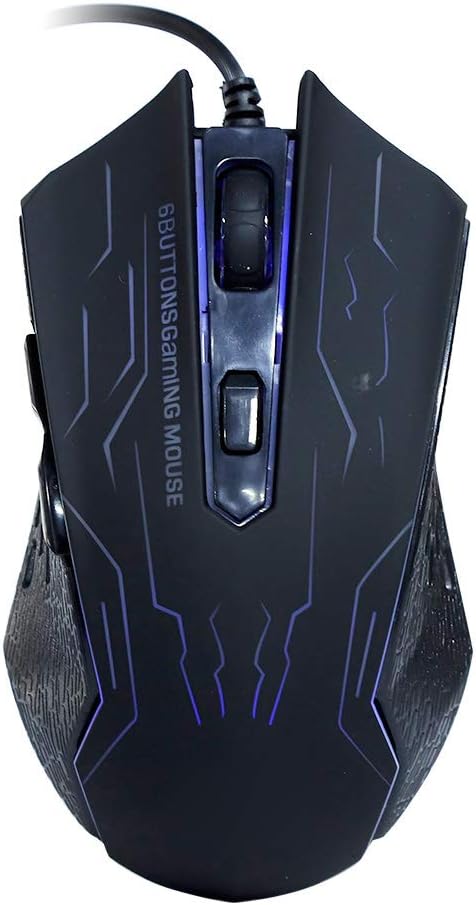
Image 5.1: Top view of the Sonew G6 Gaming Mouse, highlighting the left and right click buttons, scroll wheel, and the DPI adjustment button.
6. Maintenance
To ensure the longevity and optimal performance of your Sonew G6 Gaming Mouse, follow these maintenance guidelines:
- Cleaning: Use a soft, dry cloth to wipe the surface of the mouse. For stubborn dirt, slightly dampen the cloth with water or a mild cleaning solution. Avoid harsh chemicals or abrasive materials.
- Sensor Care: Keep the optical sensor on the bottom of the mouse clean and free from dust or debris. Use a cotton swab or compressed air if necessary.
- Cable Management: Avoid sharply bending or twisting the USB cable to prevent internal damage.
- Storage: When not in use, store the mouse in a clean, dry environment away from extreme temperatures.
7. Troubleshooting
If you encounter issues with your Sonew G6 Gaming Mouse, refer to the following table for common problems and solutions:
| Problem | Possible Cause | Solution |
|---|---|---|
| Mouse not responding | Loose USB connection, faulty USB port, driver issue. | Ensure USB cable is securely plugged in. Try a different USB port. Restart your computer. |
| Cursor movement is erratic or jumpy | Dirty optical sensor, unsuitable mouse pad surface. | Clean the optical sensor on the bottom of the mouse. Use a clean, uniform mouse pad or surface. |
| DPI adjustment not working | Software conflict, button malfunction. | Ensure no conflicting software is running. If the issue persists, contact customer support. |
8. Specifications
Technical specifications for the Sonew G6 Gaming Mouse:
| Feature | Detail |
|---|---|
| Model | G6 |
| Photoelectric Resolution | Up to 3200dpi (Six gears adjustable) |
| Interface | USB |
| Line Length | Approx. 1.5m / 4.9ft |
| Connectivity Technology | Wired |
| Movement Detection Technology | Optical |
| Special Feature | Ergonomic Design |
| Item Weight | 5.5 ounces |
| Package Dimensions | 5.51 x 4.33 x 1.97 inches |

Image 8.1: Bottom view of the Sonew G6 Gaming Mouse, displaying regulatory marks and electrical ratings (5V 100mA).
9. Warranty and Support
For warranty information or technical support, please refer to the documentation provided with your purchase or contact the retailer. Keep your proof of purchase for any warranty claims.