
Borne MP320-4SL
Pulse Clip MP3 Player User Manual
Model: MP320-4SL | Brand: Borne
Introduction
This manual provides comprehensive instructions for the safe and efficient operation of your Borne Pulse Clip MP3 Player. Please read this manual thoroughly before using the device and retain it for future reference.

Image: The Borne Pulse Clip MP3 Player, shown in its retail packaging, highlighting its compact size and clip design.
Package Contents
Verify that all items listed below are present in your package:
- Borne Pulse Clip MP3 Player (MP320-4SL)
- Earphones
- USB Charging/Data Cable
- User Manual (this document)
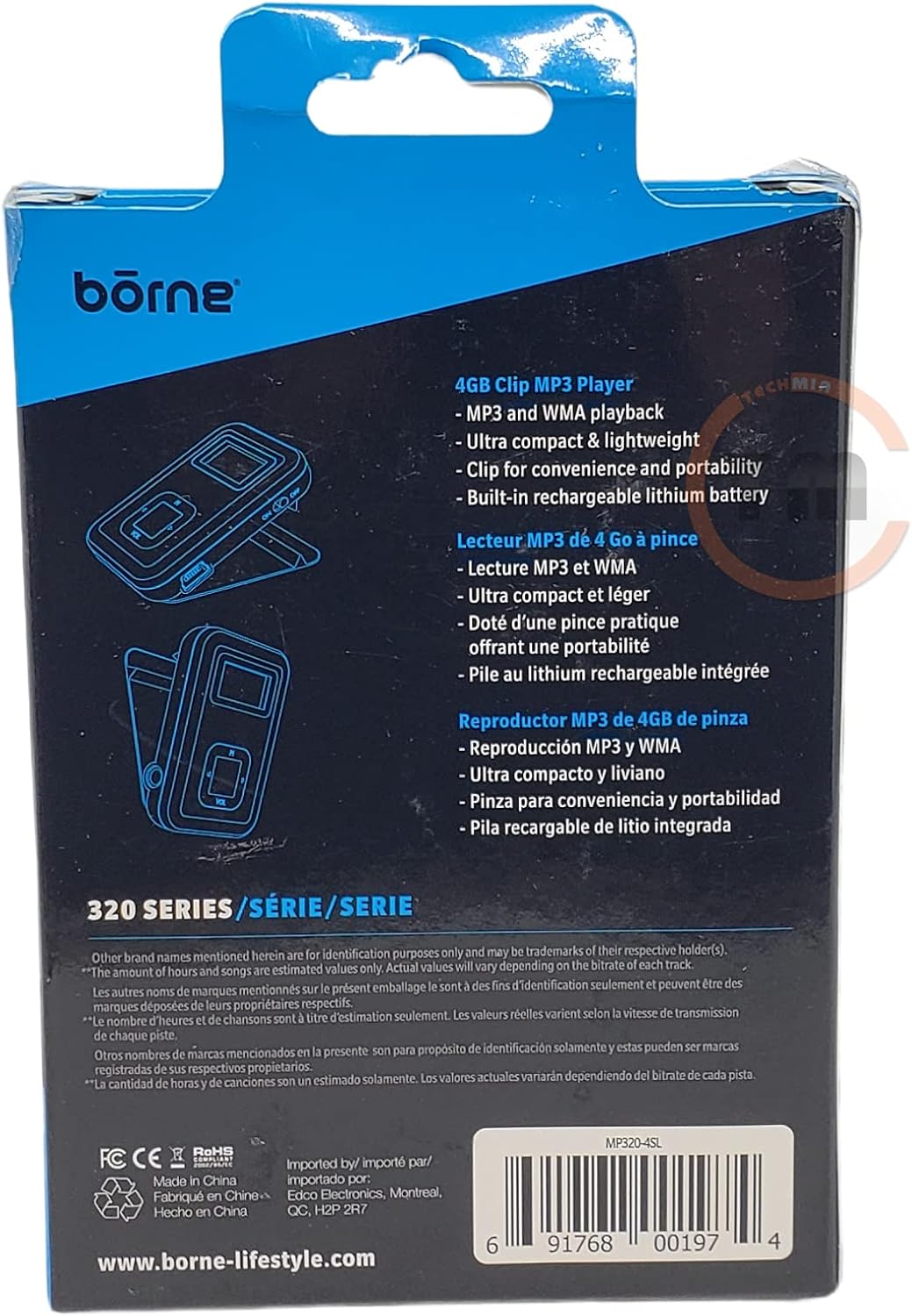
Image: The rear of the product packaging, illustrating key features such as 4GB storage, MP3/WMA playback, ultra-compact design, clip for portability, and built-in rechargeable battery.
Product Overview
Familiarize yourself with the various components and controls of your MP3 player.

Image: An angled view of the Borne Pulse Clip MP3 Player in its packaging, providing a clearer look at the device's front panel with its small display and control buttons.
Controls and Ports:
- Display Screen: Small LED/LCD screen for basic information.
- Play/Pause Button: Initiates or pauses audio playback.
- Next/Previous Track Buttons: Navigates between songs.
- Volume Up/Down Buttons: Adjusts audio output level.
- USB Port: For charging and data transfer.
- 3.5mm Headphone Jack: Connects earphones.
- Power/Hold Switch: Turns the device on/off or locks controls.
- Integrated Clip: For attaching the player to clothing or accessories.
Setup
1. Charging the Battery
Before first use, fully charge the MP3 player. Connect the small end of the included USB cable to the player's USB port and the larger end to a powered USB port on a computer or a USB wall adapter (not included). The LED indicator will show charging status. A full charge typically takes approximately 2-3 hours and provides up to 16 hours of music playback.
2. Loading Music Files
- Ensure the MP3 player is charged.
- Connect the MP3 player to your computer using the USB cable.
- The player will appear as a removable disk drive on your computer.
- Drag and drop your desired MP3 or WMA audio files into the player's storage folder.
- Once files are transferred, safely eject the device from your computer before disconnecting the USB cable.
Operating Instructions
1. Power On/Off
Slide the Power/Hold switch to the "On" position to power on the device. To power off, slide the switch to the "Off" position.
2. Playing Music
- Connect the earphones to the 3.5mm headphone jack.
- Power on the device.
- Press the Play/Pause button to begin playback.
- Press the Play/Pause button again to pause playback.
3. Volume Control
Press the "VOL +" button to increase volume and "VOL -" button to decrease volume.
4. Track Navigation
Press the "Next Track" button to skip to the next song. Press the "Previous Track" button to go back to the beginning of the current song, or press it twice quickly to go to the previous song.
5. Hold Function
Slide the Power/Hold switch to the "Hold" position to lock all buttons and prevent accidental presses during transport.
Maintenance
- Cleaning: Use a soft, dry cloth to clean the exterior of the player. Do not use liquid cleaners or aerosols.
- Storage: Store the device in a cool, dry place away from direct sunlight and extreme temperatures.
- Battery Care: To prolong battery life, avoid fully discharging the battery frequently. Charge the device regularly, even if not in use for extended periods.
- Water Exposure: This device is not waterproof. Avoid exposure to water or excessive moisture.
Troubleshooting
| Problem | Possible Cause | Solution |
|---|---|---|
| Device does not power on. | Battery is depleted. | Charge the device for at least 30 minutes. |
| No sound from earphones. | Volume is too low or earphones are not properly connected. | Increase volume. Ensure earphones are fully plugged in. Test with another pair of earphones. |
| Cannot transfer files to the player. | Incorrect USB connection or driver issue. | Ensure the USB cable is securely connected. Try a different USB port on your computer. Restart your computer. |
| Player freezes or becomes unresponsive. | Software glitch. | Slide the Power/Hold switch to "Off" and then back to "On" to reset the device. |
Specifications
| Feature | Detail |
|---|---|
| Model Name | MP320-4SL |
| Memory Storage Capacity | 4 GB |
| Compatible Media Type | MP3, WMA |
| Battery Average Life | 16 Hours (Music Playback) |
| Connectivity Technology | USB |
| Display Technology | LED/LCD |
| Mounting Hardware | Integrated Clip |
| Color | Silver |
| Dimensions (Approx.) | 16.2 x 10.2 x 3 cm (Parcel Dimensions) |
| Weight (Approx.) | 100 g (Parcel Weight) |
Warranty and Support
Borne products are designed for reliability and performance. For information regarding warranty coverage, technical support, or service inquiries, please visit the official Borne website or contact their customer service department. Please have your model number (MP320-4SL) and proof of purchase ready when seeking support.
Official Website: www.borne-lifestyle.com
Note: Product specifications and features are subject to change without notice.
Related documentsMP320-4SL


Ask a question about this manual
Ask about setup, troubleshooting, compatibility, parts, safety, or missing instructions. Manuals+ will review the question and use this page’s manual context to help answer it.