
1. Introduction
Thank you for choosing the AILINKE 3.4Gal/13L Large Room Humidifier. This manual provides essential information for the safe and efficient operation, maintenance, and troubleshooting of your new humidifier. Please read it thoroughly before use and retain it for future reference.

Figure 1.1: AILINKE 3.4Gal/13L Large Room Humidifier
2. Product Overview
Key Features:
- Large Capacity: 3.4 Gallons (13 Liters) water tank for extended operation.
- Top Fill Design: Easy and convenient water refilling.
- Integrated Humidistat: Maintains desired humidity levels automatically.
- Quiet Operation: Operates at ≤35dB, suitable for bedrooms and quiet environments.
- Aroma Box: Allows for the use of essential oils to diffuse fragrance.
- Easy to Clean: Designed for simple and hassle-free cleaning.
- Touch Control Panel: Intuitive controls for various settings.
- UV Sterilization: Helps purify water for cleaner mist.
- Sleep Mode: Dims display and operates quietly for undisturbed rest.
- Timer Function: Set operating duration from 1 to 12 hours.
- Adjustable Mist Levels: Three mist output settings (Low, Medium, High).
- 48-Hour Run Time: Provides long-lasting humidification on a single fill.
- Water Shortage Protection: Automatically shuts off when water level is low.
- Self-Cleaning Function: Simplifies internal cleaning.

Figure 2.1: Key features including 13L tank capacity, 48-hour run time, and quiet operation.
3. Setup
3.1 Unpacking
Carefully remove all packaging materials and ensure all components are present. Keep packaging for future storage or transport.
3.2 Placement
Place the humidifier on a flat, stable, and water-resistant surface at least 6 inches (15 cm) away from walls and furniture. Ensure the mist outlet is not directed at walls or electronic devices.

Figure 3.1: Humidifier placed in a large room, demonstrating mist coverage.
3.3 Filling the Water Tank
- Remove the top cover of the humidifier.
- Pour clean, cool tap water directly into the water tank through the top opening. Do not exceed the 'MAX' water level indicator.
- Replace the top cover securely.

Figure 3.2: Demonstrating the convenient top-fill design for water replenishment.
4. Operating Instructions
4.1 Control Panel Overview
The humidifier features an intuitive touch control panel located on the top. It includes buttons for Power, Max/Min Mist, Humidity, UV, Timer, and Sleep Mode.

Figure 4.1: Close-up of the humidifier's control panel.
4.2 Power On/Off
Press the Power button to turn the humidifier on or off. The display will illuminate when the unit is active.
4.3 Adjusting Mist Levels
Press the Max/Min button to cycle through three mist output levels: Low, Medium, and High. The current level will be indicated on the display.

Figure 4.2: Visual representation of the three mist output levels.
4.4 Setting Humidity
Press the Humidity button to set your desired humidity level (e.g., 40-60% RH). The humidifier will automatically adjust its mist output to maintain this level.
4.5 Timer Function
Press the Timer button to set an operating duration from 1 to 12 hours. The humidifier will automatically turn off once the set time expires.
4.6 Sleep Mode
Press the Sleep button to activate sleep mode. The display lights will dim, and the humidifier will operate at a low, quiet mist level for undisturbed sleep.
4.7 UV Sterilization
Press the UV button to turn on the UV sterilization function, which helps to purify the water before it is dispersed as mist.
4.8 Using the Aroma Box
- Locate the aroma box on the side of the humidifier.
- Pull out the aroma box tray.
- Add a few drops of your preferred essential oil onto the aroma pad.
- Slide the aroma box tray back into place.
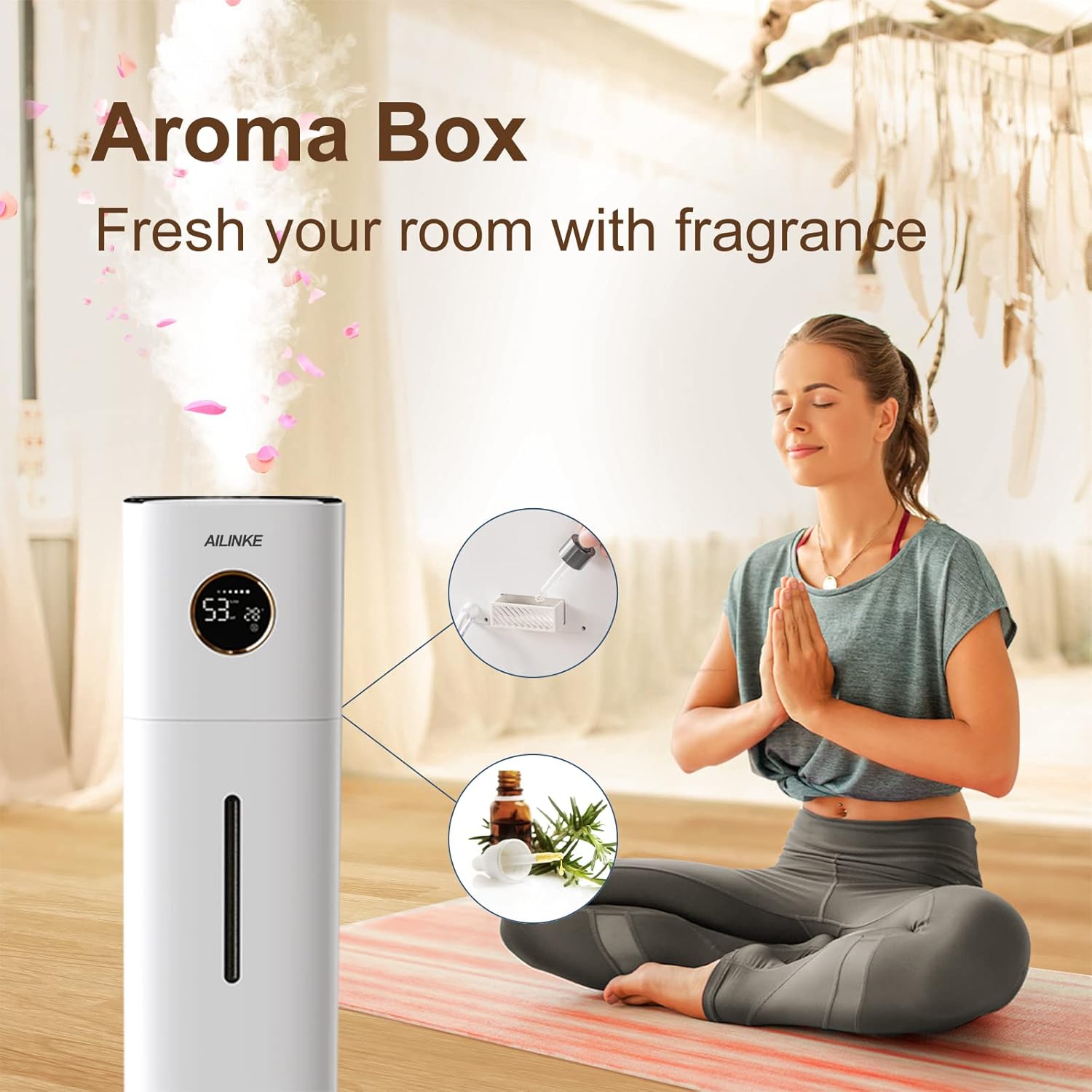
Figure 4.3: Using the integrated aroma box for essential oil diffusion.
4.9 Official Product Videos
Video 4.1: Humidifier in operation, demonstrating mist output in a home setting.
Video 4.2: Humidifier in a baby room, highlighting its suitability for sensitive environments.
Video 4.3: Demonstrating the humidifier's effectiveness for large rooms.
Video 4.4: Overview of the humidifier's features and operation for whole-house use.
5. Maintenance
5.1 Daily Maintenance
- Empty and rinse the water tank daily to prevent mineral buildup and bacterial growth.
- Wipe down the exterior of the unit with a soft, damp cloth.
5.2 Weekly Cleaning
- Unplug the humidifier before cleaning.
- Remove the water tank and pour out any remaining water.
- Clean the water tank and base with a soft brush and mild detergent. Rinse thoroughly.
- For mineral buildup, fill the tank with a 1:1 mixture of white vinegar and water. Let it soak for 30 minutes, then scrub and rinse.
- Ensure all parts are completely dry before reassembling.
5.3 Self-Cleaning Function
The humidifier includes a self-cleaning function to assist with internal maintenance. Refer to the control panel for activation. This feature helps to reduce mineral residue within the unit.
6. Troubleshooting
If you encounter issues with your humidifier, please consult the following common problems and solutions:
| Problem | Possible Cause | Solution |
|---|---|---|
| No mist output | Low water level; mineral buildup on transducer; unit not properly assembled. | Refill water tank; clean transducer with a soft brush; ensure all parts are correctly in place. |
| Red light blinking / Unit turns off | Water shortage; pump issue. | Refill water tank. If the issue persists after refilling, contact customer support. |
| Unusual noise | Unit not on a flat surface; foreign object in water tank. | Place on a stable surface; check and remove any foreign objects. |
| Weak mist output | Mineral buildup; mist outlet blocked. | Clean the transducer and mist outlet. |
7. Specifications
- Brand: AILINKE
- Model Name: Top Fill Humidifier
- Capacity: 3.4 Gallons (13 Liters)
- Control Method: Touch
- Product Dimensions: 8.66 x 29.52 x 9.18 inches
- Item Weight: 7.63 pounds
- Maximum Run Time: Up to 48 hours
- Noise Level: ≤35dB
- Coverage Area: Up to 1000 sq.ft. (approximate, varies with conditions)
- UPC: 763431933940
8. Warranty and Support
This AILINKE humidifier comes with a 1-year warranty from the date of purchase. If you experience any issues or require assistance, please contact AILINKE customer service. Please have your purchase receipt and product model information ready when contacting support.
For customer service inquiries, please refer to the contact information provided with your product packaging or visit the official AILINKE website.


