1. Introduction
This manual provides essential information for the safe and efficient operation of your LVYUAN 1000W Car Power Inverter. This device converts 12V DC power from your vehicle's battery into 110V AC power, allowing you to operate various household appliances and electronic devices on the go. Please read this manual thoroughly before use and retain it for future reference.
2. Safety Information
Always observe the following safety precautions to prevent injury or damage to the inverter and connected devices:
- Ventilation: Ensure adequate ventilation around the inverter. Do not block cooling vents.
- Environment: Avoid exposing the inverter to water, rain, snow, spray, or excessive heat. Do not operate in areas with flammable fumes or gases.
- Connection: Connect the inverter only to a 12V DC power source. Connecting to a 24V or higher DC source will damage the unit.
- Polarity: Always connect the positive (+) terminal of the inverter to the positive (+) terminal of the battery and the negative (-) terminal to the negative (-) terminal. Reverse polarity connection can cause damage.
- Load Capacity: Do not exceed the inverter's continuous power rating of 1000W. Overloading can cause the inverter to shut down or be damaged.
- Children: Keep the inverter out of reach of children.
- Servicing: Do not attempt to disassemble or modify the inverter. Refer all servicing to qualified personnel.
- Grounding: Ensure proper grounding according to local electrical codes.
3. Product Overview
The LVYUAN 1000W Car Power Inverter is designed for convenience and reliability, featuring multiple output ports and safety protections.
3.1 Components and Features
Familiarize yourself with the various parts of your power inverter:
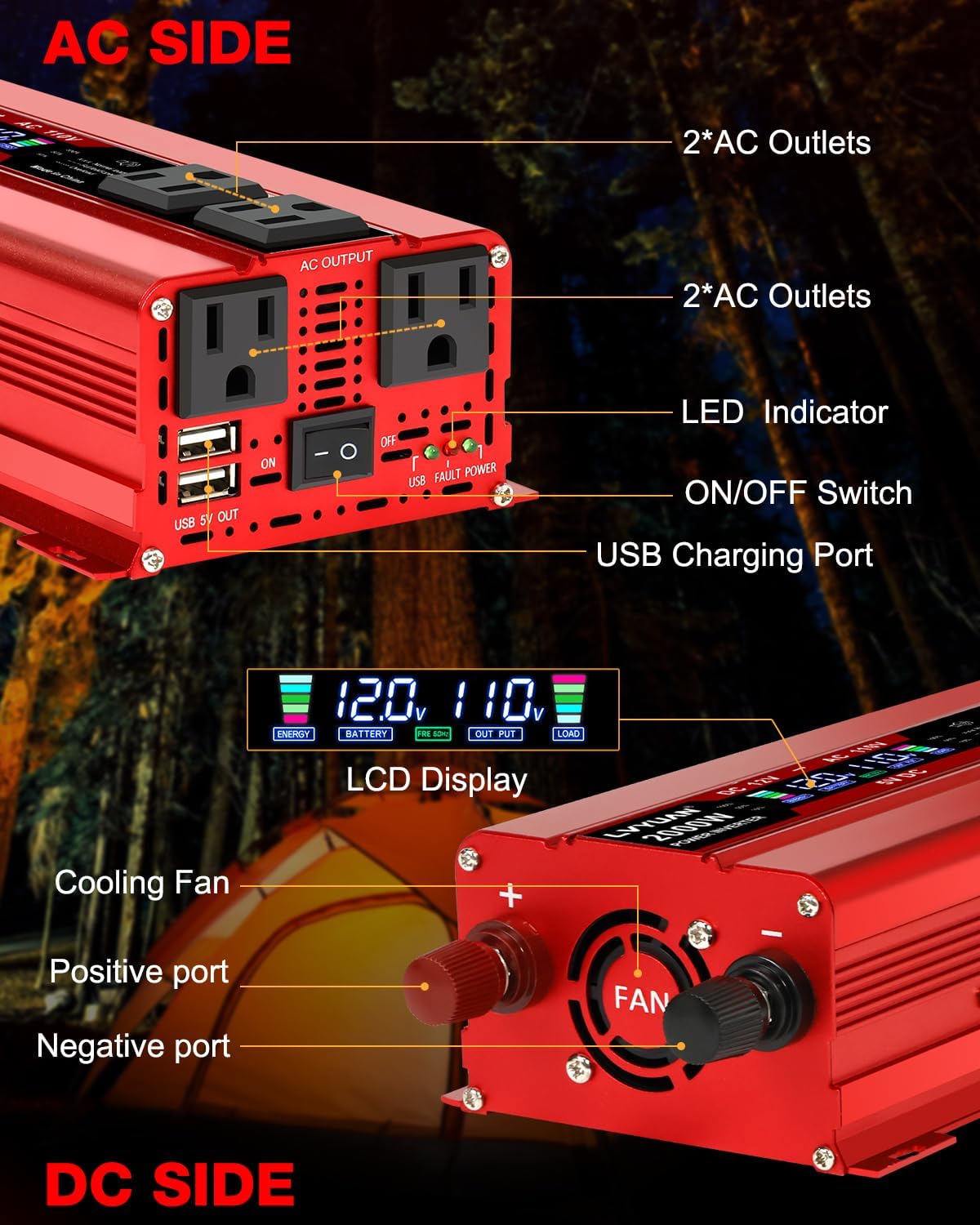
Image: LVYUAN 1000W Car Power Inverter showing AC and DC sides with labeled ports and controls. The AC side features four US sockets, an LED indicator, an ON/OFF switch, and a USB charging port. The DC side shows the cooling fan, positive port, and negative port.
- Power Output: Converts DC 12V to AC 110V 60Hz. Provides 1000 Watts continuous modified sine wave power and 2000 Watts surge power.
- Output Ports: Features 4 AC outlets and 2 USB ports for multi-purpose charging.
- Intelligent LCD Display: Shows input/output voltage, battery capacity, load capacity, and error codes for easy monitoring.
- Cooling System: Built-in temperature control cooling fan activates when internal temperature exceeds 113°F (45°C) or load is greater than 40%.
- Durable Construction: Robust aluminum alloy body provides advanced protection and aids in cooling.
- Included Accessories: Comes with 2 battery clips and a 24-inch cigarette lighter plug for versatile connection options.
4. Setup
Follow these steps to properly set up your power inverter:
- Choose a Location: Place the inverter on a flat, stable surface in a well-ventilated area, away from direct sunlight, heat sources, and moisture. Ensure cooling vents are unobstructed.
- Connect to 12V DC Source:
- For loads up to 150W: Use the cigarette lighter plug. Insert the plug into your vehicle's 12V cigarette lighter socket.
- For loads above 150W or direct battery connection: Use the battery clips. Connect the red clip to the positive (+) terminal of your 12V battery and the black clip to the negative (-) terminal. Then, connect the other ends of the cables to the corresponding positive and negative terminals on the inverter. Ensure connections are secure.
- Power On: Once connected, switch the inverter's ON/OFF switch to the 'ON' position. The LCD display should illuminate, showing input voltage and other information.
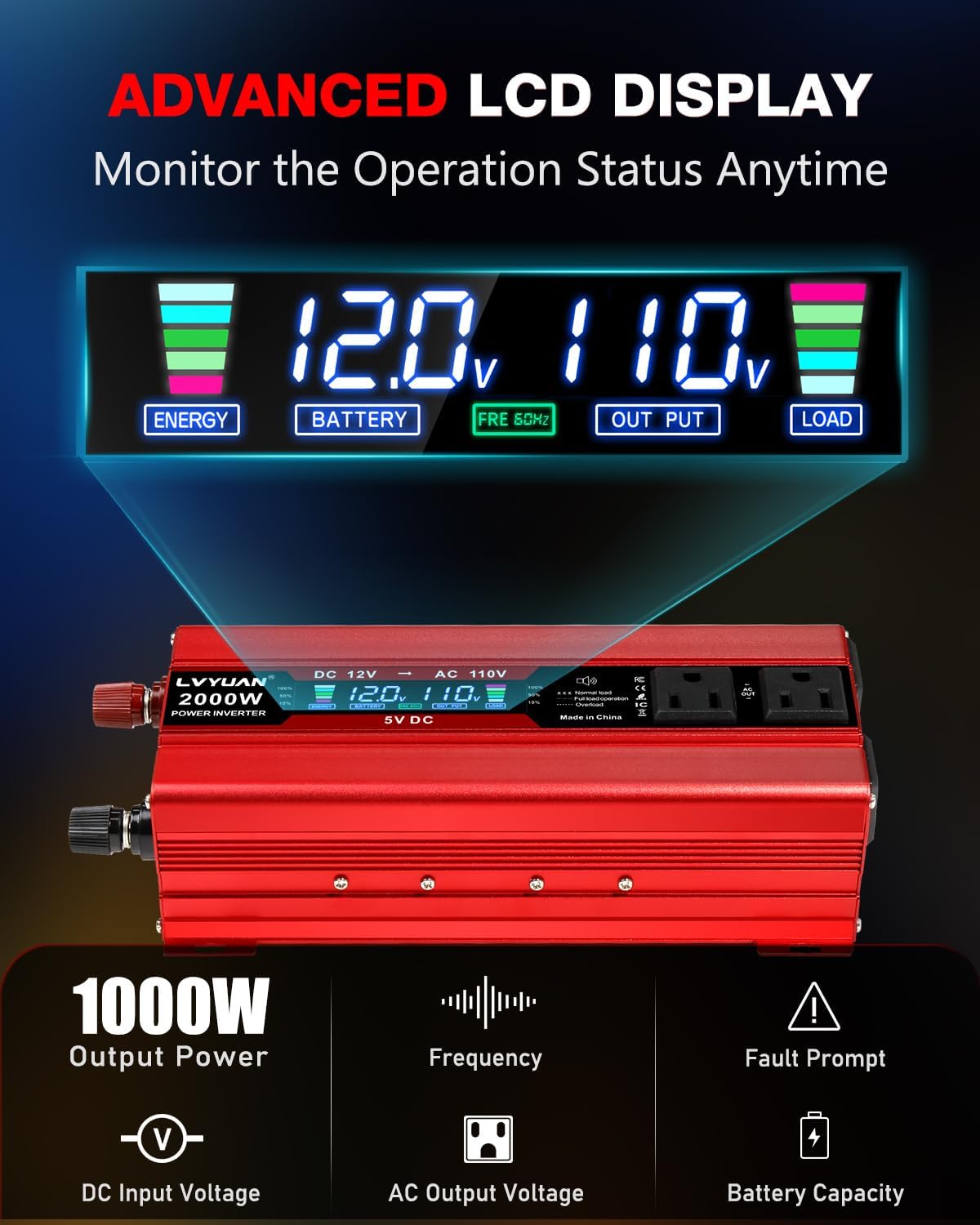
Image: Diagram illustrating the LVYUAN 1000W Car Power Inverter connected to a battery, powering various devices such as laptops, drones, cameras, TVs, fans, and fridges. This shows the versatility of the inverter for different applications.
5. Operating Instructions
Operating your LVYUAN power inverter is straightforward:
- Connect Appliances: Plug your 110V AC appliances into the inverter's AC outlets. For USB-powered devices, use the USB charging ports.
- Monitor LCD Display: The LCD display provides real-time information:
- Input Voltage: Shows the current DC voltage from your battery.
- Output Voltage: Displays the AC output voltage.
- Battery Capacity: Indicates the remaining battery charge level.
- Load Capacity: Shows the percentage of the inverter's capacity being used by connected devices.
- Power Off: When finished, switch the inverter's ON/OFF switch to the 'OFF' position and disconnect appliances.
5.1 Application Examples

Image: Examples of devices that can be powered by the LVYUAN 1000W Car Power Inverter, including mobile phones, iPads, laptops, cameras, drones, string lights, car refrigerators, and TVs. Note that the maximum operating wattage should not exceed 1000 watts.
6. Maintenance
Proper maintenance ensures the longevity and optimal performance of your inverter:
- Cleaning: Periodically clean the exterior of the inverter with a dry cloth. Ensure vents are free from dust and debris to maintain proper airflow for the cooling fan.
- Connections: Regularly check all electrical connections to ensure they are tight and free from corrosion.
- Storage: When not in use, store the inverter in a cool, dry place, away from direct sunlight and extreme temperatures.
7. Troubleshooting
The intelligent LCD display provides error codes to assist with troubleshooting common issues:

Image: LVYUAN 1000W Car Power Inverter LCD display showing various protection error codes (E-1 to E-5) and their meanings. These include Low Voltage Protection, High Voltage Protection, Over Temperature Protection, Overload Protection, and Short Circuit Protection.
| Error Code | Description | Possible Cause / Solution |
|---|---|---|
| E-1 | Low Voltage Protection | Input DC voltage is too low. Recharge or replace the 12V battery. |
| E-2 | High Voltage Protection | Input DC voltage is too high. Check the 12V power source. |
| E-3 | Overtemperature Protection | Inverter is overheating. Ensure proper ventilation, clear vents, reduce load, or allow to cool down. |
| E-4 | Overload Protection | Connected load exceeds 1000W continuous power. Reduce the total wattage of connected appliances. |
| E-5 | Short Circuit Protection | A short circuit has occurred in the output. Disconnect all appliances and check for faulty wiring or devices. |
| E-6 | Restart Required | Indicates a condition requiring the inverter to be reset. Turn off the inverter, wait a few seconds, then turn it back on. |
General Troubleshooting Tips:
- No Power Output: Check battery connections, ensure the inverter is switched ON, and verify the 12V power source is functioning.
- Low Output Power: Ensure the battery is fully charged and the cables are properly connected and of adequate gauge for the load.
8. Specifications
Detailed technical specifications for the LVYUAN 1000W Car Power Inverter:

Image: Dimensions of the LVYUAN 1000W Car Power Inverter, showing its length (10 inches / 25.5 cm), width (4.37 inches / 11 cm), and height (2.6 inches / 6.5 cm), alongside a smartphone for scale. Also shown are the included clip cables (22.8 inches / 58.0 cm) and cigarette lighter cable (20.07 inches / 51 cm).
| Feature | Specification |
|---|---|
| Model Number | 12V-1000W-LCD-NEW |
| Continuous Power | 1000 Watts |
| Surge Power | 2000 Watts |
| Input Voltage | DC 12V |
| Output Voltage | AC 110V |
| Output Frequency | 60Hz |
| Output Waveform | Modified Sine Wave |
| AC Outlets | 4 US Sockets |
| USB Ports | 2 USB Ports |
| Product Dimensions | 8.74 x 4.4 x 2.28 inches (22.2 x 11.2 x 5.8 cm) |
| Item Weight | 2.7 pounds (1.22 kg) |
| Protection Features | Overload, Short Circuit, Over Heat, Reverse Polarity, Under/Over Voltage |
9. Warranty
This LVYUAN 1000W Car Power Inverter comes with a 12-Months Warranty from the date of purchase. This warranty covers manufacturing defects and ensures the product is free from defects in material and workmanship under normal use. Please retain your proof of purchase for warranty claims. The warranty does not cover damage caused by misuse, accident, unauthorized modification, or improper installation.
10. Support
For technical assistance, troubleshooting not covered in this manual, or warranty inquiries, please contact LVYUAN customer support through the retailer where the product was purchased or visit the official LVYUAN website for contact information.


